
If you sell through UberEats, Glovo or other marketplaces, you get orders — but you don’t get the customer.
No direct contact.
No ability to send offers.
No way to bring them back without paying commission again.
Delivery Cards change that.
They turn anonymous delivery buyers into your own customer base — so you can increase repeat visits and grow revenue without paying aggregator fees again.
Why Delivery Cards Matter
Every delivery order is a missed opportunity — unless you capture it.
Without Delivery Cards:
- The marketplace keeps the data
- The customer stays anonymous
- You pay commission again next time
With Delivery Cards:
- The customer scans your card
- Your Stamp Card is saved to their Wallet
- You capture the contact
- You can now send push notifications and emails directly
That means:
📲 Push notifications to the lock screen
Send promotions, limited-time offers, slow-day boosts, or geo-location reminders when customers are nearby.
📧 Email campaigns
Announce new products, special events, or exclusive discounts.
🎉 Automatic birthday rewards
Bring customers back at exactly the right moment.
📈 More repeat visits = higher profit
Loyal customers order more often and spend more over time.
You stop paying marketplace commission on repeat orders.
What Are Delivery Cards?
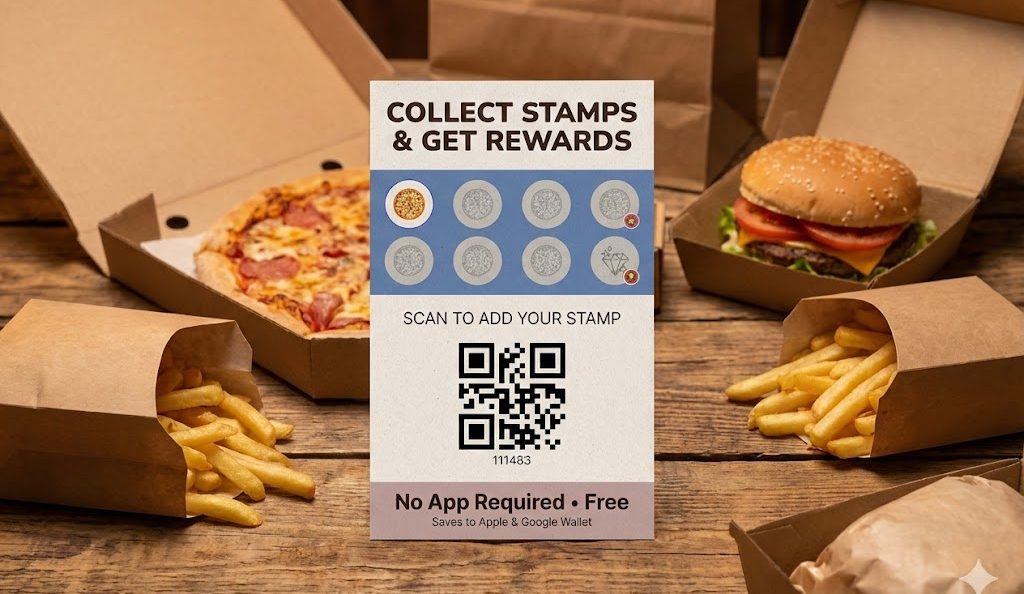
Delivery Cards are printable loyalty cards designed specifically for delivery orders.
They include:
- A preview of your Stamp Card
- A clear reward explanation
- A QR code linked to your loyalty program
- Simple instructions for the customer
They look like a real stamp card — not just a technical QR printout.
The value is visible immediately.
How It Works
Step 1 — Generate Delivery Cards
Go to Delivery Cards in your admin panel.
Click Generate Delivery Cards.
The system creates printable cards linked to your Stamp Card.
You can include predefined stamps if needed.
Step 2 — Print and Insert
Download the file and print it on a regular printer.
Place the cards inside delivery bags or boxes.
Every order becomes a loyalty invitation.
Step 3 — Customer Scans
Customer opens the bag → sees the card → scans the QR.
Your Stamp Card is instantly saved to their Apple or Google Wallet.
Stamps can be issued automatically on scan.
Now the customer joins your loyalty program — not just the marketplace.
Step 4 — Track Everything
All scans are visible in your dashboard.
You can monitor:
- Number of new Wallet adds
- Delivery conversion rate
- Repeat visits
- Campaign performance
Now delivery is measurable — not just transactional.
The Revenue Impact
Delivery Cards are not a marketing expense.
They are a revenue multiplier.
If even 15–20% of delivery customers join your loyalty program:
- Future orders move to direct channels
- Repeat frequency increases
- Customer lifetime value grows
- Commission costs decrease
Over time, your own database becomes your most valuable asset.
Because repeat customers are cheaper than new customers.
Start Today
- Open Delivery Cards in your admin panel
- Click Generate Delivery Cards
- Print them
- Insert them into every delivery order
- Track the results in your dashboard
Turn delivery into loyalty.
Turn loyalty into revenue.