
1. Open the 7stamp admin area
Go to https://admin.7stamp.com/en and sign in with the business account that manages the profile you want to remove.
If you want to remove a business profile from 7stamp, sign in to the admin area, open the Overview tab, and use the Delete Profile button at the bottom of the page.
This page explains how a business can request profile deletion directly inside the 7stamp admin panel.
Use the business switcher first if your account manages more than one profile, then complete the deletion from the correct profile page.
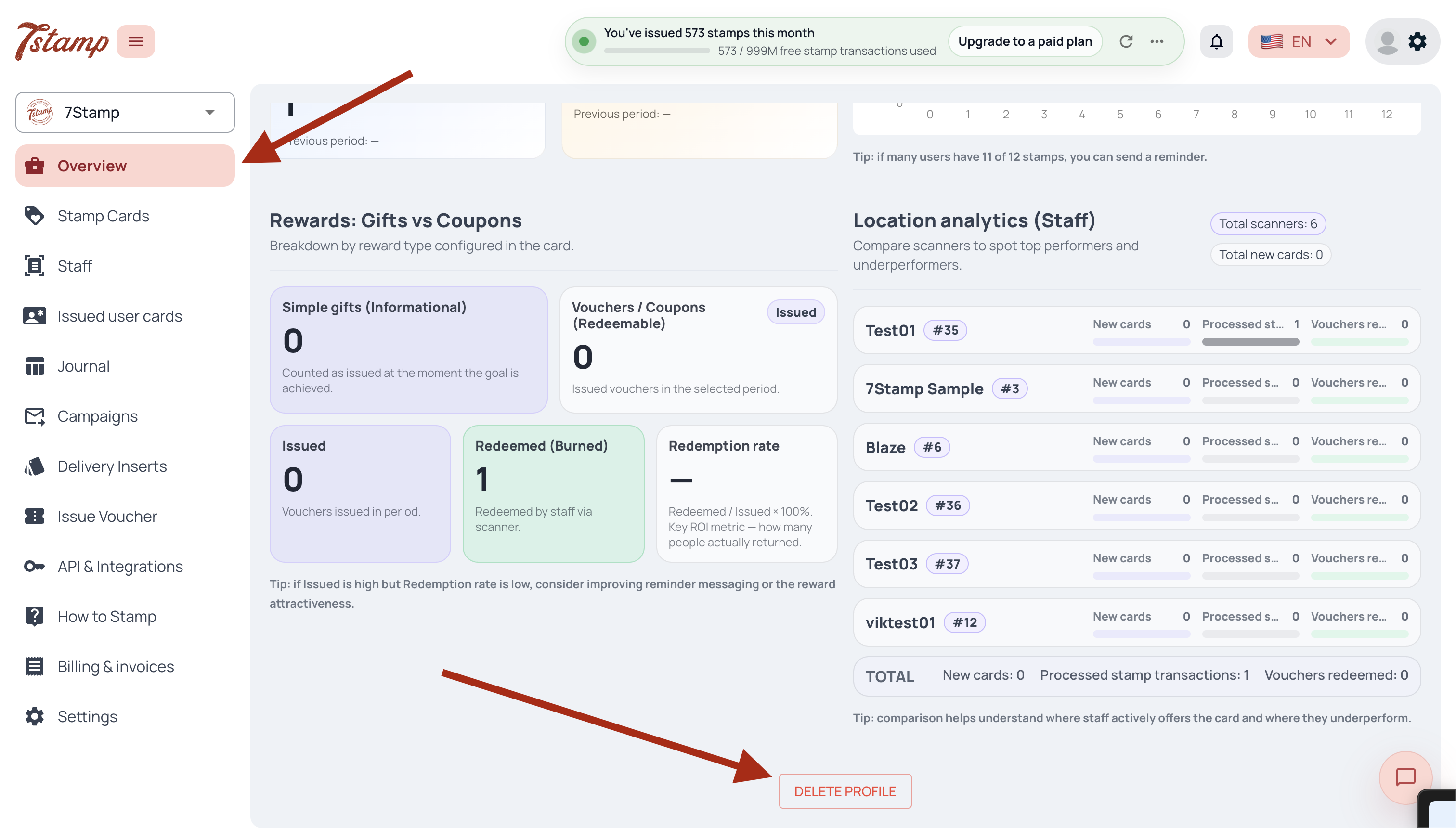
Follow these steps in the 7stamp admin area to delete the business profile shown in your account.
Go to https://admin.7stamp.com/en and sign in with the business account that manages the profile you want to remove.
If your account can access more than one business or location, use the profile switcher and confirm that the correct profile is selected before you continue.
In the left sidebar, click Overview. This is the tab shown in the screenshot below.
Scroll to the bottom of the Overview page and click the Delete Profile button to start the profile deletion request.
If you no longer have access to the business account, use the contact page and explain that you need help with a business profile deletion request.