Integration feature page

API, Webhooks and Zapier for ความภักดี การเชื่อมต่อ

When a ลูกค้า receives a แสตมป์, reaches a รางวัล, or redeems a voucher, 7stamp can trigger a webhook or connect to external systems through API and automation tools.

ไม่t every ธุรกิจ needs custom integration on day one. The practical value of API, Webhooks, and Zapier is that a brand can เริ่ม with zero-integration ความภักดี แรก, then connect ความภักดี events to CRM, reporting, สนับสนุน, or แคมเปญ systems only when it is worth the extra complexity.

API, Webhooks, and Zapier เริ่ม no-code, grow later Connect ความภักดี events to CRM ไม่ need to rebuild the วอลเล็ต การ์ด

Key facts

Integration model
Use direct API work, event-driven webhooks, or no-code automation through tools like Zapier
Typical triggers
แสตมป์ earned, รางวัล reached, voucher issued, voucher redeemed, or other lifecycle events around the ความภักดี การ์ด
Best fit
Businesses or partners that already use CRM, BI, ลูกค้า messaging, or operational dashboards
Rollout path
เริ่ม with the วอลเล็ต การ์ด แรก, then connect only the events that genuinely improve reporting or ลูกค้า follow-up
อัปเดตล่าสุด

What API and automation add to a วอลเล็ต-แรก ความภักดี ตั้งค่า

The core ความภักดี loop still works without development. การเชื่อมต่อ matter when the ธุรกิจ wants ความภักดี data to influence other systems or เวิร์กโฟลว์.

01

Send ความภักดี events into the tools you already use

CRM, analytics, สนับสนุน, and internal dashboards become more useful when they can react to real ความภักดี milestones instead of manual exports.

02

Automate follow-up without changing the ลูกค้า flow

The ลูกค้า still saves one วอลเล็ต การ์ด. The integration layer works in the background after แสตมป์, voucher, or redemption events happen.

03

เริ่ม with no-code เวิร์กโฟลว์ before custom development

Many businesses can learn what they need from เรียบง่าย webhook or Zapier flows before deciding whether a deeper integration is necessary.

04

Keep the ความภักดี rollout staged and practical

Integration should follow traction, not block เปิดตัว. 7stamp lets the ธุรกิจ test ความภักดี แรก and wire systems together after the value is proven.

How an integration rollout usually works

The simplest path is to เปิดตัว ความภักดี แรก, เลือก one event that matters, and connect that event to one downstream action. Over-engineering too early usually slows the rollout.

  1. Step 1 01

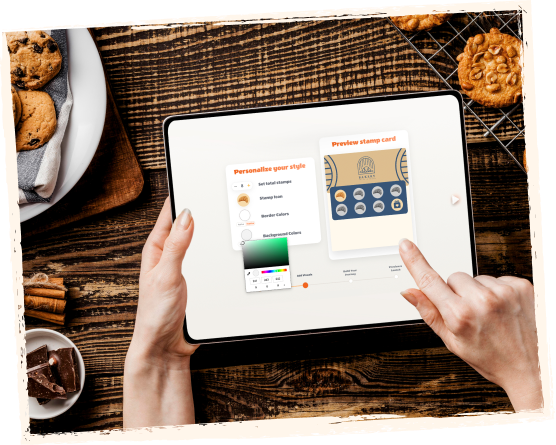
    เปิดตัว the วอลเล็ต ความภักดี เวิร์กโฟลว์ แรก

    เริ่ม with the live รางวัล, the เข้าร่วม point, and the validation flow. Make sure the ธุรกิจ and ลูกค้า experience already work before adding automation on top.
    ลูกค้า side
    ลูกค้า still experience the same no-แอป วอลเล็ต ความภักดี flow without added friction.
    ธุรกิจ side
    The team confirms the core ความภักดี loop is valuable before spending time on downstream system logic.
    เปิดตัว the วอลเล็ต ความภักดี เวิร์กโฟลว์ แรก
  2. Step 2 02

    เลือก the one event worth connecting

    ตัวอย่างs include a ลูกค้า reaching a รางวัล, redeeming a voucher, or crossing a milestone that should trigger a CRM segment or พนักงาน alert.

    ลูกค้า side
    The ลูกค้า sees a cleaner, faster ความภักดี experience because the automation happens behind the scenes.
    ธุรกิจ side
    The ธุรกิจ avoids building five connections when one event already solves the real reporting or marketing need.
    เลือก the one event worth connecting
  3. Step 3 03

    Send the event through webhook, API, or Zapier

    Pick the right level of effort for the team. ไม่-code automation works for many use cases, while direct API work fits more custom system logic.

    ลูกค้า side
    ไม่thing changes in the saved วอลเล็ต การ์ด experience during the handoff to another system.
    ธุรกิจ side
    The integration becomes a service layer around ความภักดี instead of the thing that defines the entire program.
    Send the event through webhook, API, or Zapier
  4. Step 4 04

    Use the connected data to improve retention or reporting

    Once the event lands in the downstream tool, the ธุรกิจ can trigger a follow-up message, enrich ลูกค้า records, or measure ความภักดี performance with less manual work.

    ลูกค้า side
    ลูกค้า receive more relevant communication because ความภักดี activity can feed the systems already managing follow-up.
    ธุรกิจ side
    The team gets a better operational view of which การเข้าชม, รางวัล, or triggers are creating repeat revenue.
    Use the connected data to improve retention or reporting

Who should use integrations แรก?

This feature is most valuable when the ธุรกิจ already uses a second system that should react to ความภักดี events, or when a partner manages ความภักดี inside a wider ลูกค้า stack.

01

Operators with an existing CRM or lifecycle tool

A webhook or Zapier flow can push ความภักดี milestones into a place where ลูกค้า follow-up is already happening.

02

Agencies and consultants managing retention เวิร์กโฟลว์

Partners can connect ความภักดี events to dashboards, reporting, or แคมเปญ systems without rebuilding the วอลเล็ต ความภักดี ตั้งค่า itself.

03

Multi-location brands that want better reporting

ความภักดี data becomes easier to compare or segment when it can flow into a central reporting layer after เปิดตัว.

API and automation vs manual ความภักดี follow-up

Manual เวิร์กโฟลว์ can be enough when volume is tiny. การเชื่อมต่อ become more valuable when ความภักดี should influence reporting, CRM, or triggered communication consistently.

01

Speed after each event

API, Webhooks, or Zapier
ความภักดี events can move automatically into the ถัดไป system step
Manual exports and follow-up
Someone has to pull data, interpret it, and act on it later
02

Consistency

API, Webhooks, or Zapier
The same trigger can สร้าง the same downstream action every time
Manual exports and follow-up
Execution quality depends more heavily on who remembered to do the task
03

Best use

API, Webhooks, or Zapier
Ongoing CRM, reporting, segmentation, or เวิร์กโฟลว์ automation around repeat การเข้าชม
Manual exports and follow-up
Low-volume setups where downstream actions are still rare and informal
04

Rollout caution

API, Webhooks, or Zapier
Add only the automations that clearly reduce work or improve visibility
Manual exports and follow-up
Manual steps stay simpler at แรก but become harder to scale cleanly

API, Webhooks and Zapier FAQ

Do I need a developer to use 7stamp?

ไม่. The core ความภักดี ตั้งค่า can run without custom development. API, Webhooks, and Zapier are optional layers for businesses that want ความภักดี events to feed other tools or เวิร์กโฟลว์.

Can I เริ่ม with Zapier or another no-code tool แรก?

มี. That is often the most practical แรก step. Many teams learn what they actually need from เรียบง่าย automation before deciding whether deeper API work is worth it.

What kinds of events are useful to connect?

Useful examples include a แสตมป์ being earned, a รางวัล being reached, a voucher being issued, a voucher being redeemed, or another ความภักดี milestone that should change reporting or follow-up.

Should integrations come before the แรก ความภักดี เปิดตัว?

Usually no. It is safer to prove the รางวัล, เข้าร่วม flow, and counter เวิร์กโฟลว์ แรก, then connect only the downstream events that will clearly improve การดำเนินงาน or retention.

ถัดไป step

Turn this page into a live วอลเล็ต ความภักดี ตั้งค่า

เปิดตัว one วอลเล็ต การ์ด, one ล้าง รางวัล, and one validation เวิร์กโฟลว์ แรก. 7stamp can เริ่ม เรียบง่าย, then grow into บัตรกำนัล, reminders, แคมเปญ, and no-code integrations when the ธุรกิจ is ready.