เวิร์กโฟลว์ feature

Autopilot Mode: ความภักดี สแกนning Without Slowing the Queue

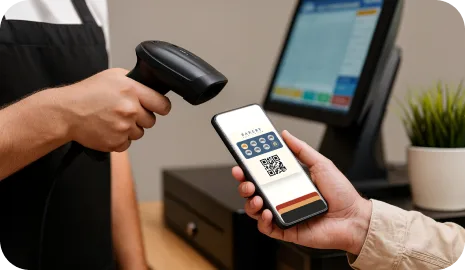
Autopilot Mode adds แสตมป์ in the background when ลูกค้า สแกน their การ์ด with an external scanner. The queue keeps moving and the ลูกค้า can check รางวัล progress later on their phone.

This เวิร์กโฟลว์ is built for businesses where speed matters more than a long ความภักดี interaction at the counter. The ลูกค้า still uses the same Apple Wallet or Google Wallet การ์ด, but the แสตมป์ moment becomes a fast background step instead of a kiosk session or พนักงาน conversation.

Background แสตมป์ validation External scanner at the counter เหมาะกับ rush-hour queues ลูกค้า checks progress on the phone
อัปเดตล่าสุด

Equipment and counter ตั้งค่า checklist

Autopilot Mode works best when the สแกน moment is already part of the counter rhythm. The goal is not to build a second kiosk, but to add ความภักดี to the existing high-speed เวิร์กโฟลว์.

01

External scanner at the active counter

Use a scanner that already fits the counter ตั้งค่า so พนักงาน do not need to switch devices or move away from the order and การชำระเงิน flow.

02

Clearly visible วอลเล็ต การ์ด สแกน point

ลูกค้า should immediately เข้าใจ where to present the Apple Wallet or Google Wallet การ์ด for the fastest possible สแกน.

03

Reliable browser or station connection

Autopilot Mode depends on a steady connection so the แสตมป์ can be processed in the background without forcing a manual retry in the middle of a queue.

04

เรียบง่าย รางวัล expectation for พนักงาน

The team should know whether the รางวัล is simply tracked on the การ์ด, revealed later, or handed off through a separate Smart Voucher or Redeem Code flow.

05

Fallback assisted option

Keep a backup path for แรก-time ลูกค้า or unusual cases so a missed สแกน does not become a stressful counter moment.

How Autopilot Mode works in a busy queue

The ideal Autopilot Mode flow is short, predictable, and almost invisible to the rest of the line. ลูกค้า get ความภักดี credit without turning checkout into a long extra step.

  1. Step 1 01

    The ลูกค้า joins once and saves the การ์ด

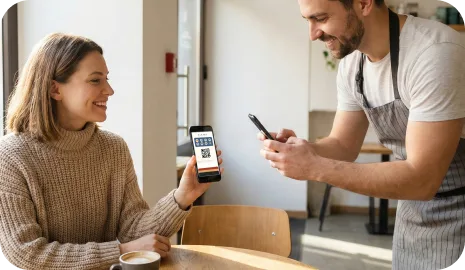
    On the แรก visit, the ลูกค้า scans a QR code and saves the ความภักดี การ์ด to Apple Wallet or Google Wallet for future use.

    The ลูกค้า joins once and saves the การ์ด
  2. Step 2 02

    At the ถัดไป visit, the ลูกค้า opens the วอลเล็ต การ์ด

    The saved การ์ด is ready on the phone before or during checkout, so the ลูกค้า does not need to ค้นหา for a separate แอป or login.

    At the ถัดไป visit, the ลูกค้า opens the วอลเล็ต การ์ด
  3. Step 3 03

    The การ์ด is scanned with the external scanner

    The สแกน happens at the active counter while the พนักงาน continues the service flow. The ความภักดี moment stays short and does not depend on a shared kiosk screen.

    The การ์ด is scanned with the external scanner
  4. Step 4 04

    7stamp adds the แสตมป์ in the background

    Autopilot Mode records the visit in the background so the queue can keep moving instead of waiting for a long on-screen รางวัล interaction.

    7stamp adds the แสตมป์ in the background
  5. Step 5 05

    The ลูกค้า checks progress or รางวัล status on the phone

    After the สแกน, the ลูกค้า can see อัปเดตแล้ว progress and any รางวัล outcome on the วอลเล็ต การ์ด without interrupting the ถัดไป order in line.

    The ลูกค้า checks progress or รางวัล status on the phone

Best industries for Autopilot Mode

Autopilot Mode is strongest where speed, repeat traffic, and short transactions matter more than a guided ความภักดี experience at the counter.

01

Coffee shops and morning rush counters

A เร็ว สแกน is easier to fit into a coffee queue than a longer kiosk step, especially when many regulars arrive in a short time window.

02

Bakeries and takeaway counters

The เวิร์กโฟลว์ fits businesses with fast-moving orders, frequent repeat ลูกค้า, and limited room for a second interaction surface near checkout.

03

Food halls, pickup windows, and express service points

Autopilot Mode helps when the team should stay focused on order handoff and speed while ความภักดี quietly runs in parallel.

04

Busy retail counters with short transactions

Useful for shops that want repeat-visit รางวัล but do not want พนักงาน to stop and explain a self-service tablet to each ลูกค้า.

Autopilot Mode vs Self-Service Self-Service Self-Service Kiosk

Both เวิร์กโฟลว์ reduce พนักงาน involvement compared with a fully พนักงาน-led ความภักดี process, but they solve different counter realities. Autopilot Mode is built for the fastest possible สแกน moment, while kiosk mode gives the ลูกค้า a more visible self-service interaction.

01

Primary goal

Autopilot Mode
Keep the live queue moving by making ความภักดี a background สแกน step
Self-Service Self-Service Self-Service Kiosk
Let ลูกค้า handle the ความภักดี interaction on a shared screen near checkout
02

Main hardware

Autopilot Mode
External scanner at the active counter or service station
Self-Service Self-Service Self-Service Kiosk
ลูกค้า-facing tablet or browser screen positioned near checkout
03

ลูกค้า action length

Autopilot Mode
Very short: present the วอลเล็ต การ์ด and continue the order flow
Self-Service Self-Service Self-Service Kiosk
Longer: สแกน on the kiosk and follow the on-screen self-service step
04

รางวัล visibility moment

Autopilot Mode
The ลูกค้า checks อัปเดตแล้ว progress or รางวัล status later on the phone
Self-Service Self-Service Self-Service Kiosk
The kiosk can show progress and the ถัดไป รางวัล action immediately on screen
05

Best environment

Autopilot Mode
Rush-hour counters, tight spaces, short transactions, fast pickup
Self-Service Self-Service Self-Service Kiosk
Locations with a natural pause, extra space, or a self-service-friendly layout
06

Counter coaching needed

Autopilot Mode
Very little once ลูกค้า เข้าใจ where to สแกน
Self-Service Self-Service Self-Service Kiosk
Low after adoption, but แรก-time users may still need orientation to the kiosk

Autopilot Mode FAQ

What is Autopilot Mode?

Autopilot Mode is a high-speed ความภักดี เวิร์กโฟลว์ for busy counters. ลูกค้า สแกน their วอลเล็ต การ์ด with an external scanner, and 7stamp adds the แสตมป์ in the background so the queue keeps moving.

What businesses get the best results from Autopilot Mode?

Autopilot Mode works best for coffee shops, bakeries, takeaway counters, food pickup points, busy retail, and other high-traffic businesses where ความภักดี should not slow the line.

What equipment does Autopilot Mode need?

At minimum, you need the normal 7stamp วอลเล็ต การ์ด flow plus an external scanner at the active counter and a stable connection for the background แสตมป์ event.

How is Autopilot Mode different from Self-Service Self-Service Self-Service Kiosk?

Autopilot Mode is optimized for the shortest possible สแกน moment at a live counter. Self-Service Self-Service Self-Service Kiosk is better when ลูกค้า can spend a few extra seconds interacting with a shared tablet or browser screen near checkout.

Can ลูกค้า still see their รางวัล progress in Autopilot Mode?

มี. The แสตมป์ is added in the background, and the ลูกค้า can check อัปเดตแล้ว progress or รางวัล status on the วอลเล็ต การ์ด after the สแกน instead of holding up the queue.

ถัดไป step

Turn rush-hour ความภักดี into one fast background step

If your team already operates in a high-speed counter environment, Autopilot Mode helps you keep the familiar แสตมป์-การ์ด habit without turning checkout into a longer conversation.