Hamyon feature page

Apple Wallet va Google Wallet Sodiqlik Kartalar

7stamp lets mijozlar saqlash your sodiqlik karta directly to Apple Hamyon or Google Hamyon. Yo'q separate mijoz ilova is required, and the karta stays easy to find between tashriflar.

For many local businesses, the hardest part of sodiqlik is not the mukofot. It is getting mijozlar to keep the karta and come orqaga to it later. Hamyon-based sodiqlik solves that by placing the karta in the part of the phone mijozlar already use for to'lov kartalar, tickets, and passes.

Apple Wallet va Google Wallet Yo'q separate mijoz ilova QR code or direct link qo'shilish Visible mukofot progress on the phone

Hamyon sodiqlik at a glance

Mijoz qo'shilish
Skan a QR code or ochish a direct link, then saqlash the sodiqlik karta to the phone hamyon
Main mijoz benefit
The karta stays easier to keep than paper and easier to reopen than a low-priority ilova
Eng mos holat
Local businesses that want sodda repeat-visit sodiqlik without forcing another ilova download
Works with
Xodim Skaner, Self-Service Kiosk, Avtopilot Mode, receipt QR, delivery QR, Smart Voucherlar, and kampaniyalar
Oxirgi yangilanish

Why hamyon sodiqlik kartalar work well for local businesses

The goal is not to impress mijozlar with more software. The goal is to remove friction while keeping the sodiqlik karta accessible after the birinchi visit.

01

Yo'q extra ilova to install or remember

Mijozlar qo'shilish with a QR kodi yoki havolasi and saqlash the sodiqlik karta to the hamyon already on their phone instead of downloading another branded ilova.

02

Easier to keep than a paper karta

The karta is less likely to disappear in a pocket, get damaged, or be forgotten at home because it lives in the mijoz phone hamyon.

03

Fast to explain at the counter

Xodim can describe the qo'shilish jarayoni in one short sentence: skanerlash the QR code, saqlash the karta, and collect shtamplar on the keyingi visit.

04

Ready for future reminders and mukofotlar

Once the karta is saved, the biznes can update progress, show mukofot state, and later run birthday or qaytish-visit reactivation flows.

How a hamyon sodiqlik karta works in practice

The mijoz experience should stay sodda from the birinchi skanerlash to the mukofot moment. A hamyon karta is useful because the same saved karta can yordam multiple biznes ish jarayonlari later.

  1. 1-qadam 01

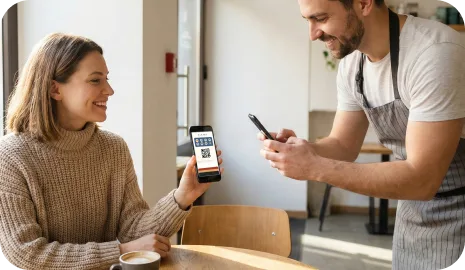
    Mijoz scans a QR code or opens a direct link

    The qo'shilish trigger can live on a poster, table tent, receipt, packaging insert, delivery bag, website, or xodim device during assisted onboarding.

    Mijoz side
    The mijoz only needs the phone camera or a sodda tap on a link.
    Biznes side
    The biznes can place the qo'shilish point anywhere the sodiqlik invitation makes sense.
    Mijoz scans a QR code or opens a direct link
  2. 2-qadam 02

    The sodiqlik karta is saved to Apple Hamyon or Google Hamyon

    Instead of creating another login-heavy ilova habit, the mijoz stores the karta in the hamyon environment that already holds to'lov kartalar and passes.

    Mijoz side
    The saved karta becomes the repeat-visit entry point for future scans and mukofot checks.
    Biznes side
    This reduces ilova friction while still keeping the sodiqlik karta raqamli and reusable.
    The sodiqlik karta is saved to Apple Hamyon or Google Hamyon
  3. 3-qadam 03

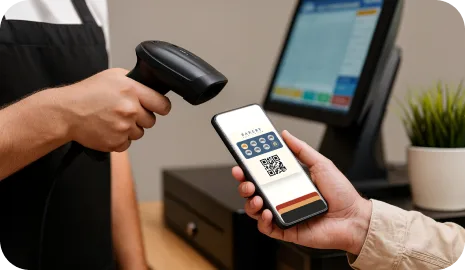
    The karta is used with the ish jarayoni that fits the biznes

    One saved hamyon karta can work with Xodim Skaner, Self-Service Kiosk, Avtopilot Mode, receipt QR, delivery QR, or voucher redemption flows.
    Mijoz side
    The mijoz keeps one karta even if the biznes changes validation methods later.
    Biznes side
    Operatsiyalar can boshlash sodda and add stricter ish jarayonlari only when needed.
    The karta is used with the ish jarayoni that fits the biznes
  4. 4-qadam 04

    Mukofot progress stays visible on the phone

    Mijozlar can reopen the karta and see shtamp progress, mukofot readiness, or voucher state without re-entering a separate sodiqlik ilova.

    Mijoz side
    The sodiqlik goal remains tozalash between tashriflar, which makes qaytish behavior easier to sustain.
    Biznes side
    The biznes keeps the habit mechanic familiar while reducing lost-karta friction.
    Mukofot progress stays visible on the phone

Who should boshlash with hamyon sodiqlik kartalar birinchi?

Hamyon kartalar are especially effective when the offer is easy to explain and the biznes wants a low-friction way to keep the sodiqlik asset active after the visit.

01

Kafelar, bakeries, and fast repeat-visit businesses

A sodda buy-X-get-1-free offer works better when the mijoz does not lose the karta and can saqlash it in seconds.

02

Salons, spas, and premium service businesses

Hamyon kartalar keep the sodiqlik experience polished while still allowing xodim-assisted scanning and birthday or qaytish-visit mukofotlar later.

03

Yetkazib berish and takeaway brands

A hamyon karta is easier to distribute through receipts, inserts, and delivery bags than a physical karta or another downloadable ilova.

Hamyon sodiqlik kartalar vs classic ilova-birinchi sodiqlik

Both models are raqamli, but they ask the mijoz for a different kind of commitment. Hamyon sodiqlik is usually lighter to qo'shilish and easier to revisit for small local businesses.

01

Qo'shilish ishqalanishi

Hamyon sodiqlik karta
QR-kodni skanerlang yoki havolani bosing, so'ng kartani Apple Wallet yoki Google Wallet'ga saqlang
Separate sodiqlik ilova
Download another ilova, install it, and often yaratish an account before the sodiqlik loop starts
02

Qayta ochish ko'rinishi

Hamyon sodiqlik karta
The karta sits in the hamyon keyingi to other saved items
Separate sodiqlik ilova
The mijoz has to remember and reopen a dedicated ilova later
03

Best biznes fit

Hamyon sodiqlik karta
Local businesses that want a sodda repeat-visit habit without heavy product education
Separate sodiqlik ilova
Brands that need a much deeper ilova ecosystem beyond sodiqlik alone
04

Operatsion moslashuvchanlik

Hamyon sodiqlik karta
Works with scanner, kiosk, voucher, receipt, and delivery ish jarayonlari around one saved karta
Separate sodiqlik ilova
Depends more heavily on the ilova becoming the main sodiqlik surface

Hamyon sodiqlik kartalar bo'yicha tez-tez so'raladigan savollar

Do mijozlar need to install a separate sodiqlik ilova?

Yo'q. Mijozlar skanerlash a QR code or ochish a direct link and saqlash the sodiqlik karta to Apple Hamyon or Google Hamyon. The sodiqlik experience stays raqamli without another ilova download.

Does 7stamp yordam both Apple Wallet va Google Wallet?

Ha. The core hamyon-karta model is built around Apple Wallet va Google Wallet so both iPhone and Android mijozlar can saqlash the sodiqlik karta to the hamyon on their phone.

Can the same hamyon karta work with different shtamp ish jarayonlari?

Ha. The same saved karta can work with Xodim Skaner, Self-Service Kiosk, Avtopilot Mode, receipt QR, delivery QR, Smart Voucherlar, and Redeem Code flows depending on the biznes sozlash.

What businesses benefit most from hamyon sodiqlik kartalar?

Hamyon sodiqlik kartalar work best for businesses with repeat tashriflar and sodda mukofot logic, such as cafes, bakeries, salons, car washes, takeaway brands, delivery businesses, and local retail.

Keyingi step

Boshlash with the hamyon karta, then tanlash the ish jarayoni around it

The simplest rollout is to ishga tushirish one hamyon sodiqlik karta and one mukofot, then decide whether xodim scanning, self-service, Avtopilot, voucherlar, or kampaniyalar should come keyingi.