
કોણ sees સેટિંગ્સ
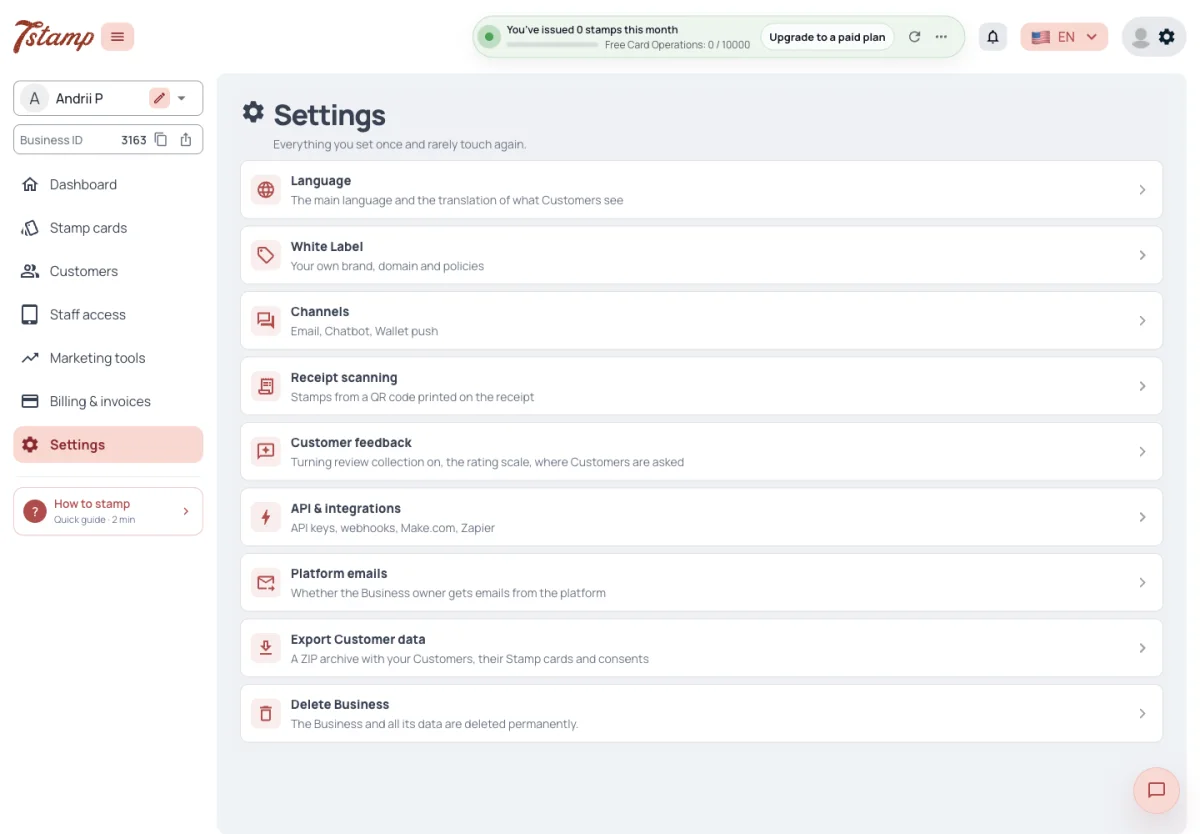
સેટિંગ્સ છે એડમિનમાં મેનૂ માટે વપરાશકર્તાઓ સાથે Editor અથવા એડમિન ભૂમિકા. શું તેઓ જુઓ there depends પર કોણ તેઓ છે: ગ્રાહક ડેટા નિકાસ કરો છે shown માટે વ્યવસાય માલિક alone, અને White Label માટે દરેક વ્યવસાય except એક Managed Business તે છે ના White Label નું તેનું પોતાનું.
I નહીં જુઓ સેટિંગ્સ માં મેનૂ. શા માટે?
સેટિંગ્સ needs Editor અથવા એડમિન ભૂમિકા માં વ્યવસાય. Ask વ્યવસાય માલિક અથવા એક એડમિન માટે તે.
શા માટે નહીં I જુઓ ગ્રાહક ડેટા નિકાસ કરો માં સેટિંગ્સ?
તે છે shown માટે વ્યવસાય માલિક alone. Other એડમિન વપરાશકર્તાઓ, એડમિન ભૂમિકા included, નહીં જુઓ તે.
શા માટે છે there ના White Label માં મારું સેટિંગ્સ?
દરેક વ્યવસાય sees White Label માં સેટિંગ્સ except એક Managed Business તે છે ના White Label નું તેનું પોતાનું.
ભાષા
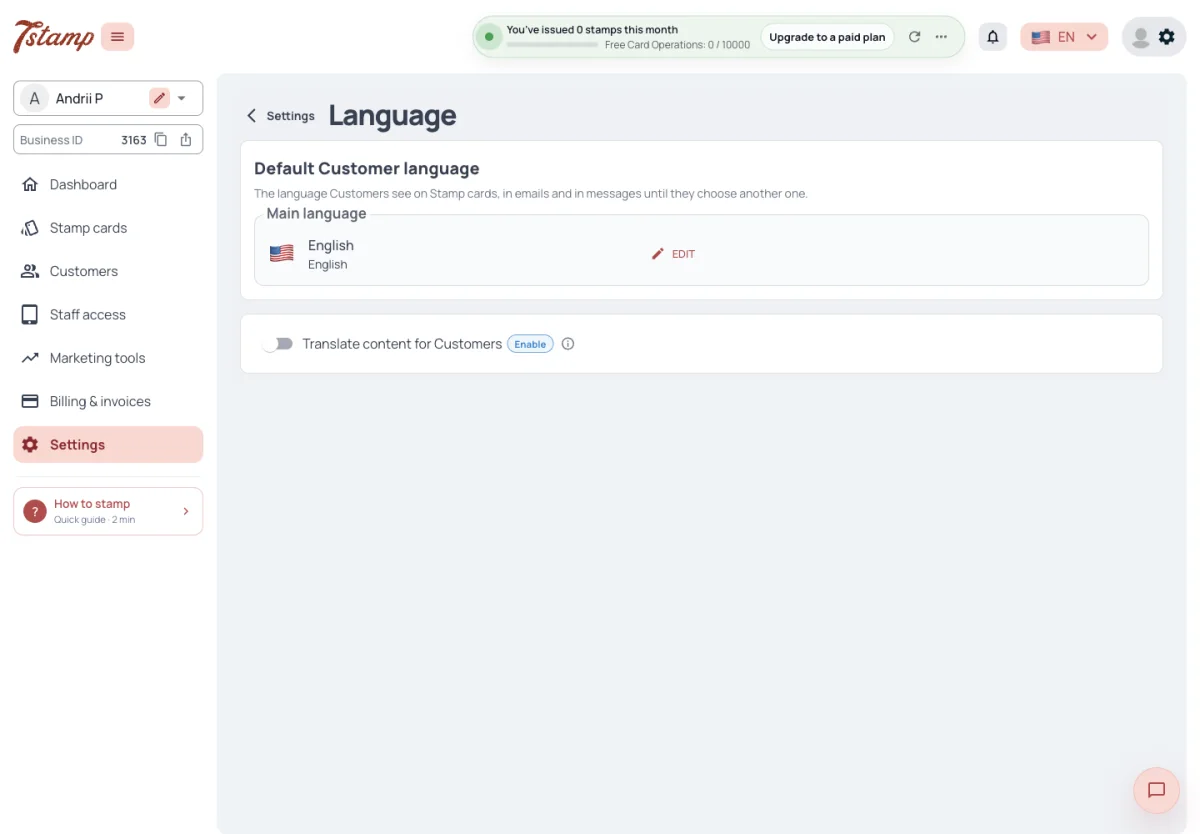
Default ગ્રાહક ભાષા છે વ્યવસાય’s main ભાષા. ગ્રાહકો મેળવો તે પર સ્ટેમ્પ કાર્ડ, માં ઇમેઇલ અને માં સંદેશો જ્યારે તેમનું પોતાનું ભાષા નથી એક વ્યવસાય offers — અને વિના translation, વ્યવસાય offers તેનું main ભાષા alone. Edit changes તે.
Translate content માટે ગ્રાહકો બતાવે છે દરેક ગ્રાહક શું વ્યવસાય wrote — તેનું સ્ટેમ્પ કાર્ડ, વાઉચર, સંદેશો અને other પેજો ગ્રાહકો જુઓ — માં ગ્રાહક’s પોતાનું ભાષા, બહાર નું દરેક ભાષા platform offers. translation છે automatic; nobody પર વ્યવસાય writes તે.
તેને ચાલુ કરવા માટે દર મહિને Auto Translation Module એડ-ઓન, $9ની જરૂર છે; તે ક્યારેય Access Code ના Packages નો ભાગ નથી. Free Forever પર એડમિન પહેલા પ્લાન બદલવાનું કહે છે; પેઇડ પ્લાન પર તે કિંમત સાથે પે અને ચાલુ ઓફર કરે છે. ફક્ત વ્યવસાયના એડમિન જ અહીં એડ-ઓનને કનેક્ટ કરી શકે છે; અન્ય કોઈને પણ વ્યવસાયના માલિક તરફ વળવાનું કહેવામાં આવે છે, અને તેના વિના તેના ભાગીદારના સમર્થન માટે Managed Business. અનુવાદ બંધ કરવાથી એડ-ઓન ડિસ્કનેક્ટ થતું નથી.
માં કયું ભાષા કરો મારું ગ્રાહકો જુઓ મારું સ્ટેમ્પ કાર્ડ?
માં main ભાષા set માં સેટિંગ્સ → ભાષા, unless Translate content માટે ગ્રાહકો છે પર — પછી દરેક ગ્રાહક sees તે માં તેમનું પોતાનું ભાષા.
કરો I છે માટે write translations myself?
ના. સાથે Translate content માટે ગ્રાહકો પર, શું તમે wrote છે translated automatically માં દરેક ગ્રાહક’s ભાષા.
શા માટે શકી શકતા નથી I turn પર Translate content માટે ગ્રાહકો?
તેને પેઇડ પ્લાન પર દર મહિને Auto Translation Module એડ-ઓન, $9ની જરૂર છે; તે Access Code સાથે આવતું નથી. Free Forever પર એડમિન પહેલા પ્લાન બદલવાનું કહે છે.
કોણ શકી શકે છે connect Auto Translation Module?
એક એડમિન નું વ્યવસાય. Anyone else છે asked માટે છે વ્યવસાય માલિક બદલો plan અથવા connect ઉમેરો-પર.
જો I switch translation off, કરે છે ઉમેરો-પર stop?
ના. Switching Translate content માટે ગ્રાહકો off કરતું નથી disconnect Auto Translation Module ઉમેરો-પર.
White Label
સેટિંગ્સ → White Label છે જ્યાં White Label છે set ઉપર. એક વ્યવસાય મેળવે છે White Label માં માંથી એક બે ways: White Label ઉમેરો-પર પર એક paid plan, $59 એક month, અથવા એક Access Code whose Packages include White Label. પર Free Forever ઉમેરો-પર કરી શકાતું નથી connected: એડમિન asks માટે move માટે એક paid plan પ્રથમ. setup છે described માં White Label.
શું હું turn પર White Label પર Free Forever?
નથી સાથે ઉમેરો-પર — એડમિન asks માટે move માટે એક paid plan પ્રથમ. એક Access Code whose Packages include White Label છે other way માટે મેળવો તે.
કેવી રીતે much છે White Label?
White Label ઉમેરો-પર costs $59 એક month પર એક paid plan.
હું ક્યાં set ઉપર મારું ડોમેન અને brand?
માં સેટિંગ્સ → White Label. steps છે described માં White Label article.
ચેનલો
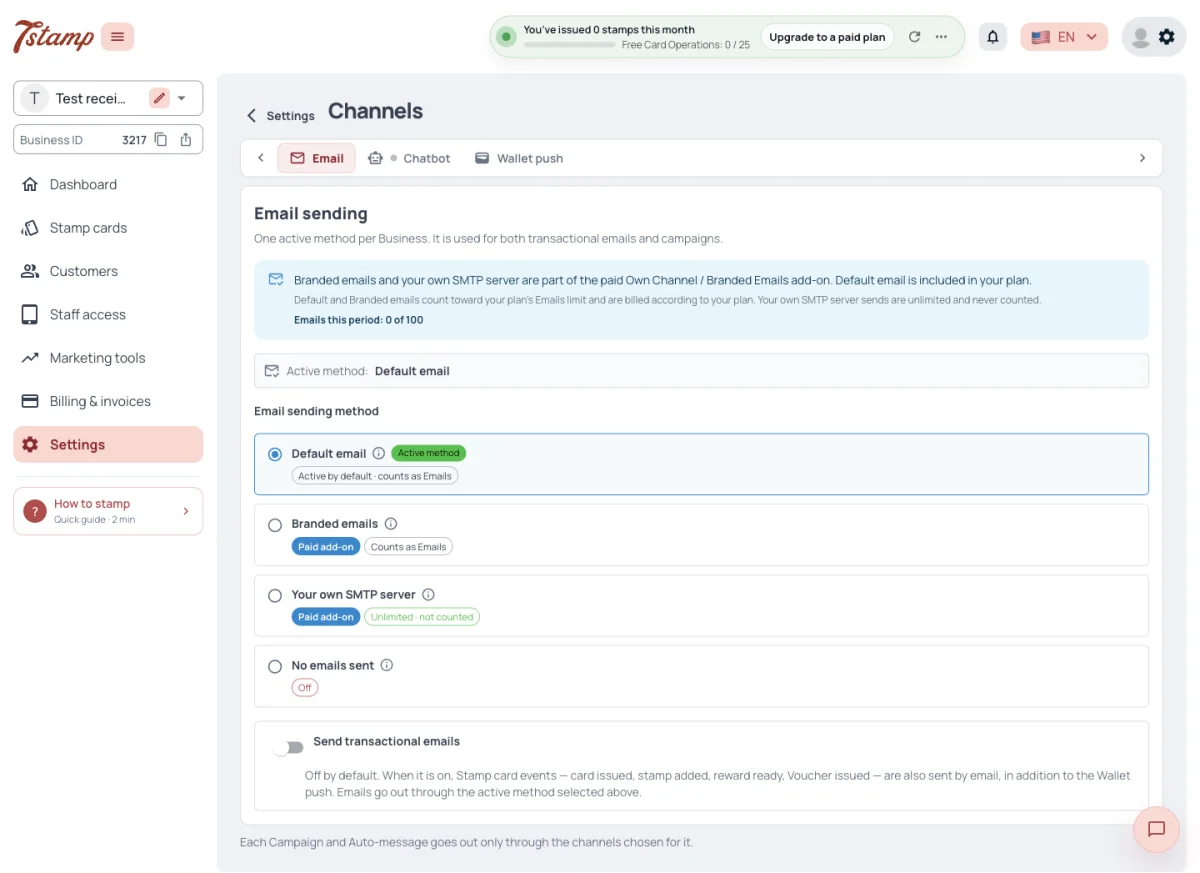
સેટિંગ્સ → Channels છે એક ટૅબ માટે દરેક Channel: Email, Chatbot અને Wallet push.
- Email — એક active method, used માટે દરેક ઇમેઇલ માટે તમારું ગ્રાહકો: Default email, Branded emails, તમારું પોતાનું SMTP server, અથવા ઇમેઇલ switched off.
- Chatbot — એક પર એક સમય, માં Telegram અથવા માં WhatsApp, never બંને.
- Wallet push — always પર, સાથે nothing માટે connect.
કેવી રીતે દરેક એક છે set ઉપર છે માં Channels: Wallet push, Email, Chatbot.
શું હું connect બંને એક Telegram અને એક WhatsApp Chatbot?
ના. એક વ્યવસાય છે એક Chatbot પર એક સમય, માં Telegram અથવા માં WhatsApp.
હું કેવી રીતે switch Wallet push પર?
There છે nothing માટે switch પર. Wallet push છે always પર અને છે nothing માટે connect.
શકી શકે છે transactional ઇમેઇલ જાય છે એક way અને ઝુંબેશો another?
ના. એક વ્યવસાય છે એક active ઇમેઇલ method, used માટે દરેક ઇમેઇલ માટે તેનું ગ્રાહકો, transactional અને marketing alike.
રસીદ સ્કેનિંગ
સેટિંગ્સ → Receipt સ્કેનિંગ gives સ્ટેમ્પ માટે એક QR પર receipt. એક fiscal receipt gives સ્ટેમ્પ માત્ર જ્યારે તે આવે છે થી એક receipt source તમે ઉમેરો there — એક cash register’s fiscal નંબર, એક company code અથવા એક SmartKasa outlet — દરેક tied માટે એક સ્ટાફ લૉગિન. Fiscal receipts કરી શકાય છે scanned માત્ર માં Ukraine, Slovakia, Kazakhstan અને Uzbekistan, સાથે સ્કેન receipt બટન માં તમારું Telegram અથવા WhatsApp bot. એક QR printed પર તમારું પોતાનું receipt works માં any country. બંને છે described માં Receipt સ્કેનિંગ.
શકી શકે છે મારું ગ્રાહકો સ્કેન fiscal receipts માં મારું country?
Fiscal receipts કરી શકાય છે scanned માત્ર માં Ukraine, Slovakia, Kazakhstan અને Uzbekistan. એક QR printed પર તમારું પોતાનું receipt works માં any country.
કરો I need એક Chatbot માટે receipt સ્કેનિંગ?
માટે fiscal receipts, હા — ગ્રાહકો સ્કેન them સાથે સ્કેન receipt બટન માં તમારું Telegram અથવા WhatsApp bot.
શા માટે કરે છે એક fiscal receipt give ના સ્ટેમ્પ?
તે gives સ્ટેમ્પ માત્ર જ્યારે તે આવે છે થી એક receipt source ઉમેરવામાં આવે છે માં Receipt સ્કેનિંગ whose સ્ટાફ લૉગિન છે active.
ગ્રાહક પ્રતિસાદ
સેટિંગ્સ → ગ્રાહક પ્રતિસાદ ધરાવે છે એક status line, Customer Feedback ઉમેરો-પર, Collecting feedback switch, જ્યાં ગ્રાહકો છે asked, શું follows એક rating, rating scale અને કેવી રીતે તે works. Collecting feedback છે વ્યવસાય’s master switch: while તે છે off, ના place asks માટે એક rating. Turning તે પર needs Customer Feedback ઉમેરો-પર, ઉપલબ્ધ પર paid plans માત્ર અને connected દ્વારા એક એડમિન નું વ્યવસાય. reviews themselves અને દરેક સેટિંગ છે described માં ગ્રાહક પ્રતિસાદ.
શા માટે શકી શકતા નથી I turn પર Collecting feedback?
તે needs Customer Feedback ઉમેરો-પર, કયું છે ઉપલબ્ધ પર paid plans માત્ર. પર Free Forever એડમિન offers માટે બદલો plan પ્રથમ.
કોણ શકી શકે છે connect Customer Feedback ઉમેરો-પર?
માત્ર એક એડમિન નું વ્યવસાય.
કરે છે switching Collecting feedback off stop Chatbot થી asking?
હા. While તે છે off, ના place asks માટે એક rating, Chatbot included.
API & integrations
સેટિંગ્સ → API & integrations છે three ટૅબ: API keys, Webhooks અને Integrations. એક API key છે બનાવ્યું માટે એક સ્ટાફ લૉગિન, હેઠળ API keys → ઉમેરો API key; એક સ્ટાફ લૉગિન છે પર most એક. API અને API keys છે free પર દરેક plan, Free Forever included. Everything પર આ ટૅબ છે described માં API, Webhooks અને integrations.
છે API એક paid ઉમેરો-પર?
ના. API અને API keys છે free પર દરેક plan, Free Forever included. સ્ટેમ્પ given દ્વારા API છે Card Operations like any other.
હું ક્યાં બનાવો એક API key?
માં સેટિંગ્સ → API & integrations → API keys → ઉમેરો API key, માટે એક સ્ટાફ લૉગિન.
શકી શકે છે એક સ્ટાફ લૉગિન છે બે API keys?
ના. એક સ્ટાફ લૉગિન છે પર most એક API key, અને એક switched-off સ્ટાફ લૉગિન કરી શકાતું નથી picked.
Platform ઇમેઇલ
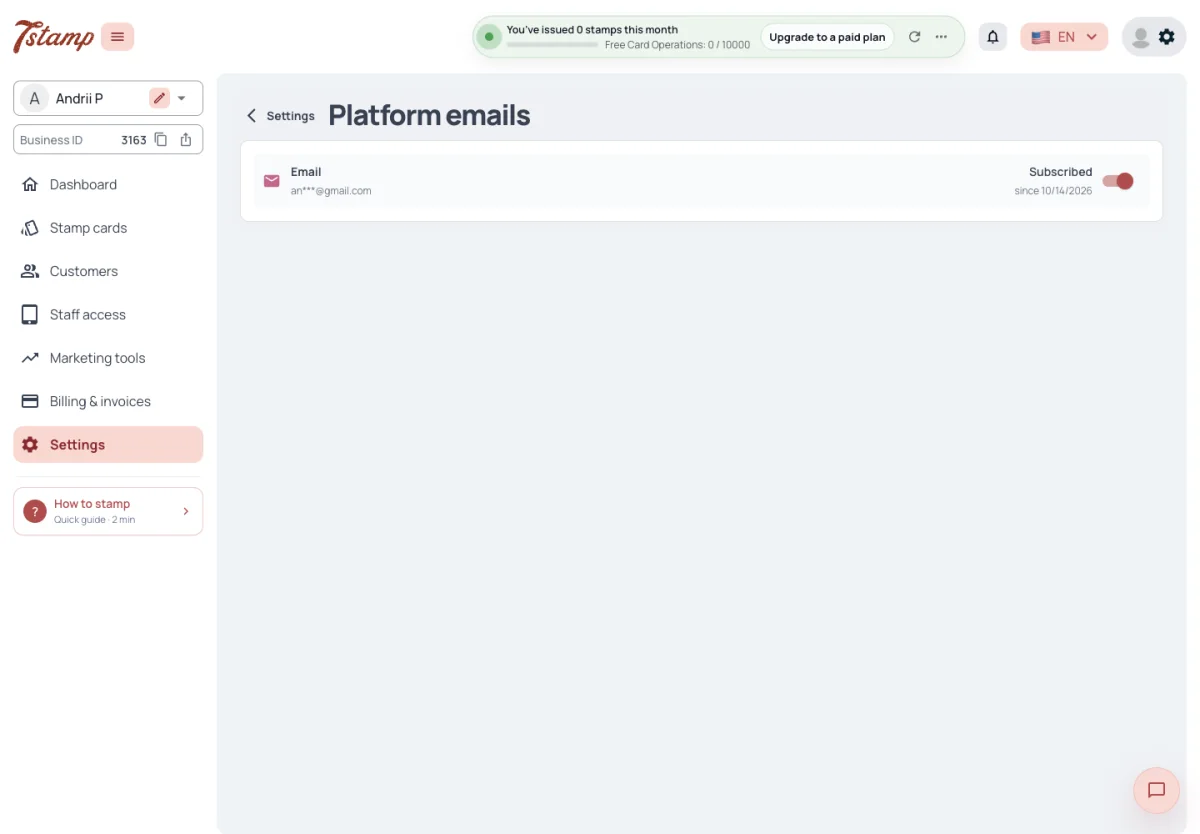
Platform ઇમેઇલ says whether વ્યવસાય માલિક મેળવે છે mailings 7Stamp sends માટે વ્યવસાય owners. There છે એક switch per channel: ઇમેઇલ, અને એક messenger જ્યારે વ્યવસાય chose એક માટે હોવું reached પર. માલિક’s ઇમેઇલ છે subscribed જ્યારે વ્યવસાય છે બનાવ્યું, અને chosen messenger joins as well. Switching એક channel off stops આ mailings પર તે; nothing else depends પર switch.
માત્ર વ્યવસાય માલિક શકી શકે છે switch તે; other એડમિન વપરાશકર્તાઓ જુઓ state અને “માત્ર વ્યવસાય માલિક શકી શકે છે બદલો આ”. subscription belongs માટે માલિક’s સરનામું, નથી માટે એક વ્યવસાય: ઇમેઇલ switched off માં એક વ્યવસાય છે off માટે દરેક 7Stamp વ્યવસાય નું એક જ માલિક. એક Managed Business નથી જુઓ Platform ઇમેઇલ: એક partner’s clients મેળવો ના platform mailings.
હું કેવી રીતે stop ઇમેઇલ 7Stamp sends me as એક વ્યવસાય માલિક?
Switch Email off માં સેટિંગ્સ → Platform ઇમેઇલ. માત્ર વ્યવસાય માલિક શકી શકે છે કરો તે.
કરશે I still મેળવો ઇમેઇલ વિશે મારું પોતાનું વ્યવસાય, such as એક ready નિકાસ?
હા. માત્ર platform’s mailings માટે વ્યવસાય owners depend પર Platform ઇમેઇલ.
I unsubscribed માં એક વ્યવસાય. કરો I need માટે કરો તે માં others?
ના. subscription belongs માટે તમારું સરનામું, તેથી ઇમેઇલ છે off માટે દરેક 7Stamp વ્યવસાય તમે પોતાનું સાથે તે.
શા માટે છે there ના Platform ઇમેઇલ માં મારું સેટિંગ્સ?
એક Managed Business નથી જુઓ તે — એક partner’s clients મેળવો ના platform mailings.
ગ્રાહક ડેટા નિકાસ કરો
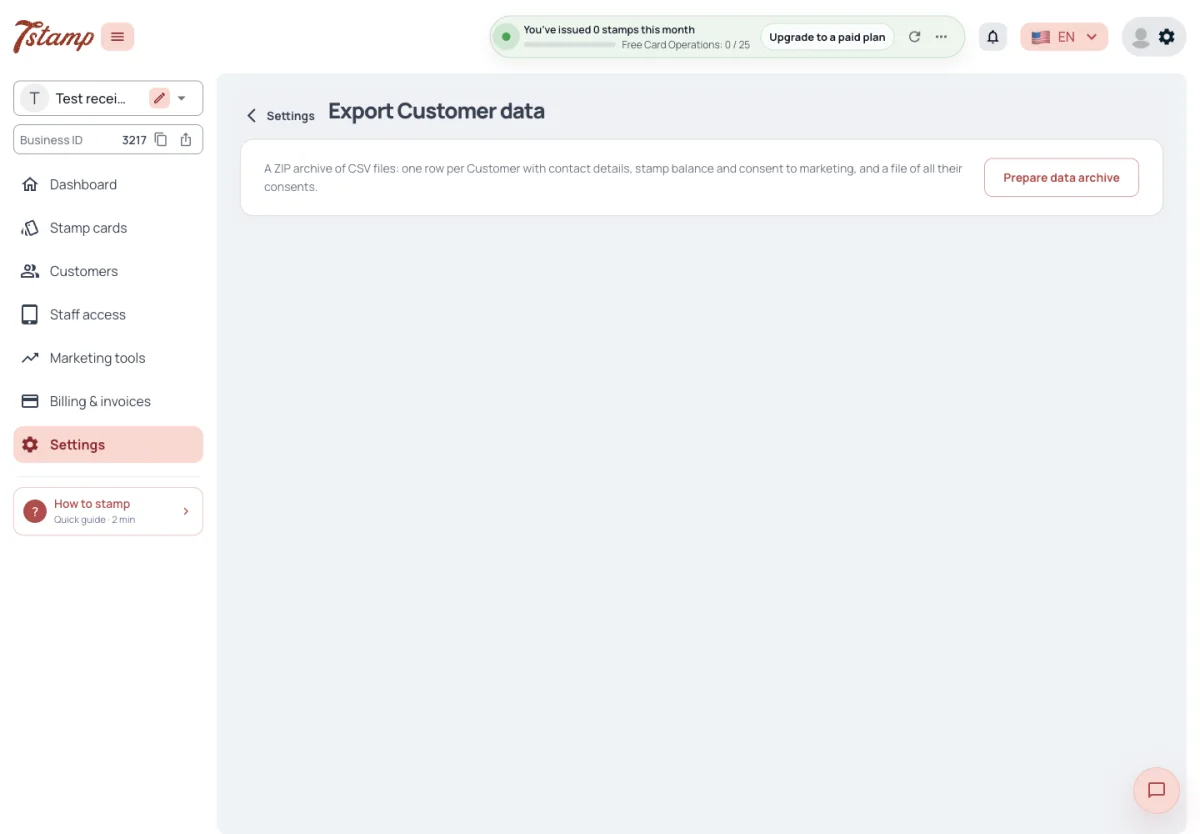
માત્ર વ્યવસાય માલિક શકી શકે છે તૈયાર કરો અને ડાઉનલોડ archive; ગ્રાહક ડેટા નિકાસ કરો છે shown માં સેટિંગ્સ માટે માલિક alone.
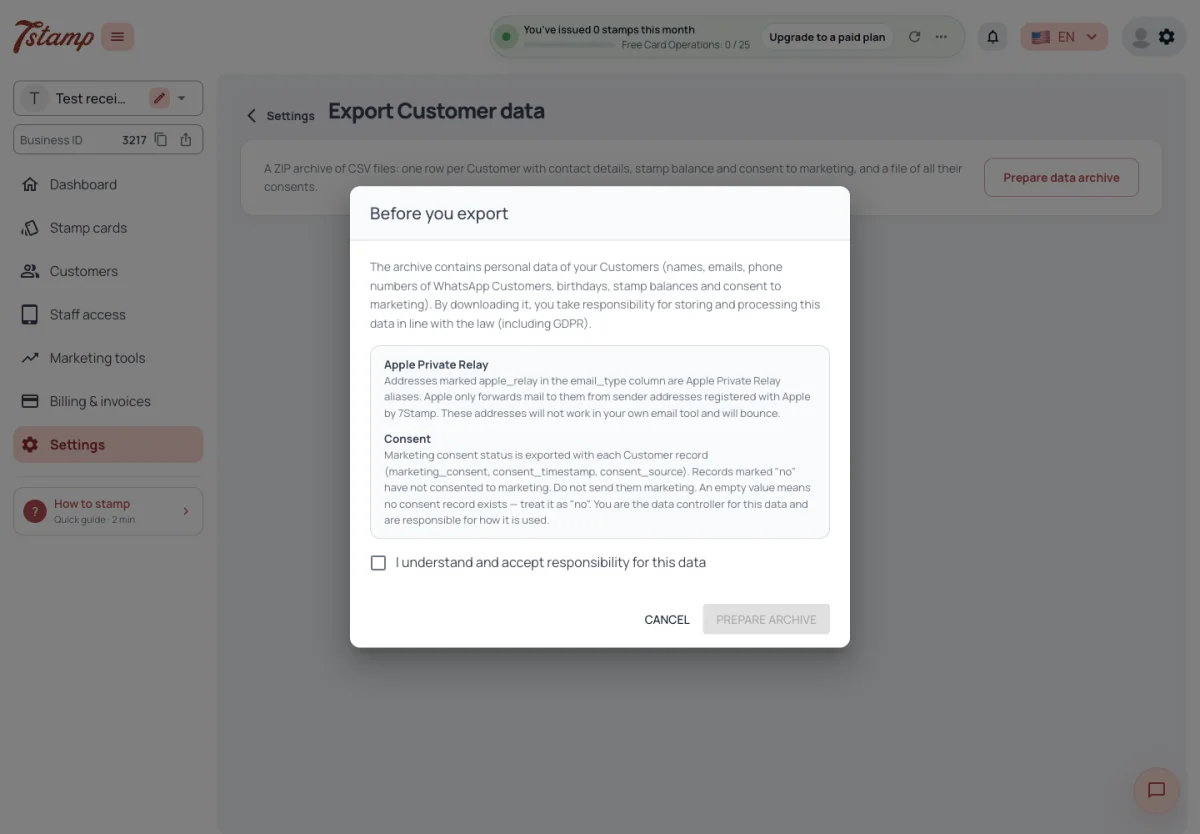
પહેલાં archive છે prepared, tick “I understand અને accept responsibility માટે આ ડેટા”: તમારું વ્યવસાય છે ડેટા નિયંત્રક નું શું તે downloads. archive છે built માં background. જ્યારે તે છે ready, એક notification દેખાય છે એડમિનમાં અને માલિક મેળવે છે એક ઇમેઇલ સાથે એક લિંક માટે એડમિન; file છે downloaded there, never attached માટે ઇમેઇલ. તે કરી શકાય છે downloaded માટે seven days અને છે પછી દૂર કર્યું.
એક નવું archive કરી શકાય છે started એક day પછી previous એક; until પછી પેજ says જ્યારે. એક failed અથવા રદ run નથી ધરાવે છે next એક back.
શકી શકે છે અમે નિકાસ ડેટા?
હા. વ્યવસાય માલિક prepares એક ZIP archive માં સેટિંગ્સ → ગ્રાહક ડેટા નિકાસ કરો અને downloads તે એડમિનમાં.
archive છે ready. શા માટે isn’t તે attached માટે ઇમેઇલ?
file છે downloaded એડમિનમાં, never attached માટે ઇમેઇલ; ઇમેઇલ લિંક્સ માટે એડમિન.
કેવી રીતે long શકી શકે છે I ડાઉનલોડ archive?
Seven days. પછી તે તે છે દૂર કર્યું, અને તમે કરી શકો છો તૈયાર કરો એક નવું એક.
શા માટે શકી શકતા નથી I start એક નવું નિકાસ?
એક નવું archive કરી શકાય છે started એક day પછી previous એક. પેજ says જ્યારે.
શું archive ધરાવે છે
ZIP archive છે three files:
- ગ્રાહકો.csv — એક પંક્તિ per ગ્રાહક: કેવી રીતે તેઓ signed ઉપર, ઇમેઇલ અને તેનું પ્રકાર, ફોન, પ્રથમ અને અટક, Telegram username અને chat ID, birthday, ભાષા, join તારીખ, કાર્ડ સ્થિતિ, સ્ટેમ્પ balance, total સ્ટેમ્પ earned, ઇનામો issued, છેલ્લું operation, માર્કેટિંગ સંમતિ સાથે તેનું સમય અને source, અને whether transactional ઇમેઇલ છે પર;
- consents.csv — એક પંક્તિ per સંમતિ રેકોર્ડ;
- README.txt — warnings વિશે Apple ખાનગી Relay અને સંમતિ.
There છે એક પંક્તિ per ગ્રાહક, નથી per કાર્ડ: સ્ટેમ્પ balance છે sum over ગ્રાહક’s live કાર્ડ, અને કાર્ડ themselves નથી listed. ગ્રાહકો કોણ કાઢી નાખ્યું તેમનું એકાઉન્ટ નથી માં archive, nor છે તેમનું સંમતિ રેકોર્ડ.
માં marketing_સંમતિ, “ના” means ગ્રાહક refused marketing, અને એક empty value means there છે ના સંમતિ રેકોર્ડ — treat તે as ના. એક ઇમેઇલ marked apple_relay છે એક Apple ખાનગી Relay સરનામું: તે bounces થી તમારું પોતાનું ઇમેઇલ સાધન.
માટે એક White Label વ્યવસાય archive નામો ના platform brand: file નામ અને README carry partner’s brand.
કરે છે નિકાસ યાદી દરેક સ્ટેમ્પ કાર્ડ નું એક ગ્રાહક?
ના. તે છે એક પંક્તિ per ગ્રાહક; સ્ટેમ્પ balance છે sum over તેમનું live કાર્ડ.
May I મોકલો marketing માટે ગ્રાહકો સાથે એક empty marketing_સંમતિ?
ના. એક empty value means there છે ના સંમતિ રેકોર્ડ — treat તે as ના.
શા માટે some exported ઇમેઇલ bounce થી મારું ઇમેઇલ સાધન?
તે marked apple_relay છે Apple ખાનગી Relay addresses. Mail માટે them arrives માત્ર થી senders Apple knows માટે 7Stamp.
છે ગ્રાહકો કોણ કાઢી નાખ્યું તેમનું એકાઉન્ટ માં નિકાસ?
ના. Neither તેઓ nor તેમનું સંમતિ રેકોર્ડ છે માં archive.
કાઢી નાખો વ્યવસાય
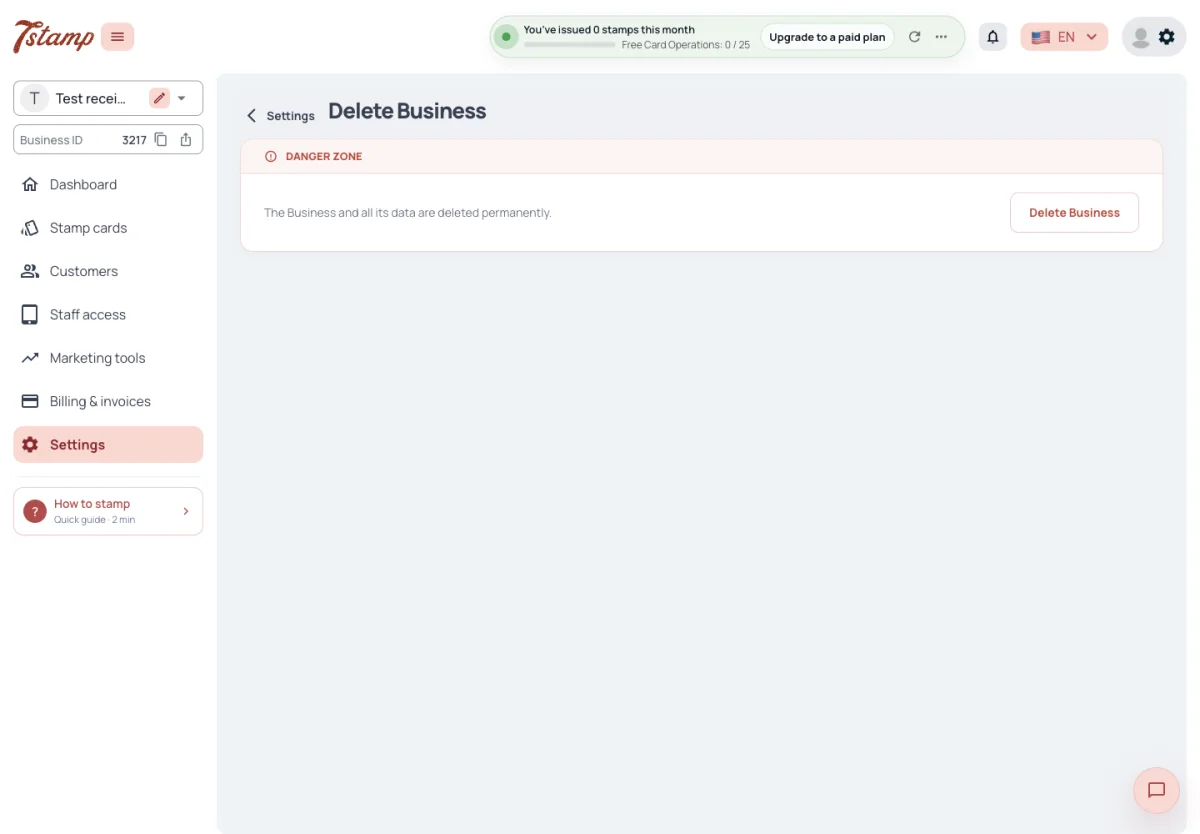
માત્ર વ્યવસાય માલિક શકી શકે છે કાઢી નાખો વ્યવસાય. કાઢી નાખવું એક વ્યવસાય છે final: વ્યવસાય અને તેનું Chatbot stop working, અને વ્યવસાય કરી શકાતું નથી restored એડમિનમાંથી.
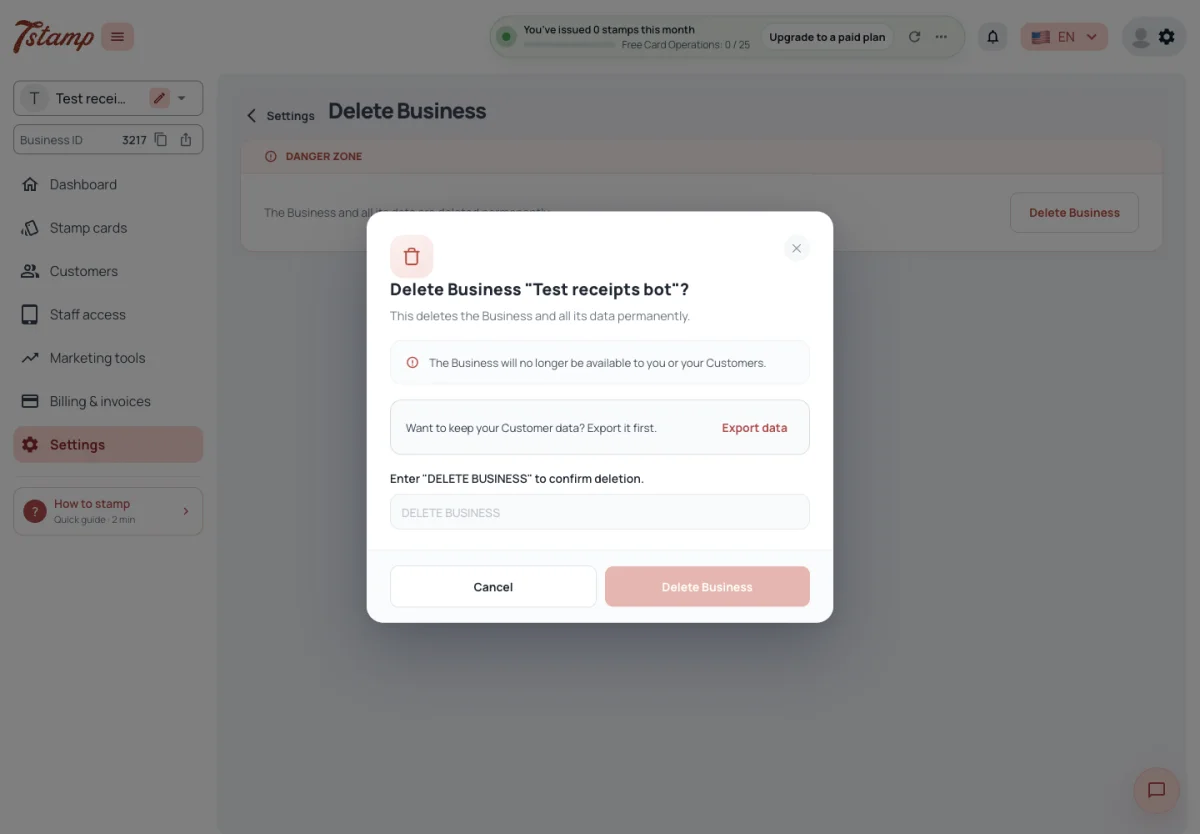
કાઢી નાખો વ્યવસાય dialog asks માટે પ્રકાર કાઢી નાખો વ્યવસાય ચોક્કસ as shown, capitals included, પહેલાં તેનું કાઢી નાખો વ્યવસાય બટન works; માં another એડમિન ભાષા phrase છે તે ભાષા’s. dialog offers માટે નિકાસ ગ્રાહક ડેટા પ્રથમ; while એક archive છે being prepared અથવા છે ready, તે says માટે wait માટે તે અથવા ડાઉનલોડ તે પહેલાં કાઢી નાખવું.
એક વ્યવસાય પર એક paid plan કરી શકાતું નથી કાઢી નાખ્યું while તેનું subscription છે active: એડમિન asks માટે cancel subscription પ્રથમ. એક વાર તે છે cancelled, વ્યવસાય કરી શકાય છે કાઢી નાખ્યું પછી એક more confirmation તે નામો તારીખ subscription રહે છે active until. પર Free Forever plan છે cancelled together સાથે વ્યવસાય.
શકી શકે છે એક કાઢી નાખ્યું વ્યવસાય હોવું restored?
ના. કાઢી નાખવું એક વ્યવસાય છે final; તે કરી શકાતું નથી restored એડમિનમાંથી.
કરશે મારું Chatbot રાખો working પછી I કાઢી નાખો વ્યવસાય?
ના. વ્યવસાય અને તેનું Chatbot stop working.
હું કેવી રીતે રાખો મારું ગ્રાહક ડેટા પહેલાં કાઢી નાખવું વ્યવસાય?
નિકાસ તે પ્રથમ — કાઢી નાખો વ્યવસાય dialog offers તે. While archive છે being prepared અથવા છે ready, wait માટે તે અથવા ડાઉનલોડ તે પહેલાં કાઢી નાખવું.
કોણ શકી શકે છે કાઢી નાખો એક વ્યવસાય?
માત્ર વ્યવસાય માલિક.
કાઢી નાખો વ્યવસાય બટન રહે છે grey. શા માટે?
પ્રકાર કાઢી નાખો વ્યવસાય ચોક્કસ as shown, capitals included. માં another એડમિન ભાષા, પ્રકાર phrase dialog બતાવે છે.
શા માટે શકી શકતા નથી I કાઢી નાખો મારું વ્યવસાય પર એક paid plan?
નથી while subscription છે active. Cancel તે પ્રથમ; પછી વ્યવસાય કરી શકાય છે કાઢી નાખ્યું, અને એડમિન નામો તારીખ subscription રહે છે active until.