
શા માટે મોટાભાગનું loyalty software નાના વ્યવસાયો માટે નિષ્ફળ જાય છે
મોટાભાગનું loyalty software IT ટીમ ધરાવતી chains માટે બનાવાયું હતું. સ્થાનિક વ્યવસાયોને તે જ complexity મળી, પરંતુ તેને ચલાવવા માટે જરૂરી resources નહોતા.
7Stamp — App નહીં. Staff નહીં. ફક્ત Loyalty.
7Stamp કાગળ Punch Cards ને Apple Wallet અને Google Wallet ની Digital Loyalty Cards માં ફેરવે છે. ગ્રાહકો QR Code Scan કરીને 15 સેકન્ડ માં Join થઈ જાય છે. Staff ને કંઈ કરવાનું નથી — Zero Level Integration.

મોટાભાગનું loyalty software IT ટીમ ધરાવતી chains માટે બનાવાયું હતું. સ્થાનિક વ્યવસાયોને તે જ complexity મળી, પરંતુ તેને ચલાવવા માટે જરૂરી resources નહોતા.
7Stamp એ બધું દૂર કરે છે જે નાના વ્યવસાયને જરૂરી નથી: customer app, POS integration અને staff training. અમારા માટે Zero Level Integration નો અર્થ એ છે કે loyalty હાલના વ્યવસાયના background માં ચાલે.
7Stamp માત્ર વધુ સુંદર પંચ કાર્ડ નથી. તે loyalty ને સ્થાનિક વ્યવસાયની દૈનિક ગતિ સાથે ફિટ થવા દે છે, ટીમને software company જેવું વર્તવું પડે તે વગર.
ગ્રાહકોને બીજું account બનાવવું પડતું નથી, બીજી app ડાઉનલોડ કરવી પડતી નથી કે નવો password યાદ રાખવો પડતો નથી. તેઓ એક QR કોડ સ્કેન કરે છે, એક pass Apple Wallet અથવા Google Wallet માં સાચવે છે અને દરેક ભવિષ્યની મુલાકાત માટે એ જ કાર્ડ રાખે છે.
વ્યવસાય Staff Scanner થી શરૂ થઈ શકે છે, વ્યસ્ત કાઉન્ટર પર Self-Service Kiosk પર સ્વિચ કરી શકે છે, ઝડપી કતાર માટે Autopilot Mode ઉમેરી શકે છે, અને હજી પણ Zero Level Integration ની અંદર રહી શકે છે જ્યાં સુધી વધુ ઊંડા POS અથવા API ઓટોમેશન ખરેખર પ્રયાસ કરવા યોગ્ય નથી.
તે loyalty ને ગ્રાહકો માટે દેખાતી અને ટીમ માટે સંભાળવા જેવી રાખે છે. સ્ટેમ્પ દ્વારા Smart Vouchers, Redeem Codes, birthday rewards અને return-visit reminders એ જ સાચવેલા કાર્ડ પર unlock કરી શકાય છે, જુદા જુદા tools માં અનુભવ વિખેર્યા વગર.
ડિજિટલ loyalty વિકલ્પોની સરખામણી કરતા વ્યવસાયો માટે અહીં 7Stamp વિશેના મુખ્ય તથ્યો છે.
7Stamp સ્વતંત્ર સ્થાનિક વ્યવસાયો માટે બનાવાયું છે, ખાસ કરીને Central અને Eastern Europe માં. આજના ગ્રાહકોમાં Slovakia, Poland અને Ukraine ના cafes, beauty salons અને નાના retail stores સામેલ છે.
ઉત્પાદન wallet-first loyalty પર જ કેન્દ્રિત રહે છે: QR signup, Apple Wallet અને Google Wallet cards, repeat-visit સ્ટેમ્પ્સ અને reward redemption, જેમાં ગ્રાહકને બીજી app તરફ કે માલિકને પહેલા જ દિવસે ભારે POS project તરફ ધકેલવામાં આવતું નથી.
7Stamp Bratislava માં PayForSay s.r.o. દ્વારા સંચાલિત થાય છે, અને customer support WhatsApp, Telegram અને Viber દ્વારા ચાલે છે, કારણ કે ઘણા સ્થાનિક માલિકો દૈનિક કામમાં પહેલેથી આ channels નો ઉપયોગ કરે છે.
7Stamp વિશે વધુ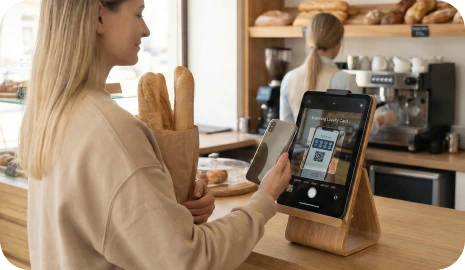
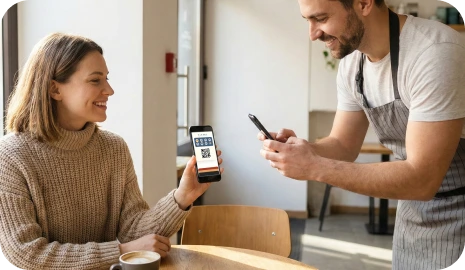
મહેમાનો ખરેખર શું સાચવી રાખે છે
મહેમાનો QR કોડ સ્કેન કરે છે, એક branded pass સાચવે છે, સ્ટેમ્પ એકત્ર કરે છે અને એક વધુ loyalty app ડાઉનલોડ કરવાની બદલે wallet-native reminders દ્વારા પાછા આવે છે.
મહેમાનને બીજી customer app ઇન્સ્ટોલ કરવાનું કહેવા બદલે branded pass Apple Wallet અથવા Google Wallet માં જ રહે છે.
કોઈપણ POS અથવા API કામ શરૂ થાય તે પહેલાં ટીમો Staff Scanner, Self-Service Kiosk અથવા assisted checkout દ્વારા સ્ટેમ્પ ઉમેરવાનું શરૂ કરી શકે છે.
Wallet updates, birthday offers અને geo reminders એ જ કાર્ડને પ્રથમ મુલાકાત પછી પણ ઉપયોગી રાખે છે.
મોટાભાગના સ્થાનિક વ્યવસાયોને જટિલ loyalty app ની જરૂર નથી. તેમને ગ્રાહકોને ફરી પાછા લાવવાનો એવો સરળ રસ્તો જોઈએ છે જે queue ધીમું ન કરે, ટીમને વધારાની training ન આપે અને customer relationship delivery platforms ને ન સોંપે.
ગ્રાહકો પેપર કાર્ડ ગુમાવે છે, એક વધુ app અવગણે છે અને પાછા આવવાનું ભૂલી જાય છે. Staff reward rules ને તરત તરત manage કરે છે, queues ધીમી પડે છે અને છતાં વ્યવસાય પાસે એ જ ગ્રાહકને પછી ફરી સક્રિય કરવા માટે સ્વચ્છ channel હોતો નથી.
Wallet pass progress ને દેખાતું રાખે છે, validation ને નિયંત્રિત રાખે છે અને reminders ને એ જ કાર્ડ સાથે જોડે છે જે ગ્રાહક પહેલેથી પોતાના ફોનમાં સાચવી ચૂક્યો છે. તમે ઝડપથી launch કરો છો, customer relationship તમારી પાસે રાખો છો અને પહેલા જ દિવસે ભારે POS project ટાળો છો.
checkout પર, receipt પર, packaging પર અથવા delivery insert પર QR કોડ મૂકો જેથી ગ્રાહકો તે જ ક્ષણે જોડાઈ શકે.
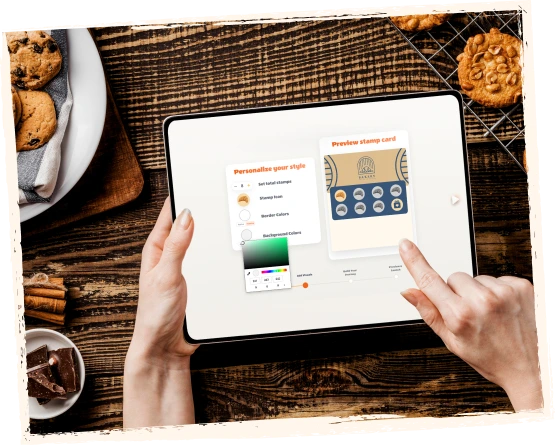
ડિજિટલ કાર્ડ Apple Wallet અથવા Google Wallet માં સાચવાય છે, જેથી ગ્રાહક દરેક ભવિષ્યની મુલાકાત માટે એ જ loyalty card રાખે છે.
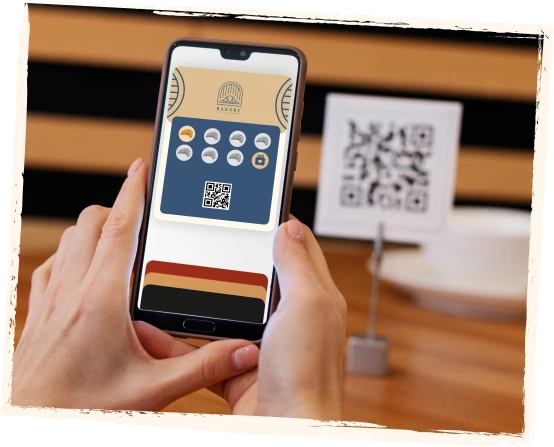
ગ્રાહકો Staff Scanner, Self-Service Kiosk flows, Autopilot Mode, Redeem Codes અથવા assisted checkout દ્વારા સ્ટેમ્પ મેળવે છે.

જ્યારે progress, rewards, birthdays અથવા nearby reminders મહત્વના બને છે, ત્યારે wallet pass ગ્રાહકને પાછા આવવા માટે સ્પષ્ટ કારણ આપે છે.

ગ્રાહકોને સરળ wallet card દેખાય છે. તમારી ટીમને launch, validation, rewards અને growth માટે browser-based control layer દેખાય છે.
અહીં walkthrough જુઓ અથવા YouTube પર ખોલીને વાસ્તવિક 7Stamp product માં live wallet flow, browser tools, reward logic અને return-visit journey જુઓ.
ઉત્પાદન બંને બાજુથી જુઓ
ગ્રાહકોને સરળ wallet card દેખાય છે. તમારી ટીમને launch, validation, rewards અને growth માટે browser-based control layer દેખાય છે.
ગ્રાહકની વીડિયો સમીક્ષા
Olena
Evolve બ્યુટી સલૂન
Customer proof
સૌપ્રથમ Evolve beauty salon ની Olena નો ટૂંકો video જુઓ, પછી તે feedback જુઓ જે સામાન્ય રીતે 7Stamp ને paper cards અથવા app-based loyalty સાથે સરખાવતા વ્યવસાયો માટે સૌથી મહત્વનું હોય છે.
7Stamp premium service, busy counters, self-service stations, high-speed queues અને હવે શરૂ કરીને પછી integrate કરવા માંગતા વ્યવસાયો માટે કામ કરે છે.
Salons, spas, restaurants અને service-led businesses માટે ઉત્તમ. Staff ફોન અથવા tablet પરથી wallet card સ્કેન કરે છે, ઝડપથી સ્ટેમ્પ ઉમેરે છે અને યોગ્ય સમયે reward alerts જુએ છે.
Cafes, bakeries, counters અને busy retail માટે ઉત્તમ. checkout નજીક tablet મૂકો જેથી ગ્રાહકો પોતાનું કાર્ડ સ્કેન કરી શકે, સ્ટેમ્પ્સ એકત્ર કરી શકે અને staff ની ઓછી કે વગર સહભાગિતાથી rewards redeem કરી શકે.
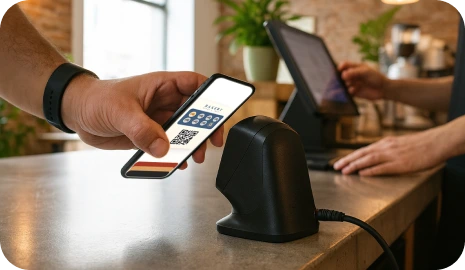
Rush hours, queues અને high-volume counters માટે ઉત્તમ. ગ્રાહકો external scanner થી સ્કેન કરે છે અને 7Stamp background માં સ્ટેમ્પ ઉમેરે છે જેથી line આગળ વધતી રહે.
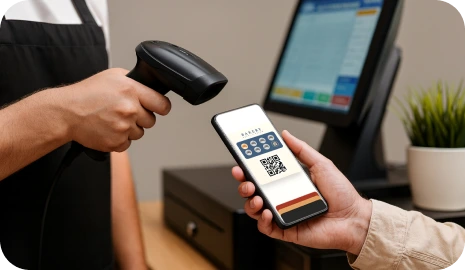
સૌ પ્રથમ browser tools અને Redeem Codes થી શરૂ કરો. loyalty loop વાસ્તવિક વ્યવસાયમાં demand સાબિત કરી દે ત્યારે પછી POS, API અથવા webhook automation ઉમેરો.
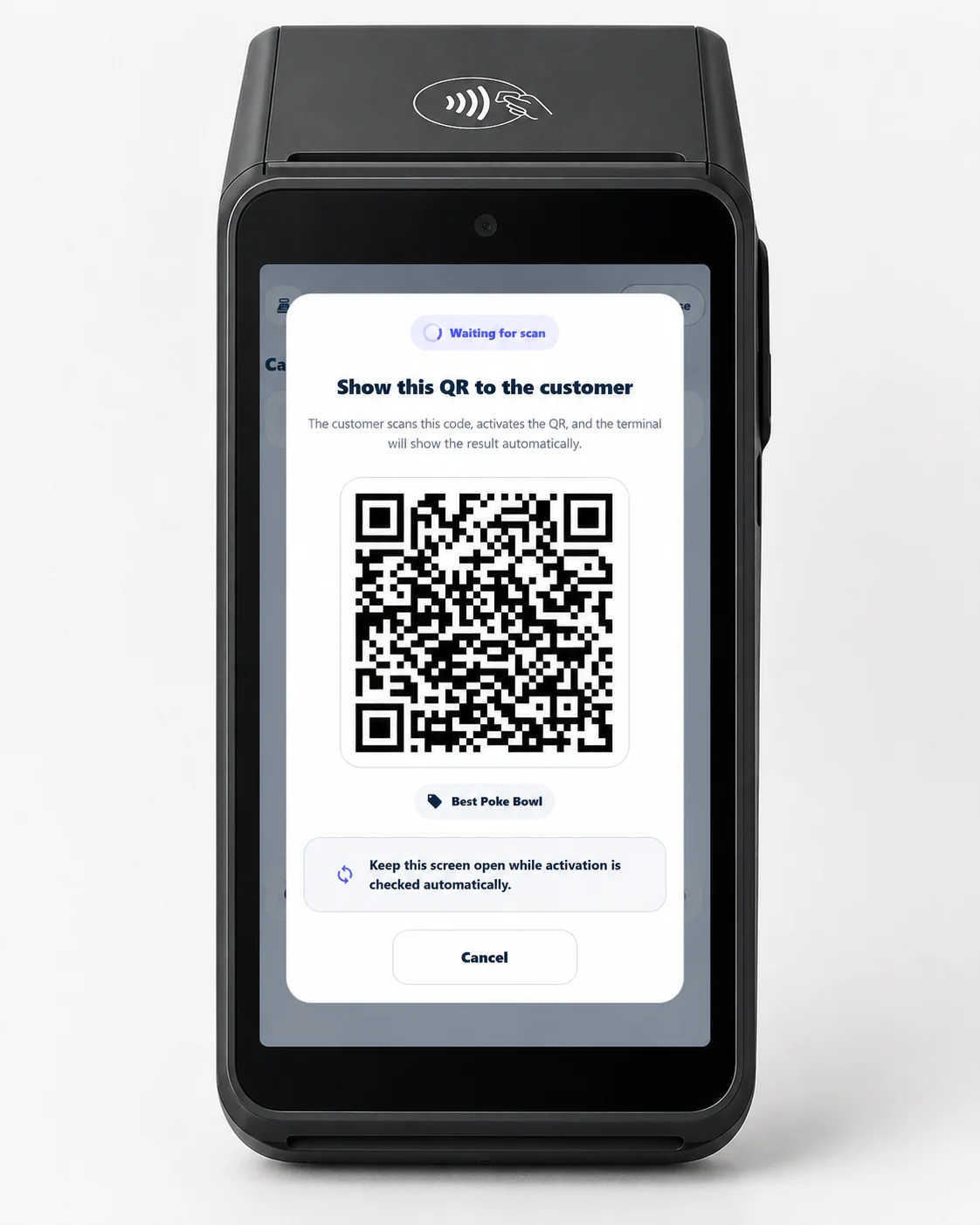
પ્રાપ્તકર્તાઓ, પ્રોસેસર્સ અને ચુકવણી ટર્મિનલ ધરાવતા કોઈપણ વેપારી માટે શ્રેષ્ઠ. હાલના Android ટર્મિનલ પર લોયલ્ટી ચલાવો — ગ્રાહક ટર્મિનલ સ્ક્રીન પર QR સ્કેન કરે છે અને તેમના વૉલેટમાં સ્ટેમ્પ એકત્રિત કરે છે.
Terminal Mode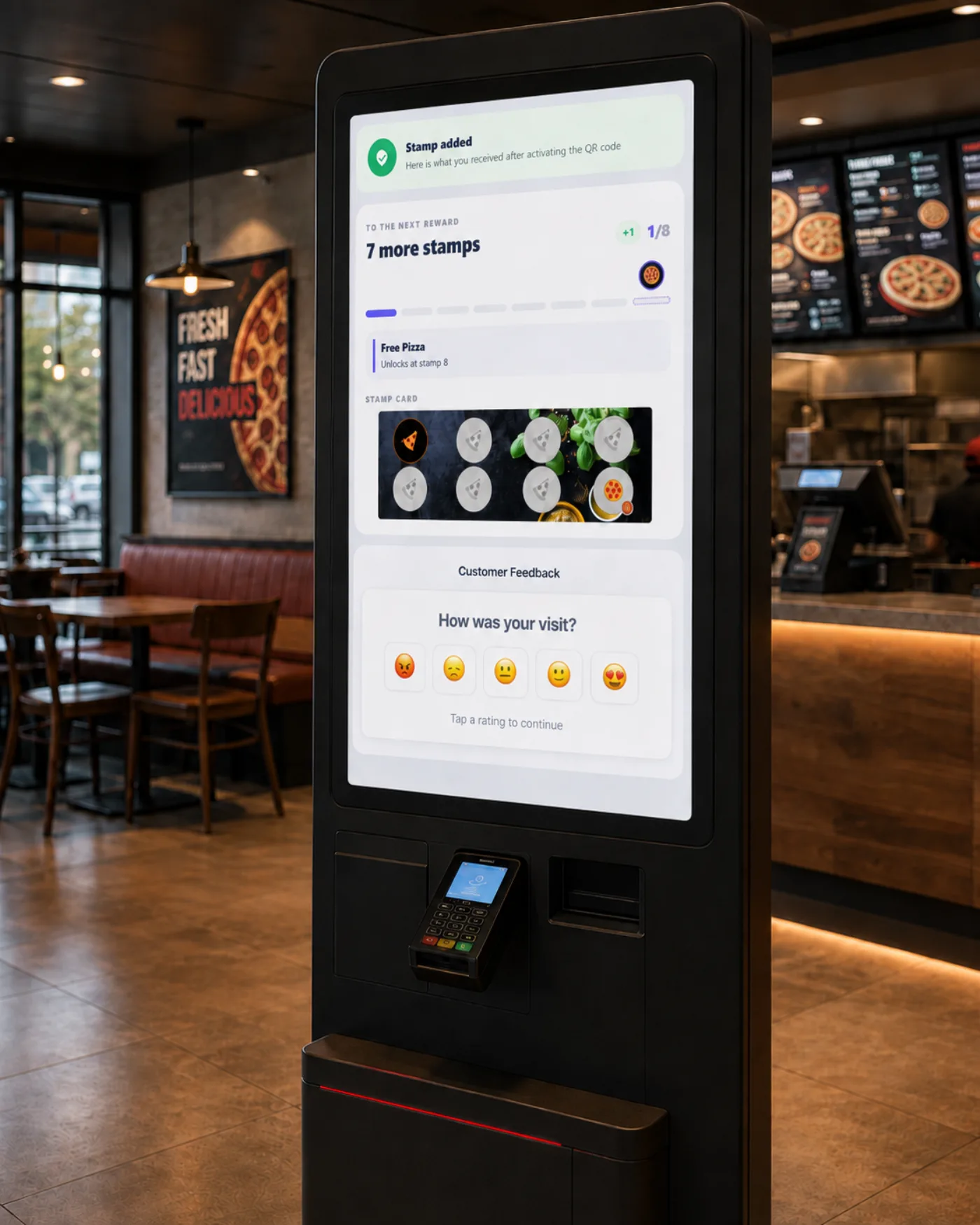
સમગ્ર ટેબલ QR, રસીદ, ચુકવણી ટર્મિનલ, Self-Service Kiosk અને ચેટ-બોટ પર ગ્રાહક પ્રતિસાદ એકત્રિત કરો — બધું એક Customer Feedback page પર. વ્યવસાયની ખાનગી લાઇન, સાર્વજનિક સમીક્ષા વિકલ્પની બાજુમાં, દરેકને સમાન રીતે બતાવવામાં આવે છે.
Customer Feedbackલોયલ્ટીને પેપર સ્ટેમ્પ કાર્ડ જેટલી સરળ રાખો, અથવા checkout પર વધુ નિયંત્રણની જરૂર હોય ત્યારે કડક voucher redemption ઉમેરો.
પરિચિત buy-X-get-1-free માળખાનો ઉપયોગ કરો. ગ્રાહકો એ જ wallet card પર progress જુએ છે અને staff ને ચોક્કસ ખબર રહે છે કે reward ક્યારે આપવો.
ઉદાહરણ
9 coffees ખરીદો, 1 મફત મેળવો.
જ્યારે ગ્રાહક લક્ષ્ય સુધી પહોંચે છે, ત્યારે 7Stamp ડિજિટલ voucher issue કરી શકે છે જે pass માંથી ખુલે છે અને reward ને સ્ટેમ્પ એકત્ર કરવાની stage થી અલગ રાખે છે.
ઉદાહરણ
મફત drink, service add-on અથવા birthday gift unlock કરો.
Voucher અંદર text code, QR code અથવા barcode બતાવો જેથી custom POS development વગર staff reward દાખલ અથવા સ્કેન કરી શકે.
ઉદાહરણ
FREECOFFEE, GIFT100 અથવા POS-ready barcode.
ગ્રાહક cycle પૂરી કરે ત્યારે game layer ઉમેરો જેથી reward ક્ષણ માત્ર transactional ન લાગે પરંતુ યાદગાર બને.
ઉદાહરણ
Kiosk અથવા staff device પર prize માટે spin કરો.
7Stamp Redeem Codes દ્વારા લગભગ કોઈપણ POS system સાથે કામ કરી શકે છે. પહેલા QR join, browser validation અને voucher codes થી શરૂ કરો. વધુ ઊંડું automation ત્યારે જ ઉમેરો જ્યારે તે પ્રયત્ન લાયક બને.
Integration layer
7Stamp connects to your existing point-of-sale, CRM, and automation tools, but only when you decide it is worth it. Most businesses launch first and integrate later.
Install in 2 clicks from the Poster marketplace. Two stamping modes, a voucher layer, and delivery inserts on top of your existing checkout flow.
See Poster integrationDirect integration for Serve POS, where every closed check can issue a stamp automatically.
Talk to usConnect 7Stamp to 6000+ apps without writing code and keep loyalty events synced with the rest of your stack.
See integrationsWorks with any POS through redeem codes, staff scanning, or Receipt QR before you commit to custom development.
Read Zero-POS Integration7Stamp માત્ર ડિજિટલ સ્ટેમ્પ કાર્ડ નથી. તે wallet reminders, birthday rewards, geo triggers અને campaign tools દ્વારા તમારા વ્યવસાયને ગ્રાહકો સુધી સીધો channel આપે છે.
Progress, rewards અને card changes Apple Wallet અને Google Wallet માં જ રહે છે, જ્યાં ગ્રાહકો પહેલેથી જ જુએ છે.
ખોટા સમયે generic message મોકલવાની બદલે ગ્રાહક તમારા location નજીક હોય ત્યારે repeat visits પ્રોત્સાહિત કરો.
જન્મદિવસનું gift, voucher અથવા staff alert આપમેળે issue કરો જેથી વ્યવસાય manual follow-up વગર ફરીથી engage કરી શકે.
Wallet push, email અથવા બંને દ્વારા loyalty customers સુધી one-off promotions અથવા win-back messages પહોંચાડો.
7Stamp ત્યાં સૌથી સારું કામ કરે છે જ્યાં ગ્રાહકો વારંવાર પાછા આવે છે, staff વ્યસ્ત રહે છે અને loyalty ને એક જ વાક્યમાં સમજાવી શકાય તેવું હોવું જોઈએ.

પેપર કાર્ડ, queue friction અથવા અલગ customer app વગર buy-X-get-1-free loyalty ચલાવો.

સેવા ધીમી કર્યા વગર અથવા app install ફરજિયાત બનાવ્યા વગર repeat visits અથવા free-item redemption ને reward આપો.

ટીમ એક જ સ્પષ્ટ validation flow રાખે ત્યારે frequent customers ને પાછા આવવાનું સરળ કારણ આપો.
ઝડપી repeat traffic અને દેખાતી reward progress જરૂરી હોય એવા વ્યવસાયો માટે ઝડપી સ્ટેમ્પ logic નો ઉપયોગ કરો.
Vending, laundromats, car washes અને unattended stations માટે plastic NFC cards ને one-tap wallet IDs થી બદલો.
Bags, receipts અને packaging પર QR codes દ્વારા marketplace orders ને direct-order retention માં ફેરવો.
તમારી પોતાની બ્રાન્ડ હેઠળ દરેક સ્થાન પર એક જ લોયલ્ટી પ્રોગ્રામ ચલાવો. કોઈ એપ બનાવવાની જરૂર નથી, Apple Wallet અને Google Wallet, કેન્દ્રિય નિયંત્રણ.
એપ વગરની Apple Wallet અને Google Wallet લોયલ્ટી તમારી પોતાની બ્રાન્ડ હેઠળ સ્થાનિક વ્યવસાયોને રિસેલ કરો. તમારી કિંમત જાતે નક્કી કરો અને ફ્લેટ ભાગીદાર દર ચૂકવો.
તમે પહેલેથી મેનેજ કરો છો તે ટર્મિનલ્સ પર વેલ્યુ એડેડ સર્વિસ તરીકે વ્હાઇટ-લેબલ લોયલ્ટી ઑફર કરો.
સાર્વજનિક સમીક્ષા માટે વાજબી, સુસંગત આમંત્રણ સાથે ગ્રાહકોને વ્યવસાય માટે એક-ટૅપ ડાયરેક્ટ લાઇન આપો.
જ્યાં aggregators અટકે ત્યાં loyalty નો ઉપયોગ કરો
Delivery marketplaces orders લાવી શકે છે, પરંતુ તેઓ ઘણીવાર customer relationship પોતે રાખે છે. Bags, receipts અને packaging inserts પર 7Stamp QR codes ગ્રાહકોને તમારું wallet loyalty card સાચવવા અને સીધા પાછા આવવા મદદ કરે છે.
7Stamp પરિચિત સ્ટેમ્પ-કાર્ડ આદત જાળવે છે, પરંતુ સૌથી મોટા અવરોધ દૂર કરે છે: app downloads, ગુમાતા પેપર કાર્ડ્સ, staff workload અને ભારે POS development.
ગ્રાહકો QR કોડ દ્વારા જોડાય છે અને loyalty card ને સીધું Apple Wallet અથવા Google Wallet માં સાચવે છે.
તમારો counter કેવી રીતે કામ કરે છે તેના આધારે Staff Scanner, Self-Service Kiosk, Autopilot Mode અથવા browser-assisted checkout પસંદ કરો.
custom development વગર શરૂ કરો, પછી business case સાબિત થયા પછી Redeem Codes, API, webhooks, Zapier અથવા POS integrations ઉમેરો.
મફતમાં શરૂઆત કરો, એક લોકેશનમાં લોયલ્ટી લૂપ સાબિત કરો, અને જ્યારે તમને વધુ સ્ટાફ લોગિન, વધુ દૈનિક ઉપયોગ અથવા પેઇડ એડ-ઓન્સની જરૂર હોય ત્યારે જ પેઇડ પ્લાન પર જાઓ. Free Forever માં પેઇડ પ્લાનની દરેક સુવિધા છે.
Free
પેઇડ પ્લાનની બધી સુવિધાઓ શામેલ છે. Per month 25 Stamps.
$35 / month
Per location.
Monthly SelectOwned terminology
These are the branded workflow terms you will see on the home page, in wallet onboarding, and in 7Stamp setup conversations.
7Stamp એ Apple Wallet અને Google Wallet માટે નો-એપ ડિજિટલ સ્ટેમ્પ કાર્ડ સિસ્ટમ છે. તે સ્થાનિક વ્યવસાયોને પેપર પંચ કાર્ડ બદલવા, પુનરાવર્તિત મુલાકાતો એકત્રિત કરવામાં, પુરસ્કારો રજૂ કરવામાં અને કસ્ટમ ગ્રાહક એપ્લિકેશન વિના વફાદારી ઝુંબેશ મોકલવામાં મદદ કરે છે.
ના. ગ્રાહકો QR કોડ સ્કેન કરે છે અથવા લિંક ખોલે છે અને લોયલ્ટી કાર્ડને સીધા Apple Wallet અથવા Google Wallet પર સાચવે છે. તેમને અલગ લોયલ્ટી એપ ડાઉનલોડ કરવાની જરૂર નથી.
ગ્રાહકો સામાન્ય રીતે QR કોડ સ્કેન કરીને અને કાર્ડને તેમના ફોન વૉલેટમાં સાચવીને લગભગ 15 સેકન્ડમાં જોડાઈ શકે છે. આ વ્યસ્ત કાઉન્ટર્સ માટે રચાયેલ છે જ્યાં સ્ટાફ પાસે જટિલ એપ્લિકેશન પ્રવાહને સમજાવવા માટે સમય નથી.
Zero Level Integration એ લોયલ્ટી પ્રોગ્રામ ચલાવવા માટે 7Stampનો શબ્દ છે જેમાં હાલના બિઝનેસ સેટઅપમાં કંઈપણ ઉમેરાયું નથી. ડાઉનલોડ કરવા માટે કોઈ ગ્રાહક એપ્લિકેશન નથી, રૂપરેખાંકિત કરવા માટે કોઈ POS કનેક્શન નથી, અને સ્ટાફ માટે કોઈ નવી ભૂમિકા નથી. ગ્રાહકો તેમના વૉલેટ પાસ દ્વારા સ્વ-સ્ટેમ્પ કરે છે, અને વ્યવસાય બ્રાઉઝરથી પ્રોગ્રામ ચલાવે છે.
હા. 7Stamp પાસે Free Forever પ્લાન છે, જેમાં દર મહિને 25 Card Operations સુધી, અમર્યાદિત Wallet push notifications અને 100 Emails શામેલ છે. તે પરીક્ષણ, નાના લોયલ્ટી પ્રોગ્રામ અને પહેલી વાર ડિજિટલ સ્ટેમ્પ કાર્ડ લોન્ચ કરવા માટે બનાવાયો છે. તેમાં પેઇડ પ્લાનની દરેક સુવિધા છે; ફક્ત મર્યાદાઓ અલગ છે. જ્યારે તમને વધુ ઉપયોગ, વધુ સ્ટાફ લોગિન અથવા પેઇડ એડ-ઓન્સની જરૂર હોય ત્યારે પેઇડ પ્લાન ઉપલબ્ધ છે.
નંબર 7Stamp Staff Scanner, Self-Service Kiosk, Autopilot Mode, Receipt QR, Delivery Inserts અથવા Redeem Codes દ્વારા POS એકીકરણ વિના કામ કરી શકે છે. સપોર્ટેડ POS અને API વર્કફ્લો પાછળથી ઉમેરી શકાય છે જ્યારે કોઈ વ્યવસાય વધુ ઊંડા ઓટોમેશન ઇચ્છે છે.
7Stamp એ સ્થાનિક વ્યવસાયો માટે બનાવવામાં આવ્યું છે જે પુનરાવર્તિત મુલાકાતો પર આધાર રાખે છે, જેમાં કાફે, કોફી શોપ, બેકરી, રેસ્ટોરાં અને ટેક-અવે વ્યવસાયો, સલુન્સ, હેર શોપ્સ, કાર વોશ, રિટેલ સ્ટોર્સ અને સમાન સેવા વ્યવસાયો સામેલ છે. જો કોઈ વ્યવસાય પહેલાં પેપર પંચ કાર્ડનો ઉપયોગ કરે છે, તો 7Stamp સામાન્ય રીતે મજબૂત ફિટ છે.
કસ્ટમ લોયલ્ટી એપ ગ્રાહકને ડાઉનલોડ કરવા, રજીસ્ટર કરવા અને બીજી એપ ખોલવાનું યાદ રાખવાનું કહે છે. 7Stamp તે વૉલેટનો ઉપયોગ કરે છે જે ગ્રાહકના ફોન પર પહેલેથી જ છે, તેથી ઑનબોર્ડિંગ QR કોડથી શરૂ થાય છે અને લોયલ્ટી કાર્ડ Apple Wallet અથવા Google Walletમાં વધારાની એપ્લિકેશન જાળવણી વિના દૃશ્યમાન રહે છે.
ના. લોયલ્ટી કાર્ડ સાચવવા માટે નોંધણી જરૂરી નથી. ગ્રાહક QR કોડ સ્કેન કરે છે અને કાર્ડને તેમના વૉલેટમાં ઉમેરે છે. જ્યારે કોઈ વ્યવસાય ઝુંબેશ અથવા જન્મદિવસના પુરસ્કારો માંગતો હોય ત્યારે નામ, ઈમેલ અથવા જન્મદિવસ જેવી વિગતો વૈકલ્પિક રીતે વિનંતી કરી શકાય છે.
સાર્વજનિક 7Stamp ઇન્ટરફેસ અને ગ્રાહક-સામનો પૃષ્ઠો હાલમાં 54 ભાષાઓમાં ઉપલબ્ધ છે. અનુવાદ અને SEO સમીક્ષા પછી જ નવી જાહેર ભાષાઓ ઉમેરવામાં આવે છે.
સેટઅપ મિનિટોમાં શરૂ થઈ શકે છે, અને મોટાભાગના વ્યવસાયો એક જ શિફ્ટમાં સ્ટેમ્પ કાર્ડ અને QR કોડને ગોઠવી શકે છે. ત્યાં કોઈ ઇન્સ્ટોલેશન નથી, કોઈ અલગ ગ્રાહક એપ્લિકેશન નથી, અને લોન્ચ પહેલાં કોઈ જરૂરી POS પ્રોજેક્ટ નથી.
Today app-free first digital Stamp Card. Customers paper cards or app download without scan, save, collect, return.