
14. API & Integrations
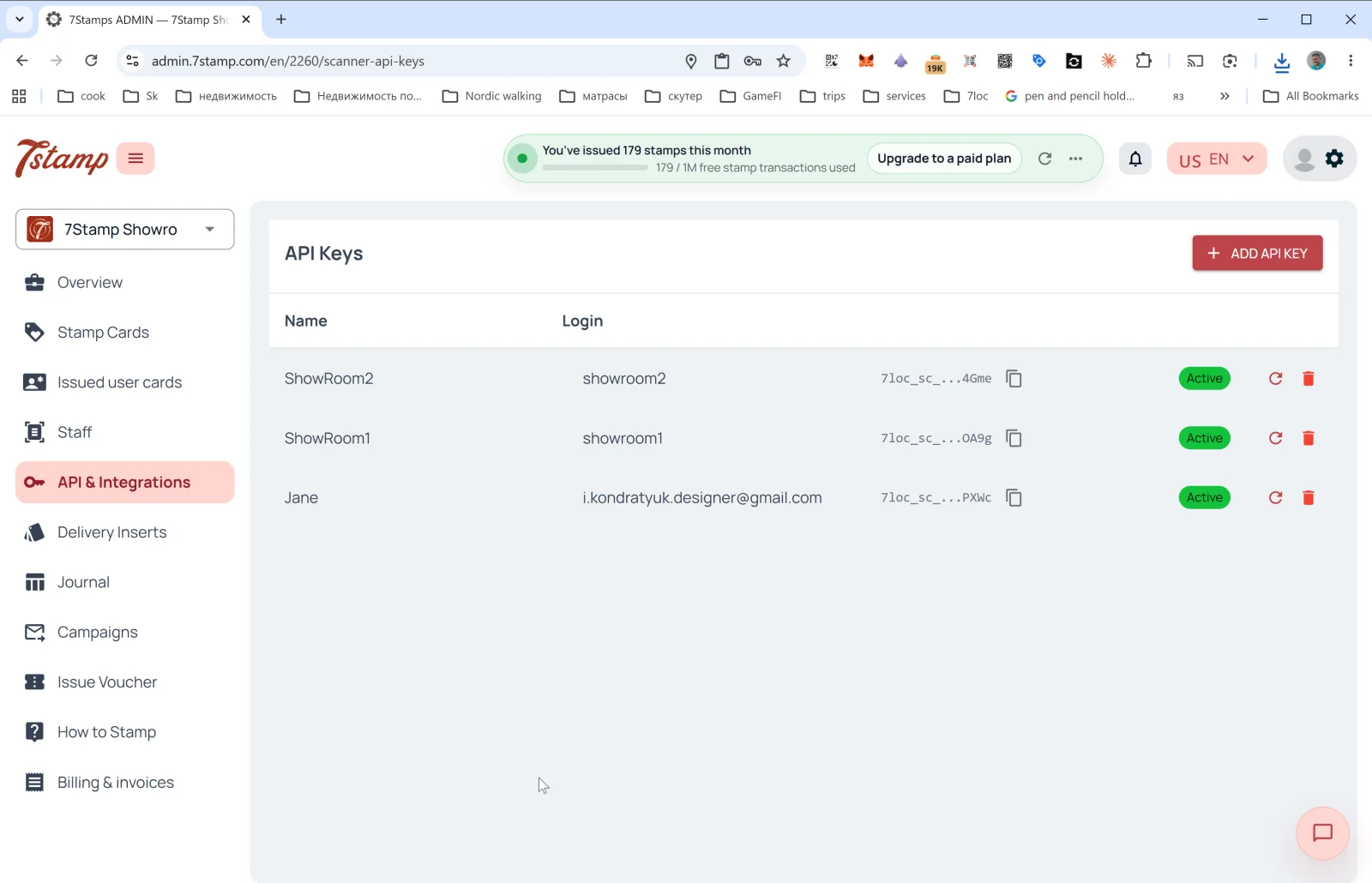
API & Integrations 섹션에는 7Stamp를 CRM, POS, ERP, 분석 도구, 메신저 봇 등 외부 시스템과 프로그래밍 방식으로 연동하는 도구가 있습니다.
API 키
이 섹션의 메인 페이지는 API 키 목록입니다. 열 구성:
- Name: 키 이름(보통 연결된 직원 이름과 같습니다).
- Login: 키가 연결된 직원 로그인.
- API Key: 키 자체(
7loc_sc_...로 시작하며 기본적으로 숨겨져 있고, 클릭 한 번으로 복사할 수 있습니다). - Status:
Active. - 🔄: 키를 다시 생성합니다.
- 🗑️: 키를 삭제합니다.
API 키 만들기
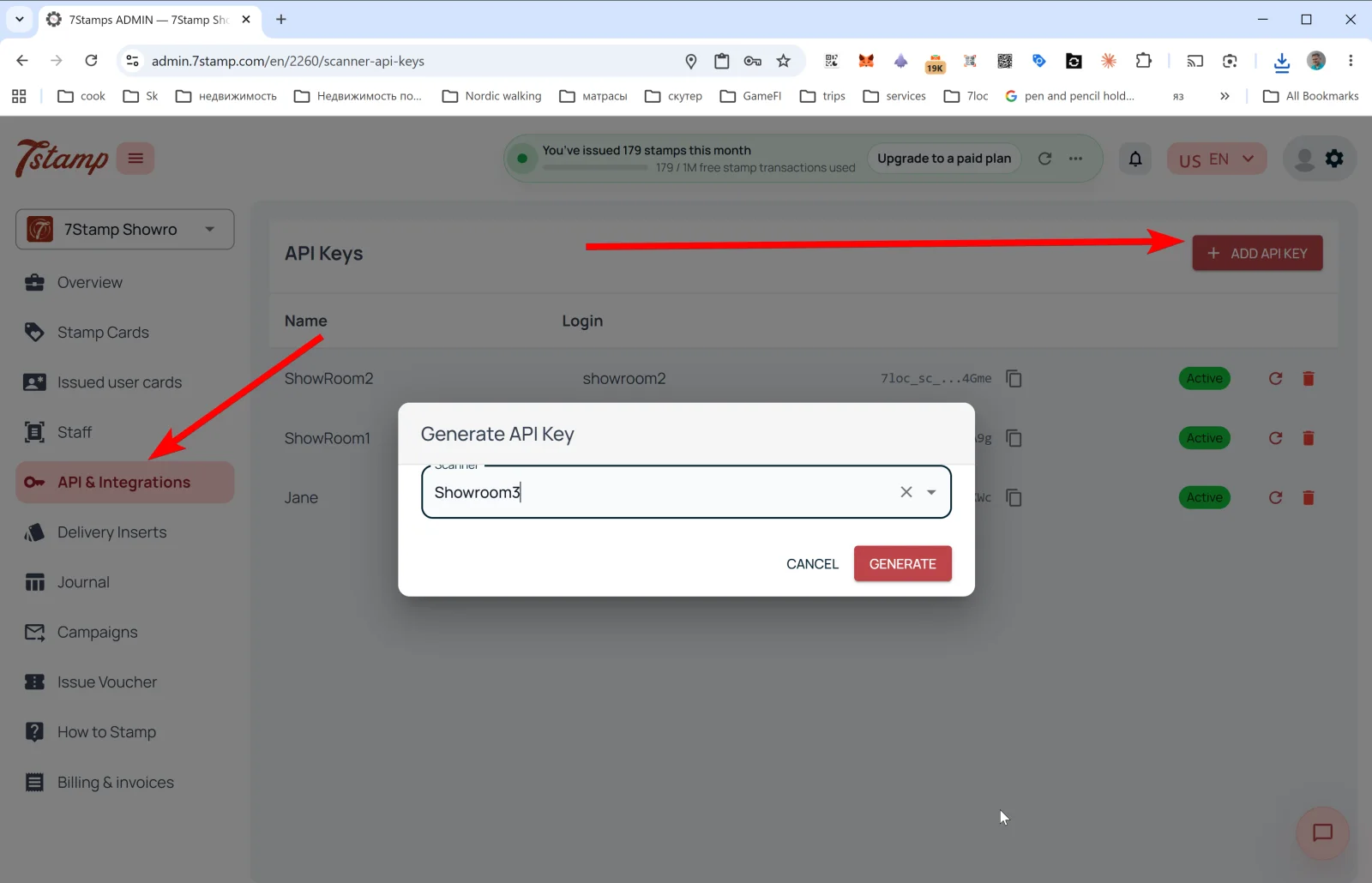
+ ADD API KEY를 누르면 Generate API Key 팝업이 열립니다.
- Scanner: 키를 연결할 직원 로그인을 고르는 드롭다운입니다(직원 1명당 키 1개).
- CANCEL / GENERATE 버튼.
GENERATE를 누르면 키가 생성되어 목록에 나타납니다. 바로 복사해 두세요. 전체 키가 다시 표시되지 않을 수 있습니다.
API로 할 수 있는 일
- 이메일/전화번호로 고객에게 카드 발급.
- 특정 고객에게 스탬프 적립.
- 바우처 발급(템플릿 또는 맞춤형, Redeem Code 포함).
- 바우처 사용 처리(자체 POS로 운영하는 경우).
- 카드의 상태 조회: 진행 상황, 이력.
- Webhooks 구독으로 이벤트를 실시간 수신.
Webhooks
Webhooks는 카드 이벤트를 외부 시스템으로 보냅니다. 지원되는 이벤트(이벤트 용어집 참고):
SCAN,DELIVERY_INSERT.REWARD_EARNED,LOTTERY_WIN.VOUCHER_ISSUED,ADMIN_VOUCHER_ISSUE,VOUCHER_REDEEMED.CARD_JOINED,CARD_ADDED_TO_WALLET,CARD_REMOVED_FROM_WALLET.CARD_CAMPAIGN,BIRTHDAY_GREETING.
Webhook 페이로드 예시
{
  "entity": "card_event",
  "action": "created",
  "entity_id": 707,
  "event_id": "8f05e58decec48e09d328f0edebbacf6",
  "profile_id": 2,
  "profile_name": "Your Business",
  "profile_lang": "en",
  "data": {
    "event_type": "SCAN",
    "scanned_at": "2026-10-01T09:19:24.179424",
    "user_card_id": 10,
    "card_template_id": 14,
    "card_template_name": "Collect your stamps!",
    "stamps_added": 3,
    "stamps_before": 1,
    "stamps_after": 4,
    "amount": null,
    "external_order_id": "ORDER-1001",
    "workplace": { "id": 4, "name": "Bar Counter" },
    "device_type": null,
    "external_id": "odoo_contact_8821",
    "external_source": "odoo",
    "issued_vouchers": [
      {
        "id": 174,
        "unique_code": "100425813507",
        "stamp_number": 4,
        "issued_at": "2026-10-01T09:19:24.191836",
        "expires_at": "2027-01-01T23:59:59",
        "status": "ACTIVE",
        "voucher_template_id": 58,
        "voucher_description": "Free coffee",
        "voucher_image_url": "https://..."
      }
    ],
    "achieved_goals": [],
    "user": {
      "id": 2,
      "name": "Anna",
      "full_name": "Anna Smith",
      "email": "anna@example.com",
      "telegram_chat_id": null,
      "telegram_username": null,
      "whatsapp_phone": null,
      "birth_date": null
    }
  }
}
기성 POS 연동
- Poster: 기성 연동으로, 몇 번의 클릭만으로 연결됩니다.
- Serve: 기성 연동.
- 기타 계산대 시스템: 요청 시 개발합니다. 기술적으로 가능하면 무료입니다(계산대 시스템이 공개 API나 Webhooks를 제공하는 경우).
7loc.com을 통한 메신저 발송
WhatsApp, Telegram, Viber 발송에는 7loc.com 연동을 사용합니다. 연동이 활성화되면 Campaigns에서 PUSH와 Email 옆에 “메신저” 채널을 사용할 수 있습니다.
노코드 시나리오: Zapier와 Make
7Stamp API + Webhooks는 Zapier 및 **Make (Integromat)**와 함께 작동하므로 코딩 없이 시나리오를 만들 수 있습니다.
- “
VOUCHER_REDEEMED발생 시 Mailchimp에 태그 추가”. - “
REWARD_EARNED발생 시 Slack으로 알림 전송”. - “
BIRTHDAY_GREETING발생 시 CRM에 작업 생성”.
시각적 안내
아래 화면 세트를 문서의 시각적 보조 자료로 사용하세요. 이미지를 클릭하면 전체 크기로 볼 수 있습니다.