
참조
사이드 메뉴의 Issued user cards 섹션은 비즈니스의 카드를 하나 이상 보유한 모든 고객의 목록입니다. 페이지 안의 제목은 User stamp cards입니다.
10. Issued user cards — 카드를 발급받은 고객
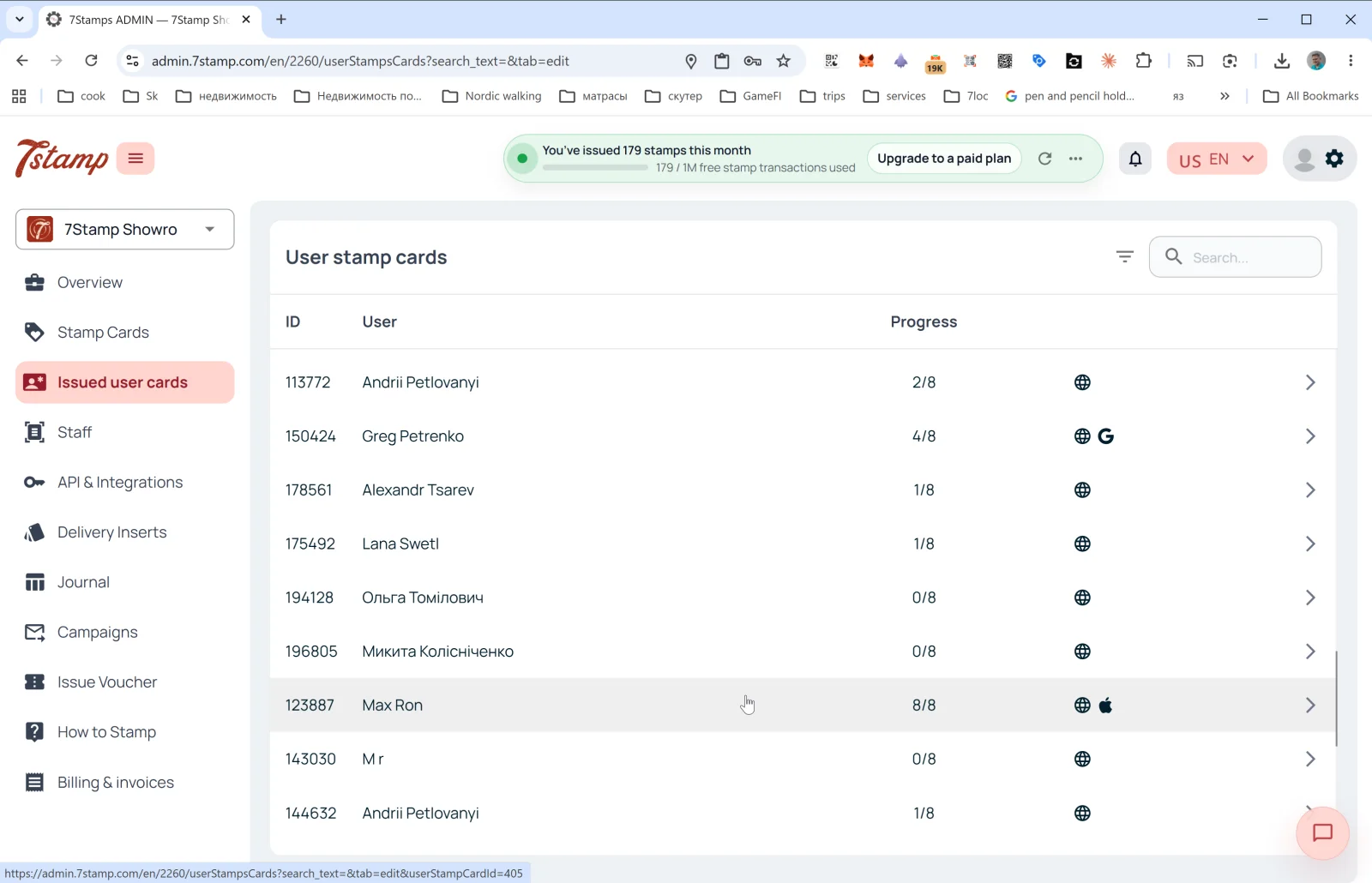
사이드 메뉴의 Issued user cards 섹션은 비즈니스의 카드를 하나 이상 보유한 모든 고객의 목록입니다. 페이지 안의 제목은 User stamp cards입니다.
목록의 열
- ID: 고객 카드 번호(예:
113772). - User: 고객 이름(가입 시 입력한 이름).
- Progress: 현재 스탬프 진행 상황(예:
2/8,8/8). - Platform: 오른쪽 아이콘으로 고객이 카드를 어디에 보관하는지 알 수 있습니다.
- 🌐: 웹 버전(Wallet에 저장하지 않음).
- 🍎: Apple Wallet.
- G: Google Wallet.
- 화살표
→: 카드 상세 정보 열기.
오른쪽 위에는 필터 아이콘과 Search… 입력란이 있습니다(이름, ID, 이메일로 검색).
고객 카드 상세 정보
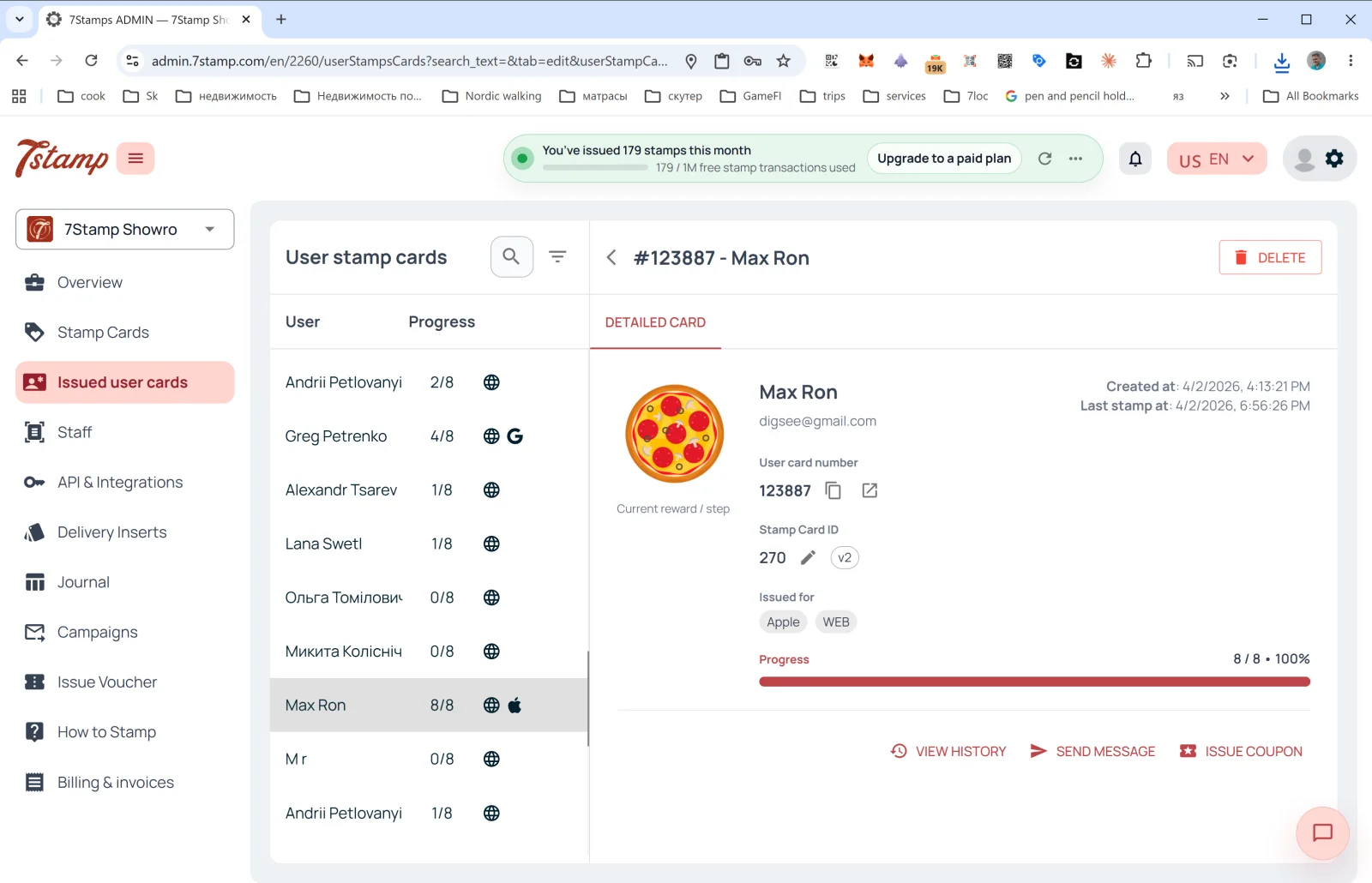
행을 클릭하면 DETAILED CARD 측면 패널이 열립니다.
- 헤더의 #ID - 고객 이름 + DELETE 버튼(고객 카드 삭제).
- Current reward / step 이미지: 현재 또는 다음 선물.
- User card number: 고객 카드 번호(복사 및 열기 버튼 포함).
- Stamp Card ID: 템플릿 ID + 버전(
v2,v10…). - Issued for: 카드가 저장된 플랫폼(Apple, WEB, Google). 한 고객이 여러 Wallet에 카드를 저장할 수 있습니다.
- Created at: 카드 생성일.
- Last stamp at: 마지막 스탬프 적립일.
- Progress: 진행률 표시줄(예:
8 / 8 • 100%).
작업
- VIEW HISTORY: 이 카드의 전체 이벤트 로그를 엽니다. 언제 발급되었는지, 언제 스탬프가 적립되었는지, 어떤 바우처를 받고 사용했는지, 어떤 캠페인이 발송되었는지 확인할 수 있습니다.
- SEND MESSAGE: 고객에게 개인 메시지를 보냅니다(PUSH/Email).
- ISSUE COUPON: 고객 카드에서 바로 개인 바우처를 발급합니다(예: 보상이나 선물로).
Issued user cards 섹션은 “최소한의 CRM”입니다. 외부 CRM이 없어도 여기서 모든 고객을 보고, 특정 고객을 찾고, 이력을 확인하고, 연락할 수 있습니다.
시각적 안내
아래 화면 세트를 문서의 시각적 보조 자료로 사용하세요. 이미지를 클릭하면 전체 크기로 볼 수 있습니다.