
Reference
በጎን ምናሌው ውስጥ ያለው Issued user cards ክፍል ቢያንስ አንድ የንግድዎን ካርድ የያዙ ደንበኞች ሁሉ ዝርዝር ነው። በውስጡ ያለው የገጽ ርዕስ User stamp cards (የተጠቃሚ የማህተም ካርዶች) ነው።
10. Issued user cards — ካርድ የተሰጣቸው ደንበኞች
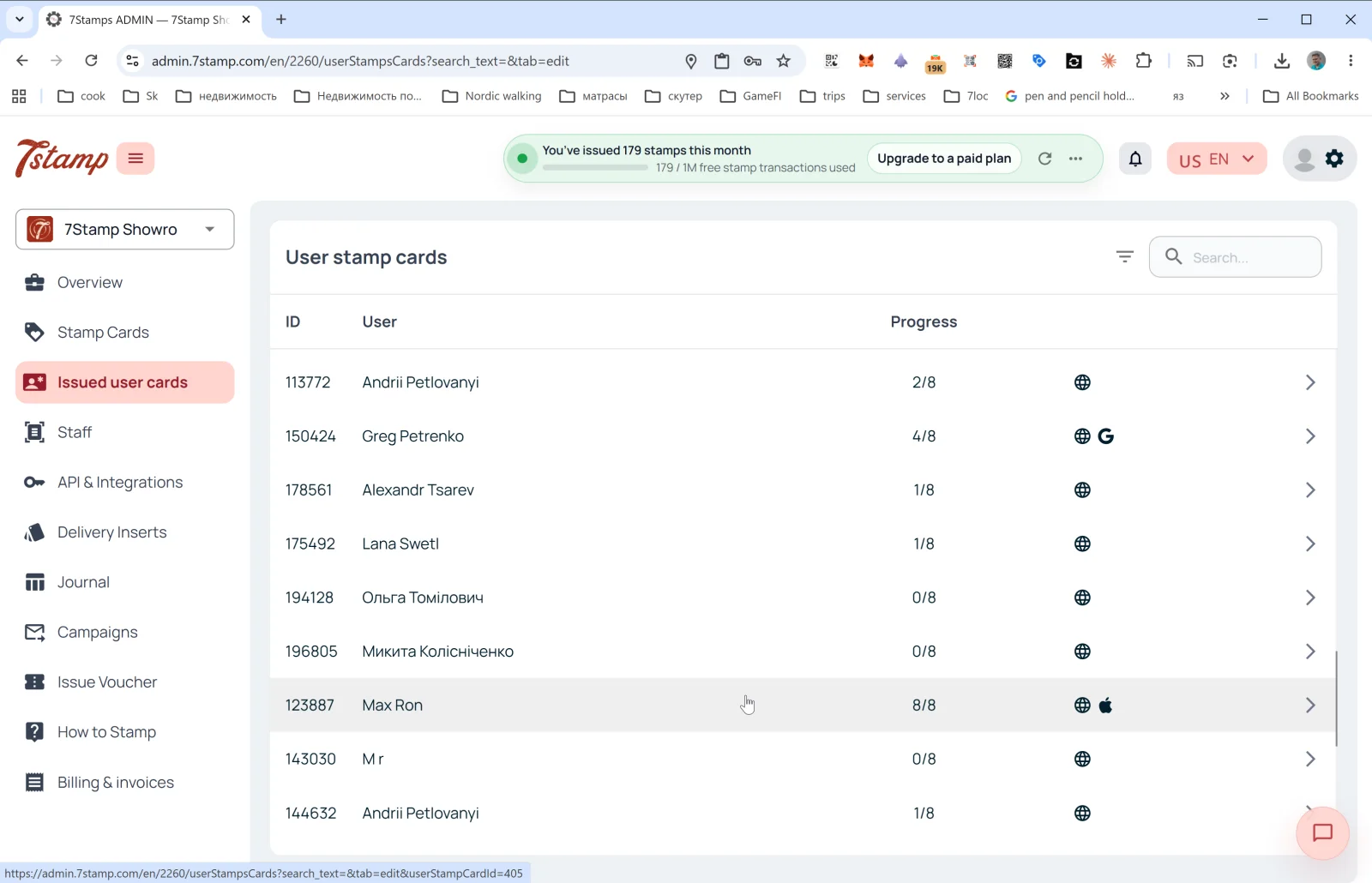
በጎን ምናሌው ውስጥ ያለው የIssued user cards ክፍል ቢያንስ አንድ የንግድዎን ካርድ የያዙ ደንበኞች ሁሉ ዝርዝር ነው። በውስጡ ያለው የገጽ ርዕስ User stamp cards (የተጠቃሚ የማህተም ካርዶች) ነው።
የዝርዝሩ ዓምዶች
- ID — የደንበኛው ካርድ ቁጥር (ለምሳሌ
113772)። - User — የደንበኛው ስም (በምዝገባ ጊዜ ያስገባው)።
- Progress — የአሁኑ የማህተም ሂደት (ለምሳሌ
2/8፣8/8)። - Platform — በቀኝ በኩል ያሉት አዶዎች ደንበኛው ካርዱን የት እንደሚያስቀምጥ ያሳያሉ፦
- 🌐 — የድር ስሪት (ወደ Wallet አልተቀመጠም)።
- 🍎 — Apple Wallet።
- G — Google Wallet።
- ቀስት
→— የካርዱን ዝርዝሮች ይከፍታል።
ከላይ በቀኝ፦ የማጣሪያ አዶ እና የSearch… መስክ (በስም፣ በID፣ በኢሜይል ፍለጋ)።
የደንበኛ ካርድ ዝርዝሮች
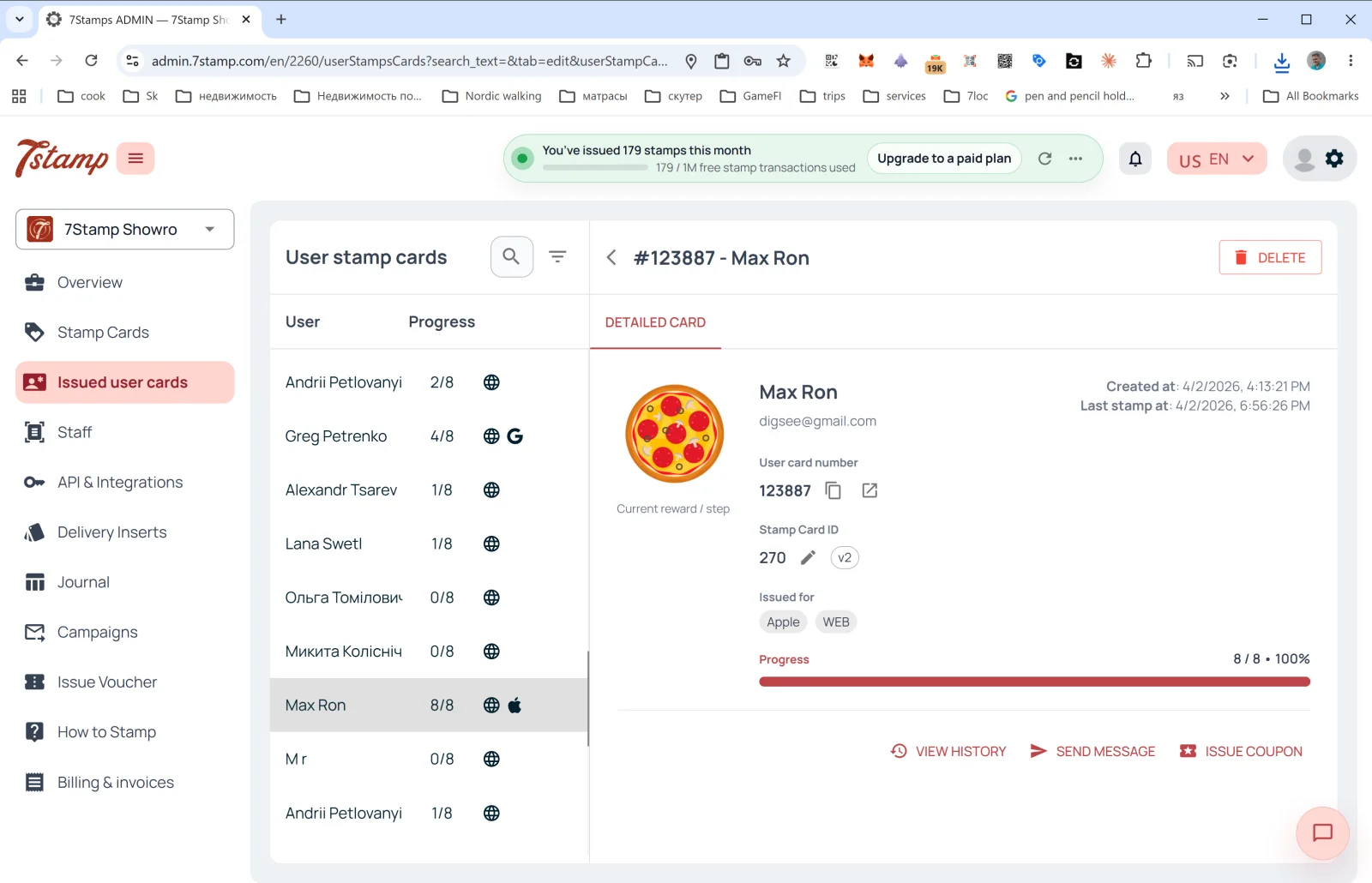
በአንድ ረድፍ ላይ ጠቅ ማድረግ የDETAILED CARD የጎን ፓነልን ይከፍታል፦
- በርዕሱ ላይ #ID - Customer Name + የDELETE ቁልፍ (የደንበኛውን ካርድ ይሰርዛል)።
- የCurrent reward / step ምስል — የአሁኑ ወይም ቀጣዩ ስጦታ።
- User card number — የደንበኛው ካርድ ቁጥር (ከመቅጃ እና ከመክፈቻ ቁልፎች ጋር)።
- Stamp Card ID — የአብነቱ መለያ + ስሪት (
v2፣v10…)። - Issued for — ካርዱ በየትኛው መድረክ ላይ እንደተቀመጠ (Apple፣ WEB፣ Google)። አንድ ደንበኛ ካርዱን በበርካታ ዋሌቶች ውስጥ ሊያስቀምጥ ይችላል።
- Created at — ካርዱ የተፈጠረበት ቀን።
- Last stamp at — የመጨረሻው ማህተም የተሰጠበት ቀን።
- Progress — የሂደት አሞሌ (ለምሳሌ
8 / 8 • 100%)።
እርምጃዎች
- VIEW HISTORY — የዚህን ካርድ ሙሉ የክስተቶች መዝገብ ይከፍታል፦ መቼ እንደተሰጠ፣ ማህተሞች መቼ እንደተጨመሩ፣ የትኞቹ ቫውቸሮች እንደተገኙና ጥቅም ላይ እንደዋሉ፣ የትኞቹ ዘመቻዎች እንደተላኩ።
- SEND MESSAGE — ለደንበኛው የግል መልእክት ይላኩ (በPUSH/Email)።
- ISSUE COUPON — በቀጥታ ከደንበኛው ካርድ የግል ቫውቸር ይስጡ (ለምሳሌ እንደ ካሳ ወይም እንደ ስጦታ)።
የIssued user cards ክፍል የእርስዎ “አነስተኛ CRM” ነው፦ ውጫዊ CRM ባይኖርዎትም እዚህ ሁሉንም ደንበኞች ያያሉ፣ አንድን ደንበኛ ማግኘት፣ ታሪኩን ማየት እና ማነጋገር ይችላሉ።
Visual walkthrough
Use the screen sets below as a visual companion to the article. Open any image to inspect it at full size.