
10. Issued user cards — जिन ग्राहकों को कार्ड जारी हुए हैं
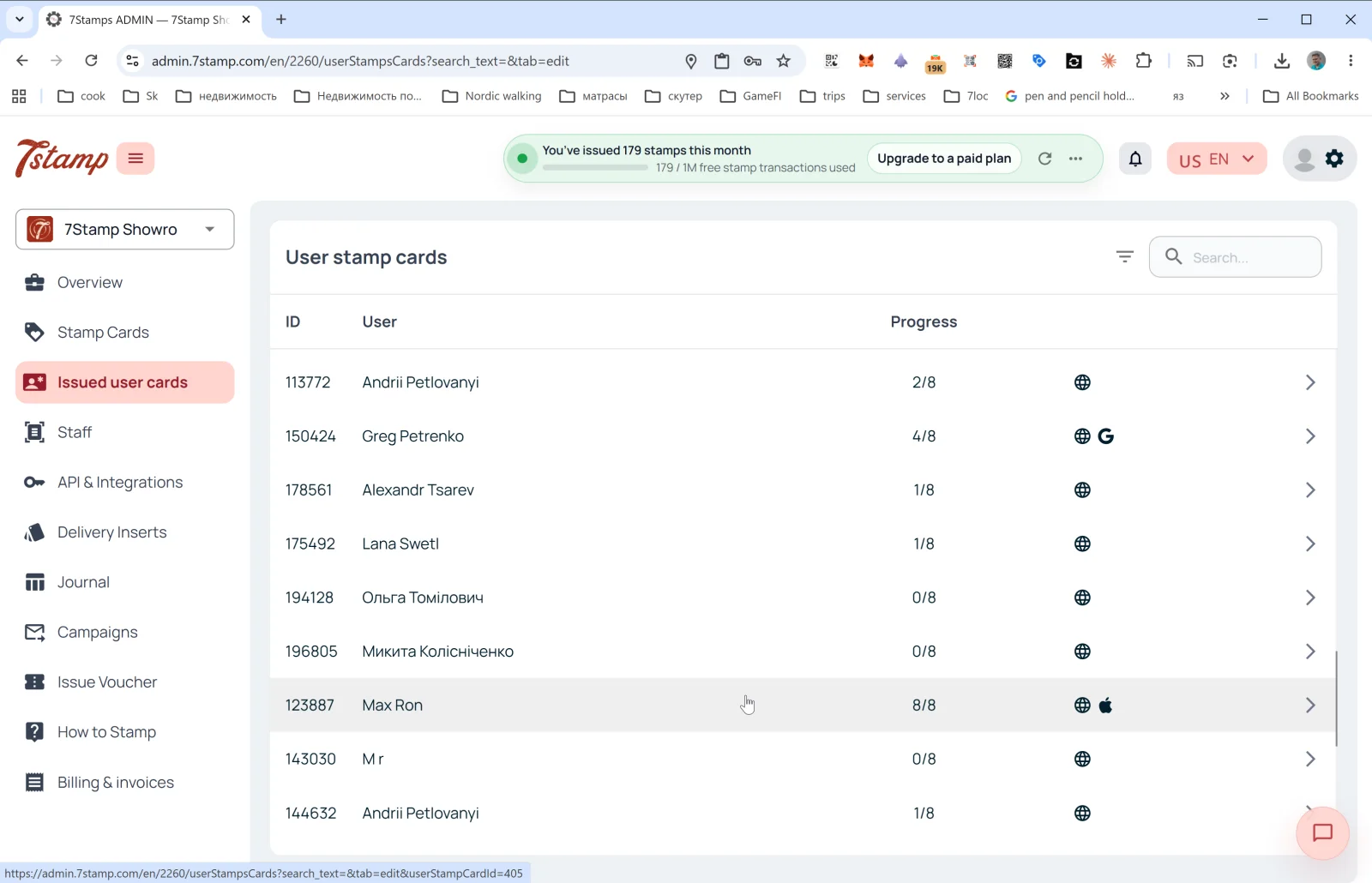
साइड मेन्यू का Issued user cards सेक्शन उन सभी ग्राहकों की सूची है जिनके पास आपके व्यवसाय का कम से कम एक कार्ड है। अंदर पेज का हेडर User stamp cards है।
सूची के कॉलम
- ID — ग्राहक के कार्ड का नंबर (जैसे
113772)। - User — ग्राहक का नाम (जैसा उसने रजिस्ट्रेशन के समय डाला)।
- Progress — स्टैम्प की मौजूदा प्रगति (जैसे
2/8,8/8)। - Platform — दाईं ओर के आइकन बताते हैं कि ग्राहक कार्ड कहां रखता है:
- 🌐 — वेब वर्ज़न (Wallet में सेव नहीं)।
- 🍎 — Apple Wallet।
- G — Google Wallet।
- तीर
→— कार्ड का विवरण खोलें।
ऊपर दाईं ओर: फ़िल्टर आइकन और Search… फ़ील्ड (नाम, ID, ईमेल से खोजें)।
ग्राहक कार्ड का विवरण
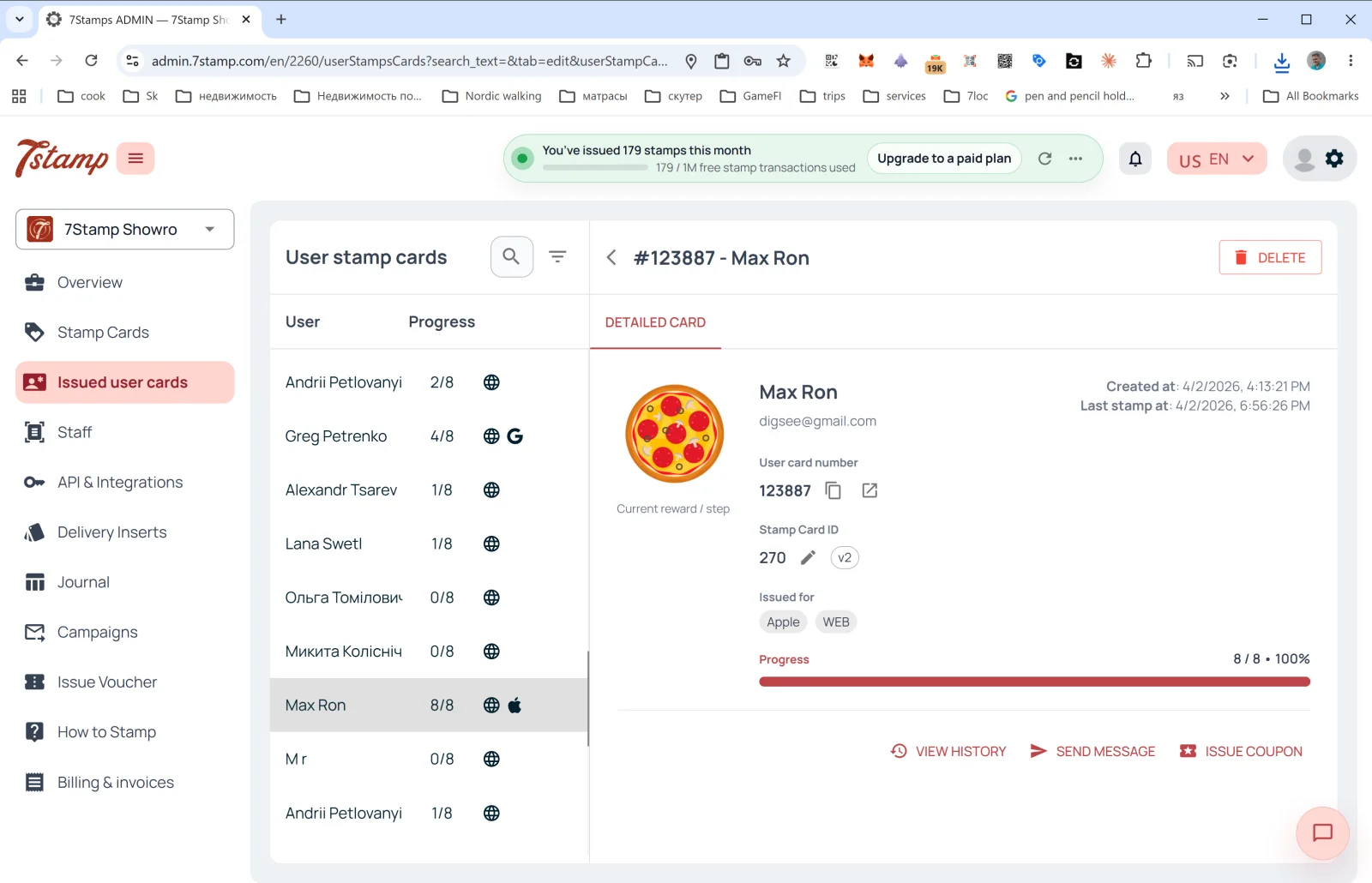
किसी पंक्ति पर क्लिक करने से DETAILED CARD साइड पैनल खुलता है:
- हेडर में #ID - ग्राहक का नाम + DELETE बटन (ग्राहक का कार्ड हटाएं)।
- Current reward / step इमेज — मौजूदा या अगला उपहार।
- User card number — ग्राहक के कार्ड का नंबर (कॉपी और खोलने के बटन के साथ)।
- Stamp Card ID — टेम्पलेट ID + वर्ज़न (
v2,v10…)। - Issued for — कार्ड किस प्लैटफ़ॉर्म पर सेव है (Apple, WEB, Google)। एक ग्राहक कार्ड को कई Wallets में सेव कर सकता है।
- Created at — कार्ड बनने की तारीख।
- Last stamp at — आख़िरी स्टैम्प की तारीख।
- Progress — प्रोग्रेस बार (जैसे
8 / 8 • 100%)।
कार्रवाइयां
- VIEW HISTORY — इस कार्ड का पूरा इवेंट लॉग खोलता है: कार्ड कब जारी हुआ, स्टैम्प कब जुड़े, कौन-से वाउचर मिले और रिडीम हुए, कौन-से कैंपेन भेजे गए।
- SEND MESSAGE — ग्राहक को निजी संदेश भेजें (PUSH/Email से)।
- ISSUE COUPON — ग्राहक के कार्ड से सीधे निजी वाउचर जारी करें (जैसे मुआवज़े या उपहार के रूप में)।
Issued user cards सेक्शन आपका “न्यूनतम CRM” है: बाहरी CRM के बिना भी यहां आप सभी ग्राहक देखते हैं, किसी खास ग्राहक को ढूंढ सकते हैं, उसका इतिहास देख सकते हैं और उससे संपर्क कर सकते हैं।
दृश्य मार्गदर्शिका
Use the screen sets below as a visual companion to the लेख. खोलें any image to inspect it at full size.