
Reference
Կողային ընտրացանկի Issued user cards բաժինը ձեր բիզնեսի առնվազն մեկ քարտ ունեցող բոլոր հաճախորդների ցանկն է։ Ներսում էջի վերնագիրը User stamp cards է։
10. Issued user cards — թողարկված քարտերով հաճախորդներ
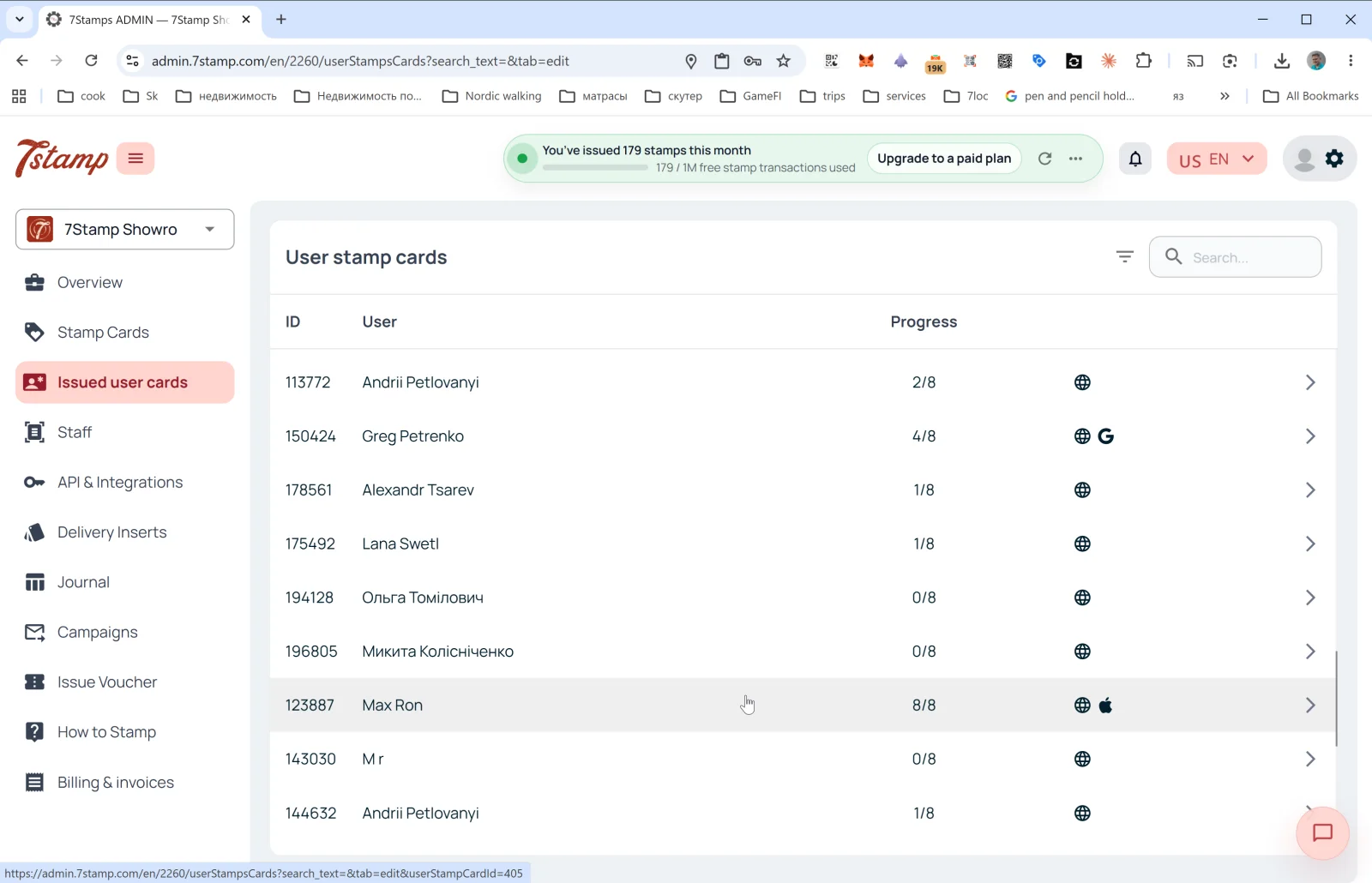
Կողային ընտրացանկի Issued user cards բաժինը ձեր բիզնեսի առնվազն մեկ քարտ ունեցող բոլոր հաճախորդների ցանկն է։ Ներսում էջի վերնագիրը User stamp cards է։
Ցանկի սյունակներ
- ID — հաճախորդի քարտի համարը (օրինակ՝
113772)։ - User — հաճախորդի անունը (ինչպես մուտքագրել է գրանցվելիս)։
- Progress — նշումների ընթացիկ առաջընթացը (օրինակ՝
2/8,8/8)։ - Platform — աջ կողմի պատկերակները ցույց են տալիս, թե որտեղ է հաճախորդը պահում քարտը.
- 🌐 — վեբ տարբերակ (առանց Wallet-ում պահելու)։
- 🍎 — Apple Wallet։
- G — Google Wallet։
→սլաք — բացել քարտի մանրամասները։
Վերևի աջ անկյունում՝ զտիչի պատկերակը և Search… դաշտը (որոնում ըստ անվան, ID-ի, էլփոստի)։
Հաճախորդի քարտի մանրամասներ
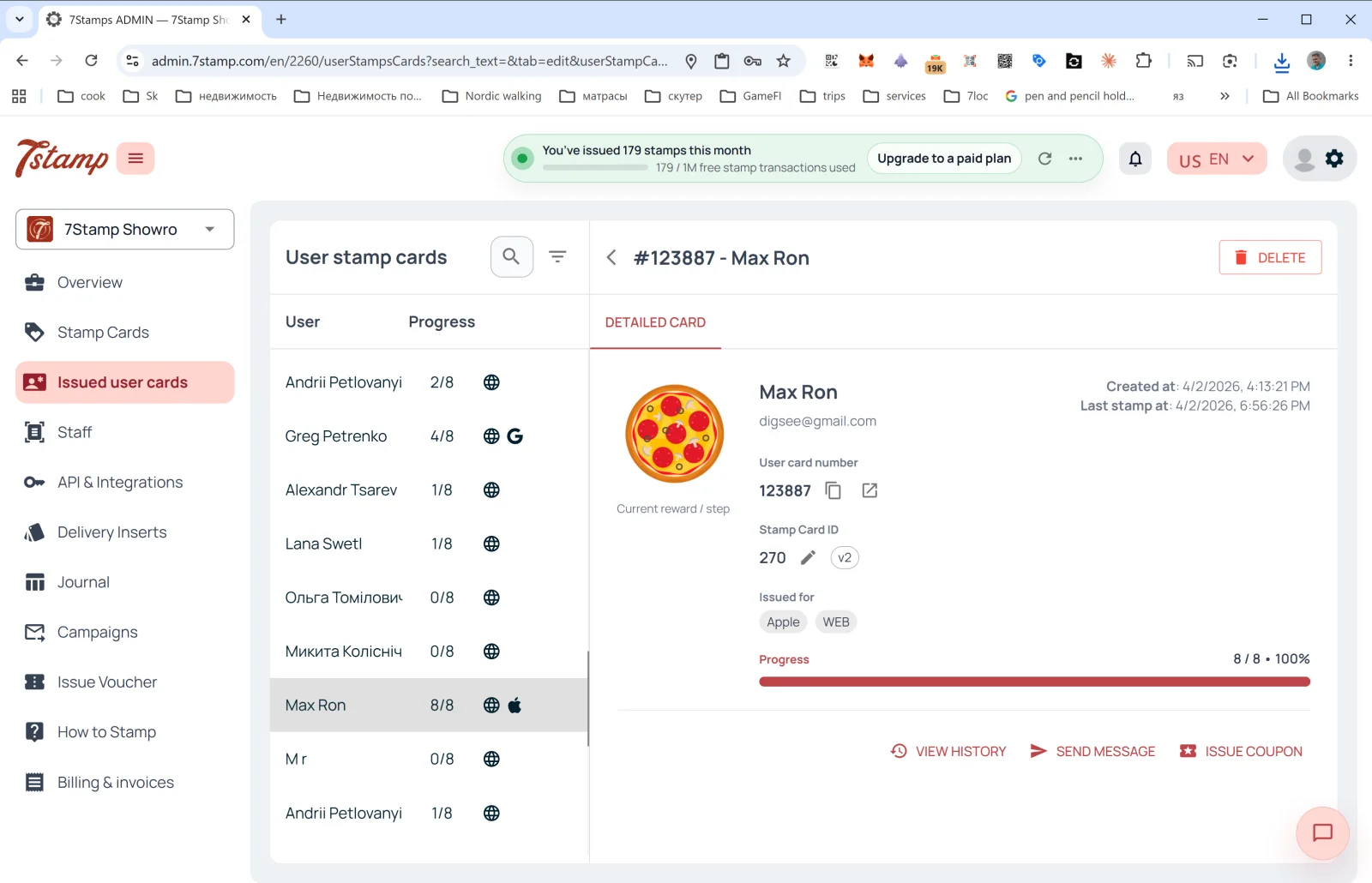
Տողի վրա սեղմելով բացվում է DETAILED CARD կողային վահանակը.
- Վերնագրում՝ #ID - Customer Name + DELETE կոճակը (ջնջել հաճախորդի քարտը)։
- Current reward / step պատկերը՝ ընթացիկ կամ հաջորդ նվերը։
- User card number — հաճախորդի քարտի համարը (պատճենելու և բացելու կոճակներով)։
- Stamp Card ID — ձևանմուշի ID-ն + տարբերակը (
v2,v10…)։ - Issued for — որ հարթակում է պահված քարտը (Apple, WEB, Google)։ Մեկ հաճախորդը կարող է քարտը պահել մի քանի Wallet-ում։
- Created at — քարտի ստեղծման ամսաթիվը։
- Last stamp at — վերջին նշման ամսաթիվը։
- Progress — առաջընթացի գոտի (օրինակ՝
8 / 8 • 100%)։
Գործողություններ
- VIEW HISTORY — բացում է այս քարտի իրադարձությունների ամբողջական մատյանը՝ երբ է թողարկվել, երբ են ավելացվել նշումները, որ վաուչերներն են վաստակվել և մարվել, որ արշավներն են ուղարկվել։
- SEND MESSAGE — ուղարկել անձնական հաղորդագրություն հաճախորդին (PUSH-ով կամ Email-ով)։
- ISSUE COUPON — թողարկել անձնական վաուչեր անմիջապես հաճախորդի քարտից (օրինակ՝ որպես փոխհատուցում կամ նվեր)։
Issued user cards բաժինը ձեր «նվազագույն CRM»-ն է. նույնիսկ առանց արտաքին CRM-ի այստեղ տեսնում եք բոլոր հաճախորդներին, կարող եք գտնել կոնկրետ մեկին, տեսնել նրա պատմությունը և կապվել նրա հետ։
Visual walkthrough
Use the screen sets below as a visual companion to the article. Open any image to inspect it at full size.