
Reference
সাইড মেনুর Issued user cards বিভাগ হলো সেই সব গ্রাহকের তালিকা, যাঁদের কাছে আপনার ব্যবসার অন্তত একটি কার্ড আছে। ভেতরে পেজের শিরোনাম User stamp cards।
10. Issued user cards — কার্ড ইস্যু করা গ্রাহকরা
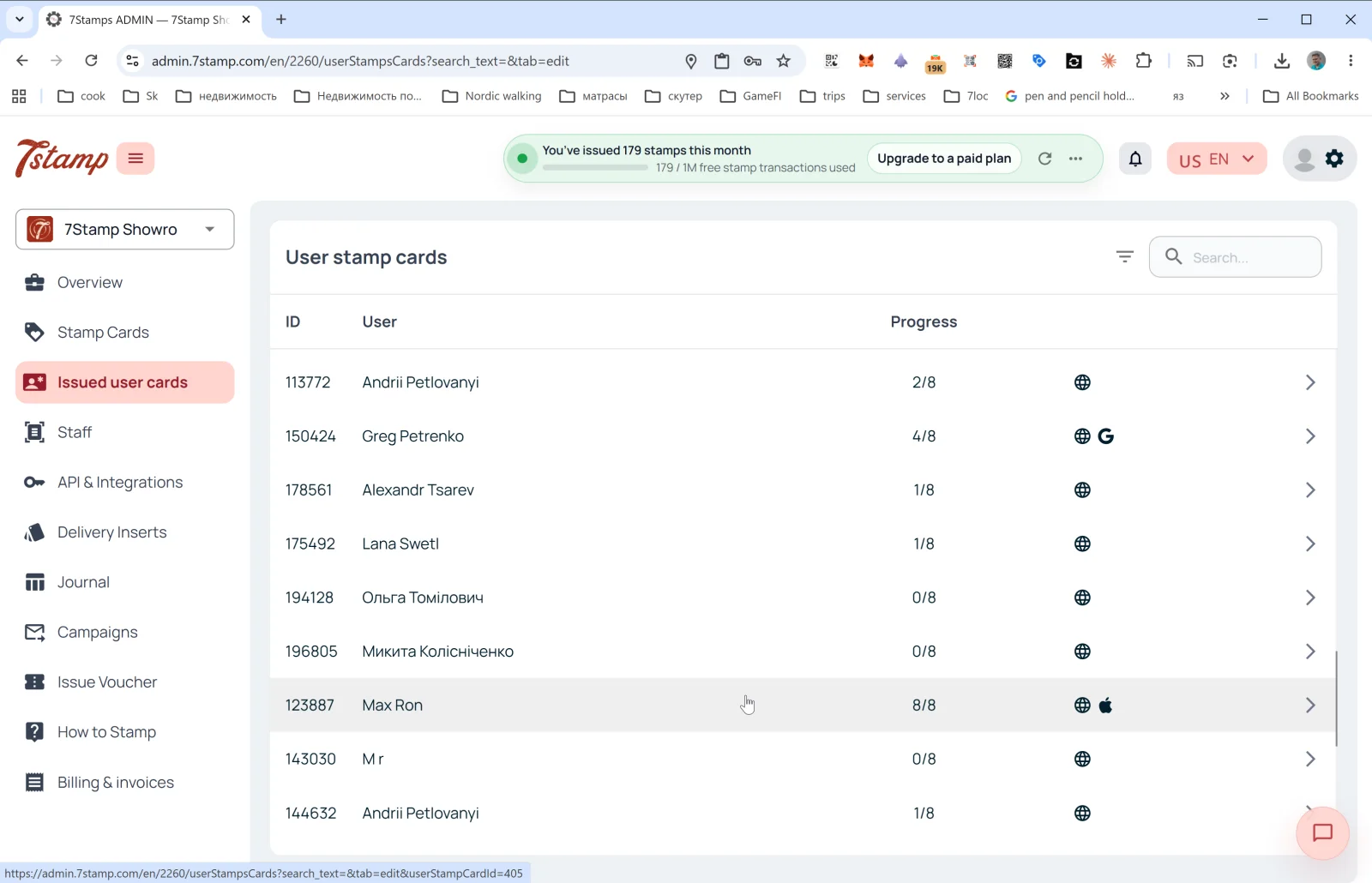
সাইড মেনুর Issued user cards বিভাগ হলো সেই সব গ্রাহকের তালিকা, যাঁদের কাছে আপনার ব্যবসার অন্তত একটি কার্ড আছে। ভেতরে পেজের শিরোনাম User stamp cards।
তালিকার কলাম
- ID — গ্রাহকের কার্ড নম্বর (যেমন,
113772)। - User — গ্রাহকের নাম (নিবন্ধনের সময় যেমন লিখেছিলেন)।
- Progress — স্ট্যাম্পের বর্তমান অগ্রগতি (যেমন,
2/8,8/8)। - Platform — ডান দিকের আইকন দেখায় গ্রাহক কার্ডটি কোথায় রাখেন:
- 🌐 — ওয়েব সংস্করণ (Wallet-এ সংরক্ষণ করা হয়নি)।
- 🍎 — Apple Wallet।
- G — Google Wallet।
- তীর
→— কার্ডের বিবরণ খোলা।
ওপরে ডানে: ফিল্টার আইকন এবং Search… ফিল্ড (নাম, ID, ইমেল দিয়ে খোঁজা)।
গ্রাহকের কার্ডের বিবরণ
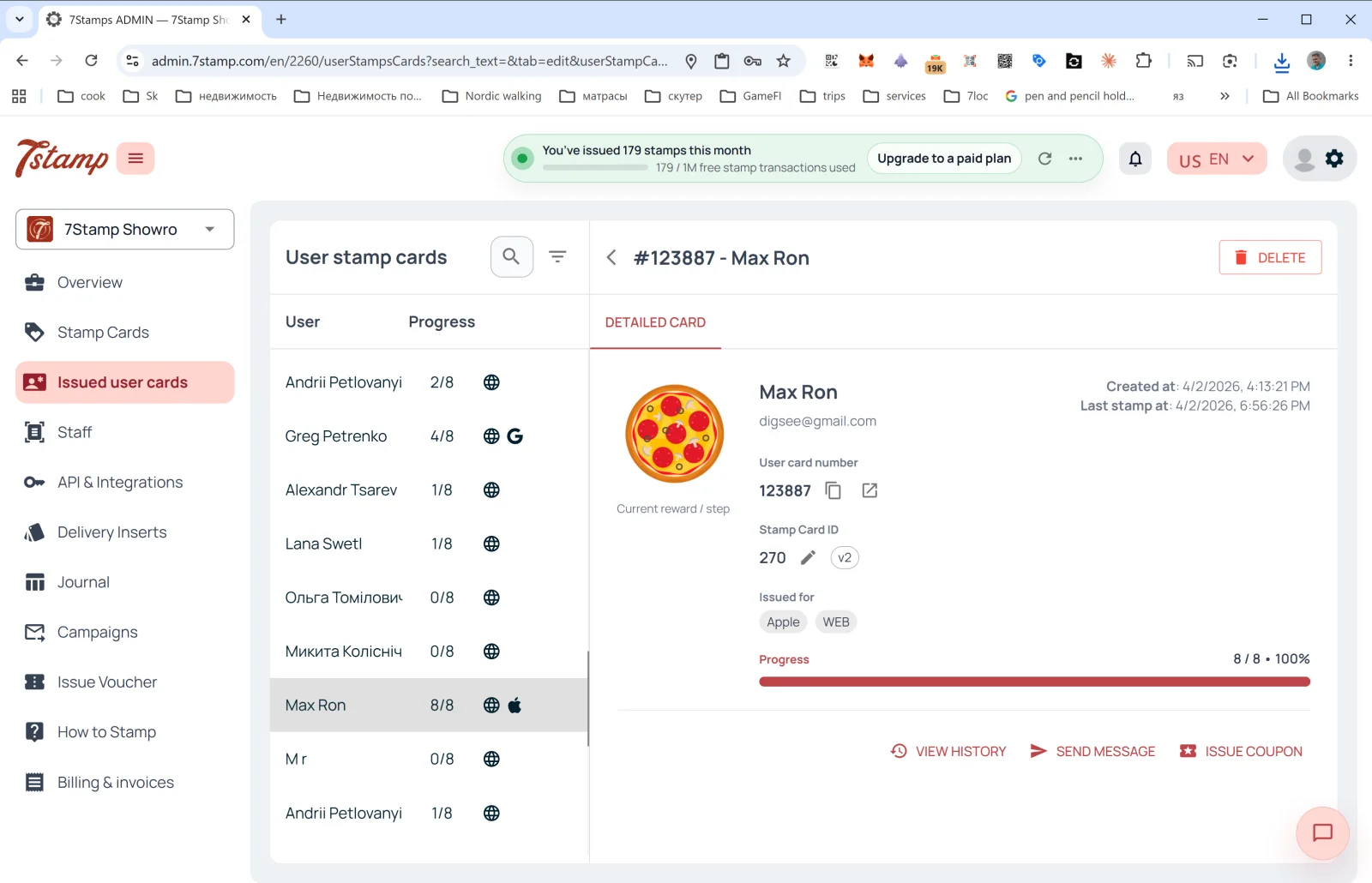
কোনো সারিতে ক্লিক করলে DETAILED CARD সাইড প্যানেল খোলে:
- শিরোনামে #ID - Customer Name + DELETE বোতাম (গ্রাহকের কার্ড মুছে ফেলা)।
- Current reward / step ছবি — বর্তমান বা পরবর্তী উপহার।
- User card number — গ্রাহকের কার্ড নম্বর (কপি ও খোলার বোতামসহ)।
- Stamp Card ID — টেমপ্লেটের ID + সংস্করণ (
v2,v10…)। - Issued for — কার্ডটি কোন প্ল্যাটফর্মে সংরক্ষিত (Apple, WEB, Google)। একজন গ্রাহক একাধিক Wallet-এ কার্ড সংরক্ষণ করতে পারেন।
- Created at — কার্ড তৈরির তারিখ।
- Last stamp at — শেষ স্ট্যাম্পের তারিখ।
- Progress — প্রগ্রেস বার (যেমন,
8 / 8 • 100%)।
অ্যাকশন
- VIEW HISTORY — এই কার্ডের পূর্ণ ইভেন্ট লগ খোলে: কবে ইস্যু হয়েছে, কবে স্ট্যাম্প যোগ হয়েছে, কোন ভাউচার পাওয়া ও রিডিম হয়েছে, কোন ক্যাম্পেইন পাঠানো হয়েছে।
- SEND MESSAGE — গ্রাহককে ব্যক্তিগত মেসেজ পাঠানো (PUSH/Email-এর মাধ্যমে)।
- ISSUE COUPON — সরাসরি গ্রাহকের কার্ড থেকে ব্যক্তিগত ভাউচার ইস্যু করা (যেমন, ক্ষতিপূরণ বা উপহার হিসেবে)।
Issued user cards বিভাগ আপনার “ন্যূনতম CRM”: বাহ্যিক CRM ছাড়াও এখানে আপনি সব গ্রাহককে দেখতে পান, নির্দিষ্ট কাউকে খুঁজে পেতে পারেন, তাঁর ইতিহাস দেখতে এবং তাঁর সঙ্গে যোগাযোগ করতে পারেন।
Visual walkthrough
Use the screen sets below as a visual companion to the article. Open any image to inspect it at full size.