
13. Staff — 직원과 scanner 로그인
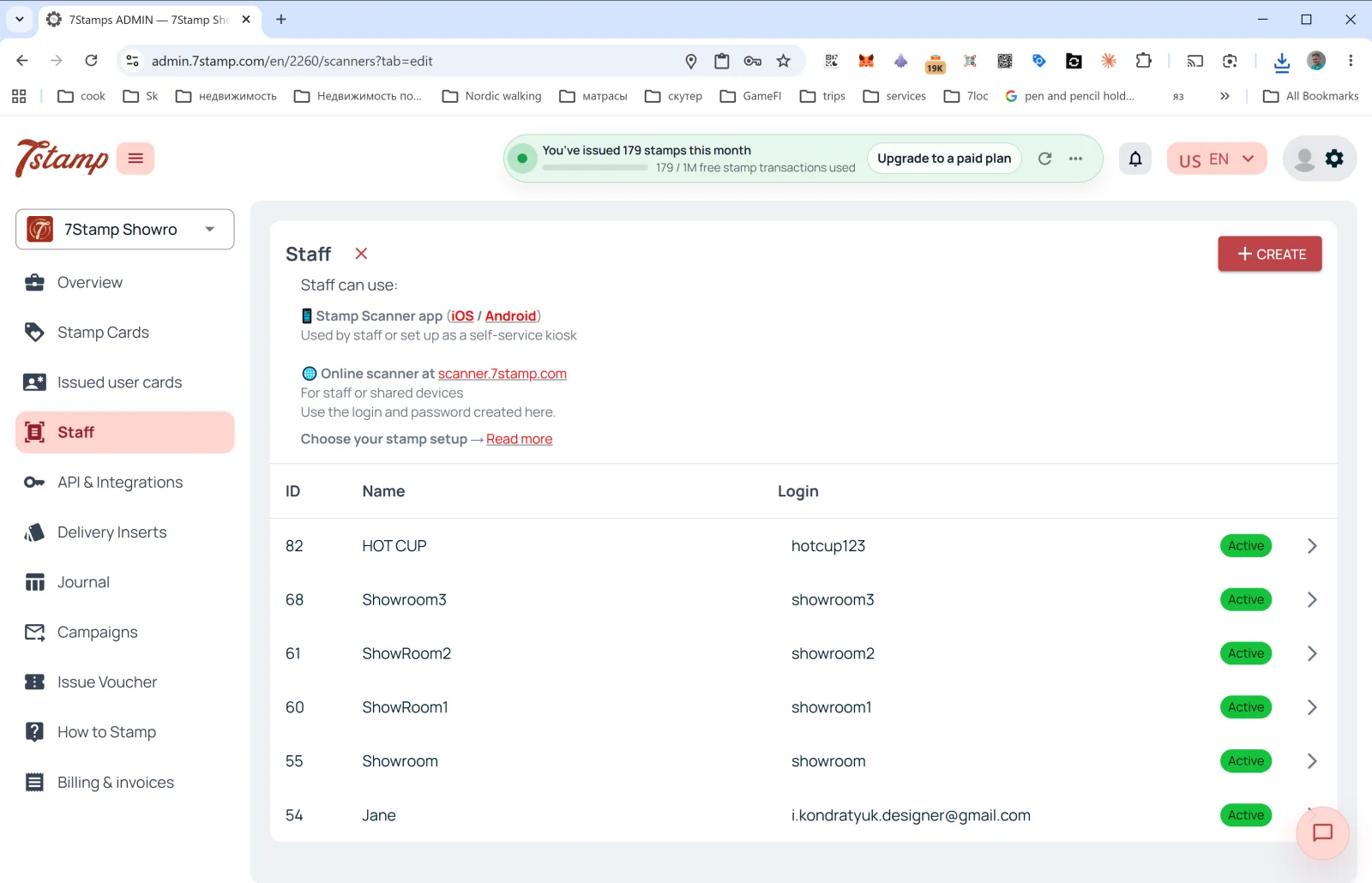
사이드 메뉴의 Staff 섹션에서 고객 카드를 스캔하는 직원을 관리합니다.
Staff란
7Stamp 요금 기준으로 직원 로그인 1개 = Staff Seat 1개 = 한 번에 하나의 세션으로 작동하는 접속 지점 1곳입니다. 하드웨어가 아니라 로그인 기준으로 계산하며, 다음과 같이 쓸 수 있습니다.
- 특정 직원(예: 바리스타 Anna).
- 특정 계산대 또는 카운터(예:
Bar Counter,Cash Register 2). - 하나의 매장/지점(매장이 여러 곳이면 매장마다 로그인을 따로 둘 수 있습니다).
Staff를 사용하는 곳
페이지 상단의 설명:
- 📱 Stamp Scanner app (iOS / Android): “직원이 사용하거나 셀프 서비스 키오스크로 설정합니다”.
- 🌐 scanner.7stamp.com의 온라인 scanner: “직원용 또는 공용 기기용입니다. 여기서 만든 로그인과 비밀번호를 사용하세요.”
즉, 같은 직원 로그인을 모바일 앱과 웹 버전에서 모두 사용할 수 있지만, 활성 세션은 한 번에 하나뿐입니다. 한쪽에서 로그인하면 다른 쪽은 로그아웃됩니다. 동시에 작동하는 접속 지점 2곳에는 직원 로그인 2개가 필요합니다.
목록의 열
- ID: 내부 직원 번호.
- Name: 표시 이름(
HOT CUP,Jane,Showroom1등). - Login: Scanner에 들어갈 때 쓰는 로그인.
- Status:
Active(초록색 배지).
새 직원 로그인 만들기
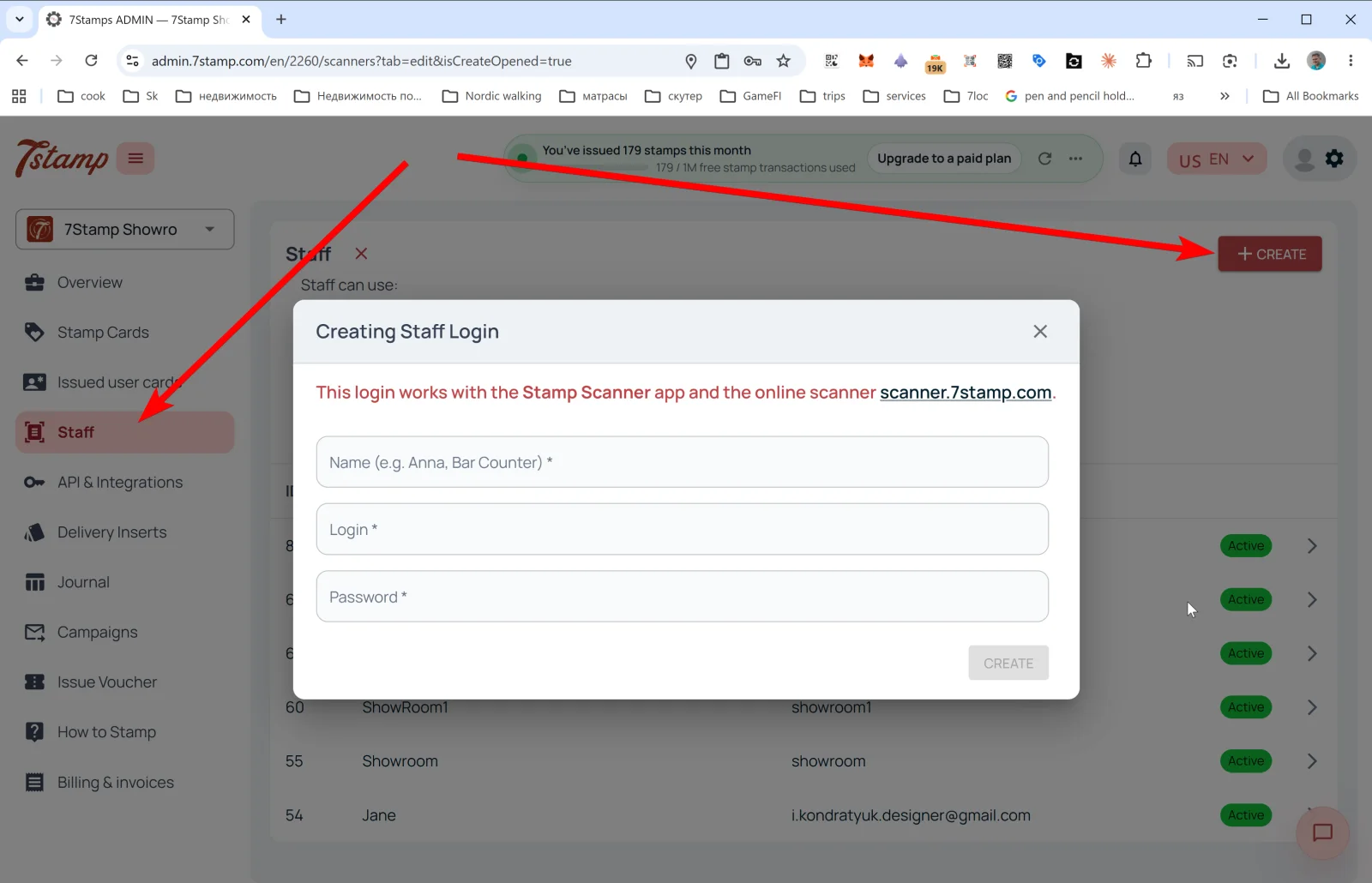
오른쪽 위의 + CREATE를 누르면 Creating Staff Login 팝업이 열립니다.
안내 문구: “이 로그인은 Stamp Scanner 앱과 온라인 scanner인 scanner.7stamp.com에서 사용할 수 있습니다.”
입력란:
- Name (e.g. Anna, Bar Counter) *: 표시 이름.
- Login *: 로그인(예:
anna_bar또는bar_counter). - Password *: 비밀번호.
CREATE를 누르면 직원 로그인이 목록에 나타나고 바로 Scanner에 로그인할 수 있습니다.
팁. 오전과 저녁 두 교대가 있다면 직원 로그인을 두 개(morning_shift와 evening_shift) 따로 만드세요. **Overview → Location analytics (Staff)**에서 각각의 통계를 따로 보고 누가 프로그램을 더 잘 안내하는지 파악할 수 있습니다.
시각적 안내
아래 화면 세트를 문서의 시각적 보조 자료로 사용하세요. 이미지를 클릭하면 전체 크기로 볼 수 있습니다.