
13. Staff — कर्मचारी आणि स्कॅनर लॉगिन
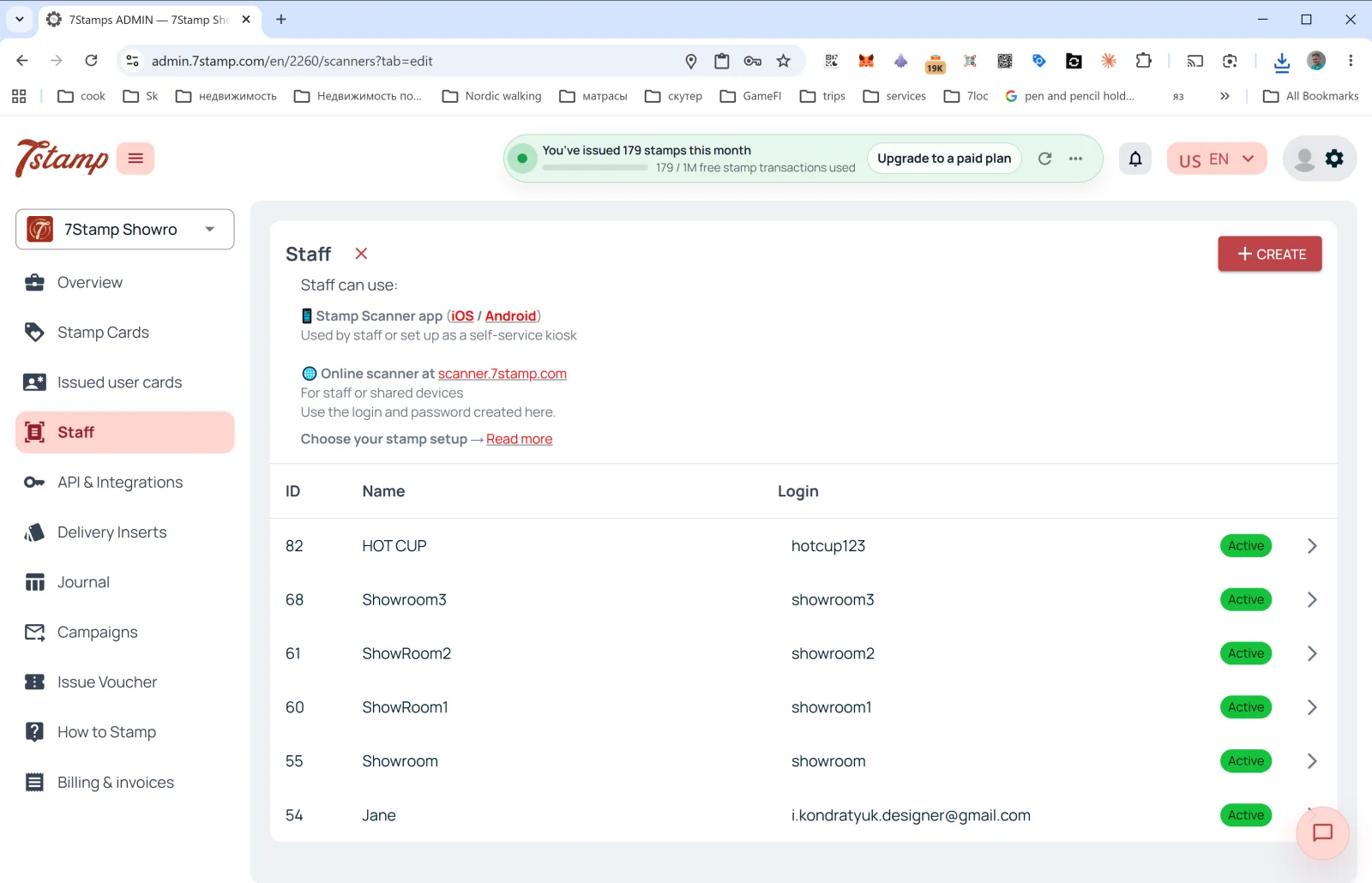
साइड मेनूमधील Staff विभागात ग्राहकांची कार्डे स्कॅन करणाऱ्या कर्मचाऱ्यांचे व्यवस्थापन केले जाते.
Staff म्हणजे काय
7Stamp च्या बिलिंगच्या भाषेत एक कर्मचारी लॉगिन = एक Staff Seat = एक एंट्री पॉइंट, जो एका वेळी एका सत्रात काम करतो. त्याची मोजणी लॉगिननुसार होते, हार्डवेअरनुसार कधीच नाही, आणि तो असा असू शकतो:
- विशिष्ट कर्मचारी (उदा. अॅना नावाची बरिस्ता).
- विशिष्ट कॅश काउंटर किंवा काउंटर (उदा.
Bar Counter,Cash Register 2). - एक लोकेशन / शाखा (तुमच्याकडे अनेक लोकेशन्स असल्यास प्रत्येकाचा स्वतःचा लॉगिन असू शकतो).
Staff कुठे काम करतो
पृष्ठाच्या वरचे वर्णन:
- 📱 Stamp Scanner app (iOS / Android) — “Used by staff or set up as a self-service kiosk” (कर्मचारी वापरतात किंवा सेल्फ-सर्व्हिस कियॉस्क म्हणून सेट केले जाते).
- 🌐 scanner.7stamp.com वरील ऑनलाइन स्कॅनर — “For staff or shared devices. Use the login and password created here.” (कर्मचारी किंवा सामायिक डिव्हाइससाठी; इथे तयार केलेला लॉगिन आणि पासवर्ड वापरा).
म्हणजेच एकच कर्मचारी लॉगिन मोबाइल ॲप आणि वेब आवृत्ती या दोन्हींमध्ये वापरता येतो, पण एका वेळी फक्त एका सक्रिय सत्रात: एकावर साइन इन केल्यावर दुसरे साइन आउट होते. एकाच वेळी काम करणाऱ्या दोन एंट्री पॉइंटसाठी दोन कर्मचारी लॉगिन लागतात.
यादीतील स्तंभ
- ID — कर्मचाऱ्याचा अंतर्गत क्रमांक.
- Name — दाखवले जाणारे नाव (
HOT CUP,Jane,Showroom1इ.). - Login — Scanner मध्ये प्रवेशासाठी लॉगिन.
- Status —
Active(हिरवा बॅज).
नवीन कर्मचारी लॉगिन तयार करणे
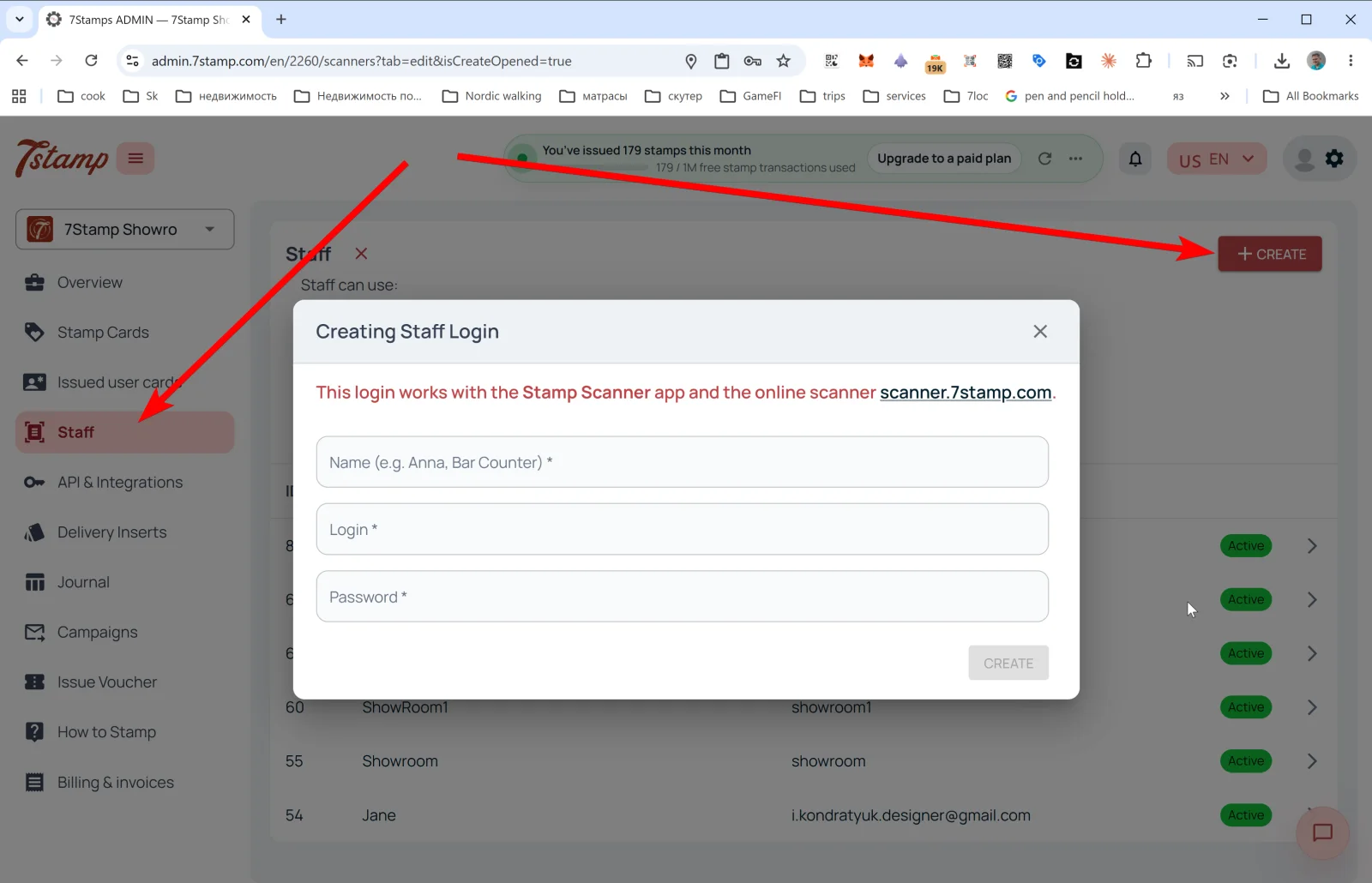
वर उजवीकडे + CREATE दाबा — Creating Staff Login पॉपअप उघडतो.
संदेश: “This login works with the Stamp Scanner app and the online scanner scanner.7stamp.com.” (हा लॉगिन Stamp Scanner ॲप आणि scanner.7stamp.com वरील ऑनलाइन स्कॅनरमध्ये चालतो.)
फील्ड्स:
- Name (e.g. Anna, Bar Counter) * — दाखवले जाणारे नाव.
- Login * — लॉगिन (उदा.
anna_barकिंवाbar_counter). - Password * — पासवर्ड.
CREATE दाबा — कर्मचारी लॉगिन यादीत दिसतो आणि लगेच Scanner मध्ये प्रवेशासाठी उपलब्ध होतो.
टीप. तुमच्याकडे दोन शिफ्ट असतील — सकाळ आणि संध्याकाळ — तर दोन स्वतंत्र कर्मचारी लॉगिन तयार करा (morning_shift आणि evening_shift). Overview → Location analytics (Staff) मध्ये तुम्हाला प्रत्येकाची आकडेवारी स्वतंत्रपणे दिसेल आणि प्रोग्राम ग्राहकांना कोण चांगल्या प्रकारे सुचवतो ते समजेल.
Visual walkthrough
Use the screen sets below as a visual companion to the article. Open any image to inspect it at full size.