
13. Staff — თანამშრომლები და სკანერის ლოგინები
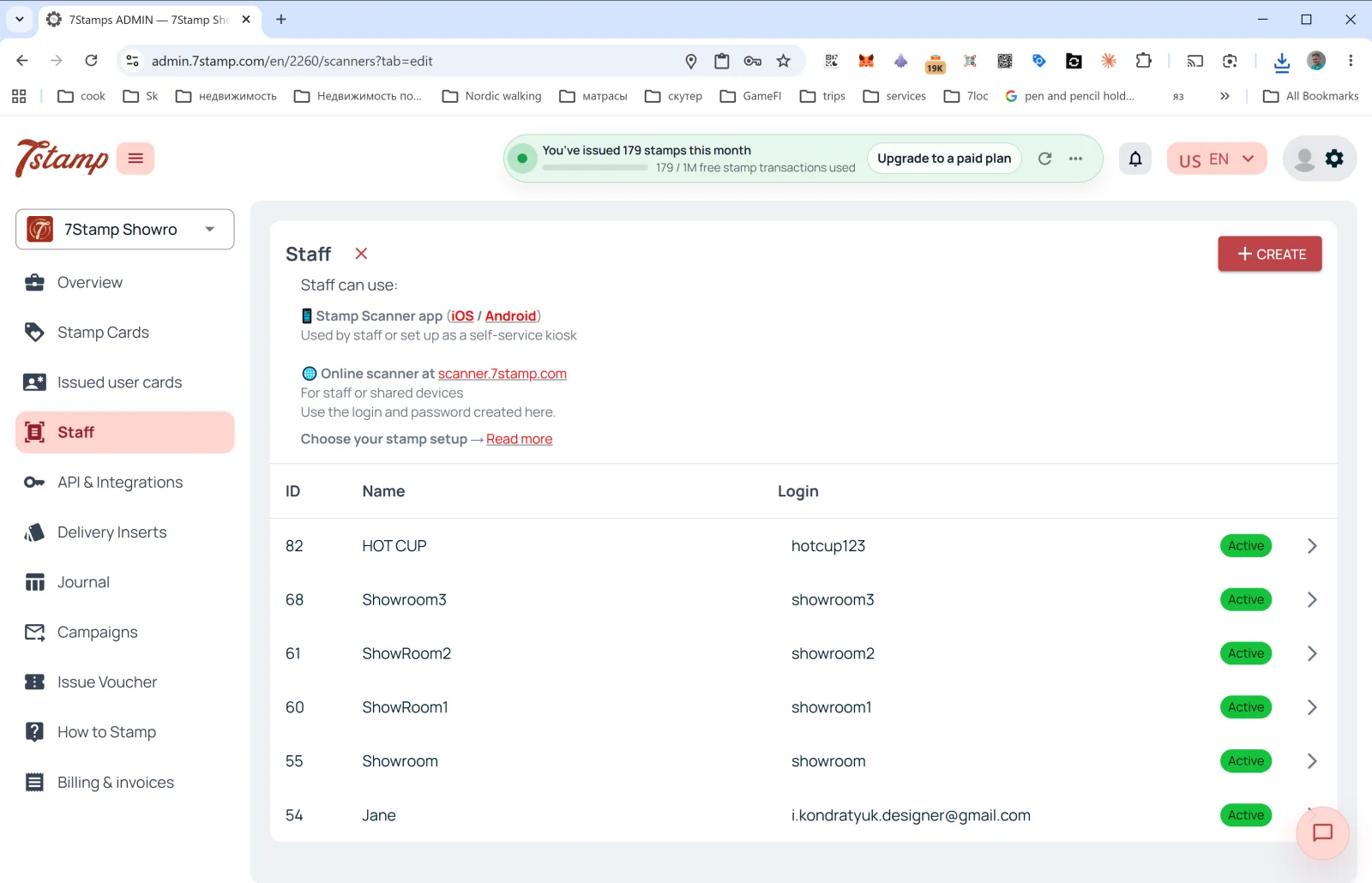
გვერდითი მენიუს განყოფილება Staff (თანამშრომლები) არის ადგილი, სადაც მართავთ თანამშრომლებს, რომლებიც მომხმარებლების ბარათებს ასკანერებენ.
რა არის Staff
7Stamp-ის ბილინგის ტერმინებით, თანამშრომლის ერთი ლოგინი = ერთი Staff Seat = შესვლის ერთი წერტილი, რომელიც ერთდროულად ერთ სესიაში მუშაობს. ის ითვლება ლოგინით და არა აღჭურვილობით, და ეს შეიძლება იყოს:
- კონკრეტული თანამშრომელი (მაგალითად, ბარისტა ანა).
- კონკრეტული სალარო ან დახლი (მაგალითად,
Bar Counter,Cash Register 2). - ერთი ლოკაცია / ფილიალი (თუ რამდენიმე ლოკაცია გაქვთ, თითოეულს შეიძლება საკუთარი ლოგინი ჰქონდეს).
სად მუშაობს Staff
აღწერა გვერდის ზედა ნაწილში:
- 📱 Stamp Scanner app (iOS / Android) — “Used by staff or set up as a self-service kiosk” (იყენებს პერსონალი ან დაყენებულია თვითმომსახურების კიოსკად).
- 🌐 Online scanner at scanner.7stamp.com — “For staff or shared devices. Use the login and password created here.” (პერსონალისთვის ან საერთო მოწყობილობებისთვის; გამოიყენეთ აქ შექმნილი ლოგინი და პაროლი).
ანუ თანამშრომლის ერთი და იგივე ლოგინი შეიძლება გამოიყენოთ როგორც მობილურ აპლიკაციაში, ისე ვებ-ვერსიაში, მაგრამ ერთდროულად მხოლოდ ერთ აქტიურ სესიაში: ერთზე შესვლა მეორეზე სესიას ხურავს. შესვლის ორ წერტილს, რომლებიც ერთდროულად მუშაობს, თანამშრომლის ორი ლოგინი სჭირდება.
სიის სვეტები
- ID — თანამშრომლის შიდა ნომერი.
- Name — საჩვენებელი სახელი (
HOT CUP,Jane,Showroom1და ა.შ.). - Login — ლოგინი Scanner-ში შესასვლელად.
- Status —
Active(მწვანე ნიშანი).
თანამშრომლის ახალი ლოგინის შექმნა
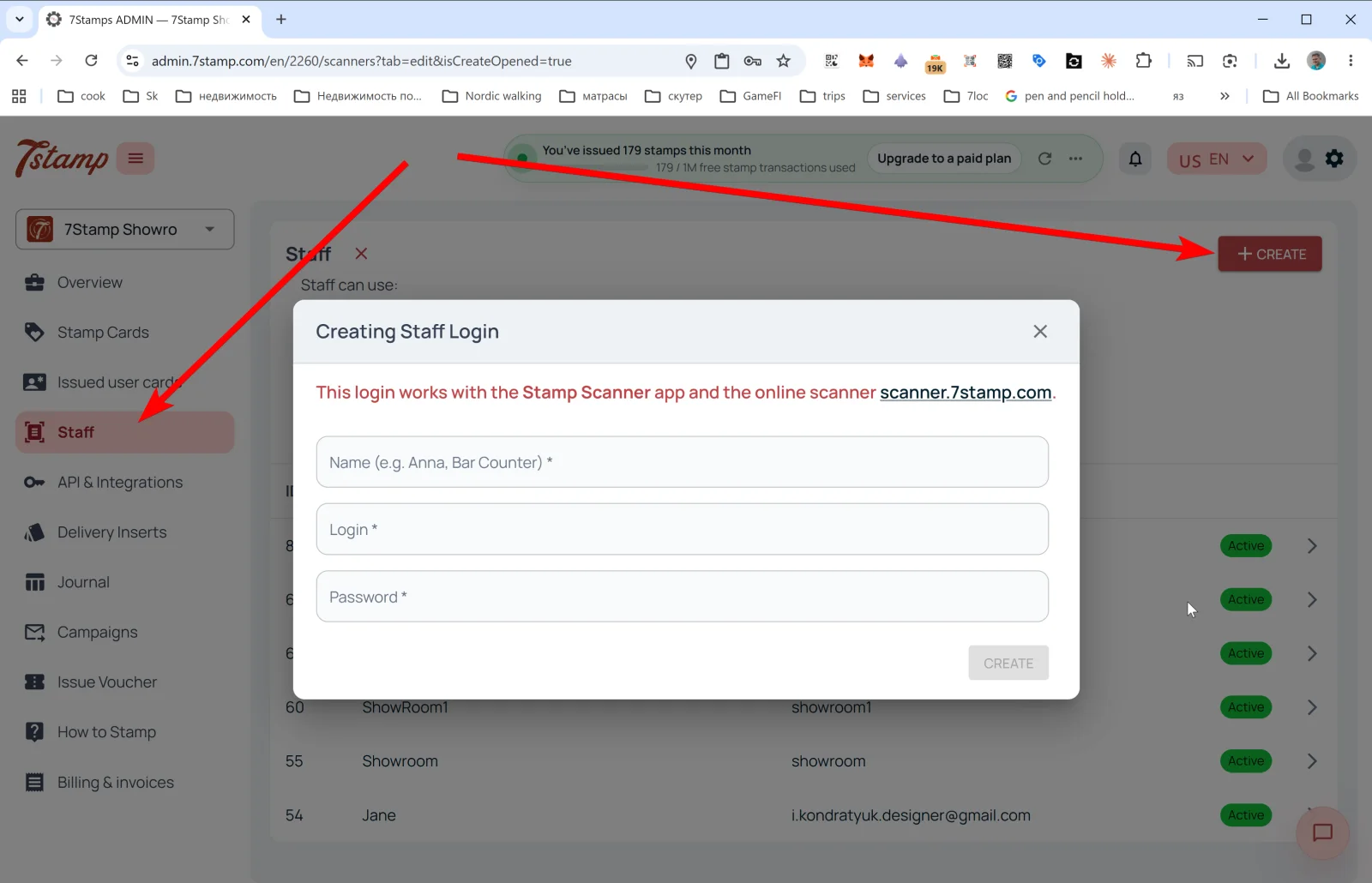
დააჭირეთ + CREATE-ს ზედა მარჯვენა კუთხეში — გაიხსნება ფანჯარა Creating Staff Login.
შეტყობინება: “This login works with the Stamp Scanner app and the online scanner scanner.7stamp.com.” (ეს ლოგინი მუშაობს Stamp Scanner აპლიკაციასა და ონლაინ-სკანერში scanner.7stamp.com).
ველები:
- Name (e.g. Anna, Bar Counter) * — საჩვენებელი სახელი.
- Login * — ლოგინი (მაგალითად,
anna_barანbar_counter). - Password * — პაროლი.
დააჭირეთ CREATE — თანამშრომლის ლოგინი სიაში ჩნდება და მაშინვე ხელმისაწვდომია Scanner-ში შესასვლელად.
რჩევა. თუ ორი ცვლა გაქვთ — დილის და საღამოს — შექმენით თანამშრომლის ორი ცალკე ლოგინი (morning_shift და evening_shift). Overview → Location analytics (Staff)-ში თითოეულის სტატისტიკას ცალ-ცალკე დაინახავთ და გაიგებთ, ვინ სთავაზობს პროგრამას უკეთ.
Visual walkthrough
Use the screen sets below as a visual companion to the article. Open any image to inspect it at full size.