
13. Staff — พนักงานและบัญชีเข้าใช้สแกนเนอร์
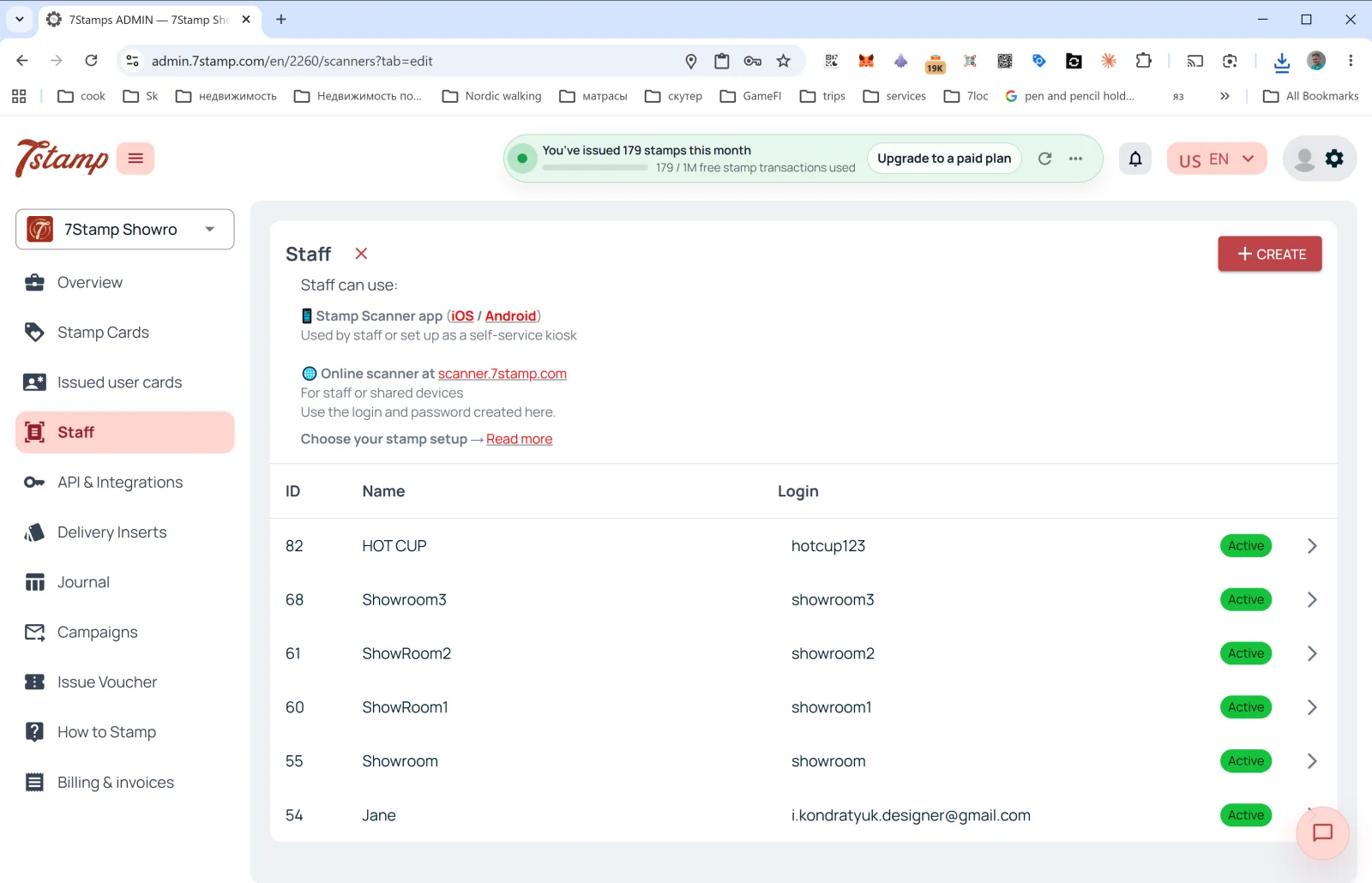
ส่วน Staff (พนักงาน) ในเมนูด้านข้างคือที่สำหรับจัดการพนักงานที่สแกนบัตรของลูกค้า
Staff คืออะไร
ในแง่ของการเรียกเก็บเงินของ 7Stamp บัญชีพนักงานหนึ่งบัญชี = หนึ่ง Staff Seat = จุดใช้งานหนึ่งจุดที่ทำงานได้ครั้งละหนึ่งเซสชัน นับตามบัญชี ไม่ใช่ตามฮาร์ดแวร์ ซึ่งอาจเป็น:
- พนักงานคนใดคนหนึ่ง (เช่น บาริสต้าชื่อแอนนา)
- เคาน์เตอร์ชำระเงินหรือเคาน์เตอร์บริการเฉพาะจุด (เช่น
Bar Counter,Cash Register 2) - สถานที่หรือสาขาหนึ่งแห่ง (หากคุณมีหลายสาขา แต่ละสาขามีบัญชีของตัวเองได้)
Staff ใช้งานได้ที่ไหน
คำอธิบายที่ด้านบนของหน้า:
- 📱 แอป Stamp Scanner (iOS / Android) — “ใช้โดยพนักงาน หรือตั้งค่าเป็นคีออสก์บริการตนเอง”
- 🌐 สแกนเนอร์ออนไลน์ที่ scanner.7stamp.com — “สำหรับพนักงานหรืออุปกรณ์ที่ใช้ร่วมกัน ใช้ชื่อผู้ใช้และรหัสผ่านที่สร้างไว้ที่นี่”
กล่าวคือ บัญชีพนักงานบัญชีเดียวกันใช้ได้ทั้งในแอปมือถือและเวอร์ชันเว็บ แต่มีเซสชันที่ใช้งานอยู่ได้ครั้งละหนึ่งเซสชันเท่านั้น การลงชื่อเข้าใช้ที่หนึ่งจะทำให้อีกที่ออกจากระบบ จุดใช้งานสองจุดที่ทำงานพร้อมกันต้องใช้บัญชีพนักงานสองบัญชี
คอลัมน์ในรายการ
- ID — หมายเลขภายในของพนักงาน
- Name — ชื่อที่แสดง (
HOT CUP,Jane,Showroom1เป็นต้น) - Login — ชื่อผู้ใช้สำหรับเข้าสู่ Scanner
- Status —
Active(ป้ายสีเขียว)
การสร้างบัญชีพนักงานใหม่
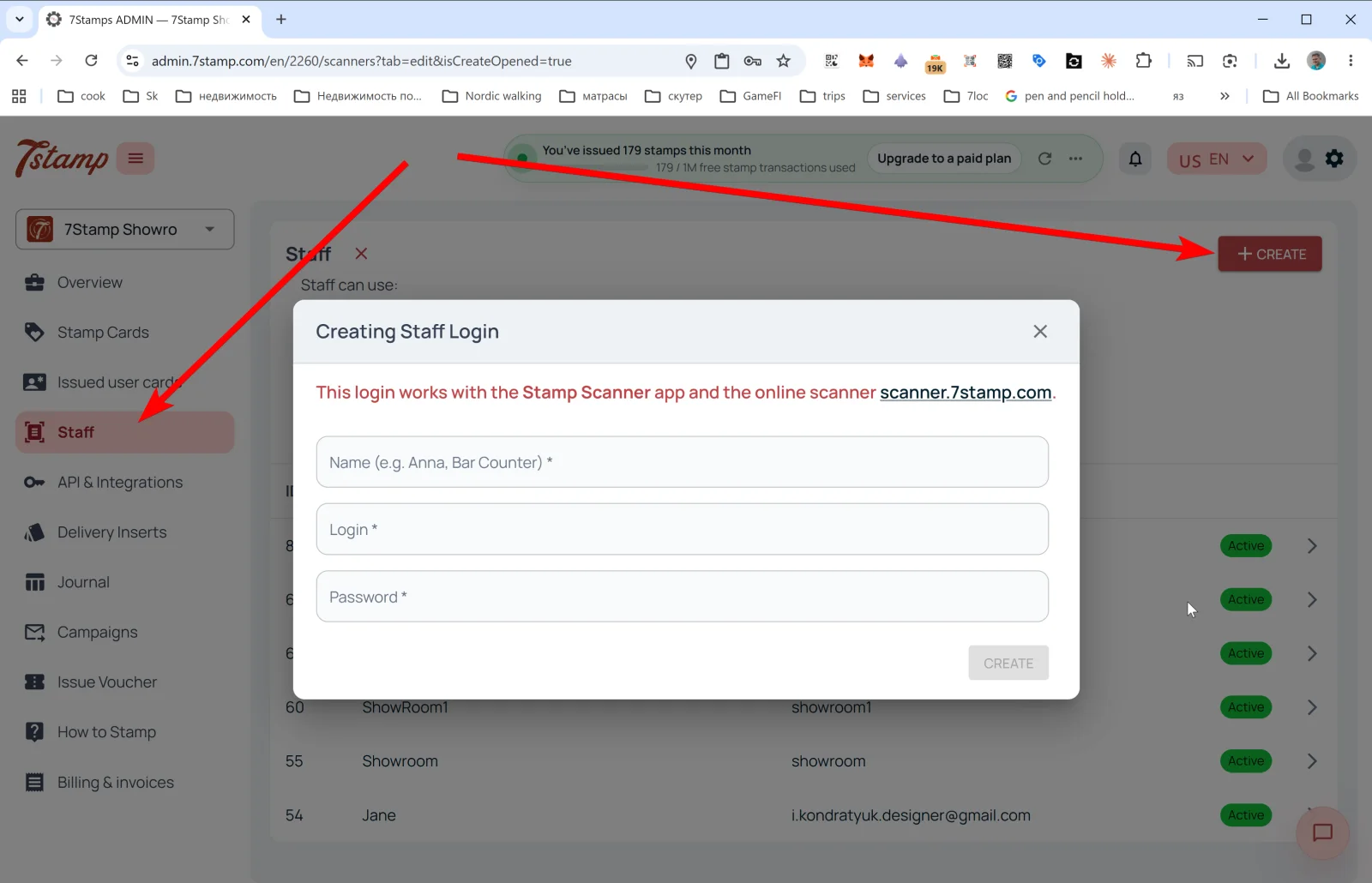
แตะ + CREATE ที่มุมขวาบน — หน้าต่าง Creating Staff Login จะเปิดขึ้น
ข้อความ: “บัญชีนี้ใช้ได้กับแอป Stamp Scanner และสแกนเนอร์ออนไลน์ scanner.7stamp.com”
ช่องข้อมูล:
- Name (e.g. Anna, Bar Counter) * — ชื่อที่แสดง
- Login * — ชื่อผู้ใช้ (เช่น
anna_barหรือbar_counter) - Password * — รหัสผ่าน
แตะ CREATE — บัญชีพนักงานจะปรากฏในรายการและใช้เข้าสู่ Scanner ได้ทันที
เคล็ดลับ หากคุณมีสองกะ — เช้าและเย็น — ให้สร้างบัญชีพนักงานแยกกันสองบัญชี (morning_shift และ evening_shift) ใน Overview → Location analytics (Staff) คุณจะเห็นสถิติของแต่ละบัญชีแยกกัน และรู้ว่าใครแนะนำโปรแกรมให้ลูกค้าได้ดีกว่า
คำแนะนำแบบภาพ
ใช้ชุดหน้าจอด้านล่างเป็นตัวช่วยทางภาพสำหรับบทความ คลิกรูปภาพใดก็ได้เพื่อดูในขนาดเต็ม