
13. Staff — işçilər və skaner girişləri
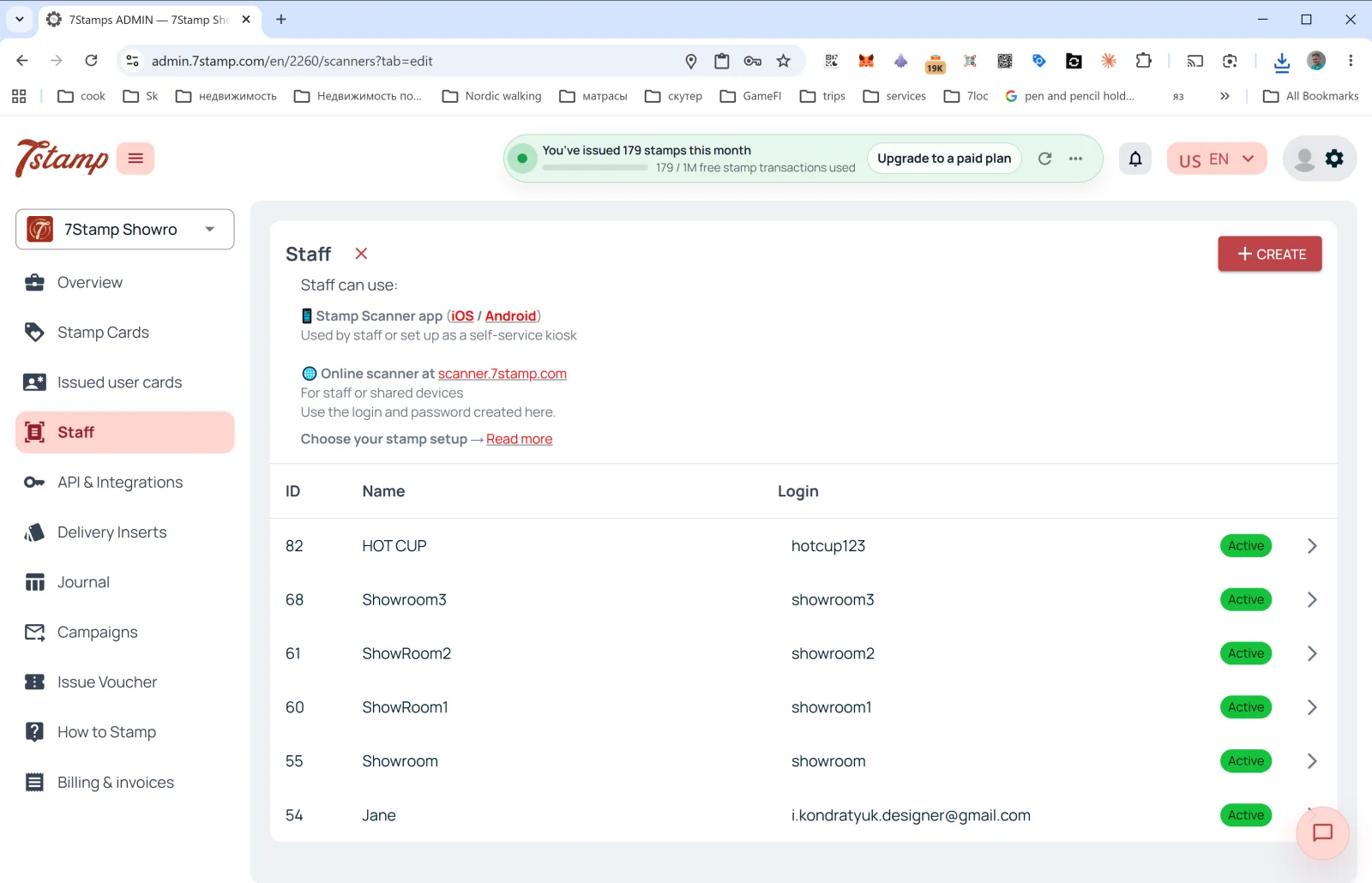
Yan menyudakı Staff bölməsi müştəri kartlarını skan edən işçiləri idarə etdiyiniz yerdir.
Staff nədir
7Stamp hesablaşma terminlərində bir işçi girişi = bir Staff Seat = hər an bir sessiya ilə işləyən bir giriş nöqtəsi. Cihaza görə yox, girişə görə sayılır və bu ola bilər:
- Konkret işçi (məsələn, Anna adlı barista).
- Konkret kassa və ya piştaxta (məsələn,
Bar Counter,Cash Register 2). - Bir məkan / filial (bir neçə məkanınız varsa, hər birinin öz girişi ola bilər).
Staff harada işləyir
Səhifənin yuxarısındakı təsvir:
- 📱 7Stamp Scanner app (iOS / Android) — “Used by staff or set up as a self-service kiosk” (işçilər istifadə edir və ya özünəxidmət kiosku kimi qurulur).
- 🌐 scanner.7stamp.com ünvanında onlayn skaner — “For staff or shared devices. Use the login and password created here.” (işçilər və ya ortaq cihazlar üçün; burada yaradılmış login və şifrədən istifadə edin).
Yəni eyni işçi girişindən həm mobil tətbiqdə, həm də veb versiyada istifadə etmək olar, amma hər an bir aktiv sessiya ilə: birində daxil olmaq digərindəki sessiyanı bağlayır. Eyni vaxtda işləyən iki giriş nöqtəsi üçün iki işçi girişi lazımdır.
Siyahının sütunları
- ID — işçinin daxili nömrəsi.
- Name — görünən ad (
HOT CUP,Jane,Showroom1və s.). - Login — Scanner-ə daxil olmaq üçün login.
- Status —
Active(yaşıl nişan).
Yeni işçi girişinin yaradılması
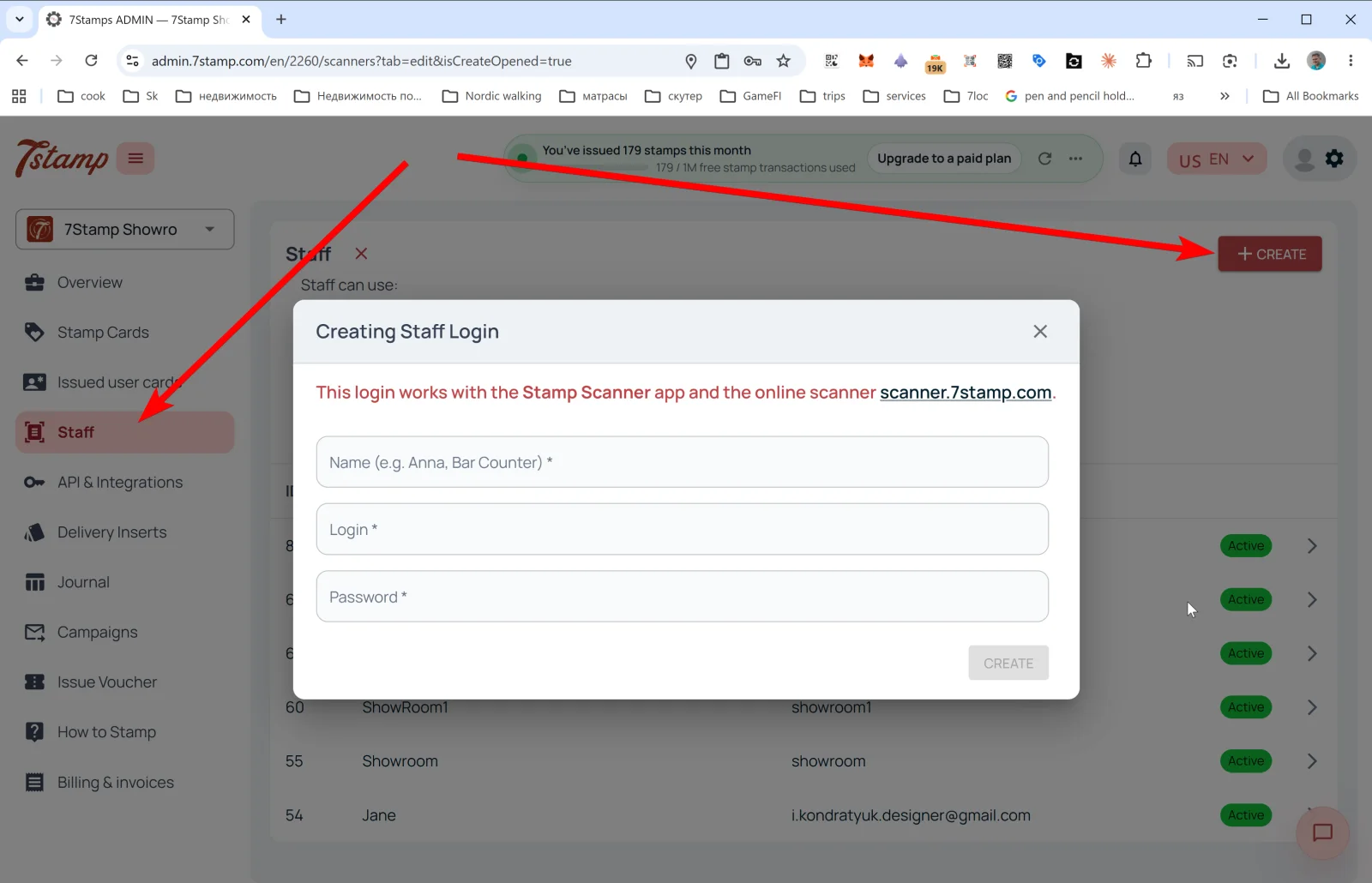
Yuxarı sağda + CREATE düyməsinə toxunun — Creating Staff Login pəncərəsi açılır.
Mesaj: “This login works with the Stamp Scanner app and the online scanner scanner.7stamp.com.” (bu giriş Stamp Scanner tətbiqi və scanner.7stamp.com onlayn skaneri ilə işləyir).
Sahələr:
- Name (e.g. Anna, Bar Counter) * — görünən ad.
- Login * — login (məsələn,
anna_barvə yabar_counter). - Password * — şifrə.
CREATE düyməsinə toxunun — işçi girişi siyahıda görünür və dərhal Scanner-ə daxil olmaq üçün əlçatan olur.
Məsləhət. İki növbəniz varsa — səhər və axşam — iki ayrı işçi girişi yaradın (morning_shift və evening_shift). Overview → Location analytics (Staff) bölməsində hər biri üzrə statistikanı ayrıca görəcək və proqramı kimin daha yaxşı təklif etdiyini anlayacaqsınız.
Vizual izah
Aşağıdakı ekran dəstlərindən məqaləyə vizual köməkçi kimi istifadə edin. İstənilən şəkli tam ölçüdə görmək üçün açın.