
12. Campaigns — การส่งข้อความและแคมเปญ
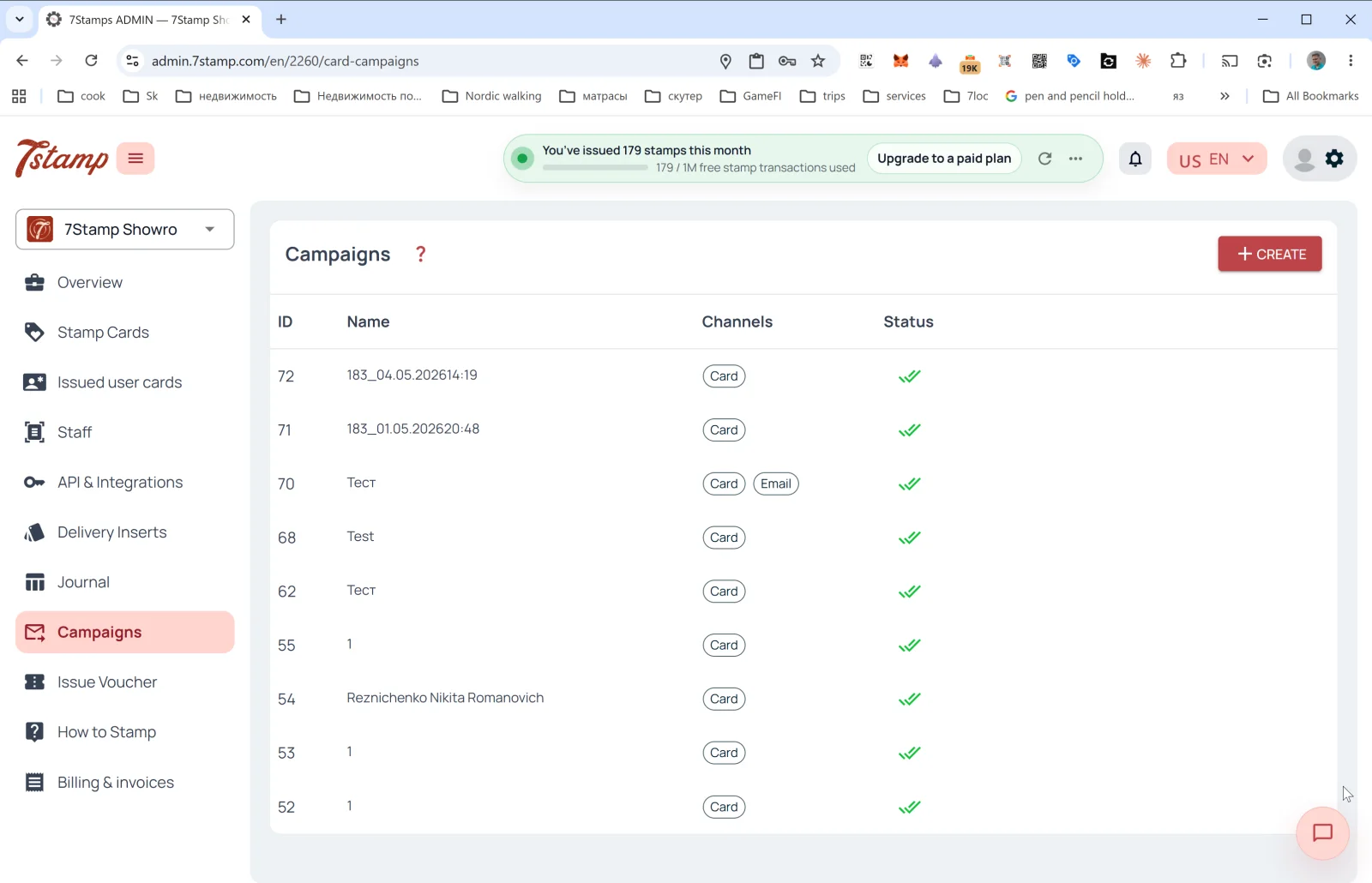
ส่วน Campaigns (แคมเปญ) คือเครื่องมือดึงลูกค้ากลับมาของคุณ ใช้ส่งข้อความถึงกลุ่มลูกค้าผ่านหลายช่องทางพร้อมกัน
รายการแคมเปญ
คอลัมน์ในตาราง:
- ID — หมายเลขแคมเปญ
- Name — ชื่อ (มักสร้างอัตโนมัติในรูปแบบ
<cardId>_<datetime>เช่น183_04.05.202614:19แต่คุณตั้งชื่อที่สื่อความหมายเองได้) - Channels — แท็กช่องทาง:
Card(PUSH บนบัตรใน Wallet),Email - Status — สถานะ (✅✅ — ส่งถึงเรียบร้อยแล้ว)
ปุ่ม + CREATE ที่มุมขวาบนจะเปิดแบบฟอร์มส่งข้อความ
การสร้าง Card Campaign
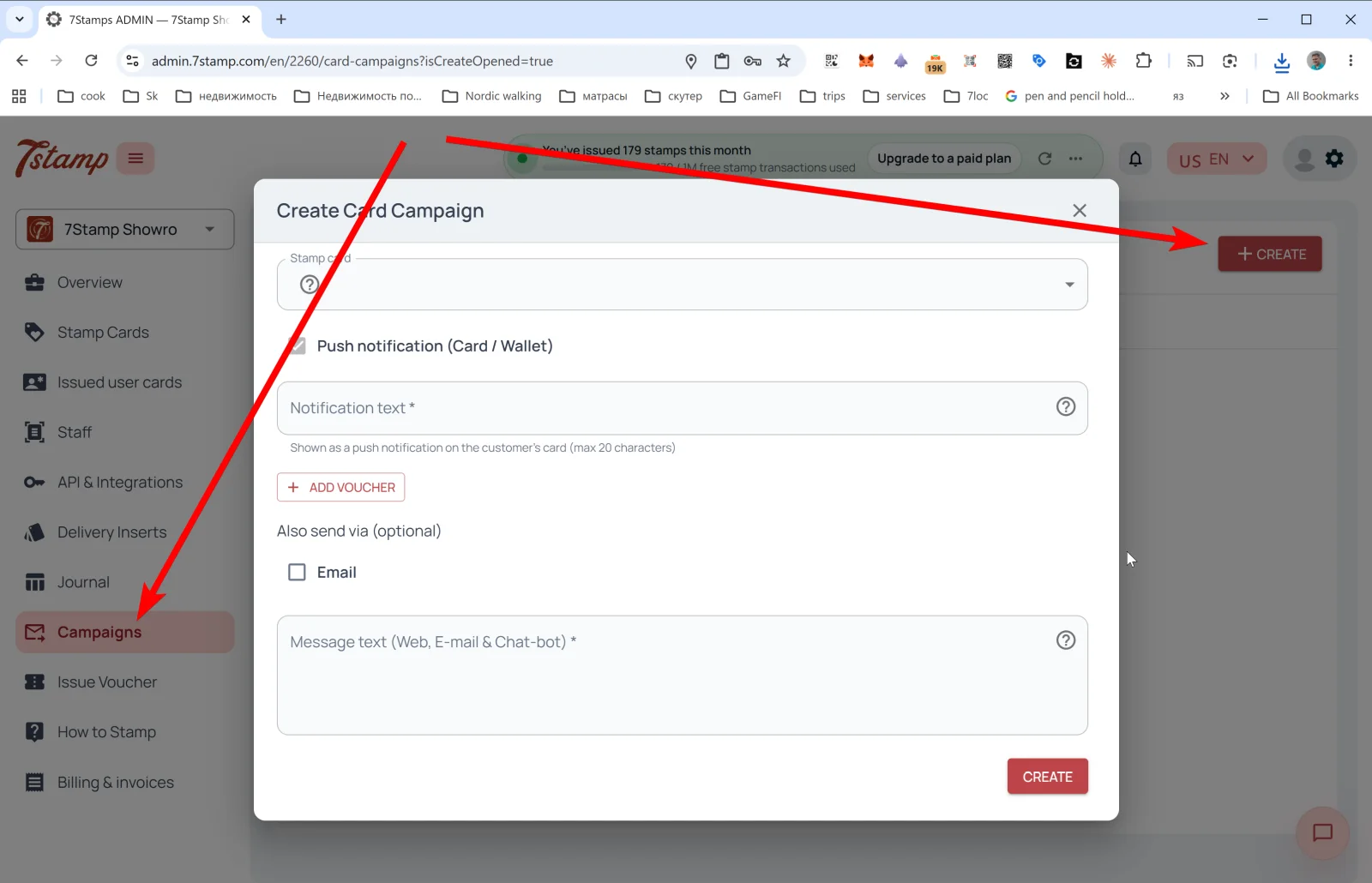
หน้าต่าง Create Card Campaign:
- Stamp card — เลือกบัตรที่จะส่งข้อความถึงกลุ่มลูกค้าของบัตรนั้น
- Push notification (Card / Wallet) — ช่องทางหลัก
- Notification text * — ข้อความ PUSH ที่จะแสดงบนบัตรใน Wallet ของลูกค้าโดยตรง จำกัด 20 ตัวอักษร (ข้อจำกัดของ PUSH ใน Apple/Google Wallet)
- + ADD VOUCHER — แนบบัตรกำนัลไปกับข้อความ มีประโยชน์สำหรับการดึงลูกค้าเก่ากลับมา (“ไม่เจอกันนาน — มีของขวัญให้”) แคมเปญช่วงเทศกาล และการขอบคุณลูกค้าประจำ
- Also send via (optional) — ช่องทางเพิ่มเติม:
- ☐ Email — ส่งข้อความเดียวกันทางอีเมลไปพร้อมกัน
- Message text (Web, E-mail & Chat-bot) * — ข้อความยาวสำหรับช่องทางเสริม (หน้าเว็บของบัตร อีเมล และแอปแชทผ่าน 7loc.com) ที่นี่คุณเขียนได้ละเอียด พร้อมลิงก์และการจัดรูปแบบ
แตะ CREATE — แคมเปญจะเริ่มทำงาน
ตรรกะแบบหลายช่องทาง (Omnichannel)
Wallet PUSH (Card / Wallet) คือการแจ้งเตือนสั้นๆ บนบัตรที่บันทึกไว้โดยตรง ทุกคนที่มีบัตรใน Wallet จะเห็น และไม่สามารถ “ยกเลิกการรับ” ได้จนกว่าจะลบบัตร ส่วนอีเมลและแอปแชทคือข้อความยาวสำหรับผู้ที่ให้อีเมลไว้ หรือเชื่อมต่อกับบอทในแอปแชทผ่าน 7loc.com
ชุดที่แนะนำสำหรับแคมเปญสำคัญ: Card + Email + Messenger พร้อมกัน PUSH สั้นๆ จะดึงความสนใจของลูกค้าได้ทันที ส่วนอีเมลและแอปแชทจะเข้าถึงผู้ที่พลาด PUSH
สถานการณ์ Card Campaign ที่พบบ่อย
- เตือนว่ารางวัลใกล้พร้อมแล้ว — “บัตรของคุณเกือบเต็มแล้ว อีกแสตมป์เดียวก็ได้ของขวัญ”
- เตือนว่ามีบัตรกำนัลรออยู่ — “อย่าลืมใช้บัตรกำนัลของคุณ จะหมดอายุใน 7 วัน”
- โปรโมชันวันที่ลูกค้าน้อย — เติมลูกค้าในวันอังคารหรือวันพุธด้วยข้อเสนอพิเศษ
- แคมเปญตามฤดูกาล — วันหยุด เมนูตามฤดูกาล และงานในท้องถิ่น
- เปิดตัวสินค้าใหม่ — ประกาศสินค้าใหม่
- ดึงลูกค้าเก่ากลับมา (Win-back) — ส่งของขวัญให้ลูกค้าที่ไม่ได้มาเป็นเวลา N วัน
ข้อจำกัด 20 ตัวอักษร ของ PUSH ไม่ใช่ข้อบกพร่อง แต่เป็นข้อดี: การแจ้งเตือนสั้นๆ จะถูกอ่าน ส่วนข้อความยาวจะถูกข้ามไป ลองทดสอบถ้อยคำของคุณ: “กาแฟรออยู่ ☕” ได้ผลดีกว่า “คุณมีบัตรกำนัลใหม่ในโปรแกรมสะสมแต้มของเรา”
คำแนะนำแบบภาพ
ใช้ชุดหน้าจอด้านล่างเป็นตัวช่วยทางภาพสำหรับบทความ คลิกรูปภาพใดก็ได้เพื่อดูในขนาดเต็ม