
12. Campaigns — հաղորդագրություններ և արշավներ
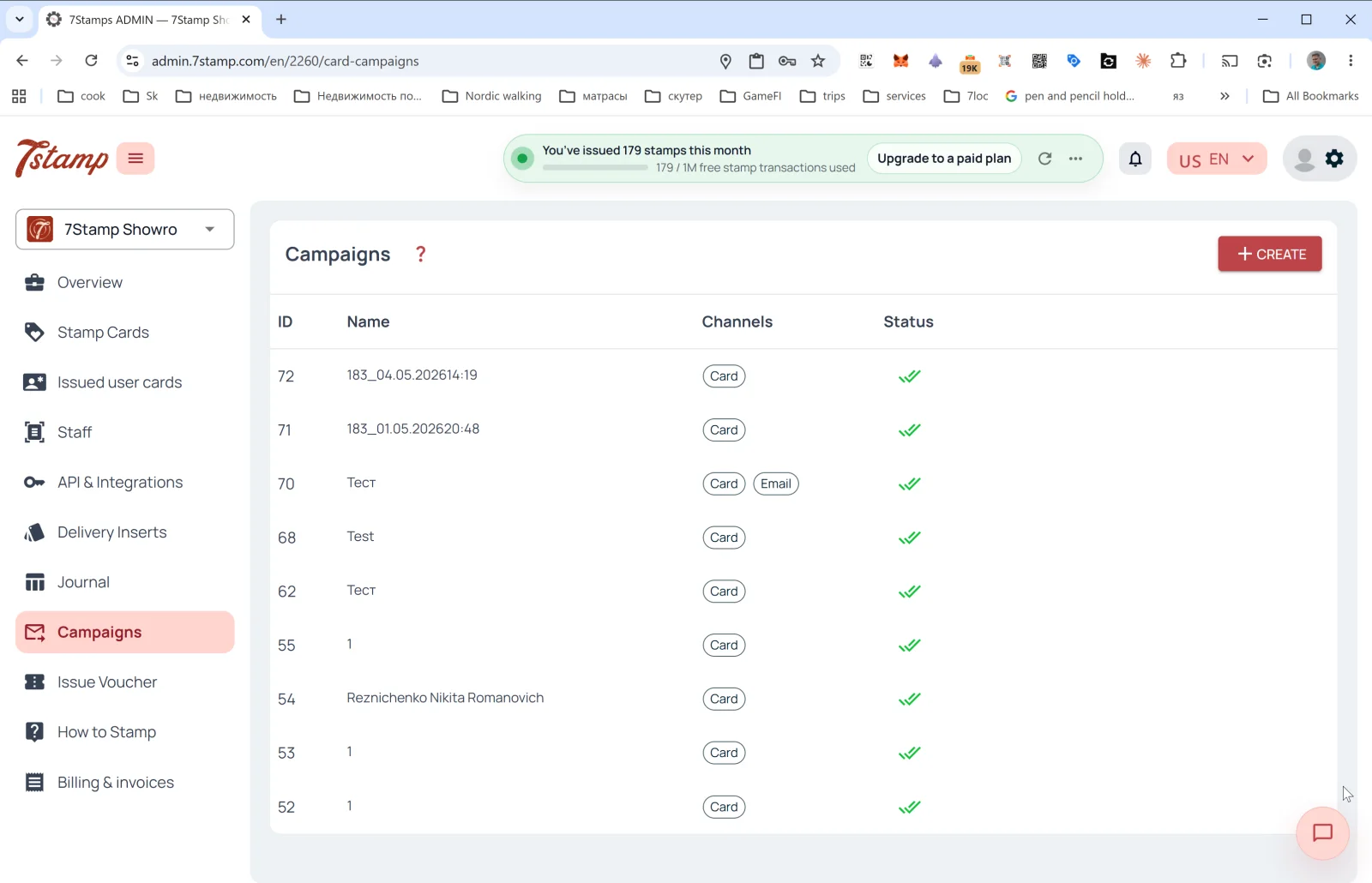
Campaigns բաժինը հաճախորդներին վերադարձնելու ձեր գործիքն է։ Դրանով հաղորդագրություններ եք ուղարկում հաճախորդների սեգմենտներին միանգամից մի քանի ալիքով։
Արշավների ցանկ
Աղյուսակի սյունակներ.
- ID — արշավի համարը։
- Name — անվանումը (հաճախ ավտոմատ ստեղծվում է
<cardId>_<datetime>ձևով, օրինակ՝183_04.05.202614:19, բայց կարող եք նշել իմաստալից անուն)։ - Channels — ալիքների պիտակներ՝
Card(PUSH Wallet քարտի վրա),Email։ - Status — կարգավիճակը (✅✅ — հաջողությամբ առաքված)։
Վերևի աջ անկյունի + CREATE կոճակը բացում է հաղորդագրության ձևը։
Card Campaign-ի ստեղծում
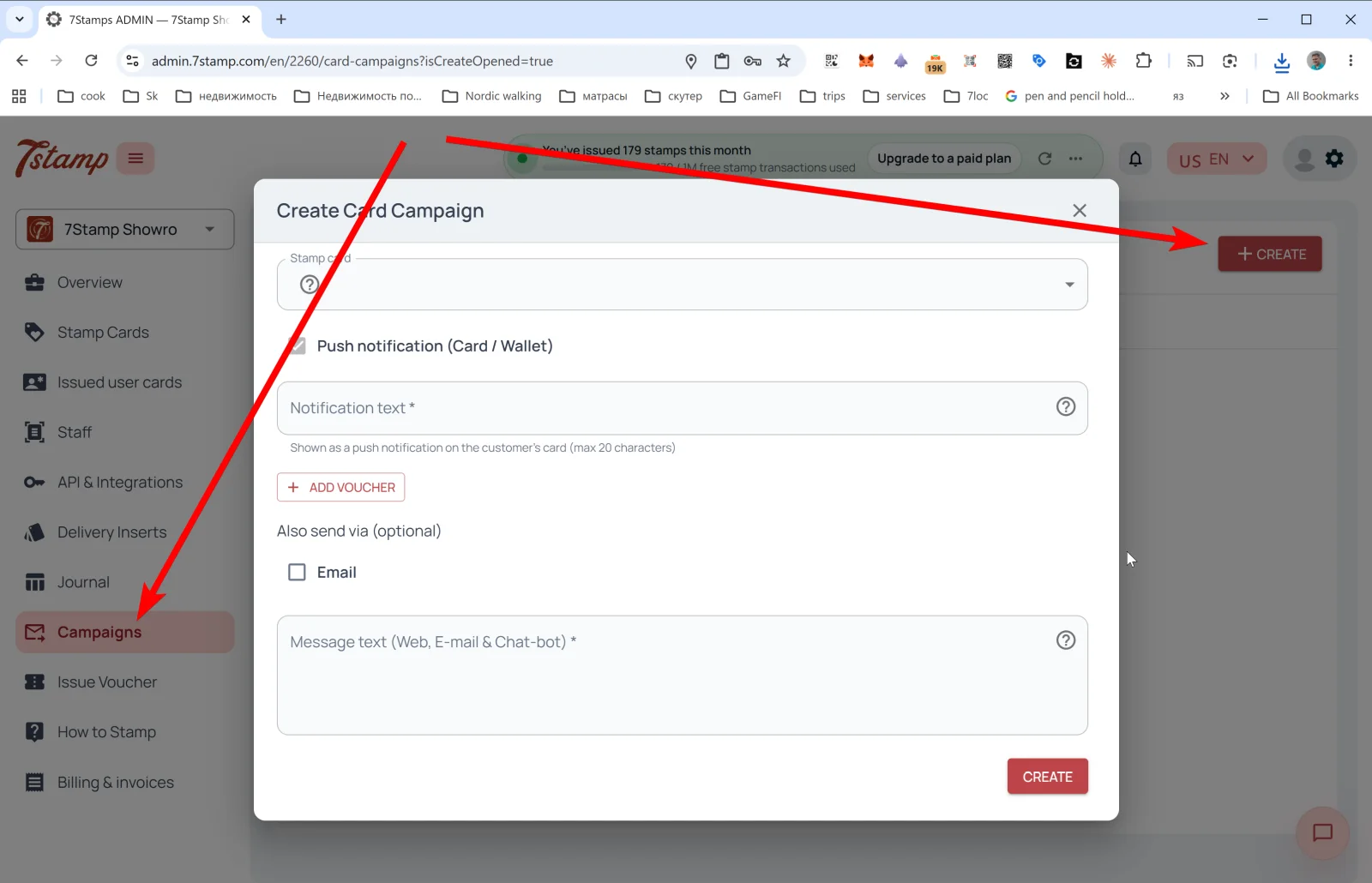
Create Card Campaign պատուհանը.
- Stamp card — ընտրեք քարտը, որի սեգմենտին կուղարկվի հաղորդագրությունը։
- Push notification (Card / Wallet) — հիմնական ալիքը։
- Notification text * — PUSH տեքստը, որը կհայտնվի անմիջապես հաճախորդի Wallet քարտի վրա։ Սահմանաչափը՝ 20 նիշ (Apple/Google Wallet PUSH-ի սահմանափակում)։
- + ADD VOUCHER — կցել վաուչեր հաղորդագրությանը։ Օգտակար է հաճախորդներին վերադարձնելու («վաղուց չենք տեսել ձեզ, ահա նվեր»), տոնական արշավների և հավատարիմ հաճախորդներին շնորհակալություն հայտնելու համար։
- Also send via (optional) — լրացուցիչ ալիքներ.
- ☐ Email — զուգահեռաբար ուղարկել նույնը էլփոստով։
- Message text (Web, E-mail & Chat-bot) * — երկար տեքստ ընդլայնված ալիքների համար (քարտի վեբ էջ, էլփոստ, մեսենջերներ 7loc.com-ի միջոցով)։ Այստեղ կարող եք գրել ծավալուն՝ հղումներով և ձևաչափմամբ։
Սեղմեք CREATE — արշավը գործարկվում է։
Բազմալիքային տրամաբանություն
Wallet PUSH-ը (Card / Wallet) կարճ ծանուցում է անմիջապես պահված քարտի վրա։ Այն տեսնում է յուրաքանչյուր ոք, ում Wallet-ում քարտը կա, և նա չի կարող դրանից «ապաբաժանորդագրվել», քանի դեռ քարտը չի ջնջել։ Էլփոստն ու մեսենջերները երկար հաղորդագրություններ են նրանց համար, ովքեր թողել են էլփոստի հասցե կամ միացված են մեսենջեր բոտին 7loc.com-ի միջոցով։
Կարևոր արշավների համար խորհուրդ տրվող համադրությունը՝ Card + Email + Messenger միաժամանակ։ Կարճ PUSH-ը անմիջապես գրավում է հաճախորդի ուշադրությունը, իսկ էլփոստն ու մեսենջերը հասնում են նրանց, ովքեր բաց են թողել PUSH-ը։
Card Campaign-ի բնորոշ սցենարներ
- Հիշեցում պատրաստ պարգևի մասին — «ձեր քարտը գրեթե լցված է, մեկ նշում է մնացել մինչև նվերը»։
- Հիշեցում սպասող վաուչերի մասին — «մի մոռացեք օգտագործել ձեր վաուչերը, այն լրանում է 7 օրից»։
- Հանգիստ օրերի ակցիա — լցրեք երեքշաբթին կամ չորեքշաբթին հատուկ առաջարկով։
- Սեզոնային արշավներ — տոներ, սեզոնային ուտեստներ, տեղական միջոցառումներ։
- Նոր ապրանքի թողարկում — հայտարարեք նոր ապրանքի մասին։
- Win-back — N օր չեկած հաճախորդներին ուղարկեք նվեր։
PUSH-ի 20 նիշի սահմանաչափը սխալ չէ, այլ առավելություն. կարճ ծանուցումը կարդում են, երկարը՝ բաց թողնում։ Փորձարկեք ձեր ձևակերպումները. «Սուրճը սպասում է ☕»-ն ավելի լավ է աշխատում, քան «Մեր հավատարմության ծրագրում նոր վաուչեր ունեք»-ը։
Visual walkthrough
Use the screen sets below as a visual companion to the article. Open any image to inspect it at full size.