Reference Retention

캠페인 — broadcasts and 캠페인

The 캠페인 섹션 is your 고객 복귀 tool. With it you send messages to 고객 segments across multiple channels at once.

빠른 읽기

업데이트됨: 2026년 5월 25일

12. 캠페인 — broadcasts and 캠페인

The 캠페인 섹션 is your 고객 복귀 tool. With it you send messages to 고객 segments across multiple channels at once.

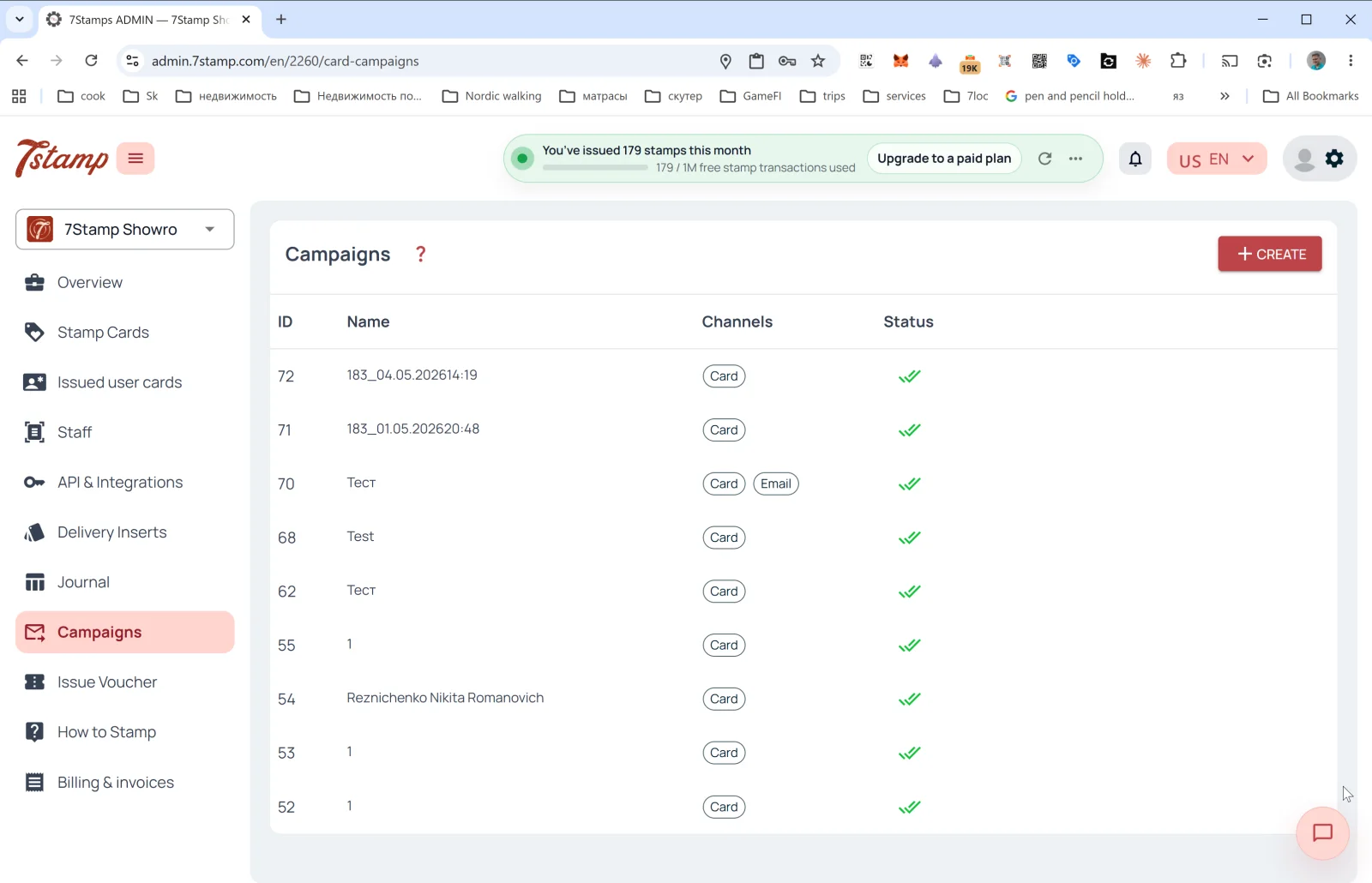
캠페인 list

Table columns:

  • ID — 캠페인 number.
  • Name — name (often autogenerated as <cardId>_<datetime>, e.g., 183_04.05.202614:19, but you can set a meaningful one).
  • Channels — channel tags: 카드 (PUSH on the 지갑 카드), Email.
  • Status — status (✅✅ — successfully delivered).

The + CREATE button in the upper right opens the broadcast form.


Creating a 카드 캠페인

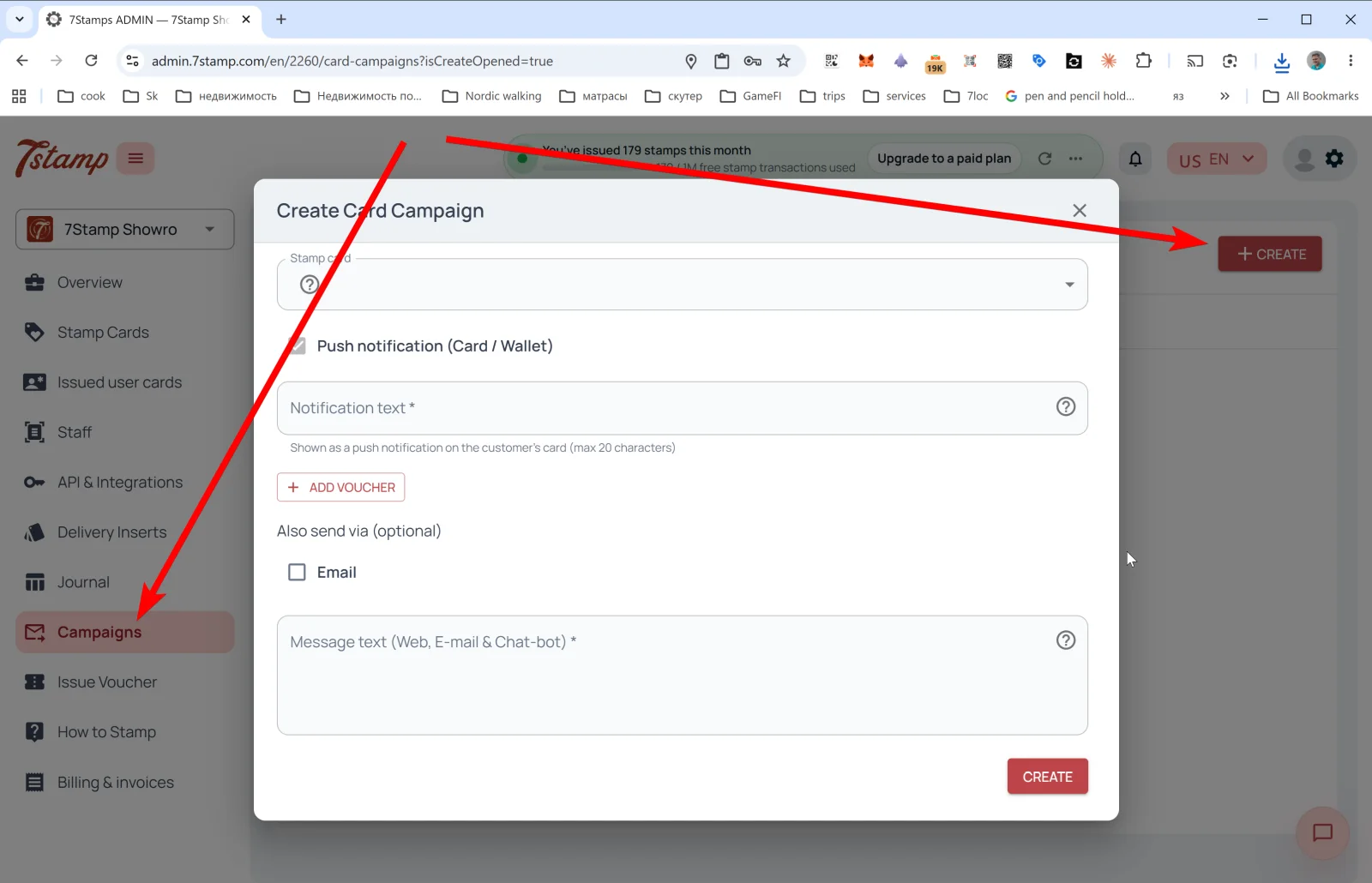
The 카드 만들기 캠페인 popup:

  • 스탬프 카드 — pick the 카드 whose segment will be broadcast to.
  • Push notification (카드 / 지갑) — the main channel.
  • 아니요tification text * — the PUSH text that will appear right on the 고객’s 지갑 카드. Limit — 20 characters (the Apple/Google 지갑 PUSH constraint).
  • + ADD VOUCHER — attach a voucher to the broadcast. Useful for win-뒤로 (“haven’t seen you — have a gift”), holiday 캠페인, thank-yous to loyalists.
  • Also send via (optional) — additional channels:
  • Email — send the same in parallel by email.
  • Message text (Web, E-mail & Chat-bot) * — the long text for extended channels (the 카드 web page, email, messengers via 7cloc.com). Here you can write extensively, with links and formatting.

Tap CREATE — the 캠페인 launches.

Omnichannel logic

A 지갑 PUSH (카드 / 지갑) is a short notification right on the saved 카드. Anyone who has the 카드 in 지갑 sees it, and they can’t “unsubscribe” from it until the 카드 is deleted. Email and messengers are long messages for those who left an email or are connected to a messenger bot via 7cloc.com.

The recommended combo for important 캠페인: 카드 + Email + Messenger simultaneously. The short PUSH catches the 고객 right away, while email and messenger catch up with those who missed the PUSH.

Typical 카드 캠페인 scenarios

  • 보상-ready 알림 — “your 카드 is almost full, one 스탬프 to the gift”.
  • Voucher-waiting 알림 — “don’t forget to use your voucher, it expires in 7 days”.
  • Slow-day promotion — fill Tuesday or Wednesday with a special offer.
  • Seasonal 캠페인 — holidays, seasonal dishes, local events.
  • New product drop — announce a new product.
  • Win-뒤로 — to 고객 who haven’t been in for N days, send a gift.

The 20-character PUSH limit isn’t a bug, it’s a feature: a short notification gets 읽기, a long one gets skipped. Test your wording: “Coffee’s waiting ☕” works better than “You have a new voucher in our 로열티 program”.


시각적 안내

Use the screen sets below as a visual companion to the 문서. 열기 any image to inspect it at full size.

Конструктор кампаній

2
Огляд кампаній і останніх відправлень
Створення нової кампанії з аудиторією та повідомленням

먼저 읽어보세요

Reference
운영 2026년 5월 12일

Issue Voucher — issuing a one-time voucher

The Issue Voucher 섹션 in the side menu lets you issue a one-time voucher outside the main accumulation mechanic. The exact admin description: "생성 a one-time voucher for a 고객 as compensation or a goodwill gesture.

업데이트됨: 2026년 5월 12일

문서 열기

다음 단계

가이드
시작하기 2026년 5월 12일

7stamp 사용자 매뉴얼

원본 매뉴얼의 각 섹션은 개별 문서로 분리되어 있으며, 이 페이지는 전체 지식 체계를 연결하는 안내 맵 역할을 합니다.

업데이트됨: 2026년 5월 12일

문서 열기