
12. Campaigns — broadcasts and campaigns
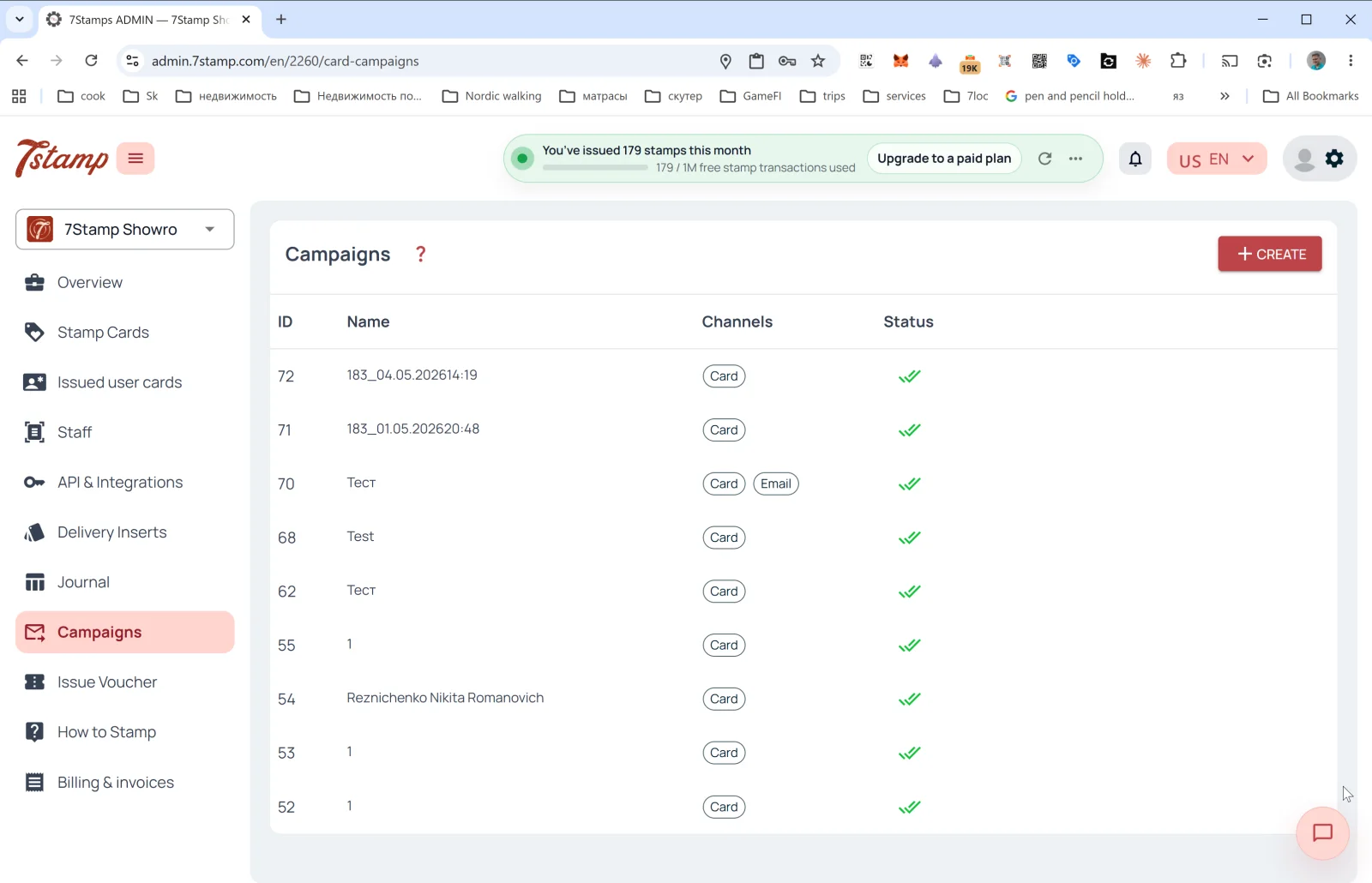
The Campaigns section is your customer return tool. With it you send messages to customer segments across multiple channels at once.
Campaign list
Table columns:
- ID — campaign number.
- Name — name (often autogenerated as
<cardId>_<datetime>, e.g.,183_04.05.202614:19, but you can set a meaningful one). - Channels — channel tags:
Card(PUSH on the Wallet card),Email. - Status — status (✅✅ — successfully delivered).
The + CREATE button in the upper right opens the broadcast form.
Creating a Card Campaign
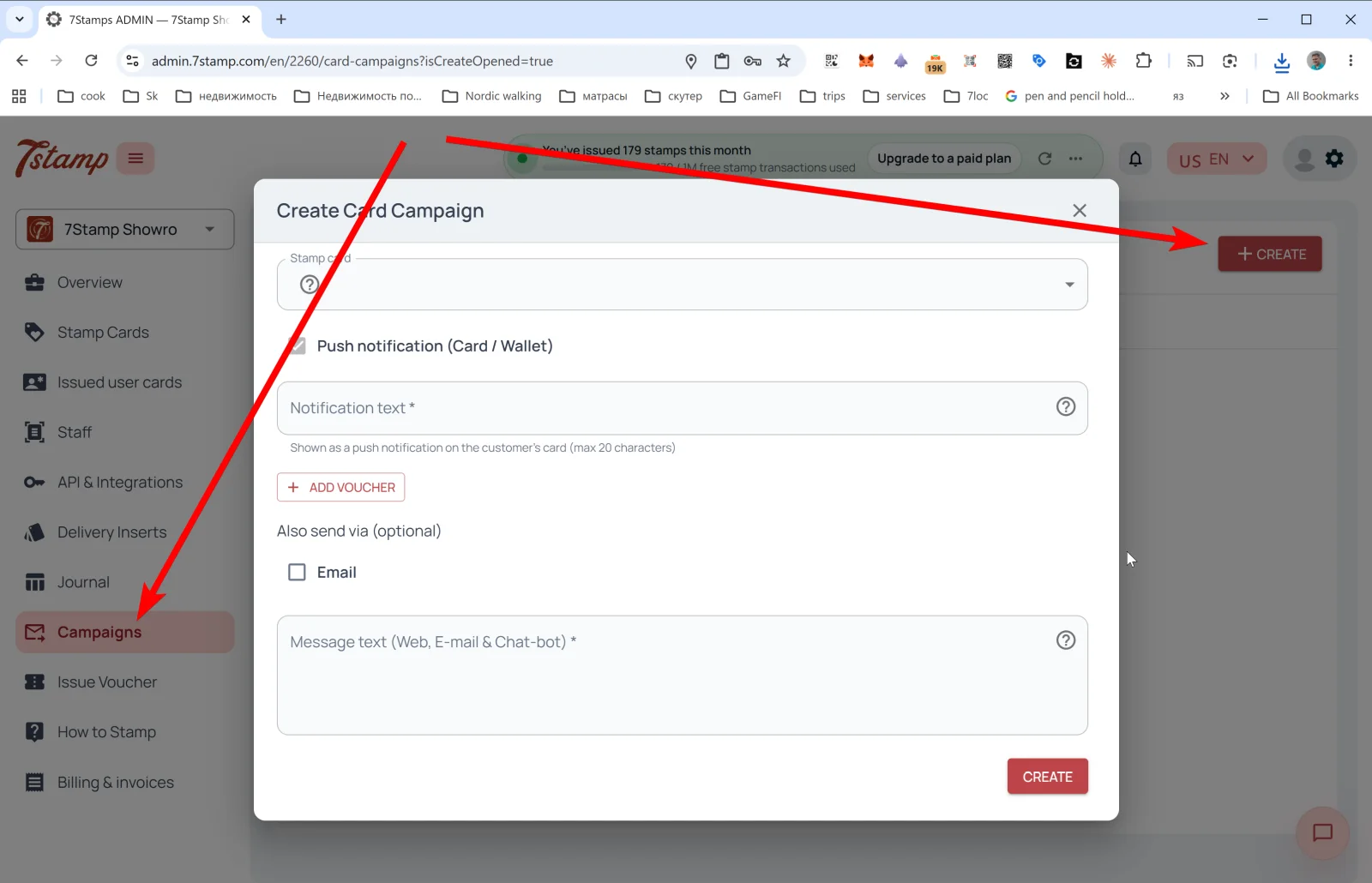
The Create Card Campaign popup:
- Stamp card — pick the card whose segment will be broadcast to.
- Push notification (Card / Wallet) — the main channel.
- Notification text * — the PUSH text that will appear right on the customer’s Wallet card. Limit — 20 characters (the Apple/Google Wallet PUSH constraint).
- + ADD VOUCHER — attach a voucher to the broadcast. Useful for win-back (“haven’t seen you — have a gift”), holiday campaigns, thank-yous to loyalists.
- Also send via (optional) — additional channels:
- ☐ Email — send the same in parallel by email.
- Message text (Web, E-mail & Chat-bot) * — the long text for extended channels (the card web page, email, messengers via 7loc.com). Here you can write extensively, with links and formatting.
Tap CREATE — the campaign launches.
Omnichannel logic
A Wallet PUSH (Card / Wallet) is a short notification right on the saved card. Anyone who has the card in Wallet sees it, and they can’t “unsubscribe” from it until the card is deleted. Email and messengers are long messages for those who left an email or are connected to a messenger bot via 7loc.com.
The recommended combo for important campaigns: Card + Email + Messenger simultaneously. The short PUSH catches the customer right away, while email and messenger catch up with those who missed the PUSH.
Typical Card Campaign scenarios
- Reward-ready reminder — “your card is almost full, one stamp to the gift”.
- Voucher-waiting reminder — “don’t forget to use your voucher, it expires in 7 days”.
- Slow-day promotion — fill Tuesday or Wednesday with a special offer.
- Seasonal campaigns — holidays, seasonal dishes, local events.
- New product drop — announce a new product.
- Win-back — to customers who haven’t been in for N days, send a gift.
The 20-character PUSH limit isn’t a bug, it’s a feature: a short notification gets read, a long one gets skipped. Test your wording: “Coffee’s waiting ☕” works better than “You have a new voucher in our loyalty program”.
Visual walkthrough
Use the screen sets below as a visual companion to the article. Open any image to inspect it at full size.