Rewards feature

Smart Vouchers and Redeem Codes

Smart Vouchers are digital rewards issued when a customer reaches a goal. They can be self-redeemed, staff-scanned, or connected to a POS with a simple redeem code.

A digital stamp card does not have to end with an uncontrolled reward moment. With 7stamp, you can separate stamp collection from reward redemption, choose how the voucher is claimed, and keep checkout clearer when the reward has real value.

Reward issued after the goal is reached Self-Redeem, Staff-Scan, or Redeem Code Works with Apple Wallet and Google Wallet cards More checkout control without a custom app

Three voucher types for three checkout realities

The right reward flow depends on how much control you need at redemption time. Some rewards can be claimed directly by the customer, while others should stay inside a staff-checked or POS-linked step.

01

Self-Redeem

How it works
The customer opens the Smart Voucher and uses the reward directly without a staff scan or POS code step. This is the lightest redemption path.
Best for
Low-risk rewards, simple perks, and businesses that want the reward moment to stay fast and customer-led.

02

Staff-Scan

How it works
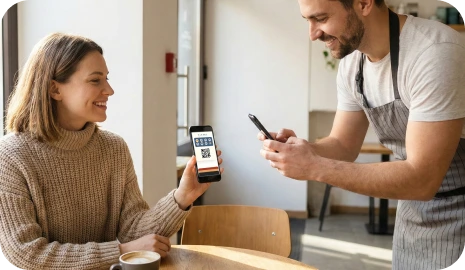
The customer reaches the reward, then a team member scans or validates the voucher during service or checkout before it is accepted.
Best for
Higher-value rewards, premium service, and businesses that want a human checkpoint before the voucher is consumed.
03

Redeem Code

How it works
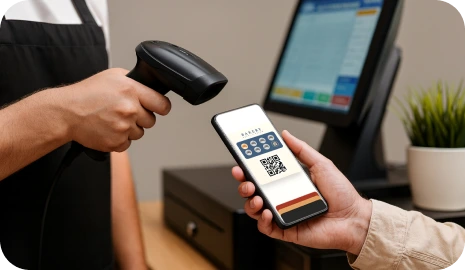
The voucher shows a text code, QR code, or barcode that staff can enter or scan in the POS or checkout flow without custom development.
Best for
Businesses that want Zero-Integration loyalty, a POS-friendly handoff, or clearer reward control at the moment of payment.

How Smart Vouchers work from goal to redemption

A Smart Voucher adds one more layer after the stamp goal is reached. Instead of ending the loyalty cycle immediately, 7stamp can issue a controlled reward object that is redeemed in the right way for your business.

  1. Step 1 01

    The customer collects stamps normally

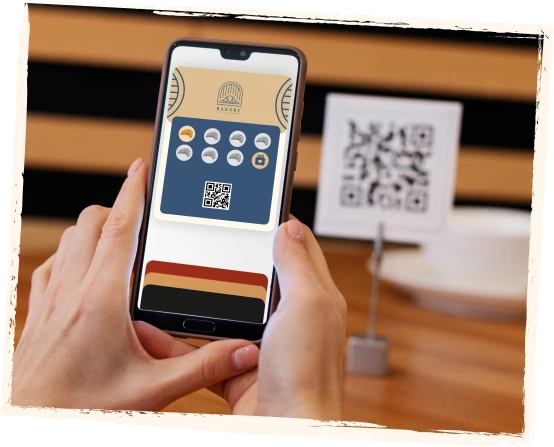
    Customers still join through a QR code, save the card to Apple Wallet or Google Wallet, and collect stamps through staff, kiosk, Autopilot, or another supported workflow.

    The customer collects stamps normally
  2. Step 2 02

    7stamp issues a Smart Voucher when the goal is reached

    Instead of only showing a static “reward earned” message, 7stamp can create a digital voucher that becomes the new reward state.

    7stamp issues a Smart Voucher when the goal is reached
  3. Step 3 03

    You choose the redemption path

    The voucher can be self-redeemed by the customer, staff-scanned during service, or linked to checkout with a Redeem Code shown inside the voucher.

    You choose the redemption path
  4. Step 4 04

    The reward is accepted in a controlled way

    The business can align the redemption step with the actual service moment, counter workflow, or POS process instead of treating every reward the same.

    The reward is accepted in a controlled way
  5. Step 5 05

    The customer returns to a clean next cycle

    After the voucher is used, the customer keeps the same wallet card and can continue into the next loyalty cycle without losing the familiar card experience.

    The customer returns to a clean next cycle

Control layers that reduce reward confusion and misuse

Smart Vouchers are useful because they do more than look digital. They let the business decide when the reward becomes active, who confirms it, and how the checkout side sees it.

01

Separate earning from redemption

A customer can finish the stamp goal first and redeem later, which reduces pressure at the exact moment the final stamp is added.

02

Match the reward to the right path

Use Self-Redeem for low-risk perks, Staff-Scan for higher-value rewards, and Redeem Code when the checkout team needs a POS-friendly handoff.

03

Keep the same code across systems

For Zero-Integration setups, you can create a code in the POS and show that same code inside the voucher as text, QR, or barcode.

04

Add a checkpoint before the reward is consumed

A controlled redemption step helps reduce confusion around screenshots, accidental double use, or rewards being claimed in the wrong service context.

Smart Vouchers FAQ

What is a Smart Voucher in 7stamp?

A Smart Voucher is a digital reward issued when a customer reaches the loyalty goal. It separates reward delivery from stamp collection and gives the business more control over how the reward is redeemed.

What voucher types does 7stamp support?

7stamp supports Self-Redeem, Staff-Scan, and Redeem Code voucher flows. The best option depends on how much control you need at checkout and whether the reward should be customer-led, staff-verified, or POS-friendly.

How do Smart Vouchers help reduce reward misuse?

Smart Vouchers add a controlled redemption step instead of treating the final stamp as the entire reward event. That helps the business decide when the reward becomes usable, whether staff should verify it, and whether a code should be scanned or entered at checkout.

Do Redeem Codes require a custom POS integration?

No. In a Zero-Integration setup, you create a code in your POS and show the same code inside the 7stamp voucher. Staff can then scan or enter that code during checkout without custom development.

When should I use Self-Redeem instead of Staff-Scan?

Use Self-Redeem when the reward is simple and low-risk. Use Staff-Scan when the reward has more value, needs a human checkpoint, or should stay tied to a live service interaction before it is accepted.

Next step

Keep the stamp card simple and make the reward moment smarter

If your business likes the familiar stamp-card habit but needs more control at redemption time, Smart Vouchers and Redeem Codes let you add that control without forcing customers into a separate app.