Reference Retention

キャンペーン — broadcasts and キャンペーン

The キャンペーン セクション is your 顧客 再来店 tool. With it you send messages to 顧客 segments across multiple channels at once.

クイックリード

更新日: 2026年5月25日

12. キャンペーン — broadcasts and キャンペーン

The キャンペーン セクション is your 顧客 再来店 tool. With it you send messages to 顧客 segments across multiple channels at once.

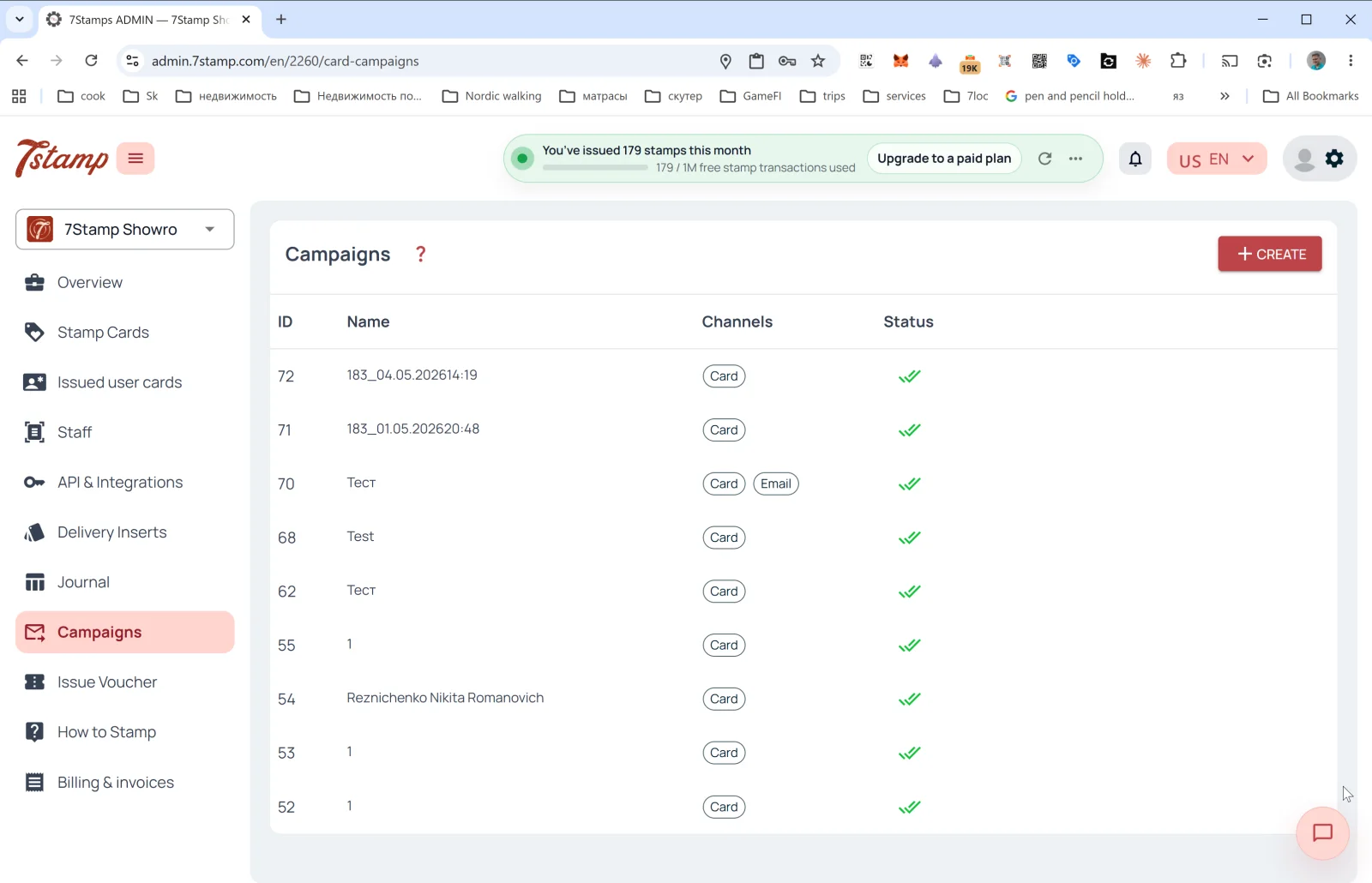
キャンペーン list

Table columns:

  • ID — キャンペーン number.
  • Name — name (often autogenerated as <cardId>_<datetime>, e.g., 183_04.05.202614:19, but you can set a meaningful one).
  • Channels — channel tags: カード (PUSH on the Wallet カード), Email.
  • Status — status (✅✅ — successfully delivered).

The + CREATE button in the upper right opens the broadcast form.


Creating a カード キャンペーン

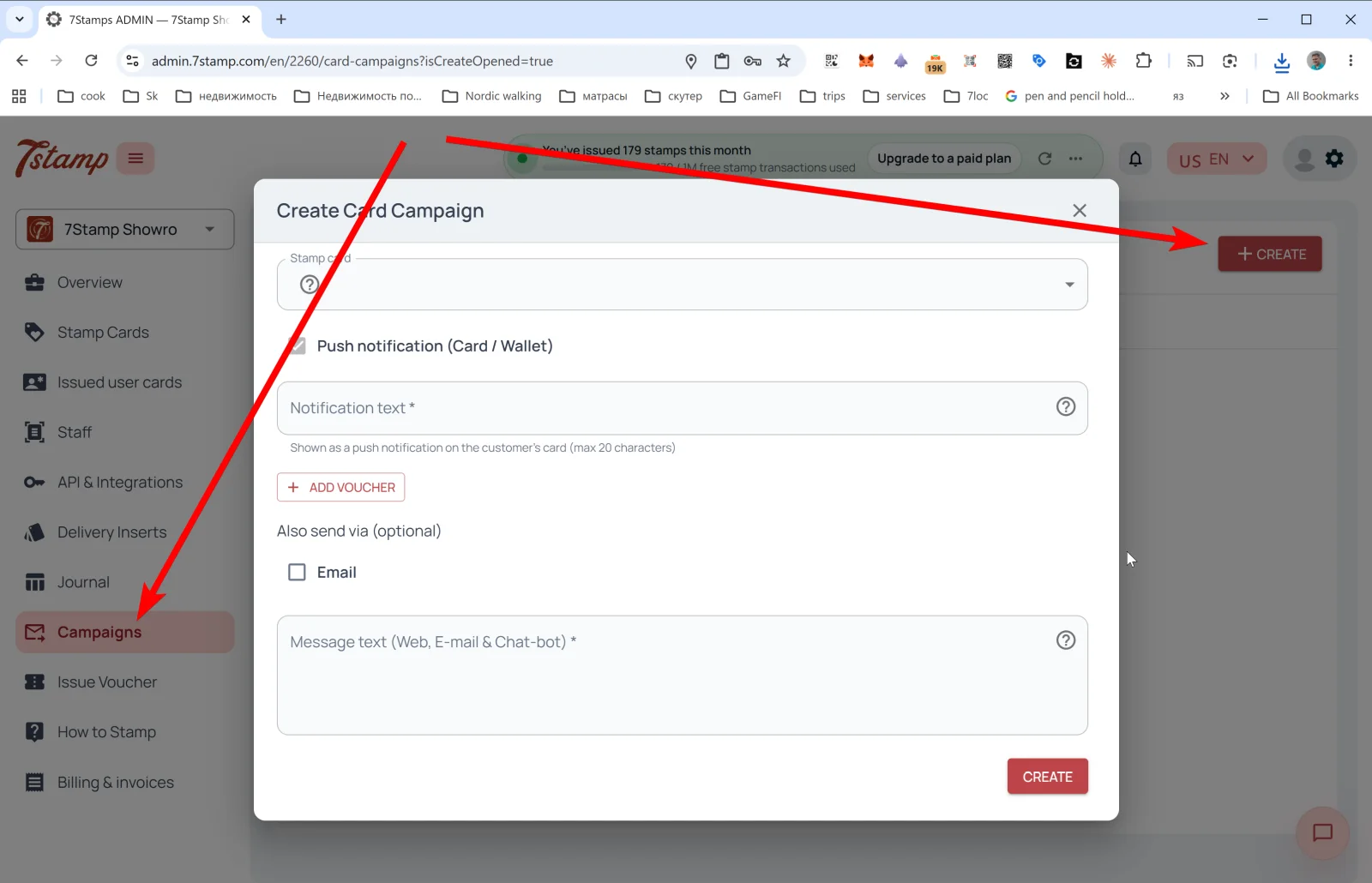
The カードを作成 キャンペーン popup:

  • Stamp カード — pick the カード whose segment will be broadcast to.
  • Push notification (カード / Wallet) — the main channel.
  • 不要tification text * — the PUSH text that will appear right on the 顧客’s Wallet カード. Limit — 20 characters (the Apple/Google Wallet PUSH constraint).
  • + ADD VOUCHER — attach a voucher to the broadcast. Useful for win-戻る (“haven’t seen you — have a gift”), holiday キャンペーン, thank-yous to loyalists.
  • Also send via (optional) — additional channels:
  • Email — send the same in parallel by email.
  • Message text (Web, E-mail & Chat-bot) * — the long text for extended channels (the カード web page, email, messengers via 7cloc.com). Here you can write extensively, with links and formatting.

Tap CREATE — the キャンペーン launches.

Omnichannel logic

A Wallet PUSH (カード / Wallet) is a short notification right on the saved カード. Anyone who has the カード in Wallet sees it, and they can’t “unsubscribe” from it until the カード is deleted. Email and messengers are long messages for those who left an email or are connected to a messenger bot via 7cloc.com.

The recommended combo for important キャンペーン: カード + Email + Messenger simultaneously. The short PUSH catches the 顧客 right away, while email and messenger catch up with those who missed the PUSH.

Typical カード キャンペーン scenarios

  • 特典-ready リマインダー — “your カード is almost full, one Stamp to the gift”.
  • Voucher-waiting リマインダー — “don’t forget to use your voucher, it expires in 7 days”.
  • Slow-day promotion — fill Tuesday or Wednesday with a special offer.
  • Seasonal キャンペーン — holidays, seasonal dishes, local events.
  • New product drop — announce a new product.
  • Win-戻る — to 顧客 who haven’t been in for N days, send a gift.

The 20-character PUSH limit isn’t a bug, it’s a feature: a short notification gets 読む, a long one gets skipped. Test your wording: “Coffee’s waiting ☕” works better than “You have a new voucher in our ロイヤルティ program”.


ビジュアルガイド

Use the screen sets below as a visual companion to the 記事. 開く any image to inspect it at full size.

Конструктор кампаній

2
Огляд кампаній і останніх відправлень
Створення нової кампанії з аудиторією та повідомленням

最初にお読みください

Reference
運用 2026年5月12日

Issue Voucher — 単発voucherの発行

サイドメニューの Issue Voucher セクションでは、通常の蓄積メカニクスとは別に、単発の voucher を発行できます。管理画面内の正確な説明は次の通りです。"Create a one-time voucher for a customer as compensation or a goodwill gesture.

更新日: 2026年5月12日

記事を開く

次のステップ

ガイド
導入の基本 2026年5月12日

7stampユーザーマニュアル

元のフルマニュアルは個別のナレッジベース記事に分割され、このページは全体構成をたどるための目次として機能します。

更新日: 2026年5月12日

記事を開く