
11. Issue Voucher — การออกบัตรกำนัลแบบใช้ครั้งเดียว
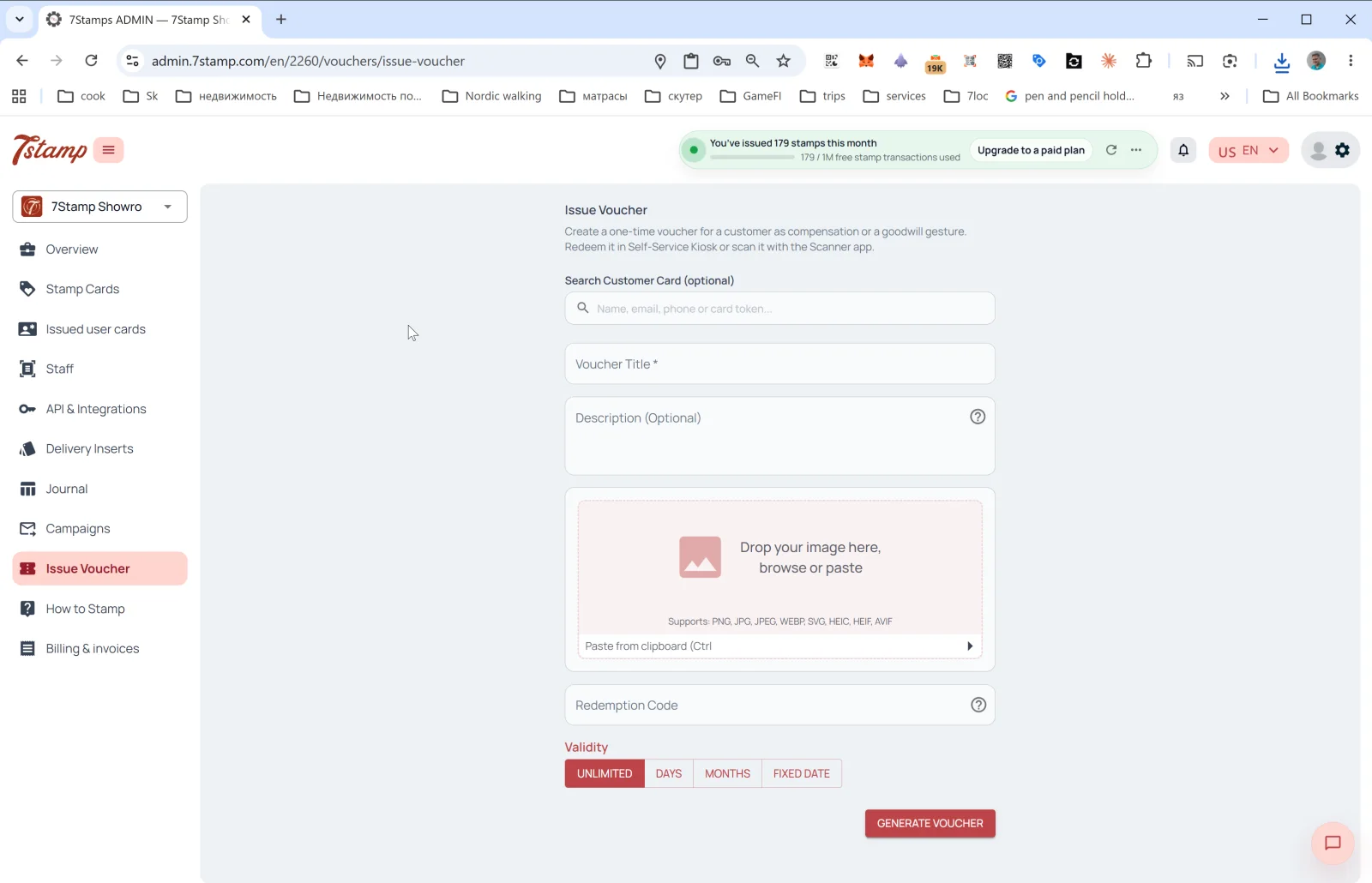
ส่วน Issue Voucher ในเมนูด้านข้างช่วยให้คุณออกบัตรกำนัลแบบใช้ครั้งเดียวนอกกลไกการสะสมหลัก คำอธิบายในแผงผู้ดูแลระบบระบุว่า: “Create a one-time voucher for a customer as compensation or a goodwill gesture. Redeem it in Self-Service Kiosk or scan it with the Scanner app.” (สร้างบัตรกำนัลแบบใช้ครั้งเดียวให้ลูกค้าเพื่อชดเชยหรือแสดงน้ำใจ ใช้สิทธิ์ได้ที่ Self-Service Kiosk หรือสแกนด้วยแอป Scanner)
ควรใช้ Issue Voucher เมื่อใด
- ของขวัญวันเกิด นอกเหนือจากระบบอัตโนมัติ Birthday หลัก
- การชดเชยเมื่อบริการผิดพลาด (“ขออภัยที่อาหารมาถึงแล้วเย็นชืด”)
- ของขวัญแบบ B2B — สำหรับนักข่าว บล็อกเกอร์ หรือพันธมิตร
- คูปองงานอีเวนต์ — เชิญมางานปาร์ตี้ งานเปิดร้าน หรืองานชิม
- โบนัสความภักดี — ขอบคุณลูกค้าประจำโดยไม่ต้องผูกกับบัตร
- คูปองแบบพิมพ์ — สร้างบัตรกำนัล แล้วพิมพ์ออกมาเพื่อแจกด้วยมือ
ช่องในแบบฟอร์ม
- Search Customer Card (optional) — ค้นหาลูกค้าที่ต้องการด้วย
Name, email, phone or card tokenหากคุณเลือกลูกค้า บัตรกำนัลจะผูกกับบัตรของลูกค้าคนนั้น หากเว้นว่างไว้ ระบบจะสร้างบัตรกำนัลแบบ “อิสระ” พร้อม Redeem Code ที่ไม่ซ้ำกัน ซึ่งคุณมอบให้ใครก็ได้ - Voucher Title * — ชื่อบัตรกำนัล (จำเป็น)
- Description (Optional) — คำอธิบาย
- Image — รูปภาพของบัตรกำนัล รูปแบบที่รองรับ: PNG, JPG, JPEG, WEBP, SVG, HEIC, HEIF, AVIF วางจากคลิปบอร์ดได้ (Ctrl+V)
- Redeem Code — รหัสสำหรับใช้สิทธิ์ (ไม่บังคับ) หากเปิดใช้งาน ระบบจะสร้าง QR และบาร์โค้ดแบบเส้นสำหรับรหัสนั้นโดยอัตโนมัติ
- Validity — ระยะเวลาใช้งาน: UNLIMITED / DAYS / MONTHS / FIXED DATE
แตะ GENERATE VOUCHER — ระบบจะสร้างบัตรกำนัล และ (หากคุณเลือกลูกค้าไว้) ส่งไปยัง Wallet ของลูกค้า หากไม่ได้เลือกลูกค้า คุณสามารถดาวน์โหลดหรือพิมพ์บัตรกำนัล แล้วมอบให้ด้วยตนเองได้
คำแนะนำแบบภาพ
ใช้ชุดหน้าจอด้านล่างเป็นตัวช่วยทางภาพสำหรับบทความ คลิกรูปภาพใดก็ได้เพื่อดูในขนาดเต็ม