
11. Issue Voucher — ಒಂದು ಬಾರಿಯ ವೋಚರ್ ನೀಡುವುದು
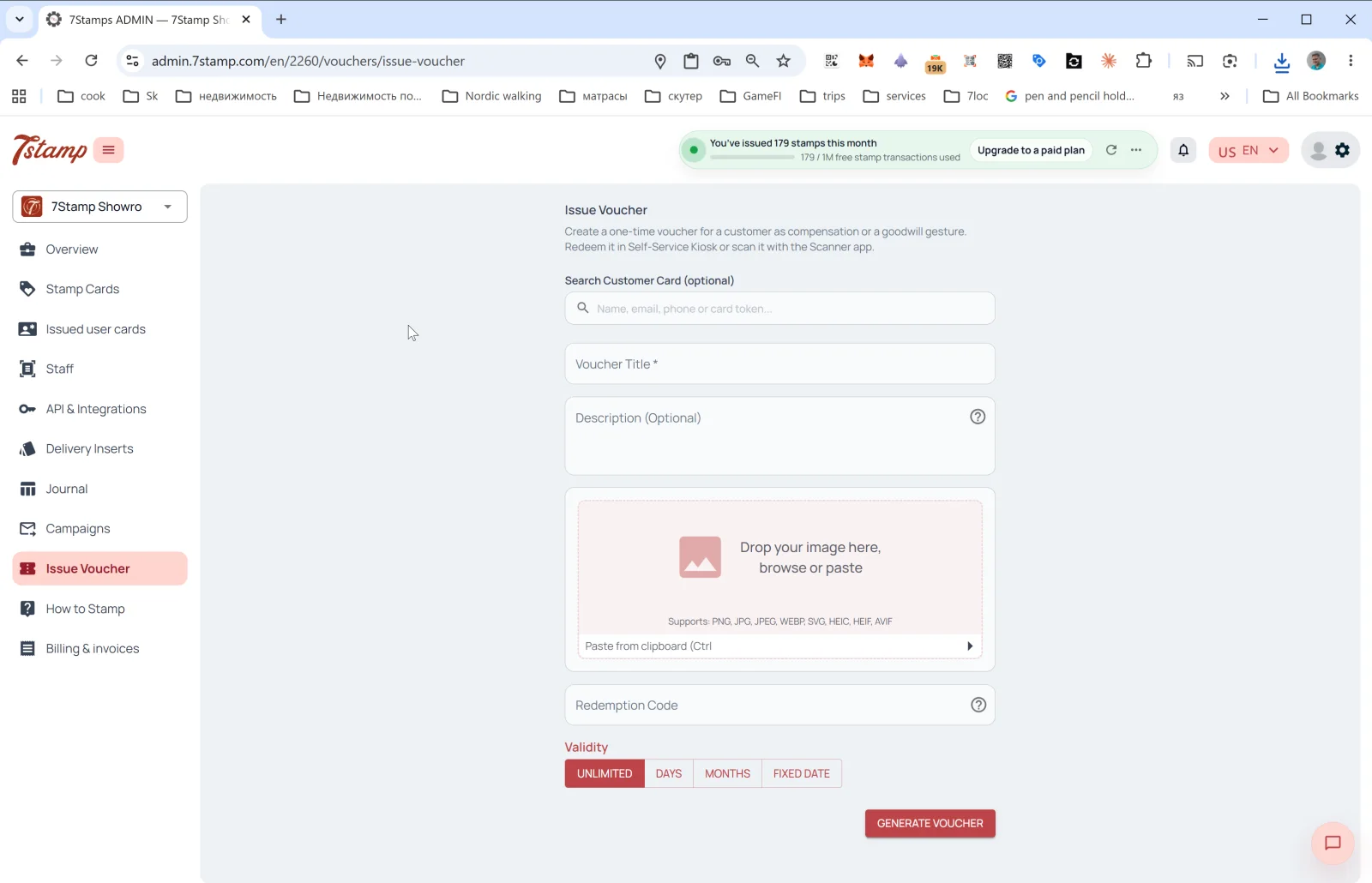
ಬದಿಯ ಮೆನುವಿನಲ್ಲಿರುವ Issue Voucher ವಿಭಾಗವು ಮುಖ್ಯ ಸಂಗ್ರಹ ಯಂತ್ರಾಂಗದ ಹೊರತಾಗಿ ಒಂದು ಬಾರಿಯ ವೋಚರ್ ನೀಡಲು ಅನುವು ಮಾಡಿಕೊಡುತ್ತದೆ. ಆಡ್ಮಿನ್ನಲ್ಲಿರುವ ನಿಖರ ವಿವರಣೆ: “Create a one-time voucher for a customer as compensation or a goodwill gesture. Redeem it in Self-Service Kiosk or scan it with the Scanner app.” (ಪರಿಹಾರವಾಗಿ ಅಥವಾ ಸದ್ಭಾವನೆಯ ಸಂಕೇತವಾಗಿ ಗ್ರಾಹಕರಿಗೆ ಒಂದು ಬಾರಿಯ ವೋಚರ್ ರಚಿಸಿ. ಅದನ್ನು Self-Service Kiosk ನಲ್ಲಿ ರಿಡೀಮ್ ಮಾಡಿ ಅಥವಾ Scanner ಆ್ಯಪ್ನಿಂದ ಸ್ಕ್ಯಾನ್ ಮಾಡಿ.)
Issue Voucher ಅನ್ನು ಯಾವಾಗ ಬಳಸಬೇಕು
- ಮುಖ್ಯ ಹುಟ್ಟುಹಬ್ಬದ ಸ್ವಯಂಚಾಲನೆಯ ಹೊರತಾಗಿ ಹುಟ್ಟುಹಬ್ಬದ ಉಡುಗೊರೆ.
- ಸೇವಾ ವೈಫಲ್ಯಕ್ಕೆ ಪರಿಹಾರ (“ಆರ್ಡರ್ ತಣ್ಣಗಾಗಿ ಬಂದದ್ದಕ್ಕೆ ಕ್ಷಮಿಸಿ”).
- B2B ಉಡುಗೊರೆ — ಪತ್ರಕರ್ತ, ಬ್ಲಾಗರ್, ಪಾಲುದಾರರಿಗೆ.
- ಕಾರ್ಯಕ್ರಮದ ಕೂಪನ್ — ಪಾರ್ಟಿ, ಉದ್ಘಾಟನೆ, ರುಚಿ ಪರೀಕ್ಷೆಗೆ ಆಹ್ವಾನ.
- ನಿಷ್ಠೆಯ ಬೋನಸ್ — ಕಾರ್ಡ್ಗೆ ಜೋಡಿಸದೆ ನಿಷ್ಠಾವಂತ ಗ್ರಾಹಕರನ್ನು ಗುರುತಿಸುವುದು.
- ಮುದ್ರಿತ ಕೂಪನ್ — ವೋಚರ್ ರಚಿಸಿ ಅದನ್ನು ಕೈಯಾರೆ ನೀಡಲು ಮುದ್ರಿಸಿ.
ಫಾರ್ಮ್ನ ಕ್ಷೇತ್ರಗಳು
- Search Customer Card (optional) —
Name, email, phone or card tokenಮೂಲಕ ನಿರ್ದಿಷ್ಟ ಗ್ರಾಹಕರನ್ನು ಹುಡುಕಿ. ನೀವು ಗ್ರಾಹಕರನ್ನು ಆರಿಸಿದರೆ — ವೋಚರ್ ಅವರ ಕಾರ್ಡ್ಗೆ ಜೋಡಿಸಲ್ಪಡುತ್ತದೆ. ಖಾಲಿ ಬಿಟ್ಟರೆ — ಯಾರಿಗಾದರೂ ನೀಡಬಹುದಾದ ವಿಶಿಷ್ಟ Redeem Code ಇರುವ “ಮುಕ್ತ” ವೋಚರ್ ರಚನೆಯಾಗುತ್ತದೆ. - Voucher Title * — ವೋಚರ್ನ ಶೀರ್ಷಿಕೆ (ಕಡ್ಡಾಯ).
- Description (Optional) — ವಿವರಣೆ.
- Image — ವೋಚರ್ನ ಚಿತ್ರ. ಬೆಂಬಲಿತ ಸ್ವರೂಪಗಳು: PNG, JPG, JPEG, WEBP, SVG, HEIC, HEIF, AVIF. ಕ್ಲಿಪ್ಬೋರ್ಡ್ನಿಂದ ಅಂಟಿಸಬಹುದು (Ctrl+V).
- Redeem Code — ರಿಡೀಮ್ ಕೋಡ್ (ಐಚ್ಛಿಕ). ಸಕ್ರಿಯಗೊಳಿಸಿದರೆ, ವ್ಯವಸ್ಥೆಯು ಕೋಡ್ಗಾಗಿ QR ಮತ್ತು ರೇಖೀಯ ಬಾರ್ಕೋಡ್ ಅನ್ನು ಸ್ವಯಂಚಾಲಿತವಾಗಿ ರಚಿಸುತ್ತದೆ.
- Validity — ಮಾನ್ಯತೆಯ ಅವಧಿ: UNLIMITED / DAYS / MONTHS / FIXED DATE.
GENERATE VOUCHER ಒತ್ತಿ — ವೋಚರ್ ರಚನೆಯಾಗುತ್ತದೆ ಮತ್ತು (ನೀವು ಗ್ರಾಹಕರನ್ನು ಆರಿಸಿದ್ದರೆ) ಅವರ Wallet ಗೆ ತಲುಪುತ್ತದೆ. ಯಾವುದೇ ಗ್ರಾಹಕರನ್ನು ಆರಿಸದಿದ್ದರೆ — ವೋಚರ್ ಅನ್ನು ಡೌನ್ಲೋಡ್ / ಮುದ್ರಿಸಿ ಕೈಯಾರೆ ನೀಡಬಹುದು.
Visual walkthrough
Use the screen sets below as a visual companion to the article. Open any image to inspect it at full size.