
Reference
გვერდითი მენიუს განყოფილება Issue Voucher საშუალებას გაძლევთ გასცეთ ერთჯერადი ვაუჩერი სტამპების დაგროვების ძირითადი მექანიკის მიღმა.
11. Issue Voucher — ერთჯერადი ვაუჩერის გაცემა
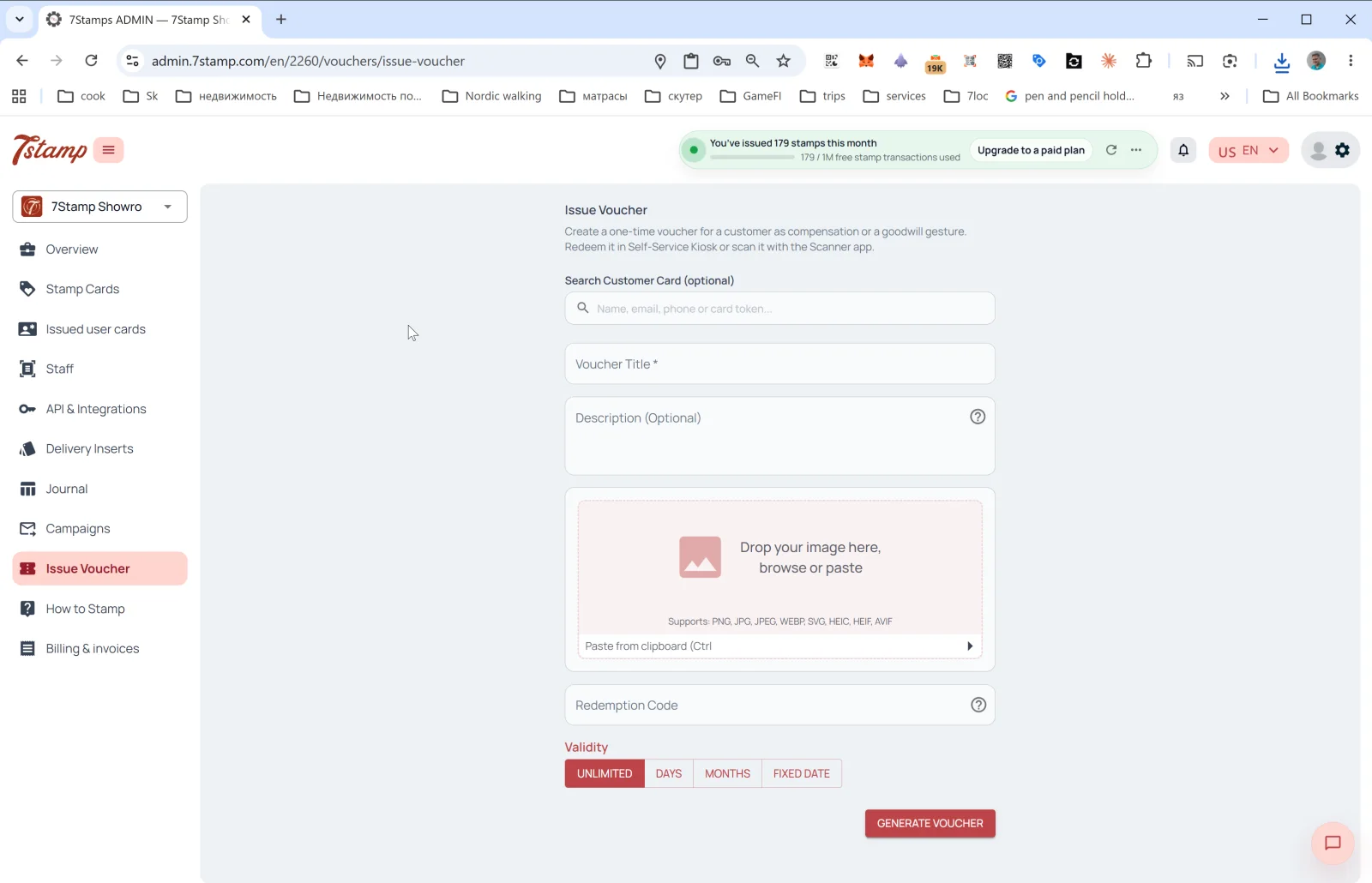
გვერდითი მენიუს განყოფილება Issue Voucher (ვაუჩერის გაცემა) საშუალებას გაძლევთ გასცეთ ერთჯერადი ვაუჩერი სტამპების დაგროვების ძირითადი მექანიკის მიღმა. ადმინისტრატორის პანელში ზუსტი აღწერაა: “Create a one-time voucher for a customer as compensation or a goodwill gesture. Redeem it in Self-Service Kiosk or scan it with the Scanner app.” (შექმენით ერთჯერადი ვაუჩერი მომხმარებლისთვის კომპენსაციად ან კეთილი ნების ჟესტად; გამოიყენეთ ის Self-Service Kiosk-ში ან დაასკანერეთ Scanner აპლიკაციით).
როდის გამოვიყენოთ Issue Voucher
- დაბადების დღის საჩუქარი ძირითადი Birthday ავტომატიზაციის მიღმა.
- კომპენსაცია მომსახურების ხარვეზისთვის („ბოდიში, შეკვეთა ცივი ჩამოვიდა“).
- B2B საჩუქარი — ჟურნალისტისთვის, ბლოგერისთვის, პარტნიორისთვის.
- ღონისძიების კუპონი — მოწვევა წვეულებაზე, გახსნაზე, დეგუსტაციაზე.
- ლოიალობის ბონუსი — ერთგული მომხმარებლის დაფასება ბარათთან მიბმის გარეშე.
- დაბეჭდილი კუპონი — შექმენით ვაუჩერი და დაბეჭდეთ ფიზიკურად გადასაცემად.
ფორმის ველები
- Search Customer Card (optional) — იპოვეთ კონკრეტული მომხმარებელი ველით
Name, email, phone or card token. თუ მომხმარებელს აირჩევთ, ვაუჩერი მის ბარათს მიება. თუ ველს ცარიელს დატოვებთ, შეიქმნება „თავისუფალი“ ვაუჩერი უნიკალური Redeem Code-ით, რომლის გადაცემაც ნებისმიერისთვის შეგიძლიათ. - Voucher Title * — ვაუჩერის სახელი (სავალდებულო).
- Description (Optional) — აღწერა.
- Image — ვაუჩერის სურათი. მხარდაჭერილი ფორმატები: PNG, JPG, JPEG, WEBP, SVG, HEIC, HEIF, AVIF. შეიძლება ჩასვათ ბუფერიდან (Ctrl+V).
- Redeem Code — გამოყენების კოდი (არასავალდებულო). თუ ჩართულია, სისტემა კოდისთვის ავტომატურად ქმნის QR-ს და ხაზოვან შტრიხკოდს.
- Validity — მოქმედების ვადა: UNLIMITED / DAYS / MONTHS / FIXED DATE.
დააჭირეთ GENERATE VOUCHER — ვაუჩერი იქმნება და (თუ მომხმარებელი აირჩიეთ) მას Wallet-ში მიუვა. თუ მომხმარებელი არჩეული არ არის, ვაუჩერი შეგიძლიათ ჩამოტვირთოთ / დაბეჭდოთ და ხელით გადასცეთ.
Visual walkthrough
Use the screen sets below as a visual companion to the article. Open any image to inspect it at full size.