
11. Issue Voucher — een eenmalige voucher uitgeven
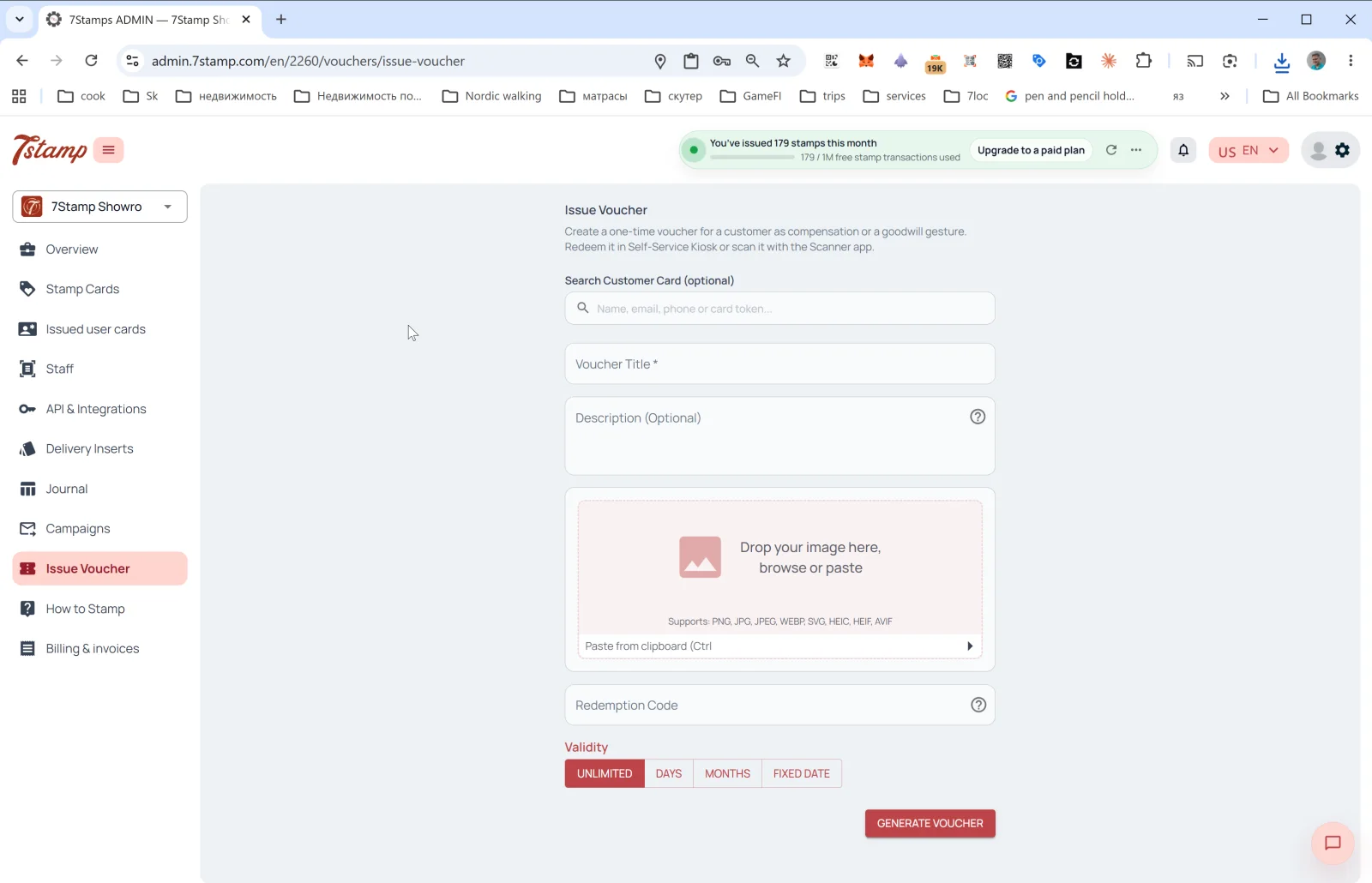
Met het onderdeel Issue Voucher (voucher uitgeven) in het zijmenu geef je een eenmalige voucher uit, los van het gewone spaarsysteem. De beschrijving in de admin luidt: „Maak een eenmalige voucher voor een klant aan als compensatie of als gebaar van goede wil. Wissel hem in bij de Self-Service Kiosk of scan hem met de Scanner-app.”
Wanneer gebruik je Issue Voucher
- Verjaardagscadeau buiten de gewone verjaardagsautomatisering (Birthday).
- Compensatie bij een fout in de service („sorry dat de bestelling koud aankwam”).
- Zakelijk cadeau — voor een journalist, blogger of partner.
- Evenementbon — een uitnodiging voor een feest, opening of proeverij.
- Loyaliteitsbonus — een trouwe klant belonen zonder dat dit aan een kaart vastzit.
- Gedrukte bon — een voucher aanmaken en printen om fysiek uit te delen.
Velden van het formulier
- Search Customer Card (optional) — zoek een klant op
Name, email, phone or card token. Kies je een klant, dan wordt de voucher aan diens kaart gekoppeld. Laat je het veld leeg, dan wordt een „vrije” voucher aangemaakt met een unieke Redeem Code die je aan iedereen kunt geven. - Voucher Title * — titel van de voucher (verplicht).
- Description (Optional) — beschrijving.
- Image — afbeelding van de voucher. Ondersteunde formaten: PNG, JPG, JPEG, WEBP, SVG, HEIC, HEIF, AVIF. Je kunt de afbeelding ook uit het klembord plakken (Ctrl+V).
- Redeem Code — inwisselcode (optioneel). Als je die inschakelt, maakt het systeem automatisch een QR-code en een lineaire barcode voor de code.
- Validity — geldigheidsduur: UNLIMITED / DAYS / MONTHS / FIXED DATE.
Tik op GENERATE VOUCHER: de voucher wordt aangemaakt en gaat (als je een klant hebt gekozen) naar diens Wallet. Is er geen klant gekozen, dan kun je de voucher downloaden of printen en zelf overhandigen.
Visual walkthrough
Use the screen sets below as a visual companion to the article. Open any image to inspect it at full size.