
संदर्भ
साइड मेनूमधील Issue Voucher विभागातून मुख्य स्टॅम्प-संग्रह यंत्रणेबाहेर एकदाच वापरता येणारे व्हाउचर देता येते.
11. Issue Voucher — एकदाच वापरता येणारे व्हाउचर देणे
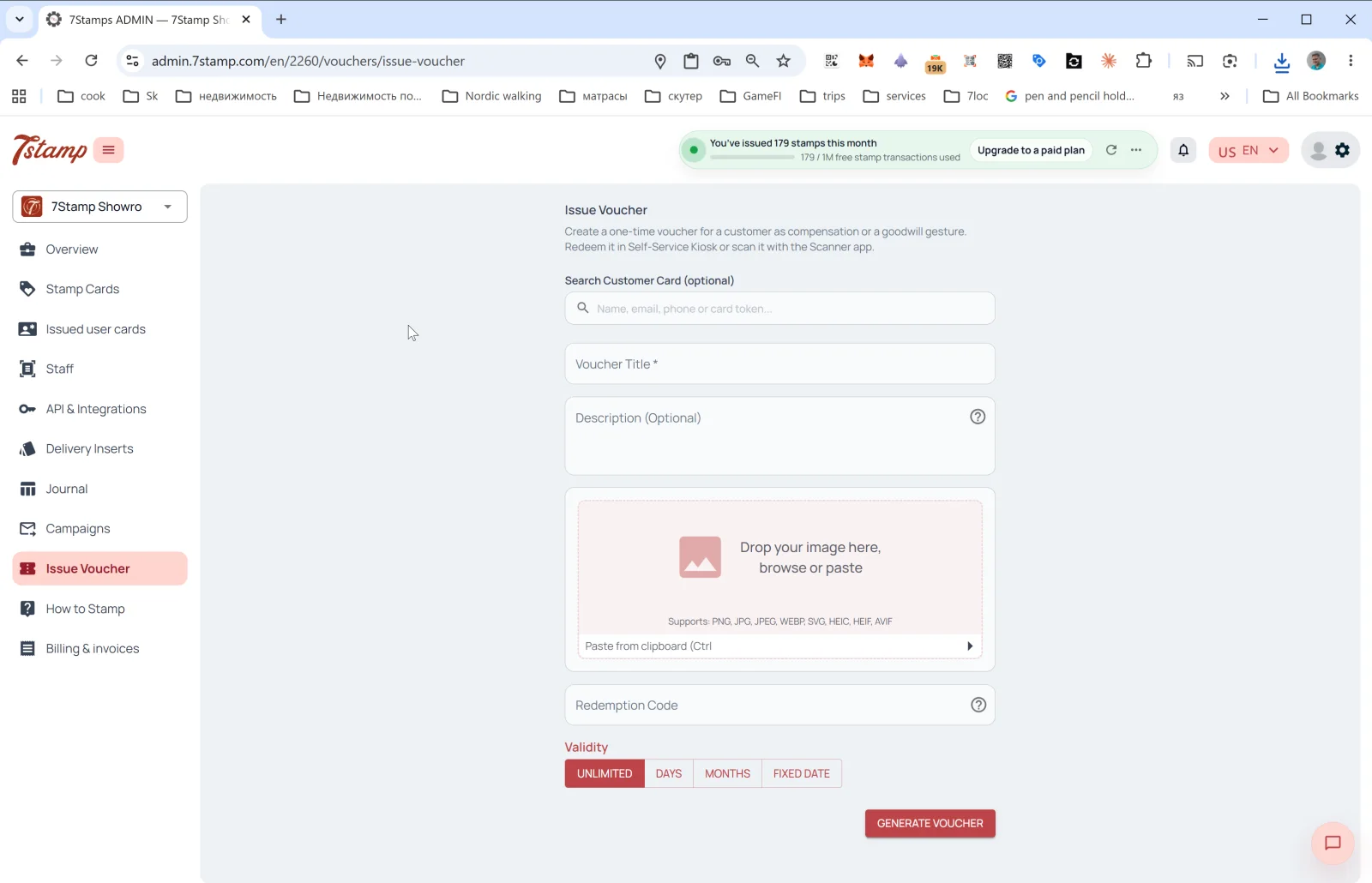
साइड मेनूमधील Issue Voucher विभागातून मुख्य स्टॅम्प-संग्रह यंत्रणेबाहेर एकदाच वापरता येणारे व्हाउचर देता येते. ॲडमिनमधील नेमके वर्णन: “Create a one-time voucher for a customer as compensation or a goodwill gesture. Redeem it in Self-Service Kiosk or scan it with the Scanner app.” (भरपाई किंवा सदिच्छा म्हणून ग्राहकासाठी एकदाच वापरता येणारे व्हाउचर तयार करा. ते Self-Service Kiosk मध्ये रिडीम करा किंवा Scanner ॲपने स्कॅन करा.)
Issue Voucher कधी वापरावे
- मुख्य वाढदिवस ऑटोमेशनबाहेर वाढदिवसाची भेट.
- सेवेतील त्रुटीसाठी भरपाई (“माफ करा, ऑर्डर थंड पोहोचली”).
- B2B भेट — पत्रकार, ब्लॉगर किंवा पार्टनरसाठी.
- कार्यक्रमाचे कूपन — पार्टी, उद्घाटन किंवा टेस्टिंगचे निमंत्रण.
- निष्ठेचा बोनस — कार्डशी न जोडता निष्ठावान ग्राहकाची दखल घेणे.
- छापील कूपन — व्हाउचर तयार करून प्रत्यक्ष देण्यासाठी छापा.
फॉर्ममधील फील्ड्स
- Search Customer Card (optional) —
Name, email, phone or card tokenवापरून विशिष्ट ग्राहक शोधा. ग्राहक निवडल्यास व्हाउचर त्याच्या कार्डशी जोडले जाते. रिकामे ठेवल्यास अद्वितीय Redeem Code असलेले “मुक्त” व्हाउचर तयार होते, जे तुम्ही कोणालाही देऊ शकता. - Voucher Title * — व्हाउचरचे शीर्षक (अनिवार्य).
- Description (Optional) — वर्णन.
- Image — व्हाउचरची प्रतिमा. समर्थित फॉरमॅट: PNG, JPG, JPEG, WEBP, SVG, HEIC, HEIF, AVIF. क्लिपबोर्डवरून पेस्ट करता येते (Ctrl+V).
- Redeem Code — रिडीम करण्याचा कोड (पर्यायी). तो सुरू केल्यास प्रणाली कोडसाठी QR आणि रेषीय बारकोड आपोआप तयार करते.
- Validity — वैधता कालावधी: UNLIMITED / DAYS / MONTHS / FIXED DATE.
GENERATE VOUCHER दाबा — व्हाउचर तयार होते आणि (तुम्ही ग्राहक निवडला असल्यास) त्याच्या वॉलेटमध्ये पोहोचते. ग्राहक निवडलेला नसल्यास व्हाउचर डाउनलोड / छापून हाताने देता येते.
Visual walkthrough
Use the screen sets below as a visual companion to the article. Open any image to inspect it at full size.