
14. API & การเชื่อมต่อ
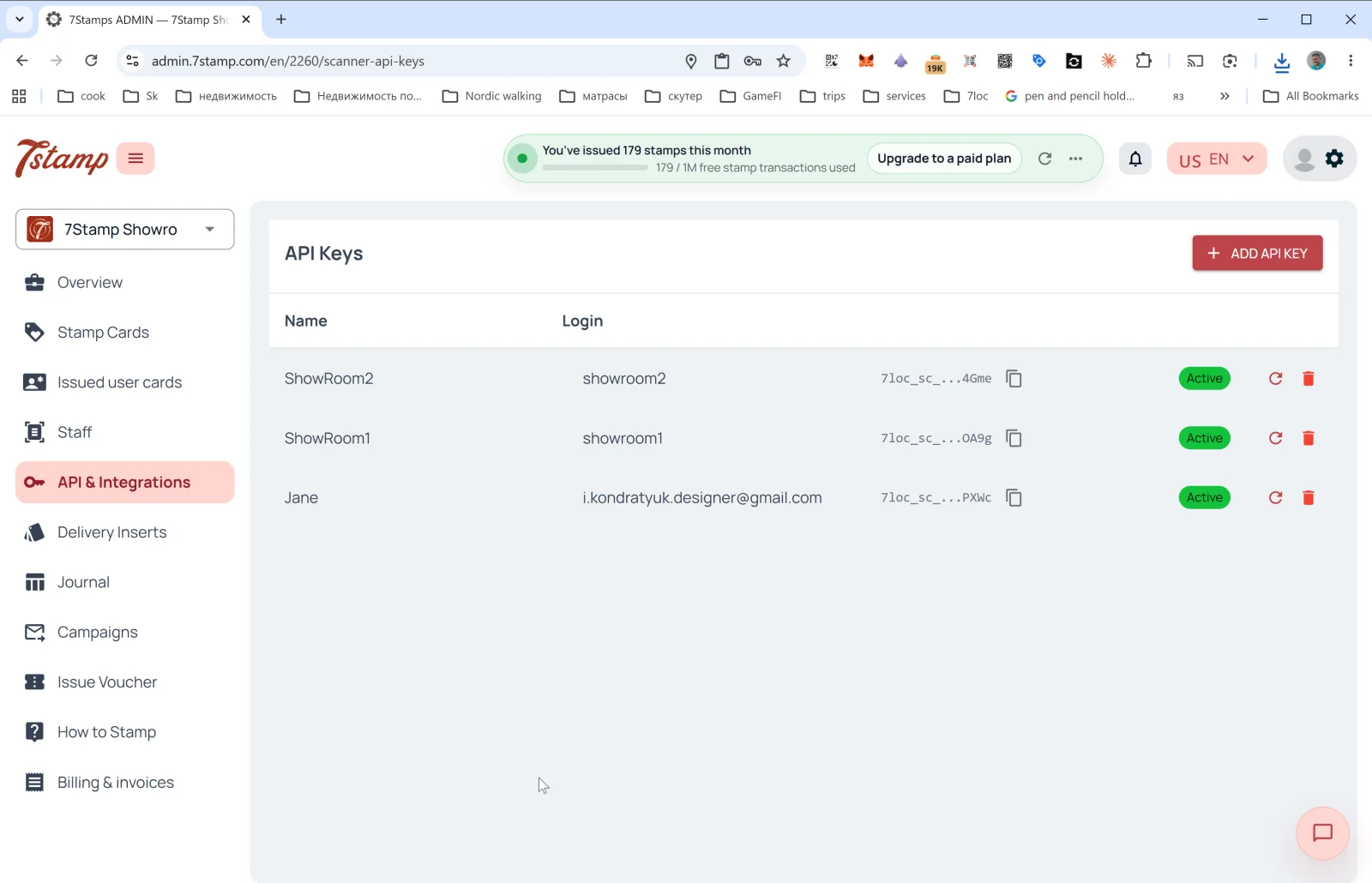
ส่วน API & Integrations (API และการเชื่อมต่อ) มีเครื่องมือสำหรับเชื่อมต่อ 7Stamp กับระบบภายนอกของคุณผ่านโปรแกรม เช่น CRM, POS, ERP, ระบบวิเคราะห์ข้อมูล และบอทในแอปแชท
API Keys
หน้าหลักของส่วนนี้คือรายการ API key โดยมีคอลัมน์ดังนี้:
- Name — ชื่อคีย์ (โดยปกติตรงกับชื่อพนักงานที่ผูกไว้)
- Login — บัญชีพนักงานที่คีย์ผูกอยู่
- API Key — ตัวคีย์ (ขึ้นต้นด้วย
7loc_sc_...ซ่อนไว้โดยค่าเริ่มต้น และคัดลอกได้ในคลิกเดียว) - Status —
Active - 🔄 — สร้างคีย์ใหม่แทนคีย์เดิม
- 🗑️ — ลบคีย์
การสร้าง API key
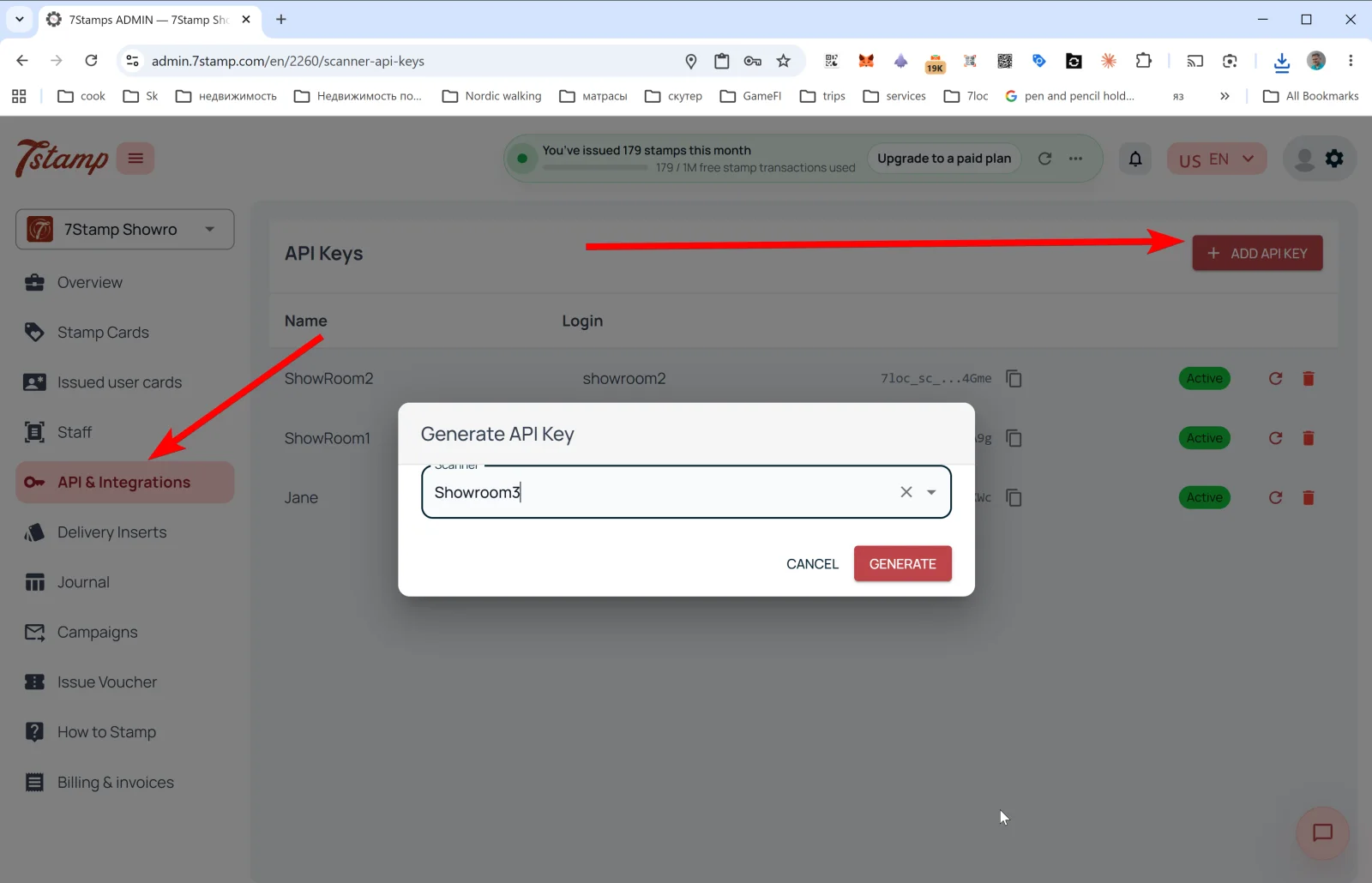
แตะ + ADD API KEY — หน้าต่าง Generate API Key จะเปิดขึ้น:
- Scanner — เมนูแบบเลื่อนลงสำหรับเลือกบัญชีพนักงานที่จะผูกกับคีย์ (พนักงานหนึ่งคนมีคีย์ได้หนึ่งคีย์)
- ปุ่ม CANCEL / GENERATE
หลังจากกด GENERATE ระบบจะสร้างคีย์และแสดงในรายการ ให้คัดลอกทันที เพราะอาจไม่แสดงคีย์แบบเต็มอีก
สิ่งที่ทำได้ผ่าน API
- ออกบัตร ให้ลูกค้าด้วยอีเมลหรือหมายเลขโทรศัพท์
- เพิ่มแสตมป์ ให้ลูกค้ารายใดรายหนึ่ง
- ออกบัตรกำนัล (จากเทมเพลตหรือกำหนดเอง พร้อม Redeem Code)
- ใช้สิทธิ์บัตรกำนัล (หากคุณทำงานผ่านระบบ POS ของคุณเอง)
- อ่านสถานะ ของบัตร ความคืบหน้า และประวัติ
- สมัครรับ Webhooks เพื่อรับเหตุการณ์แบบเรียลไทม์
Webhooks
Webhooks ส่งเหตุการณ์ของบัตรไปยังระบบภายนอก เหตุการณ์ที่รองรับ (ดูอภิธานศัพท์เหตุการณ์):
SCAN,DELIVERY_INSERT.REWARD_EARNED,LOTTERY_WIN.VOUCHER_ISSUED,ADMIN_VOUCHER_ISSUE,VOUCHER_REDEEMED.CARD_JOINED,CARD_ADDED_TO_WALLET,CARD_REMOVED_FROM_WALLET.CARD_CAMPAIGN,BIRTHDAY_GREETING.
ตัวอย่าง payload ของ Webhook
{
  "entity": "card_event",
  "action": "created",
  "entity_id": 707,
  "event_id": "8f05e58decec48e09d328f0edebbacf6",
  "profile_id": 2,
  "profile_name": "Your Business",
  "profile_lang": "en",
  "data": {
    "event_type": "SCAN",
    "scanned_at": "2026-10-01T09:19:24.179424",
    "user_card_id": 10,
    "card_template_id": 14,
    "card_template_name": "Collect your stamps!",
    "stamps_added": 3,
    "stamps_before": 1,
    "stamps_after": 4,
    "amount": null,
    "external_order_id": "ORDER-1001",
    "workplace": { "id": 4, "name": "Bar Counter" },
    "device_type": null,
    "external_id": "odoo_contact_8821",
    "external_source": "odoo",
    "issued_vouchers": [
      {
        "id": 174,
        "unique_code": "100425813507",
        "stamp_number": 4,
        "issued_at": "2026-10-01T09:19:24.191836",
        "expires_at": "2027-01-01T23:59:59",
        "status": "ACTIVE",
        "voucher_template_id": 58,
        "voucher_description": "Free coffee",
        "voucher_image_url": "https://..."
      }
    ],
    "achieved_goals": [],
    "user": {
      "id": 2,
      "name": "Anna",
      "full_name": "Anna Smith",
      "email": "anna@example.com",
      "telegram_chat_id": null,
      "telegram_username": null,
      "whatsapp_phone": null,
      "birth_date": null
    }
  }
}
การเชื่อมต่อ POS สำเร็จรูป
- Poster — การเชื่อมต่อสำเร็จรูป เชื่อมได้ในไม่กี่คลิก
- Serve — การเชื่อมต่อสำเร็จรูป
- เครื่องแคชเชียร์อื่นๆ — ทำตามคำขอ ฟรีหากทำได้ในทางเทคนิค (คือเครื่องแคชเชียร์ของคุณมี API แบบเปิดหรือ Webhooks)
การส่งข้อความผ่านแอปแชทด้วย 7loc.com
สำหรับการส่งข้อความผ่าน WhatsApp, Telegram และ Viber จะใช้การเชื่อมต่อกับ 7loc.com เมื่อเปิดใช้งานแล้ว ช่องทาง “messengers” จะใช้ได้ใน Campaigns ควบคู่กับ PUSH และ Email
สถานการณ์แบบไม่ต้องเขียนโค้ด: Zapier และ Make
7Stamp API + Webhooks ทำงานร่วมกับ Zapier และ Make (Integromat) ได้ ทำให้คุณสร้างสถานการณ์อัตโนมัติได้โดยไม่ต้องเขียนโค้ด:
- “เมื่อเกิด
VOUCHER_REDEEMED— เพิ่มแท็กใน Mailchimp” - “เมื่อเกิด
REWARD_EARNED— ส่งการแจ้งเตือนไปยัง Slack” - “เมื่อเกิด
BIRTHDAY_GREETING— สร้างงานใน CRM”
คำแนะนำแบบภาพ
ใช้ชุดหน้าจอด้านล่างเป็นตัวช่วยทางภาพสำหรับบทความ คลิกรูปภาพใดก็ได้เพื่อดูในขนาดเต็ม