
14. API & Integrations
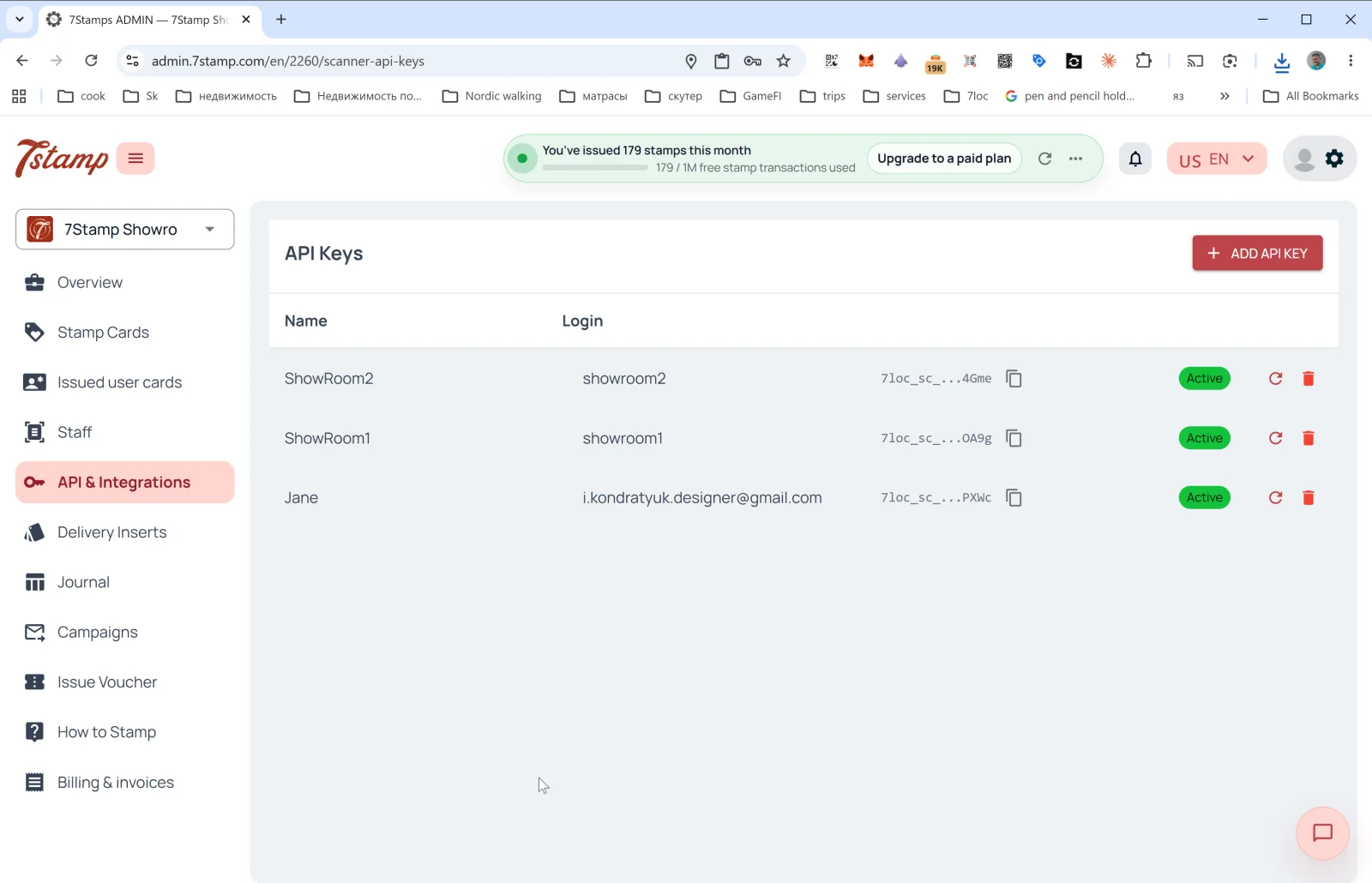
The API & Integrations section contains tools for programmatic integration of 7Stamp with your external systems — CRM, POS, ERP, analytics, messenger bots.
API Keys
The main page of the section is the API key list. Columns:
- Name — key name (usually matches the linked Staff name).
- Login — the Staff login the key is tied to.
- API Key — the key itself (starts with
7loc_sc_..., hidden by default, copyable with one click). - Status —
Active. - 🔄 — regenerate the key.
- 🗑️ — delete the key.
Creating an API key
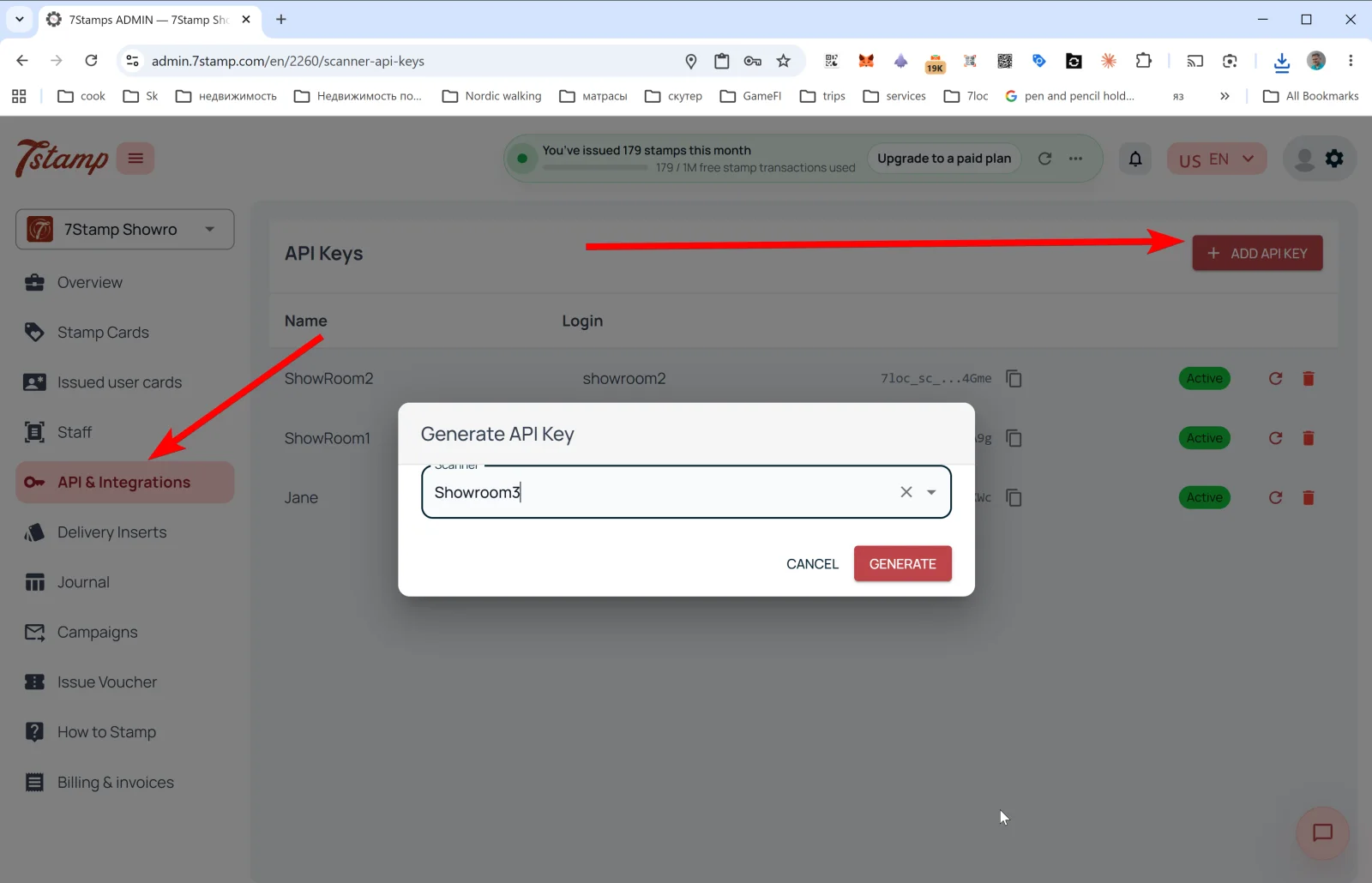
Tap + ADD API KEY — the Generate API Key popup opens:
- Scanner — dropdown to pick the Staff Login the key will be bound to (one Staff can have one key).
- Buttons CANCEL / GENERATE.
After GENERATE the key is created and appears in the list. Copy it immediately — the full key may not be shown again.
What you can do via the API
- Issue a card to a customer by email/phone.
- Add a stamp to a specific customer.
- Issue a voucher (templated or custom, with Redeem Code).
- Redeem a voucher (if you work via your own POS).
- Read state of the card, progress, history.
- Subscribe to Webhooks to receive events in real time.
Webhooks
Webhooks send card events to an external system. Supported (see the event glossary):
SCAN,DELIVERY_INSERT.REWARD_EARNED,LOTTERY_WIN.VOUCHER_ISSUED,ADMIN_VOUCHER_ISSUE,VOUCHER_REDEEMED.CARD_JOINED,CARD_ADDED_TO_WALLET,CARD_REMOVED_FROM_WALLET.CARD_CAMPAIGN,BIRTHDAY_GREETING.
Webhook payload example
{
  "entity": "card_event",
  "action": "created",
  "entity_id": 707,
  "event_id": "8f05e58decec48e09d328f0edebbacf6",
  "profile_id": 2,
  "profile_name": "Your Business",
  "profile_lang": "en",
  "data": {
    "event_type": "SCAN",
    "scanned_at": "2026-10-01T09:19:24.179424",
    "user_card_id": 10,
    "card_template_id": 14,
    "card_template_name": "Collect your stamps!",
    "stamps_added": 3,
    "stamps_before": 1,
    "stamps_after": 4,
    "amount": null,
    "external_order_id": "ORDER-1001",
    "workplace": { "id": 4, "name": "Bar Counter" },
    "device_type": null,
    "external_id": "odoo_contact_8821",
    "external_source": "odoo",
    "issued_vouchers": [
      {
        "id": 174,
        "unique_code": "100425813507",
        "stamp_number": 4,
        "issued_at": "2026-10-01T09:19:24.191836",
        "expires_at": "2027-01-01T23:59:59",
        "status": "ACTIVE",
        "voucher_template_id": 58,
        "voucher_description": "Free coffee",
        "voucher_image_url": "https://..."
      }
    ],
    "achieved_goals": [],
    "user": {
      "id": 2,
      "name": "Anna",
      "full_name": "Anna Smith",
      "email": "anna@example.com",
      "telegram_chat_id": null,
      "telegram_username": null,
      "whatsapp_phone": null,
      "birth_date": null
    }
  }
}
Ready-made POS integrations
- Poster — ready-made integration, connects in a few clicks.
- Serve — ready-made integration.
- Other tills — made on request. Free if technically feasible (i.e., your till exposes an open API or Webhooks).
Messenger broadcasts via 7loc.com
For WhatsApp, Telegram, Viber broadcasts, the 7loc.com integration is connected. Once active, the “messengers” channel becomes available in Campaigns next to PUSH and Email.
No-code scenarios: Zapier and Make
7Stamp API + Webhooks work with Zapier and Make (Integromat), letting you build scenarios without coding:
- “When
VOUCHER_REDEEMED— add a tag in Mailchimp”. - “When
REWARD_EARNED— send a notification to Slack”. - “When
BIRTHDAY_GREETING— create a task in CRM”.
Visual walkthrough
Use the screen sets below as a visual companion to the article. Open any image to inspect it at full size.