
14. API & इंटीग्रेशंस
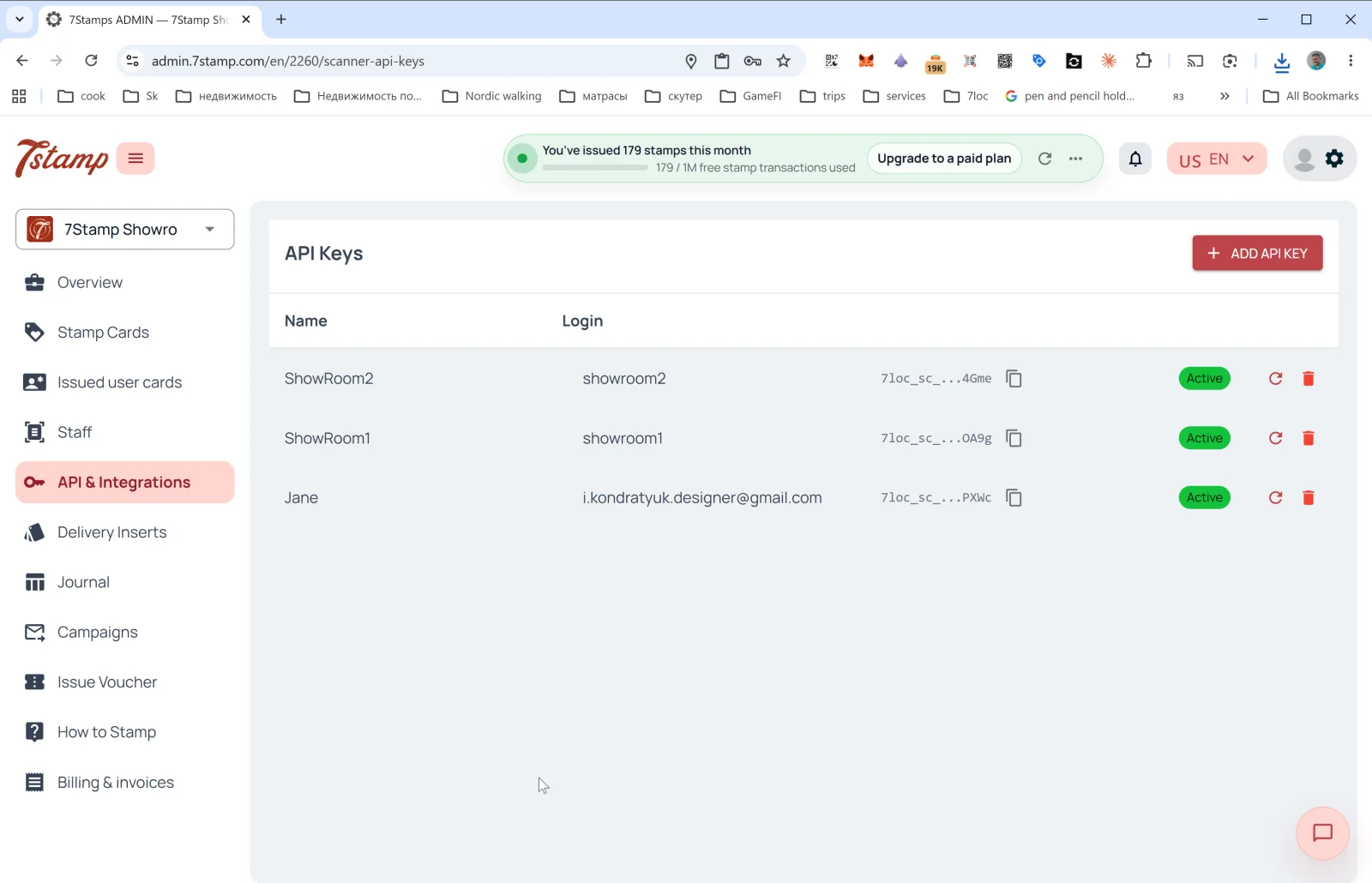
API & Integrations (API और इंटीग्रेशंस) सेक्शन में 7Stamp को आपके बाहरी सिस्टम — CRM, POS, ERP, एनालिटिक्स, मैसेंजर बॉट — से प्रोग्राम के ज़रिए जोड़ने के टूल हैं।
API Keys
सेक्शन का मुख्य पेज API कुंजियों की सूची है। कॉलम:
- Name — कुंजी का नाम (आम तौर पर जुड़े हुए कर्मचारी के नाम जैसा)।
- Login — वह कर्मचारी लॉगिन जिससे कुंजी जुड़ी है।
- API Key — खुद कुंजी (
7loc_sc_...से शुरू होती है, डिफ़ॉल्ट रूप से छिपी रहती है, एक क्लिक में कॉपी होती है)। - Status —
Active। - 🔄 — कुंजी दोबारा जनरेट करें।
- 🗑️ — कुंजी हटाएं।
API कुंजी बनाना
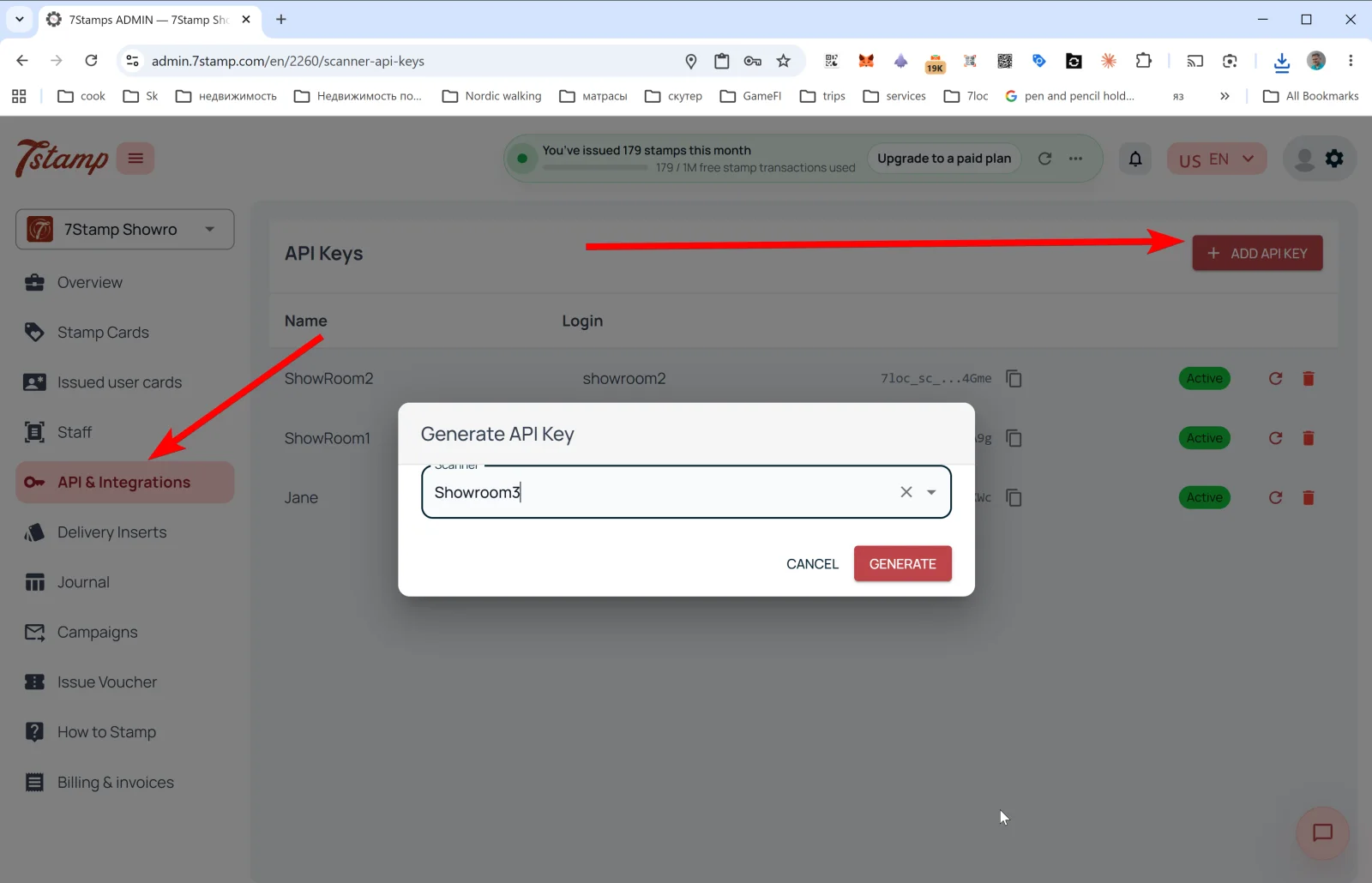
+ ADD API KEY पर टैप करें — Generate API Key पॉपअप खुलता है:
- Scanner — ड्रॉपडाउन, जिसमें वह कर्मचारी लॉगिन चुनें जिससे कुंजी जुड़ेगी (एक कर्मचारी की एक ही कुंजी हो सकती है)।
- बटन CANCEL / GENERATE।
GENERATE के बाद कुंजी बन जाती है और सूची में दिखती है। इसे तुरंत कॉपी करें — पूरी कुंजी दोबारा शायद न दिखे।
API से आप क्या कर सकते हैं
- ईमेल/फ़ोन से ग्राहक को कार्ड जारी करें।
- किसी खास ग्राहक को स्टैम्प जोड़ें।
- वाउचर जारी करें (टेम्पलेट से या कस्टम, Redeem Code के साथ)।
- वाउचर रिडीम करें (अगर आप अपने POS से काम करते हैं)।
- कार्ड की स्थिति पढ़ें, प्रगति और इतिहास।
- रियल टाइम में इवेंट पाने के लिए Webhooks सब्सक्राइब करें।
Webhooks
Webhooks कार्ड के इवेंट बाहरी सिस्टम को भेजते हैं। समर्थित इवेंट (इवेंट शब्दावली देखें):
SCAN,DELIVERY_INSERT।REWARD_EARNED,LOTTERY_WIN।VOUCHER_ISSUED,ADMIN_VOUCHER_ISSUE,VOUCHER_REDEEMED।CARD_JOINED,CARD_ADDED_TO_WALLET,CARD_REMOVED_FROM_WALLET।CARD_CAMPAIGN,BIRTHDAY_GREETING।
Webhook payload का उदाहरण
{
  "entity": "card_event",
  "action": "created",
  "entity_id": 707,
  "event_id": "8f05e58decec48e09d328f0edebbacf6",
  "profile_id": 2,
  "profile_name": "Your Business",
  "profile_lang": "en",
  "data": {
    "event_type": "SCAN",
    "scanned_at": "2026-10-01T09:19:24.179424",
    "user_card_id": 10,
    "card_template_id": 14,
    "card_template_name": "Collect your stamps!",
    "stamps_added": 3,
    "stamps_before": 1,
    "stamps_after": 4,
    "amount": null,
    "external_order_id": "ORDER-1001",
    "workplace": { "id": 4, "name": "Bar Counter" },
    "device_type": null,
    "external_id": "odoo_contact_8821",
    "external_source": "odoo",
    "issued_vouchers": [
      {
        "id": 174,
        "unique_code": "100425813507",
        "stamp_number": 4,
        "issued_at": "2026-10-01T09:19:24.191836",
        "expires_at": "2027-01-01T23:59:59",
        "status": "ACTIVE",
        "voucher_template_id": 58,
        "voucher_description": "Free coffee",
        "voucher_image_url": "https://..."
      }
    ],
    "achieved_goals": [],
    "user": {
      "id": 2,
      "name": "Anna",
      "full_name": "Anna Smith",
      "email": "anna@example.com",
      "telegram_chat_id": null,
      "telegram_username": null,
      "whatsapp_phone": null,
      "birth_date": null
    }
  }
}
तैयार POS इंटीग्रेशंस
- Poster — तैयार इंटीग्रेशन, कुछ क्लिक में जुड़ जाता है।
- Serve — तैयार इंटीग्रेशन।
- दूसरे कैश रजिस्टर — अनुरोध पर बनाए जाते हैं। तकनीकी रूप से संभव हो तो मुफ़्त (यानी आपके कैश रजिस्टर में ओपन API या Webhooks हों)।
7loc.com से मैसेंजर ब्रॉडकास्ट
WhatsApp, Telegram और Viber पर ब्रॉडकास्ट के लिए 7loc.com इंटीग्रेशन जोड़ा जाता है। चालू होने के बाद Campaigns में PUSH और Email के साथ “messengers” चैनल भी उपलब्ध हो जाता है।
बिना कोड के सिनेरियो: Zapier और Make
7Stamp API + Webhooks Zapier और Make (Integromat) के साथ काम करते हैं, जिससे आप बिना कोडिंग के सिनेरियो बना सकते हैं:
- “जब
VOUCHER_REDEEMEDहो — Mailchimp में टैग जोड़ें”। - “जब
REWARD_EARNEDहो — Slack पर सूचना भेजें”। - “जब
BIRTHDAY_GREETINGहो — CRM में टास्क बनाएं”।
दृश्य मार्गदर्शिका
Use the screen sets below as a visual companion to the लेख. खोलें any image to inspect it at full size.