
17. Billing & invoices — 요금제와 결제
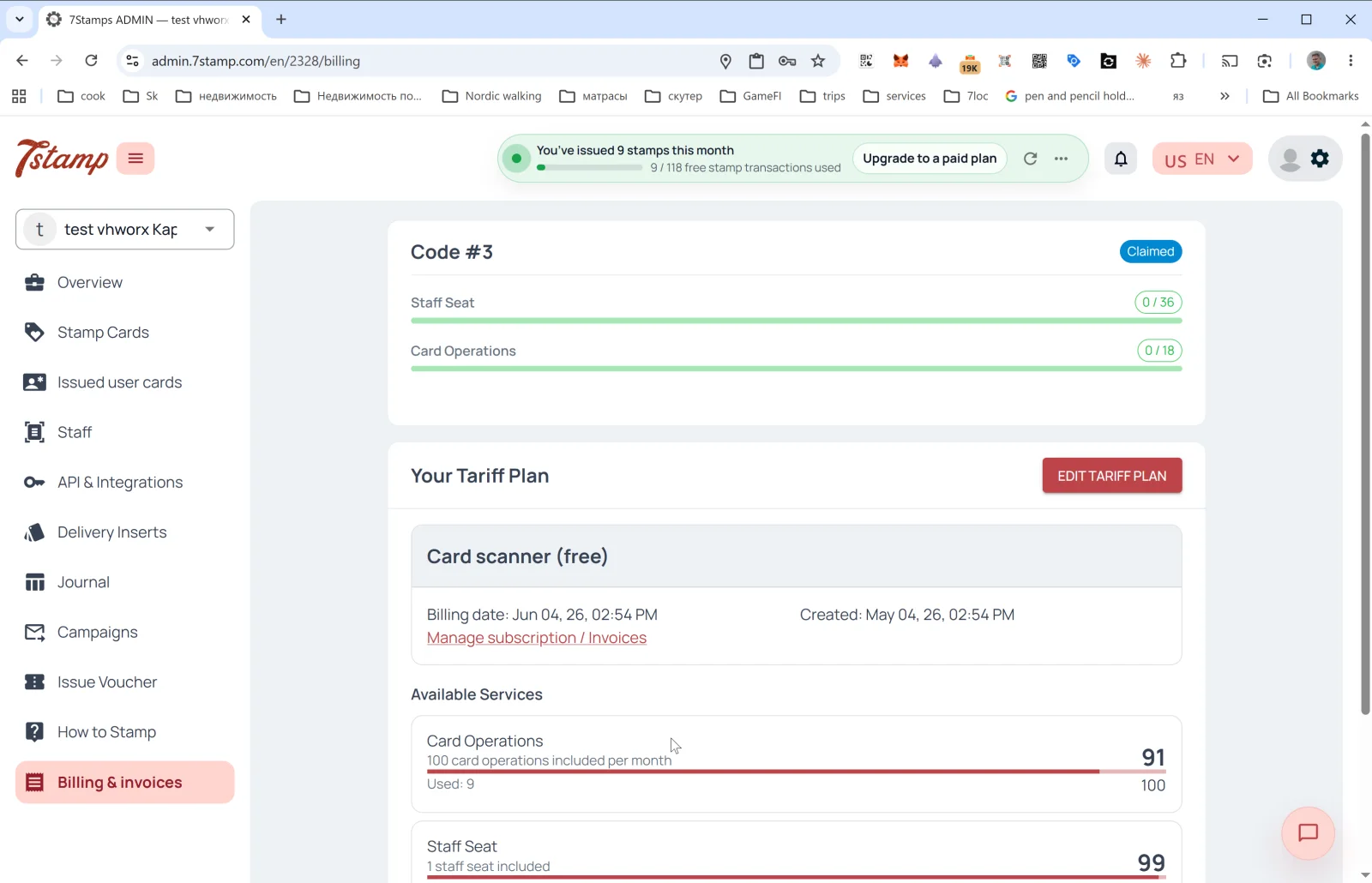
사이드 메뉴의 Billing & invoices 섹션에서 현재 요금제, 한도 사용량, 청구서 내역을 확인할 수 있습니다.
요금제
- Free Forever — 포함 사항:
- 직원 로그인 1개.
- 월 최대 25 Card Operations.
- 무제한 Wallet push notifications.
- 월 100 Emails.
- 디지털 스탬프 카드.
- QR 코드 가입과 유료 플랜의 모든 기능: 모든 스탬프 적립 워크플로, 모든 리워드 유형, 마케팅 캠페인 및 자동화. 한도만 다릅니다: 추가 사용량이 없으며 유료 Add-ons에는 유료 플랜이 필요합니다.
- Growth — 포함 사항:
- 직원 로그인 1개.
- 월 2,500 Card Operations.
- 무제한 Wallet push notifications.
- 월 2,500 Emails.
- 모든 스탬프 적립 방식(Staff Scanner, Self-Service Kiosk, Autopilot Mode, Terminal Mode, Receipt QR, Delivery Inserts).
- 마케팅 캠페인과 자동화.
- Award, Voucher, Lottery 보상, Milestone Rewards, Birthday Rewards, Win-back Automation.
- Growth Annual — 포함 사항:
- Growth 요금제의 모든 기능.
- 월 2,500 Card Operations.
- 무제한 Wallet push notifications.
- 월 2,500 Emails.
- 무료 API 이용.
- 선택형 유료 Add-ons.
- Growth Annual 결제 — 10개월 요금으로 12개월 이용.
- EUR / UAH 지역별 요금 — 요금은 USD 기준이며, EU·EEA·영국·스위스는 EUR, 우크라이나는 UAH입니다. 청구 통화는 비즈니스 계정의 국가에 따라 정해집니다.
- Enterprise / On-Premise Deployment — 대규모 고객, 프랜차이즈, 데이터 주권 요건이 있는 경우 요청 시 개별 조건을 제공합니다.
페이지에 표시되는 내용
Access Codes 섹션
파트너 코드를 활성화했다면 상단에 진행률 표시줄과 함께 Code #N — Claimed 블록이 나타납니다.
- Staff Seat —
0 / 36(코드로 제공되는 수량 중 사용한 수량). - Card Operations —
0 / 18(코드로 제공되는 수량 중 사용한 수량). - Emails — 코드에 마케팅/대량 발송 이메일 한도가 포함된 경우 그 한도.
하나의 Access Code에는 하나 이상의 Packages가 들어 있을 수 있습니다. 패키지의 정확한 구성은 파트너 스토어에서 정합니다.
Your Tariff Plan 섹션
- 헤더: Your Tariff Plan + EDIT TARIFF PLAN 버튼(요금제 변경).
- 현재 요금제 카드: 이름(
Free Forever,Growth또는Growth Annual), Billing date(다음 결제일), Created(요금제 활성화일). - Manage subscription / Invoices 링크 — 구독을 관리하고 청구서 내역을 확인합니다.
Available Services 섹션
서비스별 한도 사용량:
- Card Operations —
Used: 9 / 25 included per month. 진행률 표시줄. 일부 관리자 배너에서는 Card Operation을 거래라고 부릅니다. - Emails — Default email 또는 Branded emails로 보낸 마케팅/대량 발송 이메일. Your own SMTP server로 보낸 이메일은 무제한이며 Emails 한도에 포함되지 않습니다.
- Wallet push notifications — 무제한 무료이며 초과 사용량에 포함되지 않습니다.
- Staff Seat —
1 staff seat included. 사용 중인 수량이 표시됩니다.
Access Codes — 파트너 방식
Access Code는 7Stamp 파트너 스토어에서 구매한 선불 코드입니다. 자신의 비즈니스 또는 파트너/White-label 구성에 속한 고객사 비즈니스에 하나 이상의 Packages를 활성화합니다. 보통 Package에는 Staff Seat 1개, 월 2,500 Card Operations, 무제한 Wallet push notifications, 월 2,500 Emails가 포함되지만, 정확한 코드 구성은 항상 관리자 패널에서 확인하세요.
다음과 같은 경우:
- 비즈니스라면 — 파트너에게 Access Code를 요청하고 Billing & invoices에 입력한 뒤, Package를 올바른 비즈니스에 배정합니다.
- **파트너(에이전시, 컨설턴트, POS 공급업체)**라면 — White-label로 자체 요금제를 만들어 고객사에 청구하고, 7Stamp에는 직원 로그인당 정가의 50%인 단일 파트너 요율을 지불합니다. 프로모션이나 선불 계약에는 파트너 스토어에서 정가로 Access Codes를 구매해 자신의 비즈니스나 고객사 비즈니스에 Packages를 배정합니다.
Access Codes
Access Code 리소스는 기본 요금제보다 먼저 사용되며, 누적되지 않고 매월 갱신됩니다. 설정 방법은 Access Codes - 활성화, 배정, 패키지 관리를 확인하세요. 정확한 우선순위는 Access Codes와 요금제 비교에서 확인할 수 있습니다.
추천 프로그램(Referral Program)
모든 계정은 개인 추천 링크를 받고, 추천한 비즈니스에 대해 보상을 받을 수 있습니다. 지원팀에 요청하면 연결해 드립니다.
요금제 선택 팁. Free Forever로 시작하세요. 프로그램이 일상 업무가 되어 월 25 Card Operations 또는 100 Emails 이상이 필요해지면 Growth로 전환하세요. 1년 동안 7Stamp를 계속 사용할 것이 확실하다면 Growth Annual을 선택하세요. 10개월 요금으로 12개월을 이용할 수 있습니다.
Card Operation으로 계산되는 항목
Card Operation 1회는 고객 카드에서 이루어지는 하나의 거래입니다. 하나의 거래 안에서 일어나는 모든 일은 한 번만 계산됩니다: 여러 개의 스탬프, 그 거래로 완성되는 리워드, 스캔 중의 Lottery 추첨. 계정에 Access Code가 있으면 사용량은 먼저 코드의 할당량에서, 그다음 플랜에서 차감됩니다.
계산됨, 작업당 1회:
- 직원이 카드를 스캔하고 스탬프를 적립합니다.
- 직원이 카드를 스캔하고 스탬프를 차감합니다.
- 직원이 카드를 스캔했지만 구매 금액이 스탬프 1개 가격보다 낮아 스탬프가 적립되지 않습니다.
- 고객이 이미 카드를 가지고 있을 때 POS 단말기와 통합(Integration API / POS, Poster, 결제 단말기)을 통해 이루어지는 같은 스캔.
- 고객이 스탬프 카드에 연결된 매장에서 영수증을 스캔합니다.
계산되지 않음:
- Voucher 사용(Scanner, 고객 본인 또는 API를 통한 사용) 및 Voucher 삭제.
- 관리자 패널에서 수동으로 발급한 Voucher.
- 캠페인과 생일 축하로 발급되는 Vouchers. 해당 이메일은 Emails 한도에 포함됩니다.
- 카드 발급(Delivery Insert 또는 가입 QR을 통한 발급 포함). 카드와 함께 스탬프가 적립되어도 마찬가지입니다. 따라서 신규 고객이 단말기에서 한 첫 구매는 계산되지 않습니다.
- 스캔 전 카드 확인, 고객 검색, 카드 보기, 생일 변경.
시각적 안내
아래 화면 세트를 문서의 시각적 보조 자료로 사용하세요. 이미지를 클릭하면 전체 크기로 볼 수 있습니다.