
17. Billing & invoices — plans and payment
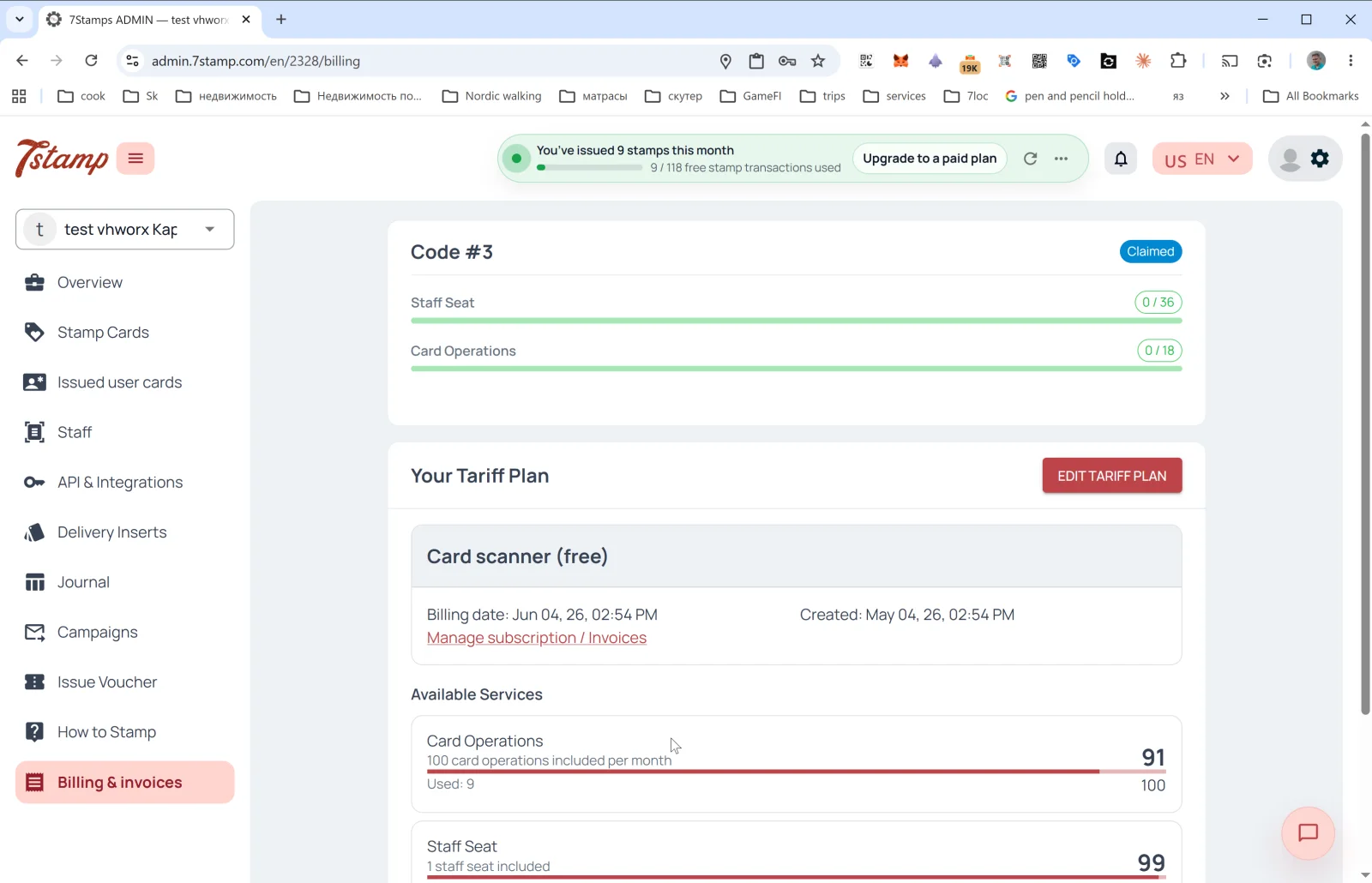
The Billing & invoices section in the side menu shows the current plan, usage of limits, and invoice history.
Pricing plans
- Free Forever — Includes:
- 1 staff login.
- Up to 25 Card Operations per month.
- Unlimited Wallet push notifications.
- 100 Emails per month.
- Digital stamp card.
- QR code signup, plus every feature of the paid plan: all stamping workflows, all reward types, and marketing campaigns and automation. Only the limits differ: no additional usage, and paid Add-ons need a paid plan.
- Growth — Includes:
- 1 staff login.
- 2,500 Card Operations per month.
- Unlimited Wallet push notifications.
- 2,500 Emails per month.
- All stamping workflows (Staff Scanner, Self-Service Kiosk, Autopilot Mode, Terminal Mode, Receipt QR, and Delivery Inserts).
- Marketing campaigns and automation.
- Award, Voucher, and Lottery rewards, Milestone Rewards, Birthday Rewards, Win-back Automation.
- Growth Annual — Includes:
- Everything in the Growth plan.
- 2,500 Card Operations per month.
- Unlimited Wallet push notifications.
- 2,500 Emails per month.
- Free API access.
- Optional paid Add-ons.
- Growth Annual billing - pay for 10 months, get 12.
- EUR / UAH regional pricing — prices in USD; EUR for the EU, EEA, UK and Switzerland; UAH for Ukraine. The billing currency follows the country of your business account.
- Enterprise / On-Premise Deployment — individual terms on request for large clients, franchises, and data-sovereignty requirements.
What’s shown on the page
Access Codes section
If you activated a partner code, a Code #N — Claimed block appears at the top with progress bars:
- Staff Seat —
0 / 36(used out of available under the code). - Card Operations —
0 / 18(used out of available under the code). - Emails — the code’s included marketing/broadcast email allowance, when present.
One Access Code can contain one or more Packages. The partner store controls the exact package contents.
Your Tariff Plan section
- Header: Your Tariff Plan + the EDIT TARIFF PLAN button (change the plan).
- Current plan card: name (
Free Forever,Growth, orGrowth Annual), Billing date (when the next charge happens), Created (when the plan was activated). - The Manage subscription / Invoices link — manage the subscription and view invoice history.
Available Services section
Limit usage per service:
- Card Operations —
Used: 9 / 25 included per month. Progress bar. Some admin banners call a Card Operation a transaction. - Emails — marketing/broadcast emails sent through Default email or Branded emails. Email sent through Your own SMTP server is unlimited and never counted against Emails limits.
- Wallet push notifications — unlimited and free; not counted against overage.
- Staff Seat —
1 staff seat included. How many are taken.
Access Codes — partner scheme
An Access Code is a prepaid code from a 7Stamp partner store purchase. It activates one or more Packages for your own business or for a client business under a partner/white-label setup. A Package usually contains 1 Staff Seat, 2,500 Card Operations/month, unlimited Wallet push notifications, and 2,500 Emails/month, but always check the exact code contents in the admin panel.
If you are:
- A business — ask your partner for an Access Code, enter it in Billing & invoices, and assign the Package to the correct business.
- A partner (agency, consultant, POS vendor) — bill your clients on your own plans with White-label and pay 7Stamp the flat partner rate of 50% of list price per staff login. For promotions or prepaid deals, buy Access Codes at list price in the Partner Store and assign Packages to your own or client businesses.
Access Code resources are consumed before the base tariff plan and refresh monthly instead of accumulating. For setup steps, read Access Codes - activate, assign, and manage packages. For the exact priority order, read Access Codes vs tariff plans.
Referral Program
Every account can get a personal referral link and a reward for referred businesses. Connected on request via support.
Plan choice tip. Start with Free Forever. If the program becomes a daily workflow and you need more than 25 Card Operations or 100 Emails per month, move to Growth. If you know 7Stamp will stay in your operation for the year, choose Growth Annual — pay for 10 months, get 12.
What counts as a Card Operation
One Card Operation is one transaction on a customer’s card. Everything inside one transaction counts once: several stamps, the reward it completes, or a Lottery spin inside the scan. With an Access Code on the account, operations come from the code’s quota first, then from the plan.
Counted, one per action:
- Staff scan a card and add stamps.
- Staff scan a card and deduct stamps.
- Staff scan a card, but the purchase is below the price of one stamp, so no stamp is added.
- The same scans through tills and integrations (Integration API / POS, Poster, payment terminal) when the customer already has the card.
- A customer scans a receipt at a location bound to a stamp card.
Not counted:
- Redeeming a Voucher (by Scanner, by the customer or via API) and deleting a Voucher.
- A Voucher issued manually from the admin panel.
- Vouchers from campaigns and birthday greetings. Their emails count against Emails.
- Issuing a card, including via a Delivery Insert or a join QR, even when stamps are credited with the card. So a new customer’s first purchase on a terminal is not counted.
- Checking a card before a scan, searching for a customer, viewing a card, or changing a birthday.
Visual walkthrough
Use the screen sets below as a visual companion to the article. Open any image to inspect it at full size.