
17. Billing & invoices — แพ็กเกจและการชำระเงิน
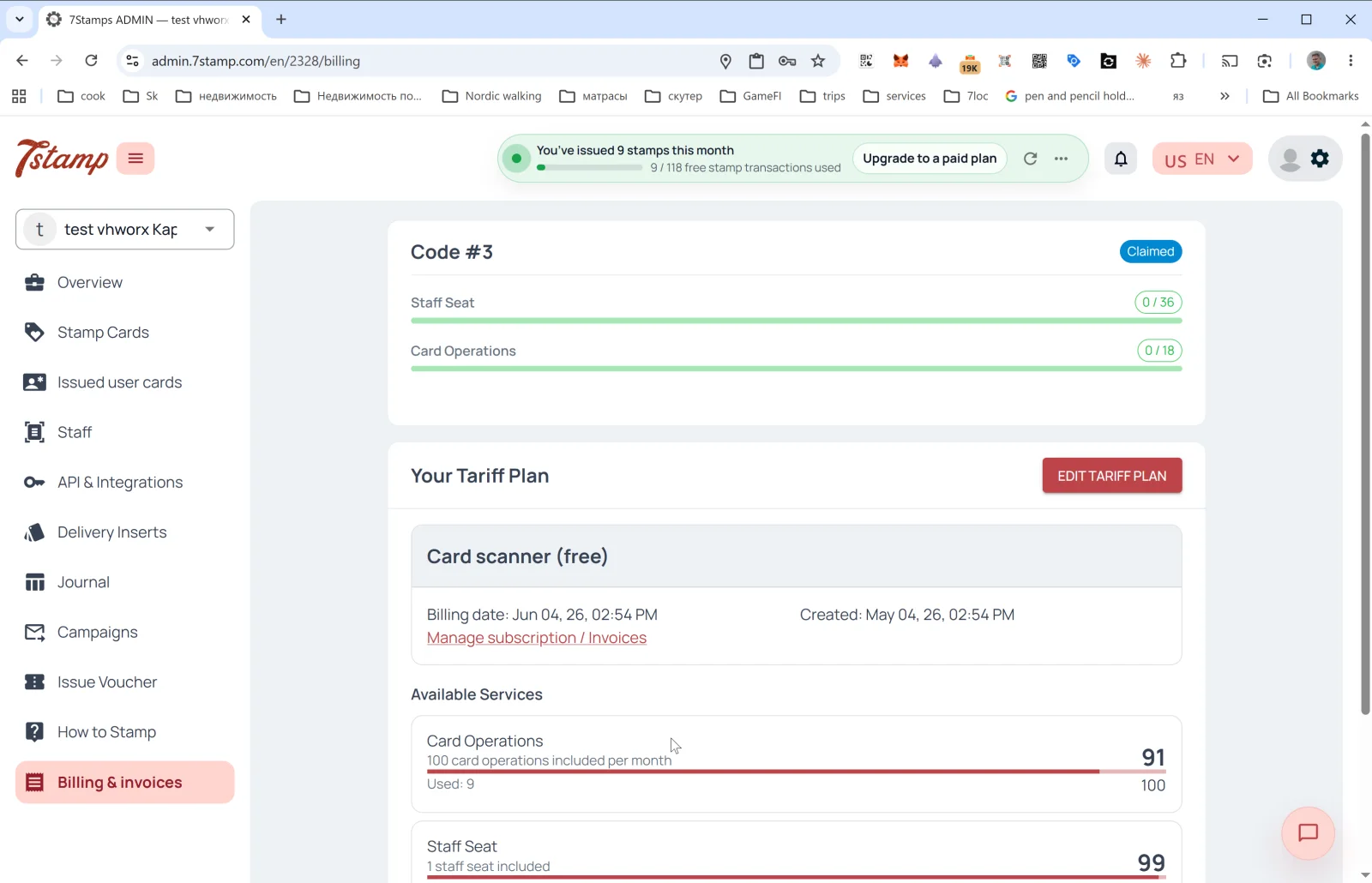
ส่วน Billing & invoices (การเรียกเก็บเงินและใบแจ้งหนี้) ในเมนูด้านข้างแสดงแพ็กเกจปัจจุบัน การใช้งานตามขีดจำกัด และประวัติใบแจ้งหนี้
แพ็กเกจราคา
- Free Forever — ประกอบด้วย:
- 1 บัญชีพนักงาน
- Card Operations สูงสุด 25 ครั้งต่อเดือน
- Wallet push notifications ไม่จำกัด
- Emails 100 ฉบับต่อเดือน
- บัตรสะสมแสตมป์ดิจิทัล
- การสมัครผ่าน QR code พร้อมทุกฟีเจอร์ของแผนแบบชำระเงิน: ทุกวิธีการให้แสตมป์ รางวัลทุกประเภท รวมถึงแคมเปญการตลาดและระบบอัตโนมัติ ต่างกันเพียงขีดจำกัด: ไม่มีการใช้งานเพิ่มเติม และ Add-ons แบบชำระเงินต้องใช้แผนแบบชำระเงิน
- Growth — ประกอบด้วย:
- 1 บัญชีพนักงาน
- Card Operations 2,500 ครั้งต่อเดือน
- Wallet push notifications ไม่จำกัด
- Emails 2,500 ฉบับต่อเดือน
- ทุกวิธีการให้แสตมป์ (Staff Scanner, Self-Service Kiosk, Autopilot Mode, Terminal Mode, Receipt QR และ Delivery Inserts)
- แคมเปญการตลาดและระบบอัตโนมัติ
- รางวัลแบบ Award, Voucher และ Lottery รวมถึง Milestone Rewards, Birthday Rewards และ Win-back Automation
- Growth Annual — ประกอบด้วย:
- ทุกอย่างในแพ็กเกจ Growth
- Card Operations 2,500 ครั้งต่อเดือน
- Wallet push notifications ไม่จำกัด
- Emails 2,500 ฉบับต่อเดือน
- เข้าถึง API ได้ฟรี
- Add-ons แบบชำระเงินเพิ่มเติมตามต้องการ
- การชำระแบบ Growth Annual — จ่าย 10 เดือน ใช้ได้ 12 เดือน
- ราคาตามภูมิภาค EUR / UAH — ราคาเป็น USD; EUR สำหรับ EU, EEA, สหราชอาณาจักร และสวิตเซอร์แลนด์; UAH สำหรับยูเครน สกุลเงินที่เรียกเก็บเป็นไปตามประเทศของบัญชีธุรกิจของคุณ
- Enterprise / On-Premise Deployment — เงื่อนไขเฉพาะตามคำขอสำหรับลูกค้ารายใหญ่ แฟรนไชส์ และองค์กรที่มีข้อกำหนดด้านอธิปไตยของข้อมูล
สิ่งที่แสดงบนหน้า
ส่วน Access Codes
หากคุณเปิดใช้งานรหัสพันธมิตรแล้ว บล็อก Code #N — Claimed จะปรากฏที่ด้านบนพร้อมแถบแสดงความคืบหน้า:
- Staff Seat —
0 / 36(ใช้ไปแล้วจากจำนวนที่มีภายใต้รหัสนี้) - Card Operations —
0 / 18(ใช้ไปแล้วจากจำนวนที่มีภายใต้รหัสนี้) - Emails — โควตาอีเมลการตลาด/อีเมลแบบ broadcast ที่รวมอยู่ในรหัส หากมี
Access Code หนึ่งรหัสอาจมี Package หนึ่งรายการหรือมากกว่า ร้านค้าพันธมิตรเป็นผู้กำหนดเนื้อหาของแต่ละ Package อย่างแน่นอน
ส่วน Your Tariff Plan
- ส่วนหัว: Your Tariff Plan + ปุ่ม EDIT TARIFF PLAN (เปลี่ยนแพ็กเกจ)
- การ์ดแพ็กเกจปัจจุบัน: ชื่อ (
Free Forever,GrowthหรือGrowth Annual), Billing date (วันที่เรียกเก็บเงินครั้งถัดไป), Created (วันที่เปิดใช้งานแพ็กเกจ) - ลิงก์ Manage subscription / Invoices — จัดการการสมัครใช้บริการและดูประวัติใบแจ้งหนี้
ส่วน Available Services
การใช้งานตามขีดจำกัดของแต่ละบริการ:
- Card Operations —
Used: 9 / 25 included per monthพร้อมแถบแสดงความคืบหน้า แบนเนอร์บางส่วนในแผงผู้ดูแลเรียก Card Operation ว่าธุรกรรม - Emails — อีเมลการตลาด/อีเมลแบบ broadcast ที่ส่งผ่าน Default email หรือ Branded emails อีเมลที่ส่งผ่านเซิร์ฟเวอร์ SMTP ของคุณเอง (Your own SMTP server) ไม่จำกัดและไม่นับรวมในขีดจำกัด Emails
- Wallet push notifications — ไม่จำกัดและฟรี ไม่นับเป็นการใช้เกินโควตา
- Staff Seat —
1 staff seat includedแสดงจำนวนที่ใช้ไปแล้ว
Access Codes — แผนสำหรับพันธมิตร
Access Code คือรหัสแบบชำระเงินล่วงหน้าที่ได้จากการซื้อในร้านค้าพันธมิตรของ 7Stamp ใช้เปิดใช้งาน Packages หนึ่งรายการหรือมากกว่าให้กับธุรกิจของคุณเอง หรือให้ธุรกิจลูกค้าภายใต้การตั้งค่าแบบพันธมิตร/White-label โดยปกติ Package หนึ่งรายการประกอบด้วย 1 Staff Seat, Card Operations 2,500 ครั้ง/เดือน, Wallet push notifications ไม่จำกัด และ Emails 2,500 ฉบับ/เดือน แต่ควรตรวจสอบเนื้อหาที่แน่นอนของรหัสในแผงผู้ดูแลระบบทุกครั้ง
หากคุณเป็น:
- ธุรกิจ — ขอ Access Code จากพันธมิตรของคุณ กรอกรหัสใน Billing & invoices แล้วมอบหมาย Package ให้กับธุรกิจที่ถูกต้อง
- พันธมิตร (เอเจนซี ที่ปรึกษา ผู้ให้บริการ POS) — เรียกเก็บเงินจากลูกค้าตามแพ็กเกจของคุณเองด้วย White-label และชำระให้ 7Stamp ในอัตราพันธมิตรคงที่ 50% ของราคาปกติต่อบัญชีพนักงาน สำหรับโปรโมชันหรือดีลแบบชำระล่วงหน้า ให้ซื้อ Access Codes ในราคาปกติจาก Partner Store แล้วมอบหมาย Packages ให้กับธุรกิจของคุณเองหรือธุรกิจของลูกค้า
ทรัพยากรของ Access Code
ทรัพยากรของ Access Code จะถูกใช้ก่อนแพ็กเกจหลัก (base tariff plan) และรีเฟรชทุกเดือนแทนที่จะสะสม อ่านขั้นตอนการตั้งค่าได้ที่ Access Codes - เปิดใช้งาน มอบหมาย และจัดการ Packages และอ่านลำดับความสำคัญที่แน่นอนได้ที่ Access Codes เทียบกับแพ็กเกจราคา
โปรแกรมแนะนำ (Referral Program)
ทุกบัญชีสามารถรับลิงก์แนะนำส่วนตัวและรางวัลสำหรับธุรกิจที่แนะนำเข้ามาได้ เปิดใช้งานได้ตามคำขอผ่านฝ่ายสนับสนุน
เคล็ดลับการเลือกแพ็กเกจ เริ่มต้นด้วย Free Forever หากโปรแกรมกลายเป็นส่วนหนึ่งของงานประจำวันและคุณต้องการ Card Operations มากกว่า 25 ครั้งหรือ Emails มากกว่า 100 ฉบับต่อเดือน ให้เปลี่ยนไปใช้ Growth หากคุณมั่นใจว่า 7Stamp จะอยู่ในงานของคุณตลอดทั้งปี ให้เลือก Growth Annual — จ่าย 10 เดือน ใช้ได้ 12 เดือน
อะไรนับเป็น Card Operation
หนึ่ง Card Operation คือหนึ่งธุรกรรมบนบัตรของลูกค้า ทุกอย่างภายในธุรกรรมเดียวนับเพียงครั้งเดียว: แสตมป์หลายดวง รางวัลที่ครบตามเงื่อนไข หรือการหมุน Lottery ภายในการสแกนนั้น หากบัญชีมี Access Code ระบบจะใช้โควต้าของรหัสก่อน จากนั้นจึงใช้ของแผน
นับ หนึ่งครั้งต่อการดำเนินการ:
- พนักงานสแกนบัตรและเพิ่มแสตมป์
- พนักงานสแกนบัตรและหักแสตมป์
- พนักงานสแกนบัตร แต่ยอดซื้อต่ำกว่าราคาของแสตมป์หนึ่งดวง จึงไม่มีการเพิ่มแสตมป์
- การสแกนแบบเดียวกันผ่านเครื่องคิดเงินและการเชื่อมต่อ (Integration API / POS, Poster, เครื่องชำระเงิน) เมื่อลูกค้ามีบัตรอยู่แล้ว
- ลูกค้าสแกนใบเสร็จที่สถานที่ซึ่งผูกกับบัตรแสตมป์
ไม่นับ:
- การแลก Voucher (ผ่าน Scanner โดยลูกค้า หรือผ่าน API) และการลบ Voucher
- Voucher ที่ออกด้วยตนเองจากแผงผู้ดูแล
- Vouchers จากแคมเปญและคำอวยพรวันเกิด อีเมลของรายการเหล่านี้นับรวมใน Emails
- การออกบัตร รวมถึงผ่าน Delivery Insert หรือ QR สำหรับเข้าร่วม แม้จะมีการเติมแสตมป์พร้อมกับบัตรก็ตาม ดังนั้นการซื้อครั้งแรกของลูกค้าใหม่ที่เครื่องชำระเงินจึงไม่ถูกนับ
- การตรวจสอบบัตรก่อนสแกน การค้นหาลูกค้า การดูบัตร หรือการเปลี่ยนวันเกิด
คำแนะนำแบบภาพ
ใช้ชุดหน้าจอด้านล่างเป็นตัวช่วยทางภาพสำหรับบทความ คลิกรูปภาพใดก็ได้เพื่อดูในขนาดเต็ม