
16. Overview — แดชบอร์ดวิเคราะห์ข้อมูล
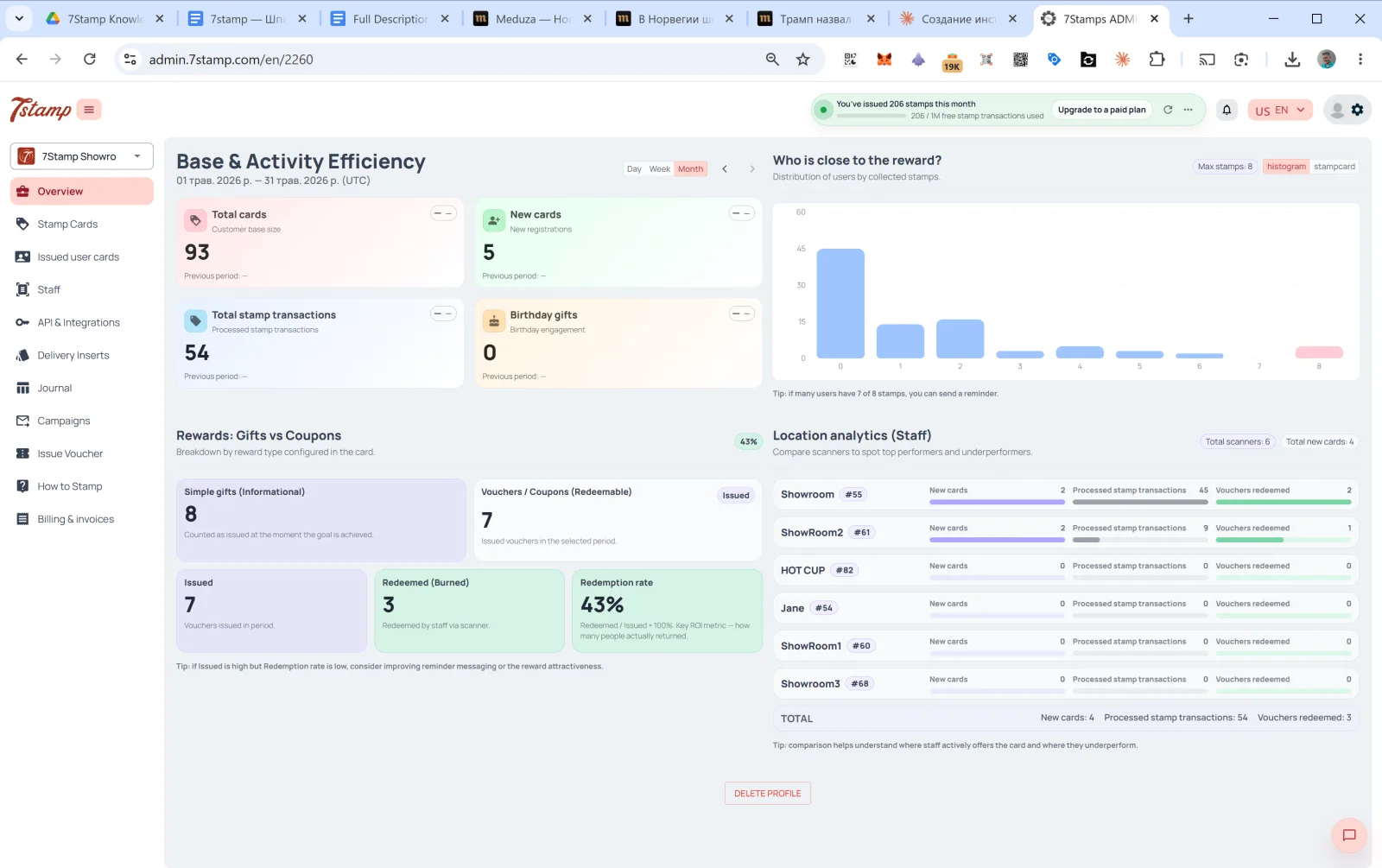
Overview คือหน้าหลักของแผงผู้ดูแลระบบ และเป็นสิ่งแรกที่คุณเห็นหลังเข้าสู่ระบบ เป็นแดชบอร์ดที่มีสี่ส่วน
16.1 Base & Activity Efficiency — ฐานลูกค้าและประสิทธิภาพของกิจกรรม
กิจกรรมของฐานลูกค้าในช่วงเวลาที่เลือก สลับได้ที่มุมขวาบน: Day / Week / Month (ค่าเริ่มต้นคือ Month) และใช้ลูกศร ← → เพื่อเลื่อนช่วงเวลา
การ์ดสี่ใบ:
- Total cards — ขนาดฐานลูกค้าทั้งหมด (Customer base size)
- New cards — การลงทะเบียนใหม่ในช่วงเวลานั้น (New registrations)
- Total stamp transactions — จำนวนธุรกรรมการให้แสตมป์ที่ประมวลผลแล้ว
- Birthday gifts — การมีส่วนร่วมในวันเกิด (ของขวัญวันเกิดที่ออกให้)
การ์ดแต่ละใบมีการเปรียบเทียบกับช่วงก่อนหน้า (Previous period: — หากไม่มีข้อมูล)
16.2 ใครใกล้จะได้รับรางวัลแล้ว?
ฮิสโตแกรมแสดงการกระจายตัวของลูกค้าตามจำนวนแสตมป์ที่สะสม แกน X คือจำนวนแสตมป์ (0, 1, 2, …, Max) แกน Y คือจำนวนลูกค้าในระดับนั้น
คำแนะนำด้านล่าง: “หากผู้ใช้จำนวนมากมีแสตมป์ 7 จาก 8 ดวง คุณสามารถส่งข้อความเตือนได้” — นี่คือเครื่องมือหากลุ่มลูกค้าที่น่าสนใจ: ลูกค้าที่ขาดแสตมป์อีกเพียง 1–2 ดวงมีแนวโน้มกลับมามากที่สุดหากได้รับการเตือน
16.3 Rewards: Gifts vs Coupons — ของขวัญเทียบกับคูปอง
การแยกตามประเภทรางวัลที่ออกให้ (Breakdown by reward type configured in the card):
- Simple gifts (Informational) — จำนวน Awards ที่ออกให้ (ของขวัญทันทีที่ไม่ต้องใช้สิทธิ์)
- Vouchers / Coupons (Redeemable) — จำนวนบัตรกำนัลที่ออกให้ ซึ่งแบ่งเป็น:
- Issued — ออกให้แล้ว
- Redeemed (Burned) — พนักงานใช้สิทธิ์ผ่านสแกนเนอร์แล้ว
- Redemption rate —
Redeemed / Issued × 100%ตัวชี้วัด ROI หลัก — แสดงว่าลูกค้ากี่คนกลับมาและใช้ของขวัญจริง
คำแนะนำด้านล่าง: “หาก Issued สูงแต่ Redemption rate ต่ำ ควรปรับปรุงข้อความเตือนหรือความน่าสนใจของรางวัล” — หากออกให้มากแต่ใช้สิทธิ์น้อย ปัญหาอยู่ที่ข้อความเตือนหรือความน่าสนใจของของขวัญ
16.4 Location analytics (Staff) — การวิเคราะห์ตามสาขาและพนักงาน
การเปรียบเทียบผลงานของพนักงานและสาขา ด้านบนมีตัวนับ Total scanners และ Total new cards
สำหรับพนักงานแต่ละคน:
- ชื่อ +
#ID - New cards — จำนวนลูกค้าใหม่ที่พนักงานคนนี้นำเข้ามาในช่วงเวลานั้น
- Processed stamp transactions — จำนวนแสตมป์ที่เพิ่มให้
- Vouchers redeemed — จำนวนบัตรกำนัลที่ใช้สิทธิ์แล้ว
ด้านล่าง — TOTAL รวมของพนักงานทุกคน
คำแนะนำ: “การเปรียบเทียบช่วยให้เข้าใจว่าพนักงานคนไหนแนะนำบัตรอย่างจริงจัง และคนไหนยังทำได้ไม่ดีพอ”
บล็อกนี้เป็นเครื่องมือบริหารที่สำคัญมาก หาก Showroom1 มีแสตมป์ 45 ดวงในหนึ่งเดือน แต่ HOT CUP มี 0 นั่นคือสัญญาณว่าพนักงานไม่ได้แนะนำบัตรให้ลูกค้า หรือสแกนเนอร์มีปัญหาทางเทคนิค ควรนำตัวเลขนี้ไปใช้เป็น KPI ของแต่ละกะ
คำแนะนำแบบภาพ
ใช้ชุดหน้าจอด้านล่างเป็นตัวช่วยทางภาพสำหรับบทความ คลิกรูปภาพใดก็ได้เพื่อดูในขนาดเต็ม