
16. Overview — एनालिटिक्स डैशबोर्ड
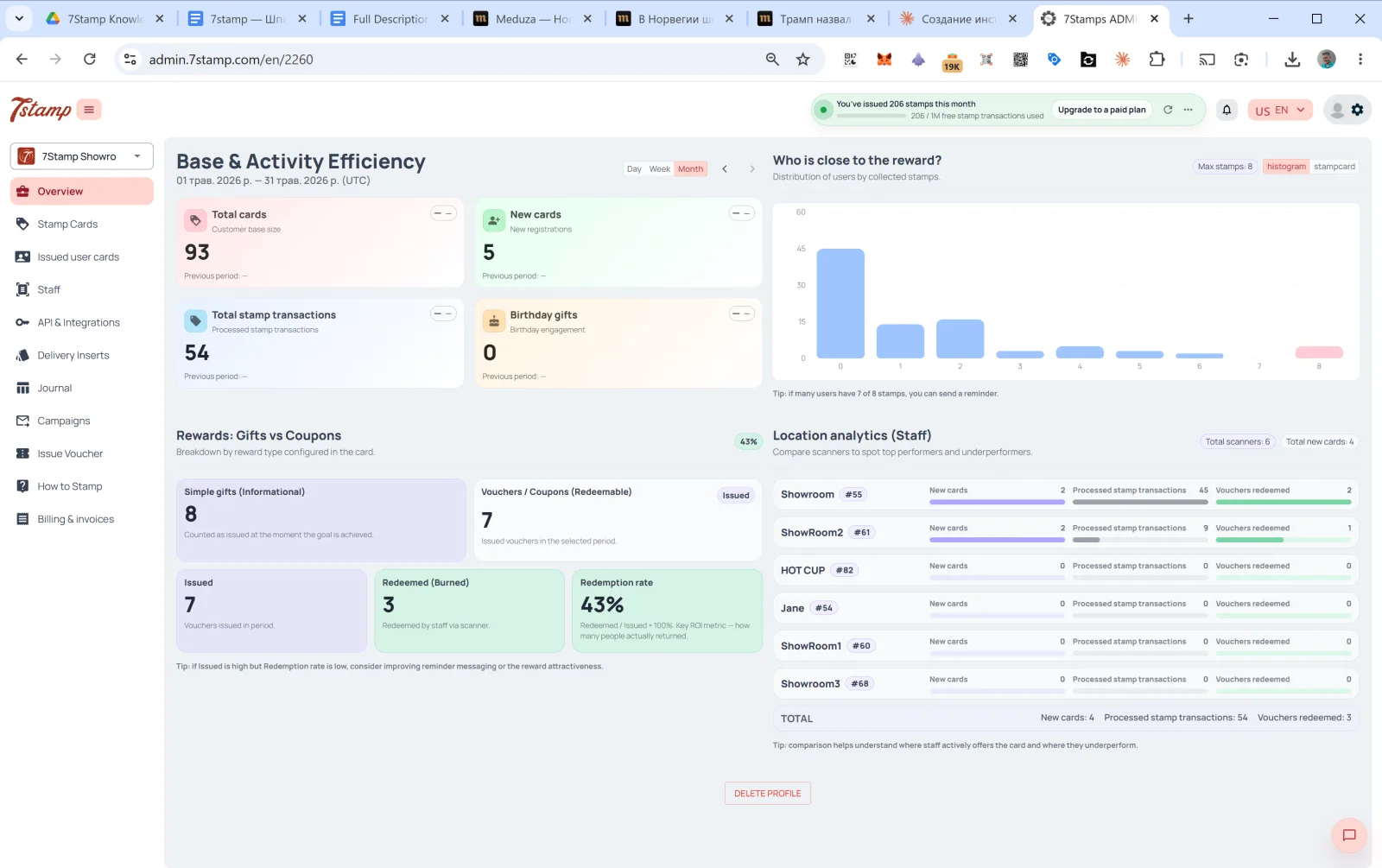
Overview एडमिन का मुख्य पेज है, लॉगिन के बाद सबसे पहले यही दिखता है। चार सेक्शन वाला डैशबोर्ड।
16.1 Base & Activity Efficiency — ग्राहक आधार और गतिविधि
चुनी गई अवधि में ग्राहक आधार की गतिविधि। ऊपर दाईं ओर स्विच: Day / Week / Month (डिफ़ॉल्ट Month), अवधियों के बीच जाने के लिए तीर ← →।
चार कार्ड:
- Total cards — कुल ग्राहक आधार (Customer base size)।
- New cards — अवधि में नए रजिस्ट्रेशन (New registrations)।
- Total stamp transactions — प्रोसेस किए गए स्टैम्प ट्रांज़ैक्शन।
- Birthday gifts — जन्मदिन पर जुड़ाव (जारी किए गए जन्मदिन उपहार)।
हर कार्ड में पिछली अवधि से तुलना होती है (डेटा न हो तो Previous period: —)।
16.2 रिवॉर्ड के करीब कौन है?
इकट्ठा किए गए स्टैम्प के हिसाब से ग्राहकों के बंटवारे का हिस्टोग्राम। X अक्ष स्टैम्प की संख्या है (0, 1, 2, …, Max), Y अक्ष उस स्तर पर ग्राहकों की संख्या।
नीचे दी गई सलाह: “अगर कई यूज़र्स के पास 8 में से 7 स्टैम्प हैं, तो आप रिमाइंडर भेज सकते हैं।” — यह “हॉट” सेगमेंट ढूंढने का टूल है: जिन ग्राहकों को बस 1–2 स्टैम्प और चाहिए, याद दिलाने पर उनके लौटने की संभावना सबसे ज़्यादा होती है।
16.3 Rewards: Gifts vs Coupons — उपहार बनाम कूपन
जारी किए गए रिवॉर्ड के प्रकार के हिसाब से बंटवारा (Breakdown by reward type configured in the card):
- Simple gifts (Informational) — जारी किए गए Awards की संख्या (तुरंत मिलने वाले उपहार जिन्हें रिडीम करने की ज़रूरत नहीं)।
- Vouchers / Coupons (Redeemable) — जारी किए गए वाउचर की संख्या। इनमें से:
- Issued — जारी किए गए।
- Redeemed (Burned) — कर्मचारियों ने स्कैनर से रिडीम किए।
- Redemption rate —
Redeemed / Issued × 100%। मुख्य ROI मेट्रिक — यह दिखाता है कि कितने ग्राहक सच में लौटे और उपहार का इस्तेमाल किया।
नीचे दी गई सलाह: “अगर Issued ज़्यादा है लेकिन Redemption rate कम, तो रिमाइंडर संदेशों या रिवॉर्ड के आकर्षण को बेहतर करने पर विचार करें।” — अगर आप जारी बहुत करते हैं लेकिन रिडीम कम होते हैं, तो समस्या या तो रिमाइंडर में है या उपहार के आकर्षण में।
16.4 Location analytics (Staff) — लोकेशन और कर्मचारी एनालिटिक्स
कर्मचारियों / लोकेशन के प्रदर्शन की तुलना। सबसे ऊपर — Total scanners और Total new cards काउंटर।
हर कर्मचारी के लिए:
- नाम +
#ID। - New cards — इस कर्मचारी ने अवधि में कितने नए ग्राहक जोड़े।
- Processed stamp transactions — कितने स्टैम्प जोड़े गए।
- Vouchers redeemed — कितने वाउचर रिडीम हुए।
सबसे नीचे — सभी कर्मचारियों का TOTAL।
सलाह: “तुलना से समझ आता है कि कहां कर्मचारी सक्रिय रूप से कार्ड ऑफ़र करते हैं और कहां पीछे रह जाते हैं।”
यह ब्लॉक प्रबंधन का बेहद अहम टूल है। अगर Showroom1 के पास महीने में 45 स्टैम्प हैं और HOT CUP के पास 0, तो यह संकेत है: या तो कर्मचारी ग्राहकों को कार्ड ऑफ़र नहीं कर रहे, या स्कैनर में कोई तकनीकी समस्या है। इसे शिफ़्ट के KPI में शामिल करना फ़ायदेमंद है।
दृश्य मार्गदर्शिका
Use the screen sets below as a visual companion to the लेख. खोलें any image to inspect it at full size.