
16. Overview — het dashboard met analyses
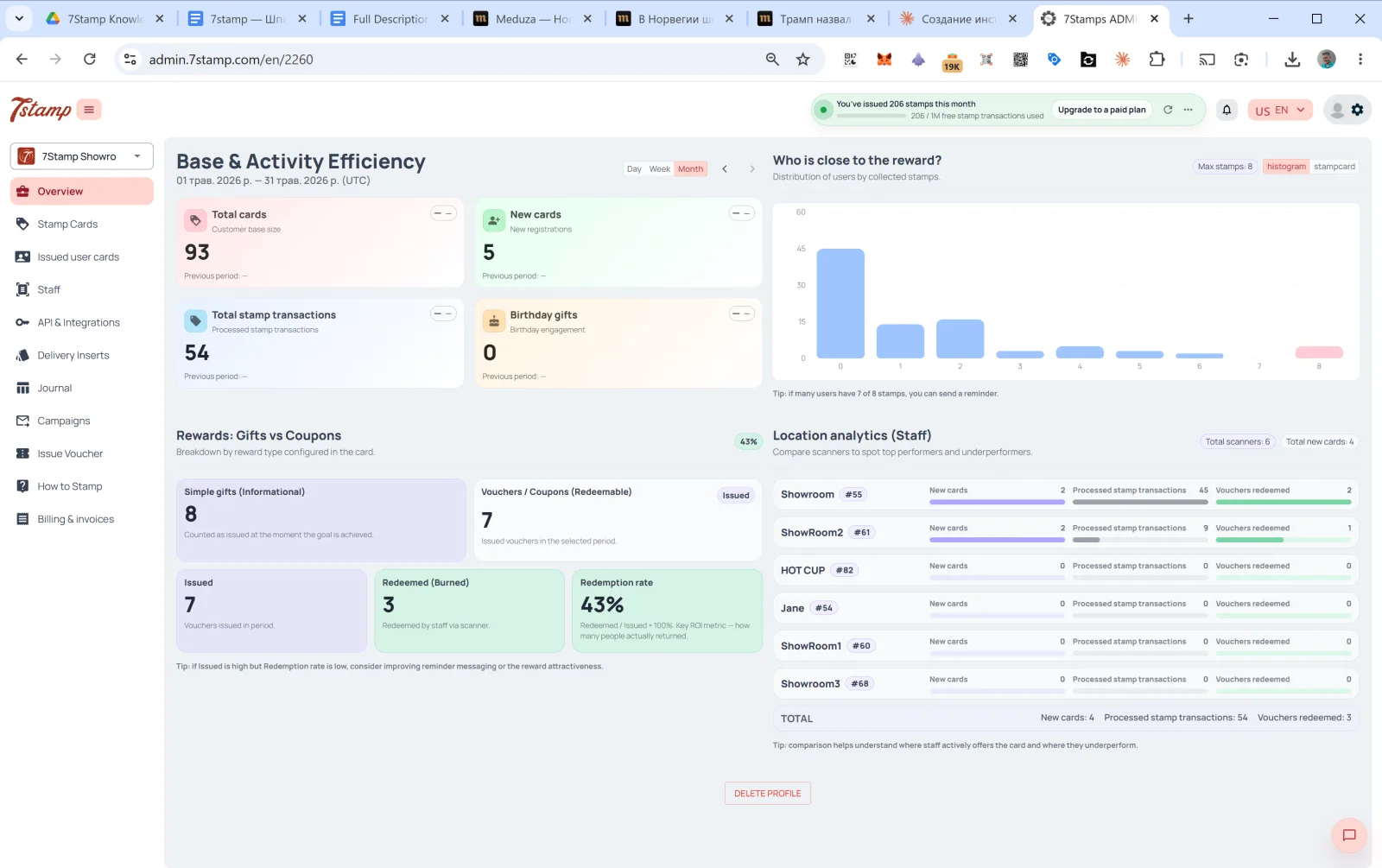
Overview is de hoofdpagina van de admin en het eerste wat je ziet na het inloggen: een dashboard met vier onderdelen.
16.1 Base & Activity Efficiency
De activiteit van je klantenbestand in de gekozen periode. Rechtsboven kies je Day / Week / Month (standaard Month); met de pijlen ← → blader je tussen periodes.
Vier tegels:
- Total cards — de omvang van je totale klantenbestand.
- New cards — nieuwe aanmeldingen in de periode.
- Total stamp transactions — het aantal verwerkte stempeltransacties.
- Birthday gifts — betrokkenheid rond verjaardagen (uitgegeven verjaardagscadeaus).
Elke tegel toont een vergelijking met de vorige periode (Previous period: — als er geen gegevens zijn).
16.2 Who is close to the reward?
Een histogram van de klanten, verdeeld naar het aantal verzamelde stempels. Op de X-as staat het aantal stempels (0, 1, 2, …, maximum), op de Y-as het aantal klanten op dat niveau.
De hint eronder: „als veel klanten 7 van de 8 stempels hebben, kun je een herinnering sturen.” Hiermee vind je de kansrijke groepen: klanten die nog 1–2 stempels nodig hebben, komen na een herinnering het vaakst terug.
16.3 Rewards: Gifts vs Coupons
Een verdeling naar het soort uitgegeven beloning (Breakdown by reward type configured in the card):
- Simple gifts (Informational) — het aantal uitgegeven Awards (directe cadeaus die niet ingewisseld hoeven te worden).
- Vouchers / Coupons (Redeemable) — het aantal uitgegeven vouchers. Daarvan:
- Issued — uitgegeven.
- Redeemed (Burned) — door het personeel ingewisseld via de scanner.
- Redemption rate —
Redeemed / Issued × 100%. De belangrijkste ROI-maatstaf: hij laat zien hoeveel klanten echt zijn teruggekomen en het cadeau hebben gebruikt.
De hint eronder: „als Issued hoog is maar de Redemption rate laag, verbeter dan je herinneringen of maak de beloning aantrekkelijker.” Geef je veel vouchers uit maar worden er weinig ingewisseld, dan zit het probleem meestal in de herinneringen of in de aantrekkingskracht van het cadeau.
16.4 Location analytics (Staff)
Vergelijking van de prestaties per medewerker of vestiging. Bovenaan staan de tellers Total scanners en Total new cards.
Per medewerker:
- Naam +
#ID. - New cards — hoeveel nieuwe klanten deze medewerker in de periode heeft aangebracht.
- Processed stamp transactions — hoeveel stempels er zijn toegevoegd.
- Vouchers redeemed — hoeveel vouchers er zijn ingewisseld.
Onderaan staat het TOTAL van alle medewerkers.
Hint: „de vergelijking laat zien waar medewerkers de kaart actief aanbieden en waar ze achterblijven.”
Dit blok is een essentieel managementinstrument. Heeft Showroom1 45 stempels in een maand en HOT CUP 0, dan is dat een signaal: ofwel biedt het personeel de kaart niet aan, ofwel is er een technisch probleem met de scanner. Het loont om dit op te nemen in de KPI’s per dienst.
Visual walkthrough
Use the screen sets below as a visual companion to the article. Open any image to inspect it at full size.