
16. Overview — 분석 대시보드
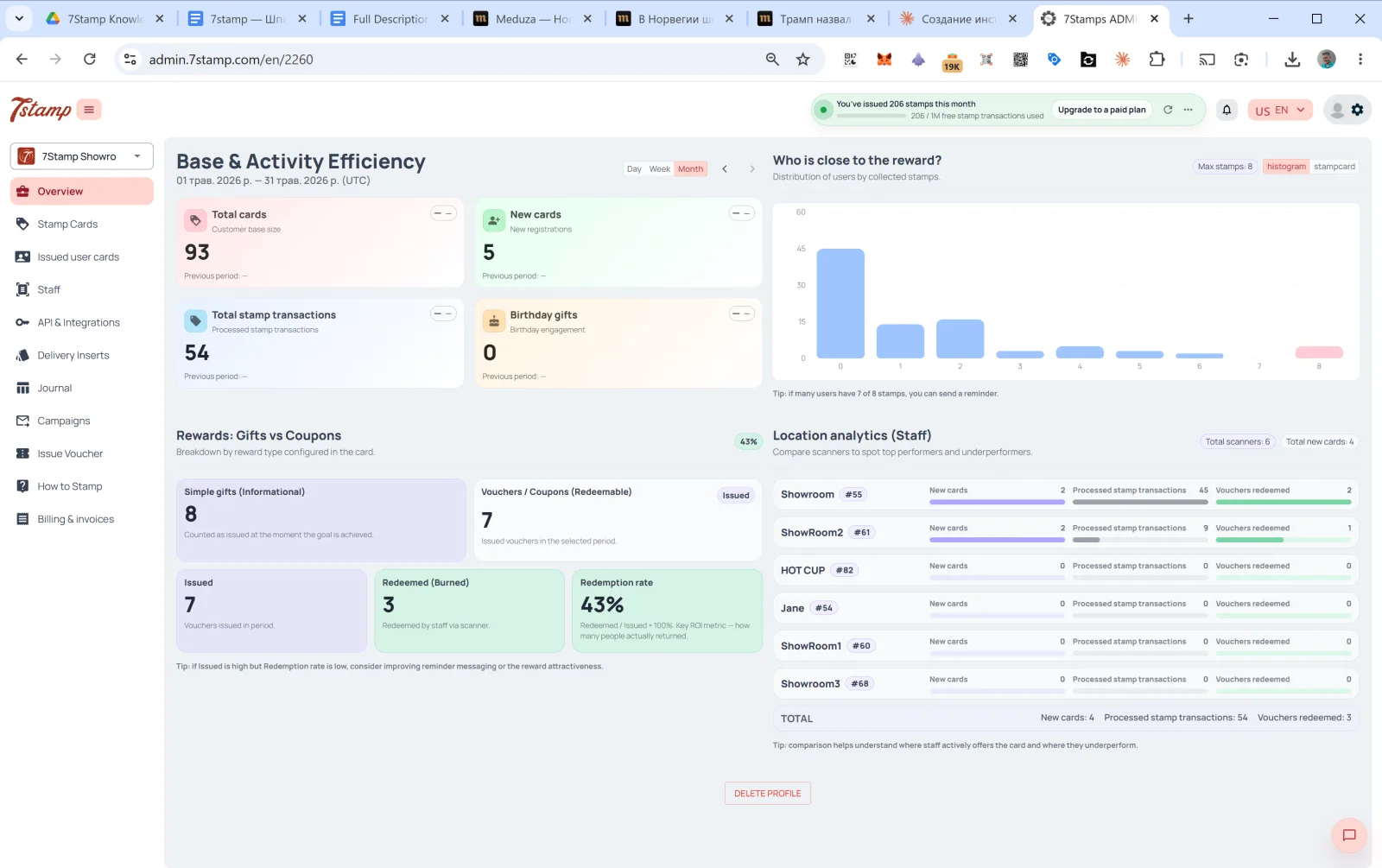
Overview는 관리자 화면의 메인 페이지로, 로그인하면 가장 먼저 보이는 화면입니다. 네 개의 섹션으로 구성된 대시보드입니다.
16.1 Base & Activity Efficiency(고객 기반 및 활동 효율)
선택한 기간의 고객 기반 활동입니다. 오른쪽 위에서 Day / Week / Month(일/주/월, 기본값 Month)를 전환하고, 화살표 ← →로 기간을 이동합니다.
네 개의 카드:
- Total cards: 전체 고객 수(고객 기반 규모).
- New cards: 해당 기간의 신규 가입 수.
- Total stamp transactions: 처리된 스탬프 적립 건수.
- Birthday gifts: 생일 참여도(발급된 생일 선물 수).
각 카드에는 이전 기간과의 비교가 표시됩니다(데이터가 없으면 Previous period: —).
16.2 Who is close to the reward?(보상에 가까운 고객)
모은 스탬프 수에 따른 고객 분포를 보여 주는 히스토그램입니다. X축은 스탬프 수(0, 1, 2, …, 최대), Y축은 해당 단계에 있는 고객 수입니다.
아래 힌트 *“8개 중 7개의 스탬프를 모은 사용자가 많다면 알림을 보낼 수 있습니다.”*처럼, 이 차트는 반응이 좋은 세그먼트를 찾는 도구입니다. 스탬프가 1~2개만 더 필요한 고객은 알림을 받으면 다시 방문할 가능성이 가장 높습니다.
16.3 Rewards: Gifts vs Coupons(보상: 선물과 쿠폰)
발급된 보상 유형별 분류입니다(Breakdown by reward type configured in the card):
- Simple gifts (Informational)(간단한 선물): 발급된 Award 수(사용 처리가 필요 없는 즉시 제공 선물).
- Vouchers / Coupons (Redeemable)(바우처/쿠폰): 발급된 바우처 수. 그중:
- Issued: 발급 수.
- Redeemed (Burned): 직원이 scanner로 사용 처리한 수.
- Redemption rate:
Redeemed / Issued × 100%. 가장 중요한 ROI 지표로, 실제로 다시 방문해 선물을 사용한 고객의 비율을 보여 줍니다.
아래 힌트 *“발급 수는 많은데 사용률이 낮다면 알림 메시지나 보상의 매력도를 개선해 보세요.”*처럼, 많이 발급했는데 사용이 적다면 원인은 알림이나 선물의 매력도에 있습니다.
16.4 Location analytics (Staff)(매장·직원별 분석)
직원/매장별 성과를 비교합니다. 상단에는 Total scanners와 Total new cards 카운터가 있습니다.
각 직원별로:
- 이름 +
#ID. - New cards: 이 직원이 해당 기간에 유치한 신규 고객 수.
- Processed stamp transactions: 적립한 스탬프 수.
- Vouchers redeemed: 사용 처리한 바우처 수.
하단에는 전체 직원의 합계 TOTAL이 표시됩니다.
힌트: “비교해 보면 어느 직원이 카드를 적극적으로 안내하고 어디에서 성과가 부족한지 알 수 있습니다.”
이 블록은 매우 중요한 관리 도구입니다. Showroom1은 한 달에 스탬프 45개를 적립했는데 HOT CUP은 0개라면 신호입니다. 직원이 고객에게 카드를 안내하지 않거나 scanner에 기술적인 문제가 있는 것입니다. 교대 근무 KPI에 포함할 만합니다.
시각적 안내
아래 화면 세트를 문서의 시각적 보조 자료로 사용하세요. 이미지를 클릭하면 전체 크기로 볼 수 있습니다.