
16. Overview — 分析ダッシュボード
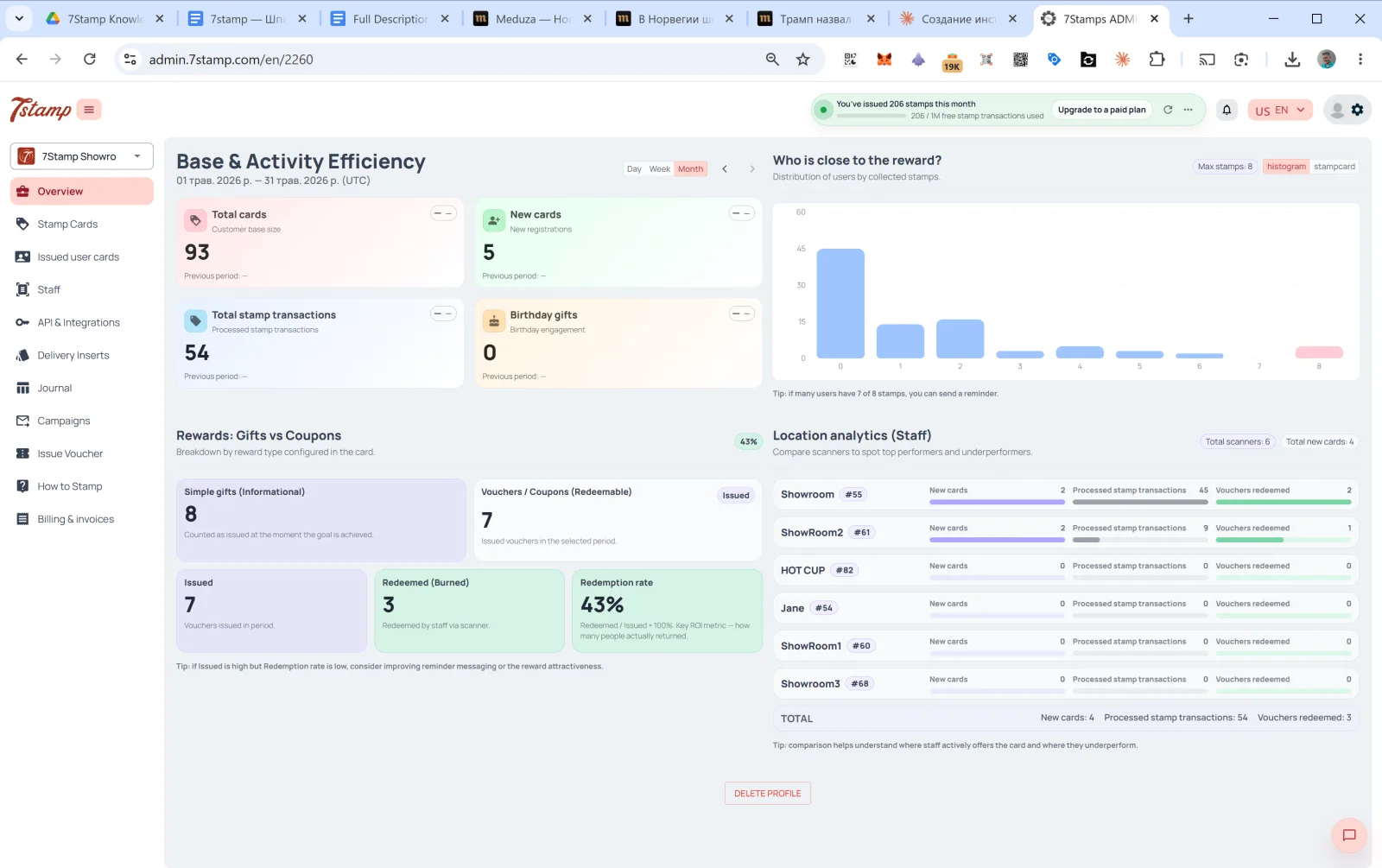
Overview は管理画面のメインページで、ログイン後に最初に表示されます。4つのセクションで構成されたダッシュボードです。
16.1 Base & Activity Efficiency(顧客基盤と活動状況)
選択した期間の顧客基盤の活動状況です。右上で Day / Week / Month(日/週/月、初期値は Month)を切り替え、矢印 ← → で期間を移動します。
4つのカード:
- Total cards:顧客基盤の総数(顧客基盤の規模)。
- New cards:期間中の新規登録数。
- Total stamp transactions:処理されたスタンプ付与の件数。
- Birthday gifts:誕生日施策への反応(発行された誕生日ギフトの数)。
各カードには前の期間との比較が表示されます(データがない場合は Previous period: —)。
16.2 Who is close to the reward?(特典まであと少しの顧客)
集めたスタンプ数ごとの顧客分布を示すヒストグラムです。X 軸はスタンプ数(0、1、2、…、最大)、Y 軸はその段階にいる顧客の数です。
下のヒント 「8個中7個のスタンプを持つユーザーが多ければ、リマインダーを送れます。」 のとおり、これは反応の良いセグメントを見つけるためのツールです。あと1~2個のスタンプで特典に届く顧客は、リマインダーを受け取ると再来店する可能性が最も高くなります。
16.3 Rewards: Gifts vs Coupons(特典:ギフトとクーポン)
発行された特典の種類別の内訳です(Breakdown by reward type configured in the card):
- Simple gifts (Informational)(シンプルなギフト):発行された Award の数(引き換え不要のその場で渡すギフト)。
- Vouchers / Coupons (Redeemable)(バウチャー/クーポン):発行されたバウチャーの数。内訳:
- Issued:発行数。
- Redeemed (Burned):スタッフが scanner で引き換えた数。
- Redemption rate:
Redeemed / Issued × 100%。最も重要な ROI 指標で、実際に再来店してギフトを使った顧客の割合を示します。
下のヒント 「発行数が多いのに引き換え率が低い場合は、リマインダーのメッセージや特典の魅力を見直しましょう。」 のとおり、多く発行しても引き換えが少ないなら、原因はリマインダーかギフトの魅力のどちらかにあります。
16.4 Location analytics (Staff)(店舗・スタッフ別の分析)
スタッフ/店舗ごとの成果を比較します。上部には Total scanners と Total new cards のカウンターがあります。
各スタッフについて:
- 名前 +
#ID。 - New cards:このスタッフが期間中に獲得した新規顧客の数。
- Processed stamp transactions:付与したスタンプの数。
- Vouchers redeemed:引き換えたバウチャーの数。
下部には全スタッフの合計 TOTAL が表示されます。
ヒント:「比較すると、どこでスタッフが積極的にカードを案内し、どこで成果が出ていないかがわかります。」
このブロックは重要な管理ツールです。Showroom1 は1か月に45個のスタンプを付与しているのに HOT CUP が0個なら、それはサインです。スタッフが顧客にカードを案内していないか、scanner に技術的な問題があるかのどちらかです。シフトの KPI に組み込む価値があります。
ビジュアルウォークスルー
以下のスクリーンセットを記事のビジュアルガイドとして使用してください。任意の画像をクリックしてフルサイズで確認できます。