UberEats, Glovo அல்லது பிற மார்க்கெட்பிளேஸ் வழியாக விற்றால் ஆர்டர்கள் கிடைக்கும் — ஆனால் வாடிக்கையாளர் கிடைக்க மாட்டார்.
நேரடித் தொடர்பு இல்லை.
சிறப்புச் சலுகைகளை அனுப்ப வழி இல்லை.
மீண்டும் கமிஷன் செலுத்தாமல் அவர்களை மீண்டும் வரவைக்க வழி இல்லை.
Delivery Cards இதை மாற்றுகிறது.
அநாமதேய டெலிவரி வாங்குபவர்களை அவை உங்கள் சொந்த வாடிக்கையாளர் தளமாக மாற்றுகின்றன — இதனால் மீள் ஆர்டர்களும் வருவாயும் வளரும், அக்ரிகேட்டர் கட்டணத்தை மீண்டும் செலுத்தாமல்.
Delivery Cards ஏன் முக்கியம்
நீங்கள் பிடிக்காவிட்டால் ஒவ்வொரு டெலிவரி ஆர்டரும் தவறவிட்ட வாய்ப்பு.
Delivery Cards இல்லாமல்:
- தரவை மார்க்கெட்பிளேஸ் வைத்துக்கொள்கிறது
- வாடிக்கையாளர் அநாமதேயமாகவே இருக்கிறார்
- அடுத்த முறையும் கமிஷன் செலுத்துவீர்கள்
Delivery Cards உடன்:
- வாடிக்கையாளர் உங்கள் அட்டையை ஸ்கேன் செய்கிறார்
- உங்கள் ஸ்டாம்ப் கார்டு அவரது Wallet-இல் சேமிக்கப்படுகிறது
- தொடர்புத் தகவலைப் பெறுகிறீர்கள்
- இப்போது push அறிவிப்புகளையும் மின்னஞ்சலையும் நேரடியாக அனுப்பலாம்
அதாவது:
📲 பூட்டுத் திரையில் push அறிவிப்புகள்
விளம்பரங்கள், கால வரம்புள்ள சலுகைகள், மந்தமான நாட்களுக்கான ஊக்கம் அல்லது வாடிக்கையாளர்கள் அருகில் இருக்கும்போது இருப்பிட அடிப்படையிலான நினைவூட்டல் அனுப்புங்கள்.
📧 மின்னஞ்சல் பிரச்சாரங்கள்
புதிய தயாரிப்புகள், சிறப்பு நிகழ்வுகள் அல்லது தனிச்சிறப்பு தள்ளுபடிகளை அறிவிக்கவும்.
🎉 தானியங்கி பிறந்தநாள் பரிசுகள்
சரியான தருணத்தில் வாடிக்கையாளர்களை மீண்டும் வரவையுங்கள்.
📈 அதிக மீள்வருகை = அதிக லாபம்
விசுவாசமான வாடிக்கையாளர்கள் அடிக்கடி ஆர்டர் செய்கிறார்கள், காலப்போக்கில் அதிகம் செலவழிக்கிறார்கள்.
மீள் ஆர்டர்களுக்கு மார்க்கெட்பிளேஸ் கமிஷன் செலுத்துவது நின்றுவிடுகிறது.
Delivery Cards என்றால் என்ன?
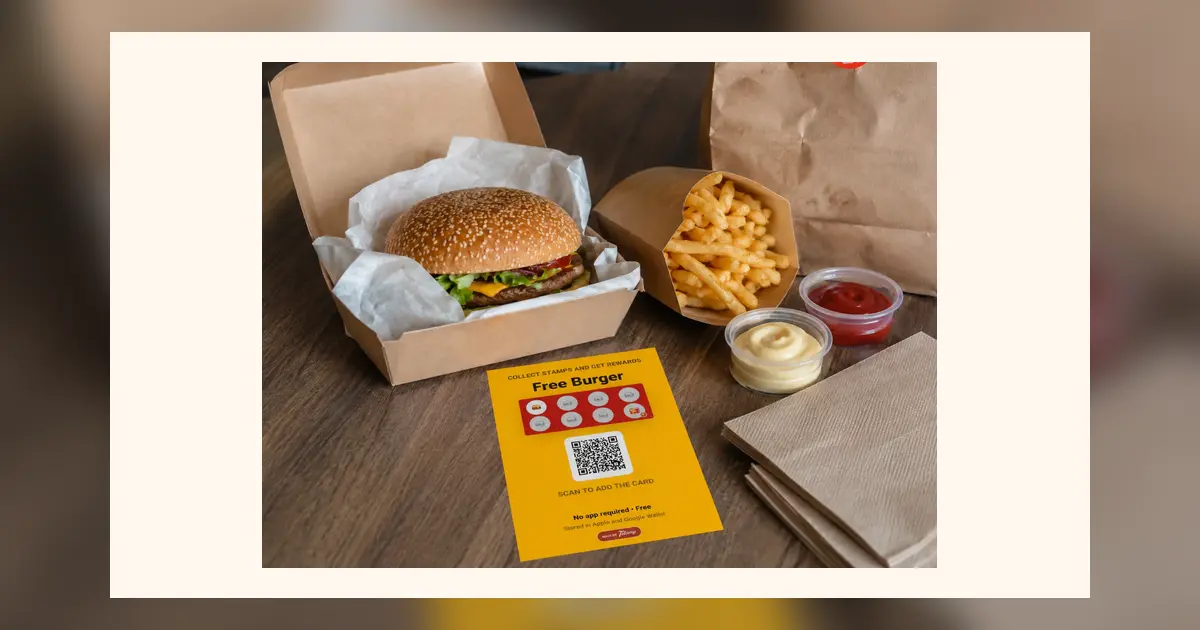
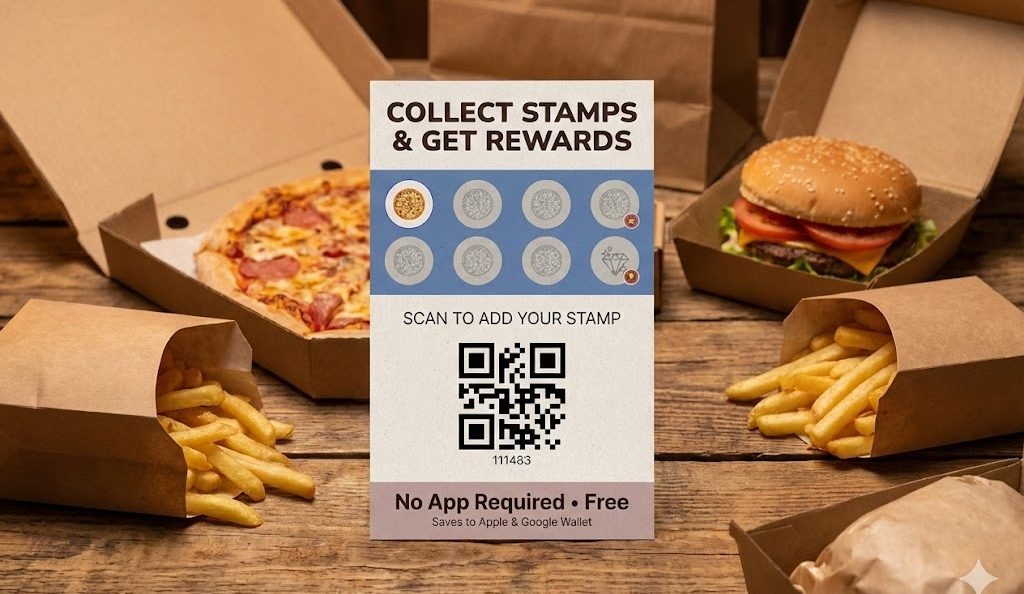
Delivery Cards டெலிவரி ஆர்டர்களுக்கு மட்டுமே வடிவமைக்கப்பட்ட, அச்சிடக்கூடிய லாயல்டி அட்டைகள்.
அவற்றில் உள்ளவை:
- உங்கள் ஸ்டாம்ப் கார்டின் முன்னோட்டம்
- பரிசின் தெளிவான விளக்கம்
- உங்கள் லாயல்டி திட்டத்துடன் இணைந்த QR குறியீடு
- வாடிக்கையாளருக்கான எளிய வழிமுறைகள்
அவை உண்மையான ஸ்டாம்ப் அட்டை போலவே தெரிகின்றன — வெறும் தொழில்நுட்ப QR அச்சு அல்ல.
மதிப்பு உடனே தெரிகிறது.
இது எப்படி வேலை செய்கிறது
படி 1 — Delivery Cards உருவாக்குங்கள்
பகுதியைத் திறக்கவும் Delivery Cards உங்கள் நிர்வாகப் பலகத்தில்.
கிளிக் செய்யவும் Generate Delivery Cards.
உங்கள் ஸ்டாம்ப் கார்டுடன் இணைந்த அச்சிடக்கூடிய அட்டைகளை அமைப்பு உருவாக்கும்.
தேவைப்பட்டால் முன்னரே நிர்ணயிக்கப்பட்ட ஸ்டாம்ப்களையும் சேர்க்கலாம்.
படி 2 — அச்சிட்டு உள்ளே வையுங்கள்
கோப்பைப் பதிவிறக்கி சாதாரண பிரிண்டரில் அச்சிடுங்கள்.
அட்டைகளை டெலிவரி பேக் அல்லது பெட்டியில் வையுங்கள்.
ஒவ்வொரு ஆர்டரும் லாயல்டிக்கான அழைப்பாக மாறுகிறது.
படி 3 — வாடிக்கையாளர் ஸ்கேன் செய்கிறார்
வாடிக்கையாளர் பேக்கைத் திறக்கிறார் → அட்டையைப் பார்க்கிறார் → QR-ஐ ஸ்கேன் செய்கிறார்.
உங்கள் ஸ்டாம்ப் கார்டு உடனே அவரது Apple அல்லது Google Wallet-இல் சேமிக்கப்படுகிறது.
ஸ்கேன் செய்யும்போது ஸ்டாம்ப்கள் தானாகவே வழங்கப்படலாம்.
இப்போது வாடிக்கையாளர் உங்கள் லாயல்டி திட்டத்தில் இணைகிறார் — மார்க்கெட்பிளேஸில் மட்டும் அல்ல.
படி 4 — அனைத்தையும் அளவிடுங்கள்
எல்லா ஸ்கேன்களும் உங்கள் டாஷ்போர்டில் தெரியும்.
நீங்கள் கண்காணிக்கலாம்:
- புதிய Wallet சேர்ப்புகளின் எண்ணிக்கை
- டெலிவரி மாற்று விகிதம்
- மீள்வருகைகள்
- பிரச்சாரத்தின் செயல்திறன்
இப்போது டெலிவரி அளவிடக்கூடியது — வெறும் பரிவர்த்தனை அல்ல.
வருவாயில் தாக்கம்
Delivery Cards ஒரு சந்தைப்படுத்தல் செலவு அல்ல.
அவை வருவாயின் பெருக்கி.
டெலிவரி வாடிக்கையாளர்களில் 15–20% மட்டும் உங்கள் லாயல்டி திட்டத்தில் இணைந்தாலும்:
- எதிர்கால ஆர்டர்கள் நேரடி சேனல்களுக்கு நகர்கின்றன
- மீள் அடர்த்தி அதிகரிக்கிறது
- வாடிக்கையாளரின் வாழ்நாள் மதிப்பு வளர்கிறது
- கமிஷன் செலவுகள் குறைகின்றன
காலப்போக்கில் உங்கள் சொந்த தரவுத்தளம் மிக மதிப்புமிக்க சொத்தாகிறது.
ஏனெனில் மீண்டும் வரும் வாடிக்கையாளர் புதியவரை விட மலிவானவர்.
இன்றே தொடங்குங்கள்
- திறக்கவும் Delivery Cards உங்கள் நிர்வாகப் பலகத்தில்
- கிளிக் செய்யவும் Generate Delivery Cards
- அவற்றை அச்சிடுங்கள்
- ஒவ்வொரு டெலிவரி ஆர்டரிலும் வையுங்கள்
- டாஷ்போர்டில் முடிவுகளைக் கண்காணியுங்கள்
டெலிவரியை விசுவாசமாக மாற்றுங்கள்.
விசுவாசத்தை வருவாயாக மாற்றுங்கள்.