
Create an invite from a CRM contact
Trigger on a new or qualified contact, map its CRM ID to External ID, create a card invite, and pass the returned install URL to an email or SMS step.
No-code automation guide
Use Zapier when your workflow is a clear sequence: a contact or order appears, 7Stamp performs an action, then another business tool is updated. The secure route today is API by Zapier for outgoing 7Stamp API calls and Webhooks by Zapier → Catch Hook for incoming 7Stamp events.
There is no public 7Stamp app in Zapier's marketplace. Use API by Zapier → API Request where available: it stores a static API key in the app connection instead of exposing it in a Zap step. Use Webhooks by Zapier only for incoming Catch Hook events; do not put a 7Stamp Bearer key into a visible Webhooks action field.
Keep the first Zap small. A reliable contact-to-card or paid-order-to-stamps flow is a better starting point than a broad two-way CRM sync.
Trigger on a new or qualified contact, map its CRM ID to External ID, create a card invite, and pass the returned install URL to an email or SMS step.
Trigger from the paid order or closed receipt, map the customer identity and order ID, then use Scan Card with the order amount or explicit number of stamps.
Use a CRM rule, support event, or segment export to identify a customer, issue a voucher to their card, and send a follow-up message from the correct channel.
Use Webhooks by Zapier > Catch Hook to receive 7Stamp card events. Match the returned External ID to the CRM record and add the relevant note, tag, or task.
Add API by Zapier → API Request after your trigger. Create one 7Stamp API-key connection, then select the exact method and full URL below. Each operation returns fields that you can map into the next Zap step.
POST /cards/invite Creates a fresh wallet-card install URL and delivery-insert code for one external contact.
POST /cards/invite/bulk Creates up to 100 invite links from a controlled JSON batch.
POST /cards/scan Adds stamps by User Card ID or External ID, with amount, stamp count, order ID, and optional receipt data.
POST /vouchers/issue Issues a voucher directly to a card owner.
POST /messages/send Sends wallet-card push and/or email content to a card owner.
GET /cards Finds card records by External ID, with optional source and template filters.
GET /cards/{user_card_id} Reads the state of a card by its 7Stamp internal ID.
GET /templates Lists templates available to the connected profile and verifies the API connection.
GET /templates/{template_id}/design Retrieves a template's design settings for a known template ID.
Webhooks by Zapier → Catch Hook Catch Hook gives Zapier a unique HTTPS URL. Paste it in 7Stamp Admin's webhook settings and test it with a real card event.
Each scenario uses a real, currently available Zapier module. Build one small route first and test it with a disposable contact before turning the Zap on.
Expected result: The next Zap step receives install_url and can send it to the customer or write it back to the CRM record.
Check: Create Card Invite always returns a fresh invite. Add a Find Cards request or a Zapier Filter first if your policy is one invite per contact.
Expected result: The order creates a traceable 7Stamp scan and the Zap can record stamps_added or scan_id in the source system.
Check: If the Zap is replayed, check the original order before sending another scan. Keep external_order_id stable so the event can be reconciled later.
Expected result: Zapier receives a parsed 7Stamp event, finds the customer by external_id, and creates the appropriate follow-up.
Check: A Catch Hook URL is a secret. If the Zap is transferred to another owner, update the URL in 7Stamp Admin before relying on it.
These are the 7Stamp-side steps. Do this once, then use the key only inside the API by Zapier connection—not in a Webhooks by Zapier action field or a note.
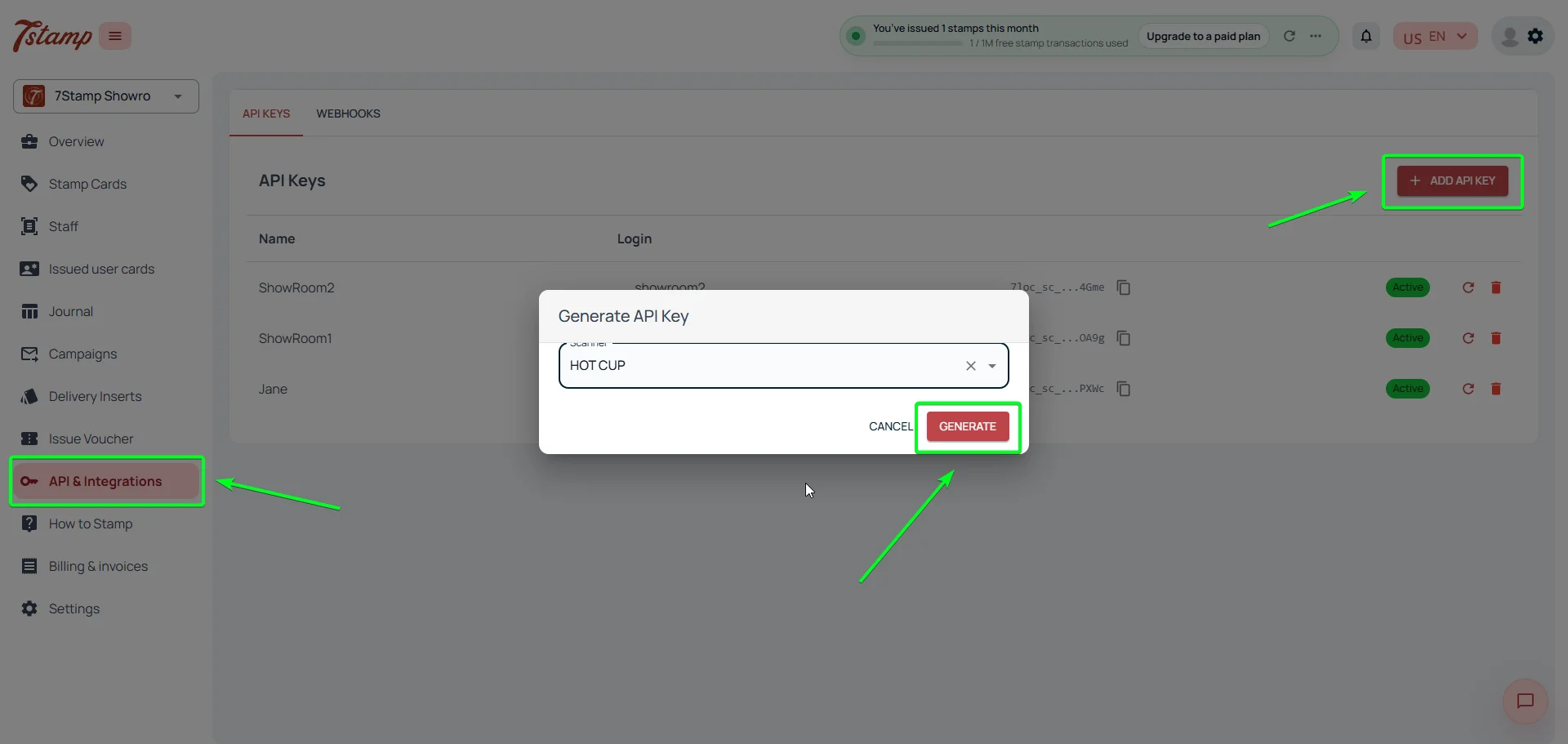
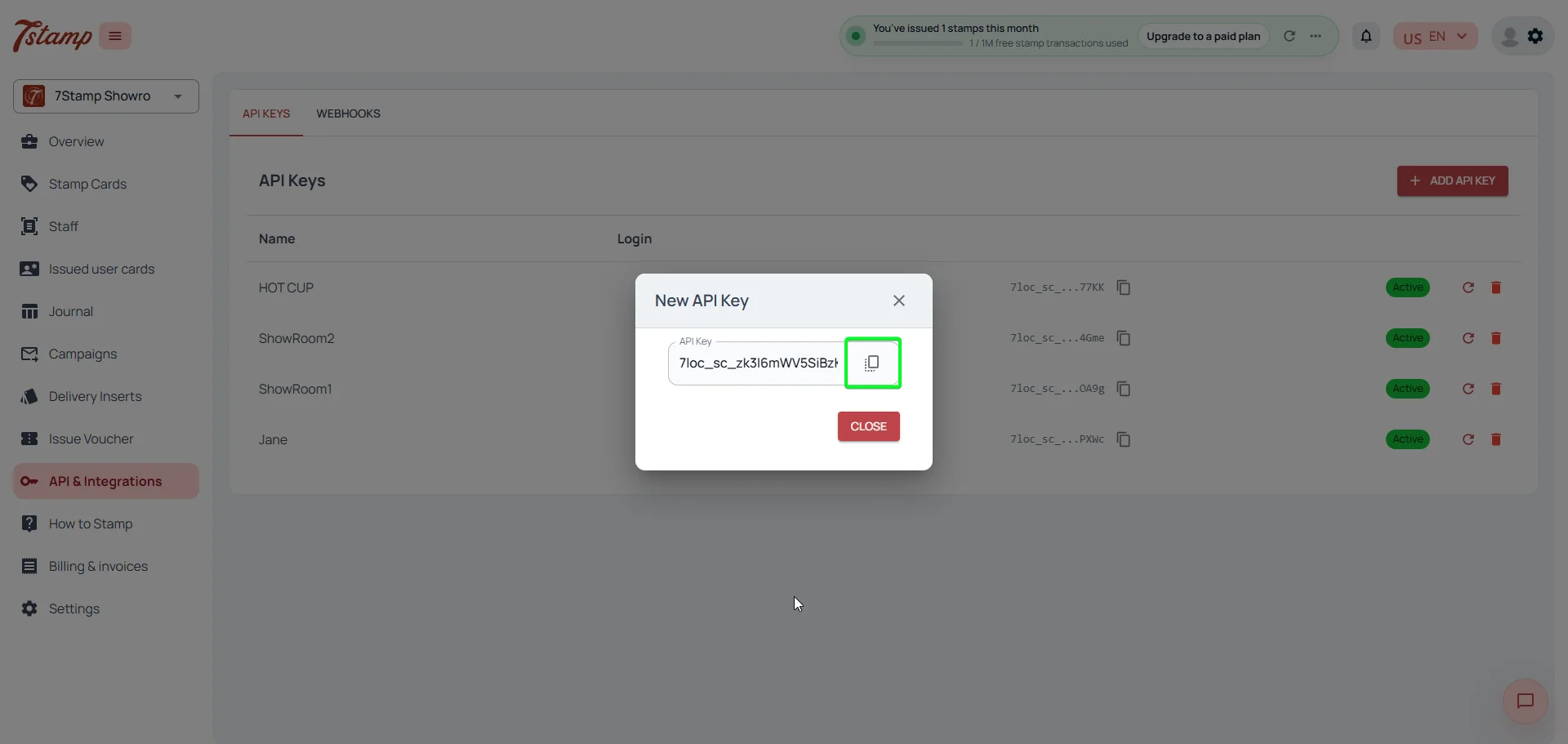
In 7Stamp Admin, choose API & Integrations → API Keys → Add API Key. In API by Zapier, create an API-key connection with a static Authorization header containing Bearer followed by that key. API by Zapier keeps the credential in the connection instead of a visible Zap step; restrict access to the connection and rotate the key if it is exposed.
External ID is your own stable customer identifier; External Source labels where it came from, for example hubspot, bitrix24, shopify, or poster. Use the same pair for create, find, scan, voucher, and webhook flows.
Card-targeting actions accept User Card ID or External ID. When both are present, User Card ID takes priority. Use the internal ID only after it was returned by a trusted 7Stamp step; otherwise prefer the source-system External ID.
http Method: POST
URL: https://api.7loc.com/cards-api/cards/scan
Headers:
Authorization: Bearer YOUR_7STAMP_API_KEY
Content-Type: application/json
Data:
{
"external_id": "crm_contact_8821",
"external_source": "hubspot",
"stamps_count": 1,
"external_order_id": "order_2048"
}Create a 7Stamp API key in Admin: API & Integrations → API Keys → Add API Key. Use a separate test key/profile when available.
In Zapier, create a Zap and test the source trigger. Use a real sample so the contact ID, customer ID, order ID, and amount are available for mapping.
Add API by Zapier → API Request. Create a 7Stamp connection for the static Bearer Authorization header rather than putting the secret in a Webhooks by Zapier action field.
Call GET https://api.7loc.com/cards-api/templates first. This confirms the key works and shows which active template IDs are available without modifying customer data.
Select POST /cards/invite or POST /cards/scan, set JSON as the body type, and map the stable External ID plus the relevant template/order fields from the trigger.
Run the action with a disposable contact, inspect its exact response fields, then map those fields into the next CRM, email, or messaging step before publishing the Zap.
Use API by Zapier for a 7Stamp request with a Bearer API key: it keeps static header keys in an app connection. Use Webhooks by Zapier for Catch Hook event delivery, not as the preferred location for a 7Stamp secret. Keep the base URL at https://api.7loc.com/cards-api, use the public OpenAPI reference for exact schemas, and never send credentials or customer data to an unverified URL.
Create Webhooks by Zapier → Catch Hook, copy the unique URL shown in the test setup, paste it into the 7Stamp profile's webhook settings, and then send a real test scan or card event. The hook receives every card event, so filter by card_event.event_type in the Zap. Use the event payload's External ID and External Source to locate the right CRM contact. Choose Catch Raw Hook only when you specifically need the unparsed body and request headers.
API by Zapier and Catch Hook are sufficient for every public 7Stamp API operation and card event. If you need a future native 7Stamp Zapier app, send us the exact action/trigger your team uses most.
There is no public 7Stamp marketplace app today. Use API by Zapier → API Request for 7Stamp API calls and Webhooks by Zapier → Catch Hook for incoming 7Stamp events.
Create a 7Stamp API key in Admin under API & Integrations → API Keys → Add API Key. Store it as a static Bearer Authorization header in the API by Zapier connection, not in a visible Webhooks by Zapier action field.
Create a Catch Hook in Webhooks by Zapier, paste the generated URL into the 7Stamp profile's webhook settings, select the events, and send a test event before enabling CRM updates.
Choose Zapier for a mostly linear trigger-action workflow. Choose Make when you need routers, complex transformations, or long multi-branch scenarios. Both use the same 7Stamp API key and endpoints.
Next step
Create the API key, test GET /templates through API by Zapier, then build one contact-to-card or order-to-stamps action. Add the Catch Hook once the outbound flow has a proven test result.