
15. Journal — ಘಟನೆಗಳ ದಾಖಲೆ (Card Events)
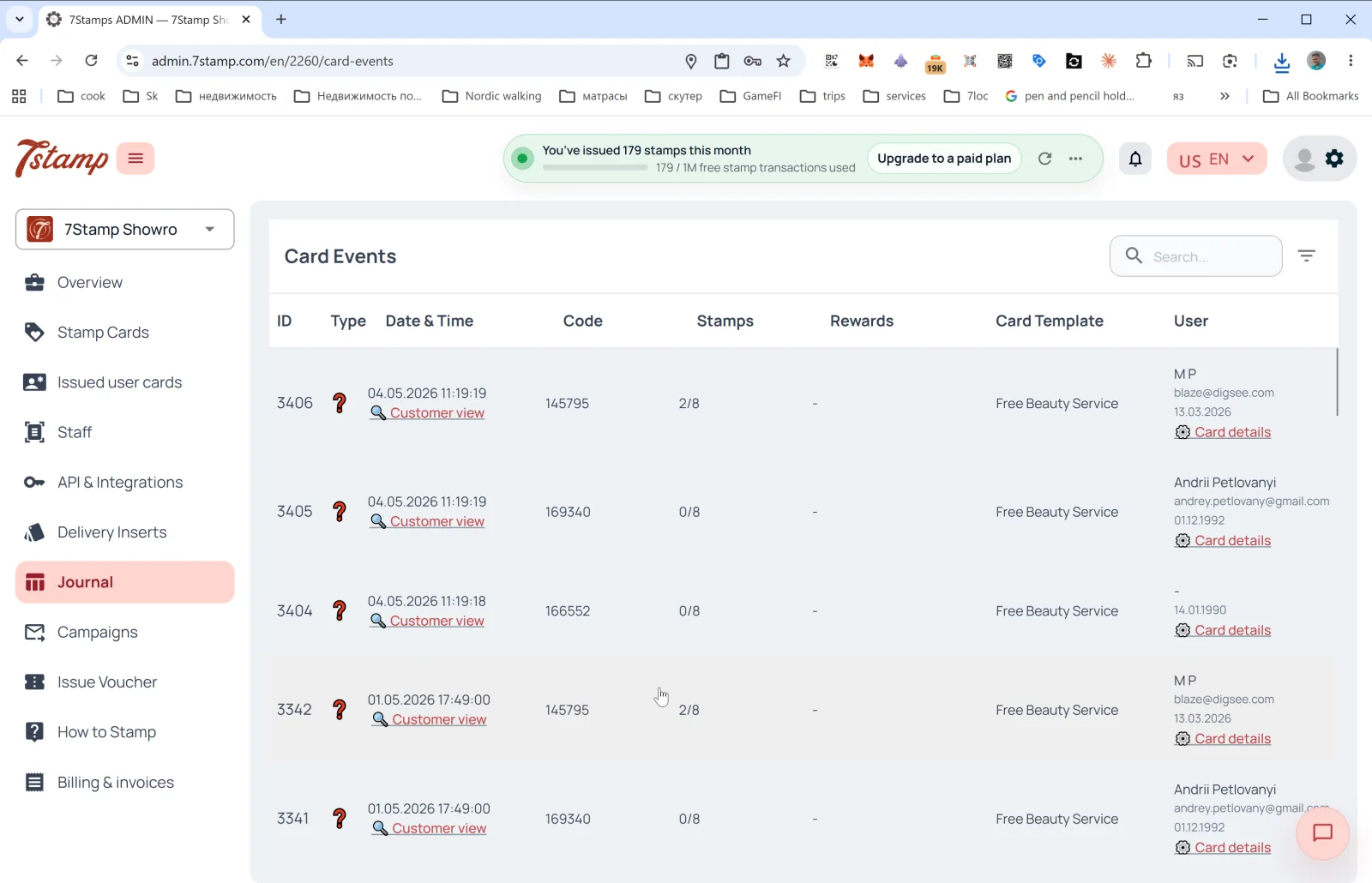
ಬದಿಯ ಮೆನುವಿನಲ್ಲಿರುವ Journal ವಿಭಾಗವು ಎಲ್ಲ ಕಾರ್ಡ್ ಘಟನೆಗಳ ಸಂಪೂರ್ಣ ದಾಖಲೆಯಾಗಿದೆ. ಒಳಗಿನ ಪುಟದ ಶೀರ್ಷಿಕೆ Card Events.
ಕೋಷ್ಟಕದ ಕಾಲಮ್ಗಳು
- ID — ಘಟನೆಯ ಕ್ರಮ ಸಂಖ್ಯೆ.
- Type — ಘಟನೆಯ ಪ್ರಕಾರ (ಐಕಾನ್ಗಳು). ಕಾರ್ಡ್ ನೀಡಿಕೆ, ಸ್ಟ್ಯಾಂಪ್ ಸೇರ್ಪಡೆ, ಗುರಿ ತಲುಪಿದ್ದು, ವೋಚರ್ ನೀಡಿಕೆ / ರಿಡೀಮ್, ಲಾಟರಿ, ಹುಟ್ಟುಹಬ್ಬ, ಕಳುಹಿಸಿದ ಅಭಿಯಾನ ಸೇರಿವೆ.
- Date & Time — ದಿನಾಂಕ ಮತ್ತು ಸಮಯ + ಗ್ರಾಹಕರ ಕಣ್ಣಿನಿಂದ ಕಾರ್ಡ್ ತೆರೆಯಲು 🔍 Customer view ಲಿಂಕ್ (ಕೆಳಗೆ ನೋಡಿ).
- Code — ಘಟನೆಯ ಕೋಡ್ (ಉದಾ., ನೀಡಲಾದ Delivery Insert ಅಥವಾ Receipt ID).
- Stamps — ಘಟನೆಯ ಸಮಯದ ಸ್ಟ್ಯಾಂಪ್ ಪ್ರಗತಿ (
2/8,0/8). - Rewards — ಯಾವ ಉಡುಗೊರೆ ಸಿಕ್ಕಿತು (ಅನ್ವಯಿಸಿದರೆ).
- Card Template — ಟೆಂಪ್ಲೇಟ್ನ ಹೆಸರು (
Free Beauty Service,Free Coffee). - User — ಗ್ರಾಹಕರ ಹೆಸರು, ಇಮೇಲ್, ಹುಟ್ಟುಹಬ್ಬ + Card details ಲಿಂಕ್ (
Issued user cardsನಲ್ಲಿ ಕಾರ್ಡ್ ವಿವರಗಳನ್ನು ತೆರೆಯುತ್ತದೆ).
ಕೋಷ್ಟಕದ ಮೇಲೆ — ಹುಡುಕಾಟ ಕ್ಷೇತ್ರ ಮತ್ತು ಫಿಲ್ಟರ್.
Customer view — ಗ್ರಾಹಕರ ಕಣ್ಣಿನಿಂದ ಮುನ್ನೋಟ
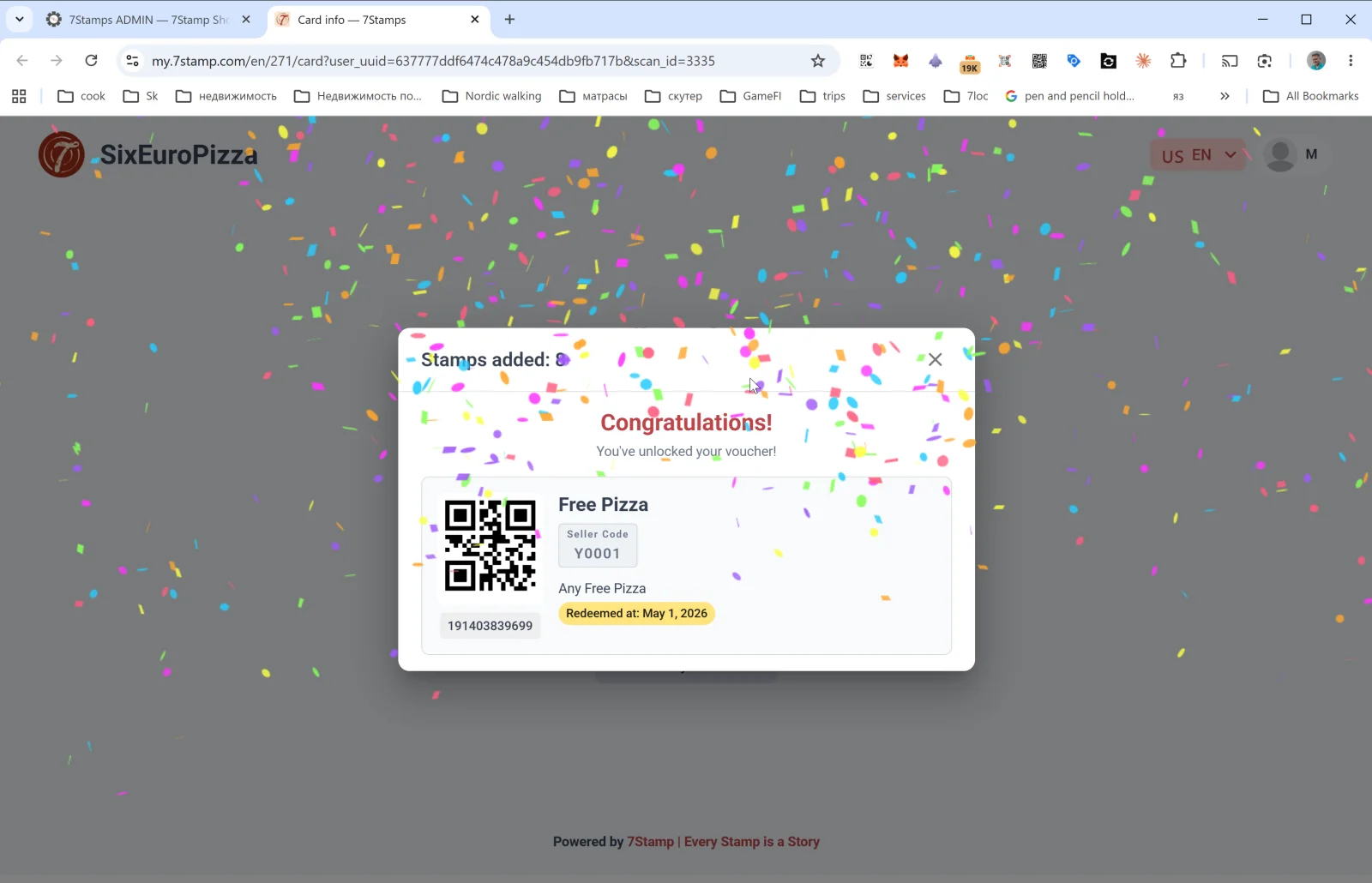
ಜರ್ನಲ್ ಸಾಲಿನಲ್ಲಿರುವ Customer view ಲಿಂಕ್ my.7stamp.com/{lang}/{cardId}/card?user_uuid=...&scan_id=... ಡೊಮೇನ್ನಲ್ಲಿ ಗ್ರಾಹಕರ ಪುಟವನ್ನು ತೆರೆಯುತ್ತದೆ. ನೀವು ನೋಡುವುದು:
- ಮೇಲ್ಭಾಗದಲ್ಲಿ ನೈಜ ಬ್ರ್ಯಾಂಡ್ (ಲೋಗೋ, ವ್ಯಾಪಾರದ ಹೆಸರು).
Stamps added: Nಪಾಪ್ಅಪ್.- ಗುರಿ ತಲುಪಿದ್ದರೆ — ಕಾನ್ಫೆಟ್ಟಿಯೊಂದಿಗೆ Congratulations! You’ve unlocked your voucher!.
- ವೋಚರ್ ಕಾರ್ಡ್: QR ಕೋಡ್, ಹೆಸರು, Redeem Code, ವಿವರಣೆ, ಸ್ಥಿತಿ (
Redeemed at: <date>— ಈಗಾಗಲೇ ಬಳಸಿದ್ದರೆ), ಬಾರ್ಕೋಡ್. - ಅಡಿಟಿಪ್ಪಣಿ:
Powered by 7Stamp | Every Stamp is a Story.
ಇದು ಬದಲಿಯಿಲ್ಲದ ದೋಷನಿವಾರಣೆ ಸಾಧನ: ಗ್ರಾಹಕರು “ಸ್ಟ್ಯಾಂಪ್ ಸೇರಲಿಲ್ಲ” ಎಂದು ದೂರು ನೀಡಿದರೆ, ನೀವು Customer view ತೆರೆದು ಅವರು ನಿಖರವಾಗಿ ಏನು ಮಾಡಿದರು ಎಂದು ನೋಡಬಹುದು.
Card details
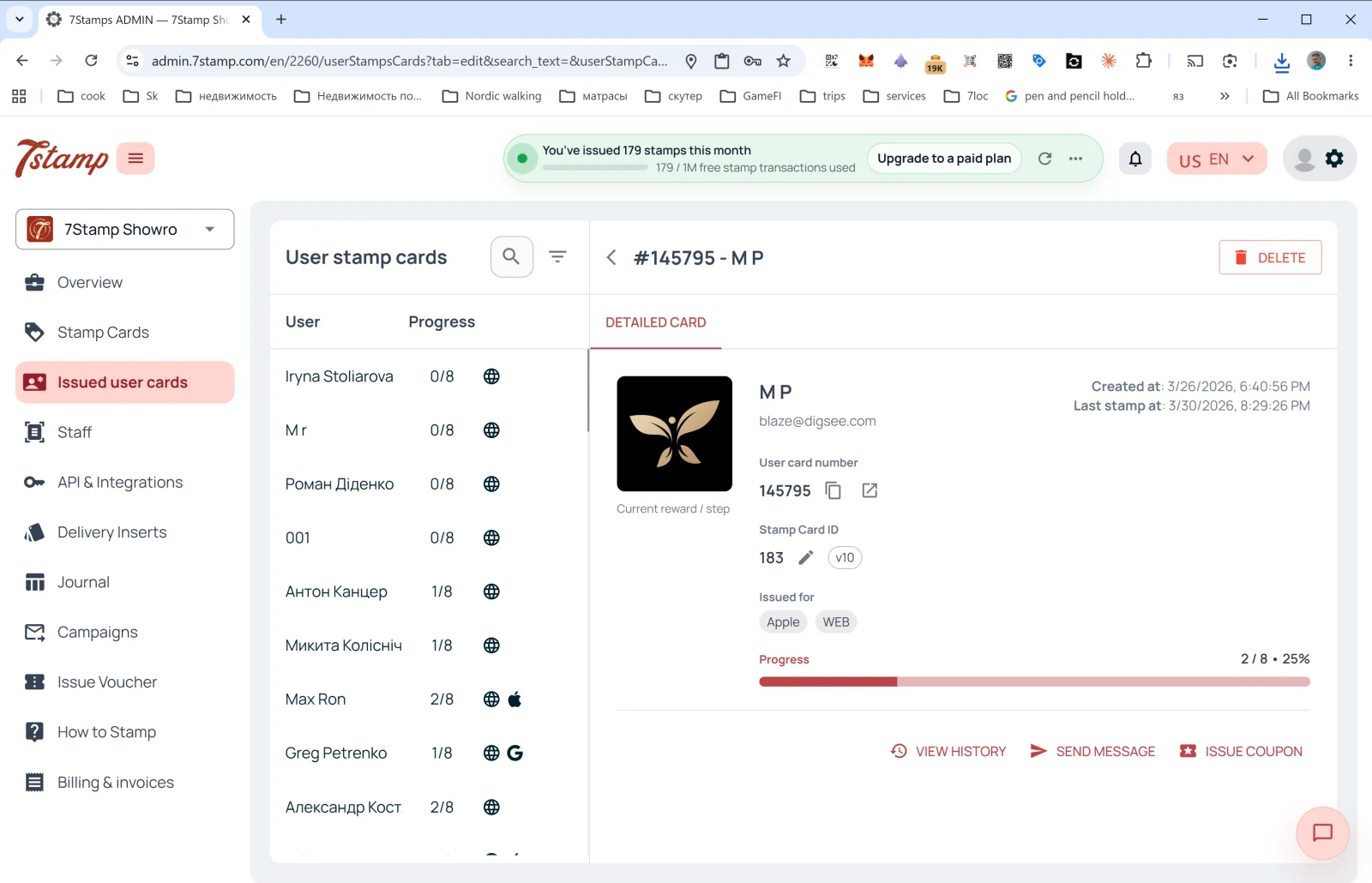
Journal ಸಾಲಿನಲ್ಲಿರುವ Card details ಲಿಂಕ್ ಆ ನಿರ್ದಿಷ್ಟ ಕಾರ್ಡ್ನ ವಿವರಗಳ ಫಲಕ ಈಗಾಗಲೇ ತೆರೆದಿರುವ Issued user cards ಗೆ ಕರೆದೊಯ್ಯುತ್ತದೆ — ಅಲ್ಲಿಂದ ನೀವು ಸಂಪೂರ್ಣ ಇತಿಹಾಸ ನೋಡಬಹುದು, ಸಂದೇಶ ಕಳುಹಿಸಬಹುದು ಅಥವಾ ವೈಯಕ್ತಿಕ ವೋಚರ್ ನೀಡಬಹುದು.
Visual walkthrough
Use the screen sets below as a visual companion to the article. Open any image to inspect it at full size.