
Get your program running
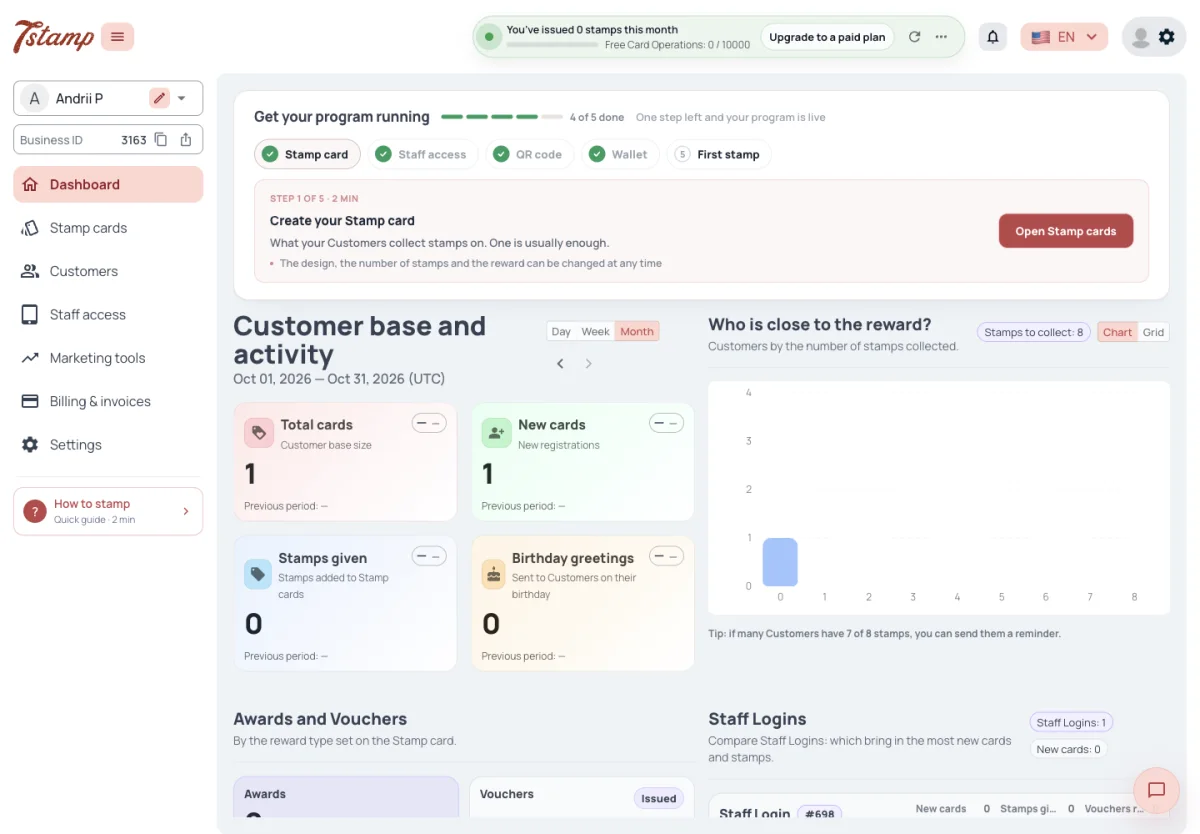
A new Business sees “Get your program running” at the top of its Dashboard: five steps in a row, with how many are done. The step to do next is written out under the row with its time and button; the steps after it open only once it is done.
- Stamp card — Create your Stamp card, two minutes. Open Stamp cards. Done once your Business has a Stamp card.
- Staff access — Create a Staff Login, two minutes. Create Staff Login opens Staff access. Done once your Business has a Staff Login.
- QR code — Print the QR or open the joining link, one minute. Get the QR code opens Stamp cards. Done when you print or download a card’s sticker, or copy or open its join link, in the card’s tile; that is remembered only in the browser you did it in. Elsewhere it is done once a Customer holds a card or a stamp has been given.
- Wallet — Add a test card to your wallet, two minutes. Open my card opens the Wallet modal on the spot. Done once any card of your Business, yours or a Customer’s, is installed in Apple Wallet or Google Wallet, or once a stamp has been given. A card that never reached a wallet does not count.
- First stamp — Give your first stamp, one minute. Open staff access. Done once a card gets a stamp from 7Stamp Scanner, a receipt, a Stamp Code, Delivery Inserts or the API. Test stamps from the Wallet modal do not count.
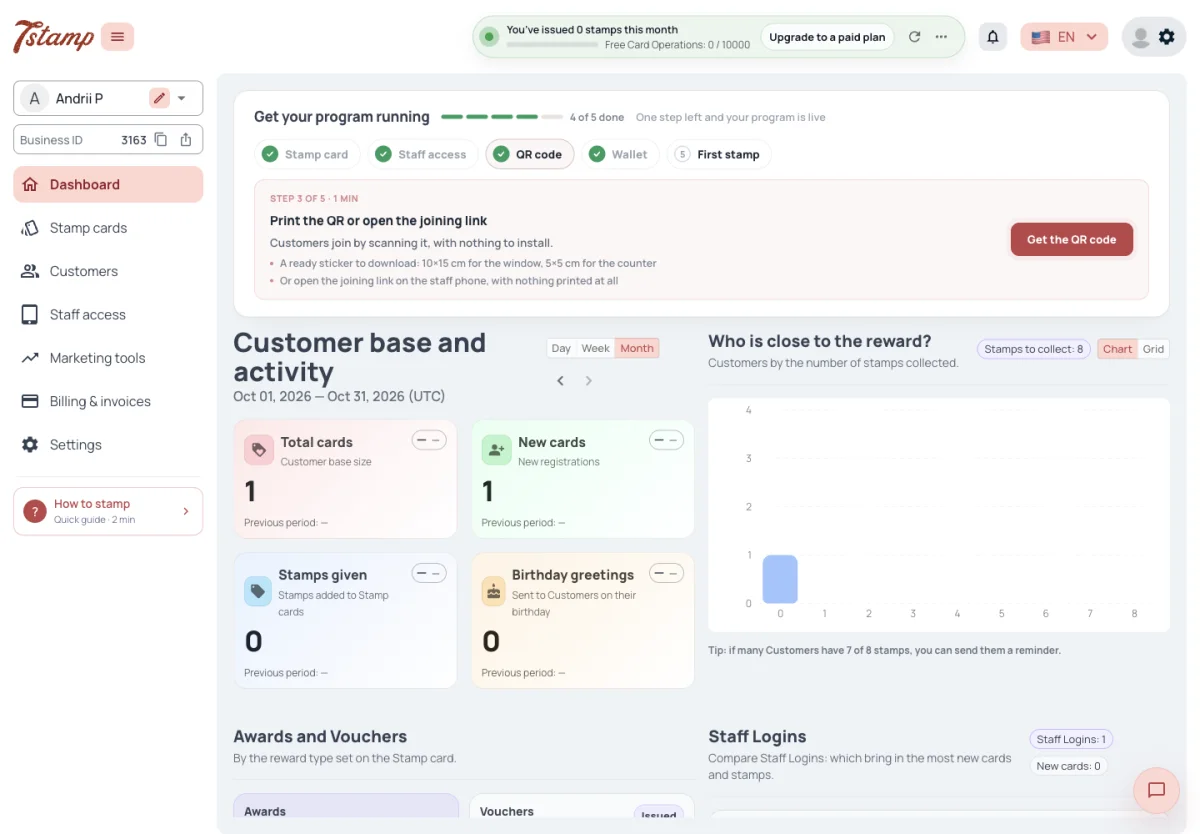
There is nothing to tick, skip or close: each step is read from your Business’s data. When all five are done, the checklist is gone for good, on every device.
I printed the QR, but on my other computer the QR code step is not done. Why?
Printing, downloading or copying the link is remembered only in the browser you did it in. Everywhere else the step is done once a Customer holds a card or a stamp has been given.
I gave myself test stamps. Why is First stamp still not done?
Test stamps do not count. The step is done by a stamp from 7Stamp Scanner, a receipt, a Stamp Code, Delivery Inserts or the API.
My card was issued but the Wallet step is not done. Why?
The step needs a card installed in Apple Wallet or Google Wallet. A card that only reached the join page does not count.
Can I hide the checklist?
No. It disappears by itself, for good, once all five steps are done.
Why can’t I open the Wallet step yet?
The steps after the one to do next open only once it is done. Finish the step written out under the row first.
Customer base and activity
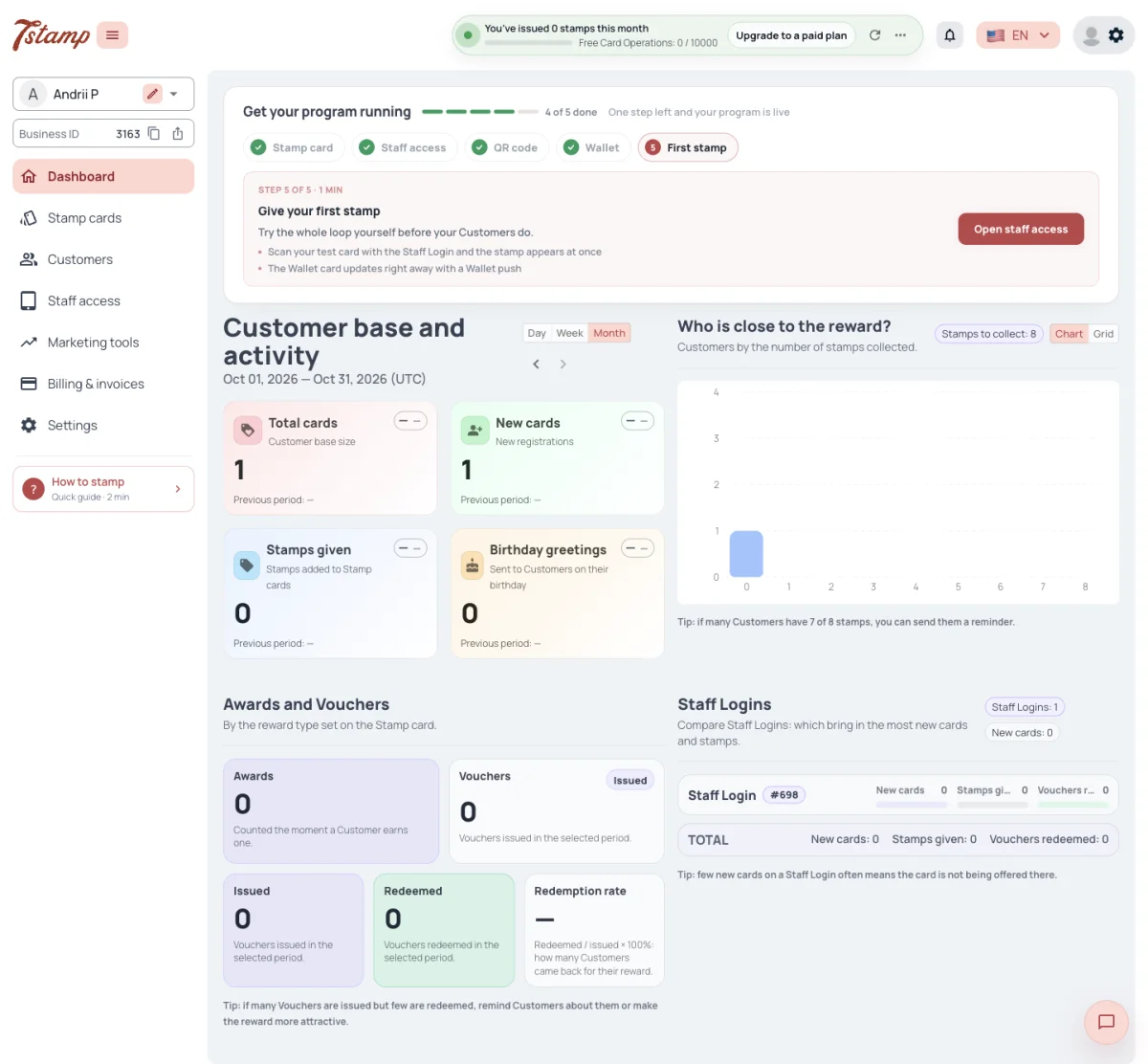
The Dashboard’s figures are for a Day, a Week from Monday or a Month, in UTC, with arrows to step back. The previous period’s value is shown only when you look at a past period. The figures cover all Stamp cards of your Business together; one Stamp card can’t be picked.
- Total cards — Customers’ Stamp cards issued up to the end of the period, minus cards deleted in the admin. It counts cards, not people: a Customer with two Stamp cards counts twice.
- New cards — cards issued in the period that have not been deleted since.
- Stamps given — stamps staff gave in the period, in 7Stamp Scanner or through the API, less the stamps staff took off. Stamps from receipts, Stamp Codes and test stamps are not counted.
- Birthday greetings — birthday greetings sent in the period.
The Dashboard has no figure of active or returning Customers: it counts cards, stamps, birthday greetings, rewards and Vouchers.
Why don’t my receipt stamps show in Stamps given?
Stamps given counts only the stamps staff gave in 7Stamp Scanner or through the API, less those taken off. Stamps from receipts, Stamp Codes and test stamps are not counted.
Is Total cards the number of my Customers?
No. It counts cards — a Customer with two Stamp cards counts twice.
Can I see the figures for one Stamp card?
No. The figures cover all Stamp cards of your Business together.
Which time zone does the Dashboard use?
UTC. A Day, a Week from Monday or a Month is counted in UTC.
Does the Dashboard show how many Customers came back?
No. It has no figure of active or returning Customers; it counts cards, stamps, birthday greetings, rewards and Vouchers.
Who is close to the reward?
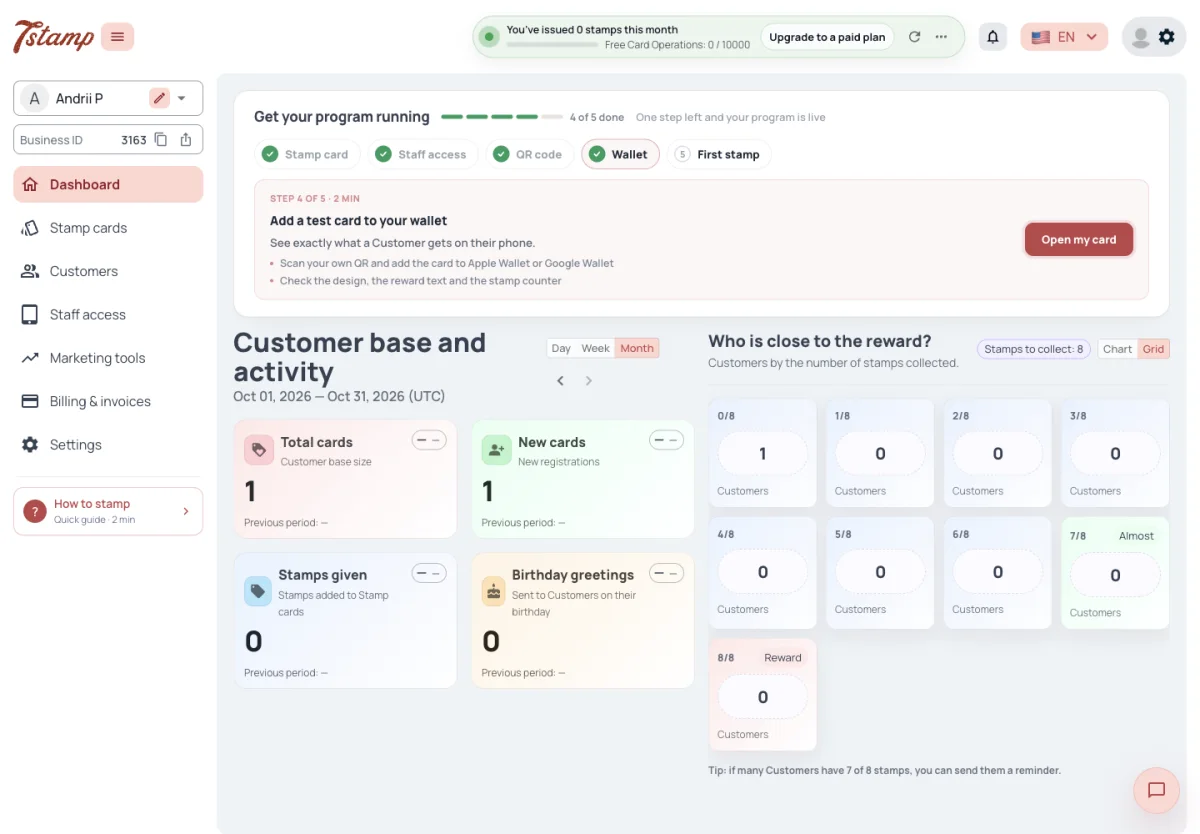
“Who is close to the reward?” groups your Customers’ cards by the number of stamps they hold now. Your own test cards are left out.
What does “Who is close to the reward?” show?
Your Customers’ cards grouped by the number of stamps they hold now.
Does my own test card count in it?
No. Your own test cards are left out.
Does it change when I step back to a past period?
It groups the cards by the stamps they hold now, so it shows the current picture.
Awards and Vouchers
Awards counts every Award Customers earned in the period, whatever reached it: stamps in 7Stamp Scanner or through the API, a receipt, a Stamp Code, a Campaign’s stamps or an Award won on a lottery wheel. Test stamps from the admin are not counted. An Award has nothing to redeem in the system — no code, no Validity and no Redeemed state — so it has no Redeemed figure. The Dashboard counts Vouchers as well, for the period you picked:
- Issued — every Voucher issued in the period, whatever issued it: a stamp, a Lottery, Vouchers with the card, a birthday greeting, a Campaign, an Auto-message, Issue Voucher in the admin or the API. Deleted Vouchers are not counted.
- Redeemed — Vouchers redeemed in the period, whenever they were issued and whoever redeemed them: staff, the Customer or the API.
- Redemption rate — of the Vouchers issued in the period, the share redeemed so far, as a percentage. With no Voucher issued in the period it shows a dash.
Why is there no Redeemed figure for Awards?
An Award has nothing to redeem in the system — no code, no Validity and no Redeemed state. It is counted when the Customer earns it.
When is an Award counted?
When a Customer earns it, whatever reached it — a stamp in 7Stamp Scanner or through the API, a receipt, a Stamp Code, a Campaign or a lottery wheel. Test stamps from the admin are not counted.
Does the Dashboard count rewards?
Yes. Besides cards, stamps and birthday greetings it counts rewards and Vouchers.
Do Vouchers I issue by hand count in Issued?
Yes. Issued counts every Voucher issued in the period — from a stamp, a Lottery, Vouchers with the card, a birthday greeting, a Campaign, an Auto-message, Issue Voucher or the API.
How is the Redemption rate worked out?
Of the Vouchers issued in the period you picked, the share already redeemed, whenever they were redeemed. Vouchers issued earlier do not count in it.
Why does the Redemption rate show a dash?
No Voucher was issued in the period you picked, so there is nothing to divide by.
Are Vouchers my Customers redeemed themselves counted in Redeemed?
Yes. Redeemed counts every redemption in the period — by staff, by the Customer or through the API.
Staff Logins
The Staff Logins block compares your Staff Logins over the chosen period: new cards, stamps given and Vouchers redeemed by each.
New cards here counts staff scans of a card that held no stamps at that moment. It is not the number of cards issued, so it need not match New cards at the top. A redeemed Voucher is recorded with the Staff Login that redeemed it; a Voucher the Customer redeemed has no Staff Login. A deleted Staff Login no longer appears in the comparison.
Why don’t New cards in the Staff Logins block match New cards at the top?
In the Staff Logins block New cards counts staff scans of a card that held no stamps at that moment, not the cards issued.
Which Staff Login gets a redeemed Voucher?
The one that redeemed it. A Voucher the Customer redeemed themselves has no Staff Login.
A Staff Login disappeared from the comparison. Why?
It was deleted. A deleted Staff Login no longer appears in the Dashboard’s Staff Logins comparison.
Dashboard figures and Card Operations
The Dashboard counts stamps; billing counts Card Operations, and the two need not match. A Card Operation is counted for every scan that stamps a card — in 7Stamp Scanner, by a receipt QR, through the API or a POS integration — and also for a scan below the stamp price and for removing stamps. Stamps given on the Dashboard leaves out receipts and Stamp Codes. Stamps in Terminal Mode come as a Stamp Code and are not Card Operations; test stamps are neither Card Operations nor counted on the Dashboard.
Card Operations per Staff Login are on Staff access, for information: the allowance is shared by the whole Business. What is counted and what is free is in Plans and billing.
Why is my Card Operations count higher than Stamps given?
Card Operations also count receipt QR scans, scans below the stamp price and removing stamps. Stamps given counts only stamps staff gave in 7Stamp Scanner or through the API, less those taken off.
Where do I see how many Card Operations each Staff Login used?
On Staff access, for information. The allowance is shared by the whole Business.
Are stamps in Terminal Mode Card Operations?
No. In Terminal Mode the stamps come as a Stamp Code, and Stamp Codes are not counted.