
Plans
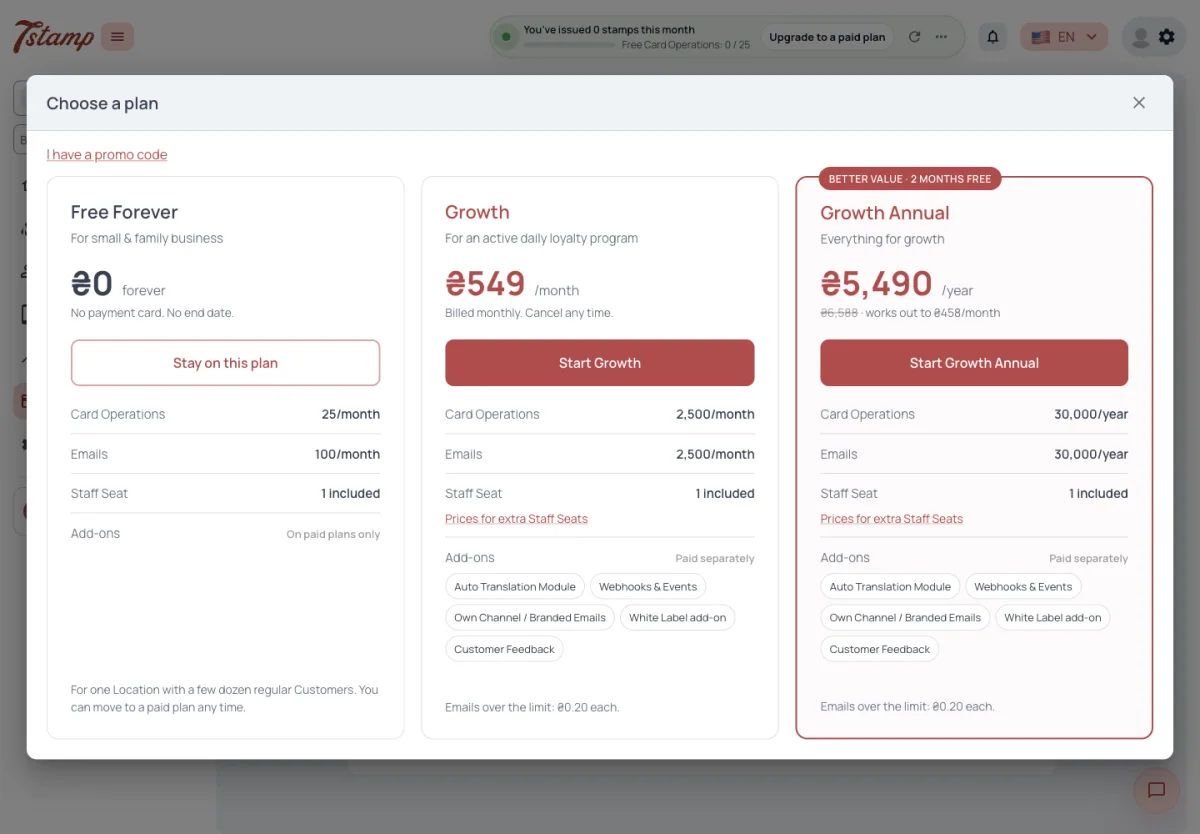
7Stamp has three plans: Free Forever, Growth and Growth Annual. A Plan is only how your Staff Logins are billed. A Package from an Access Code is not a Plan: it works before billing.
Prices are set separately in USD, EUR and UAH, and one is never converted from another. The admin shows them in the currency of your Business’s country. Growth and Growth Annual need a payment card; Free Forever does not.
Which plans does 7Stamp have?
Three — Free Forever, Growth and Growth Annual.
Why are the prices in my admin in a different currency than on the website?
The admin shows prices in the currency of your Business’s country. Prices in USD, EUR and UAH are set separately, not converted from one another.
Do I need a payment card to start?
No. Free Forever needs no payment card. Growth and Growth Annual do.
Is an Access Code a plan?
No. A Package from an Access Code works before billing and is not a Plan. Your plan only decides how Staff Logins are billed.
Free Forever
Free Forever costs nothing, has no end date and needs no payment card. It includes one Staff Login, 25 Card Operations and 100 Emails a month. Add-ons are not available on it.
Both allowances reset together every month, on the day and at the time your Business started Free Forever — not on the 1st. What is left over does not roll over.
When the Card Operations run out, stamping stops until the next reset. Nothing is charged, and the admins of your Business get a notice in the admin. Counted Emails over the allowance are paused, not sent; system emails, such as a password reset, are always sent.
Does Free Forever end after a trial period?
No. It has no end date and costs nothing.
What happens when I use up the Card Operations on Free Forever?
Stamping stops until the allowance resets. Nothing is charged, and your admins get a notice in the admin.
When do my Free Forever limits reset?
Every month, on the day and at the time your Business started Free Forever — not on the 1st. Unused Card Operations and Emails do not roll over.
Can I buy an add-on on Free Forever?
No. Add-ons are available on paid plans only.
Growth
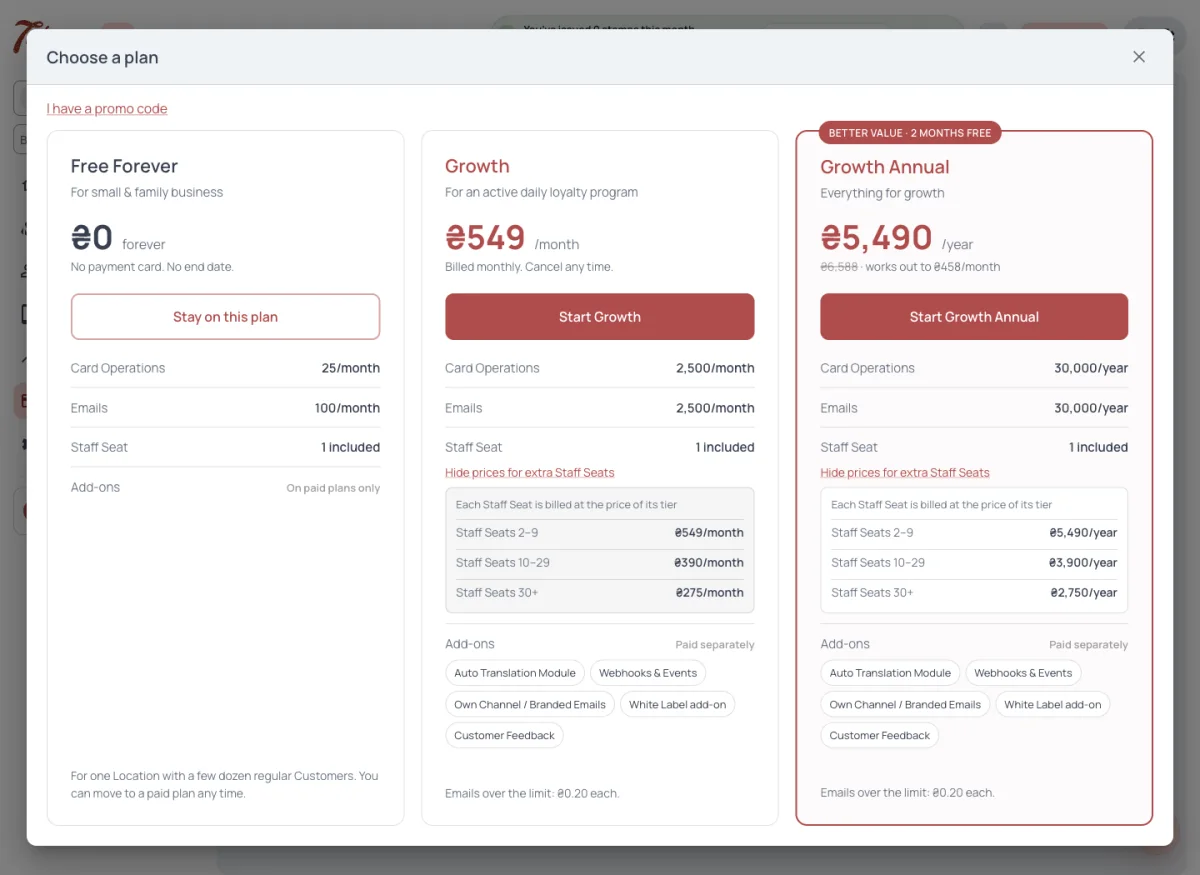
Growth is billed monthly per Staff Login, and each Staff Login is priced by its position: logins one to nine at $35, ten to twenty-nine at $25, thirty and more at $17.50 each. More than a hundred Staff Logins are priced by agreement.
Each Staff Login brings 2,500 Card Operations and 2,500 Emails a month: your Business’s allowance is that times the number of Staff Logins you pay for. It resets every month on the renewal day, the day the subscription was bought, and what is left over does not roll over.
Growth never stops at the allowance. Each Card Operation over it costs $0.01 and each Email over it $0.01.
How much does Growth cost for several Staff Logins?
Each Staff Login is priced by its position — logins one to nine at $35, ten to twenty-nine at $25, thirty and more at $17.50 each, a month.
Does stamping stop on Growth when the allowance is used up?
No. Growth never stops at the allowance; each Card Operation over it costs $0.01 and each Email $0.01.
Do unused Card Operations carry over to next month?
No. The allowance resets on the renewal day and what is left over does not roll over.
We need more than a hundred Staff Logins. What is the price?
More than a hundred Staff Logins are priced by agreement — contact us.
Growth Annual
Growth Annual is paid once a year: ten months of Growth for twelve. Each Staff Login brings a yearly pool of 30,000 Card Operations and 30,000 Emails. The whole pool is available at once and can be spent at any pace; it resets once a year, on the renewal day, with no monthly reset.
Add-ons on Growth Annual are paid yearly too, ten months for twelve.
How is Growth Annual cheaper than Growth?
It is paid once a year — ten months of Growth for twelve.
Is there a monthly limit on Growth Annual?
No. Each Staff Login brings a yearly pool that is available at once and can be spent at any pace. It resets once a year, on the renewal day.
How are add-ons billed on Growth Annual?
Yearly, ten months for twelve.
Staff Logins and Staff Seats
Each active Staff Login takes one Staff Seat of your plan. When all seats are taken, a new Staff Login can’t be created or switched on. Switching a Staff Login off or deleting it frees its seat; its history of Card Operations stays.
A Staff Login added in the middle of a Growth period joins the same subscription, and the renewal day stays. The days left until renewal are charged at once, pro rata, and the full per-login allowance is added at once. A paid Staff Login can be removed from the next period only.
Why can’t I create another Staff Login?
Every seat of your plan is taken — each active Staff Login takes one Staff Seat. Free a seat by switching a Staff Login off or deleting it, or add a seat to your plan.
If I delete a Staff Login, do I lose its history?
No. Its seat is freed, and its history of Card Operations stays.
I added a Staff Login in the middle of the month. How is it charged?
It joins the same subscription and the renewal day stays. The days left until renewal are charged at once, pro rata, and its full allowance is added at once.
Can I stop paying for a Staff Login right away?
No. A paid Staff Login can be removed from the next period only.
Card Operations
A Card Operation is one transaction with a Customer’s card. A stamp and the rewards it unlocks in the same transaction count as one Card Operation.
One is counted for every scan that stamps a card: in 7Stamp Scanner (Manual and Kiosk Mode), by a receipt QR, and through the API or a POS integration. A scan that passes but adds no stamp, because the amount is below the stamp price, still counts, and so does removing stamps in 7Stamp Scanner. A refused scan costs nothing.
These are free: redeeming a Voucher, looking up a card, issuing a card, Wallet push, Stamp Codes, birthday greetings, Campaigns and a Voucher issued from the admin. Stamps given in Terminal Mode are free too: Serve Customer shows a single-use Stamp Code.
The allowance is shared by the whole Business; Staff access shows how many each Staff Login used in the current period, for information only. When the Card Operations run out, a receipt QR scan still saves the receipt but issues no card and adds no stamp, and your admins get a notice.
What counts as a Card Operation?
One transaction with a Customer’s card. If a Customer gets a stamp and a reward in the same transaction, it is still one Card Operation. Issuing a card, Wallet push, redeeming a Voucher and looking up a card don’t count.
Does a scan below the stamp price use a Card Operation?
Yes. A scan that passes but adds no stamp still counts. A refused scan — no amount, or the card’s owner not found — costs nothing.
Are stamps in Terminal Mode counted?
No. In Terminal Mode Serve Customer shows a single-use Stamp Code, and Stamp Codes are not counted.
Does each Staff Login have its own Card Operations?
No. The allowance is shared by the whole Business. Staff access shows how many each Staff Login used, for information only.
Emails and messages
With the shared default sender only marketing emails count against the Emails allowance: Campaigns, Auto-messages, birthday greetings and messages sent to a card holder from the admin. Transactional and system emails are free.
Branded emails go from your own domain through 7Stamp’s servers, and every one of them counts, transactional and system ones too; system emails are never held back. Emails sent through your own SMTP server are never counted and have no limit. Wallet push and Chatbot messages in Telegram or WhatsApp are never counted either.
A Business on an LTD Access Code without a paid plan sends emails to Customers only through its own SMTP server.
Which emails count against my Emails allowance?
With the default sender, only marketing emails — Campaigns, Auto-messages, birthday greetings and messages to a card holder from the admin. With Branded emails every email counts. Through your own SMTP server nothing counts.
Are Wallet push messages limited?
No. Wallet push and Chatbot messages in Telegram or WhatsApp are never counted and have no limit.
I’m on an LTD Access Code. How do I send emails to Customers?
Without a paid plan, through your own SMTP server only. Branded emails need a paid plan.
Add-ons
Five add-ons are paid separately, on paid plans only:
- White Label add-on — $59 a month per account;
- Own Channel / Branded Emails — $15 a month per account;
- Webhooks & Events — $19 a month;
- Auto Translation Module — $9 a month;
- Customer Feedback — $9 a month per Staff Login.
For Customer Feedback every created Staff Login counts, switched-off ones too, deleted ones don’t; a Business without Staff Logins pays for one. One Webhooks & Events add-on keeps one Webhook switched on.
Which add-ons can I buy?
White Label add-on, Own Channel / Branded Emails, Webhooks & Events, Auto Translation Module and Customer Feedback — on paid plans only.
Why am I charged Customer Feedback for a switched-off Staff Login?
Customer Feedback is billed per created Staff Login, switched-off ones too. Delete the Staff Login to stop paying for it.
How many Webhooks does the Webhooks & Events add-on cover?
One Webhooks & Events add-on keeps one Webhook switched on.
Packages from an Access Code
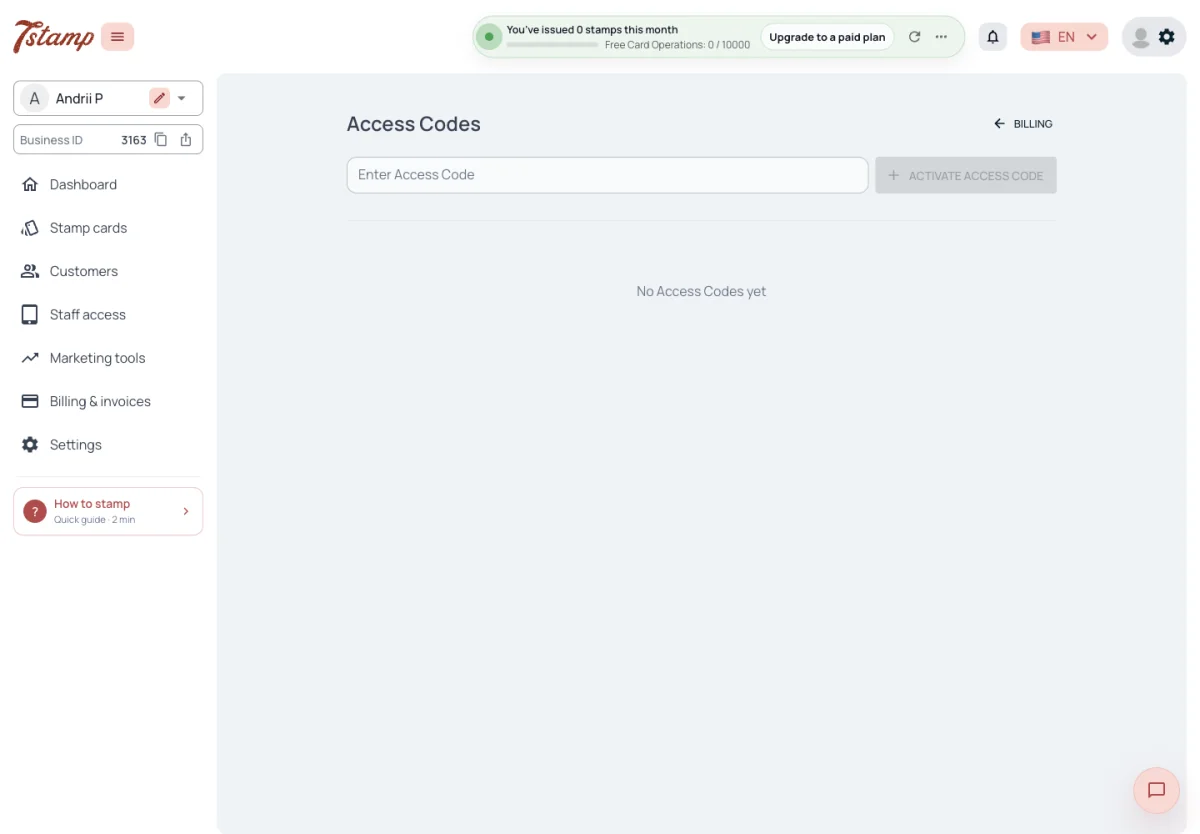
One Package is one Staff Login with 2,500 Card Operations and 2,500 Emails a month. Packages are used before the plan; with several, the oldest is used first. Any number of Access Codes can be added to one account, and their Packages add up.
Each Package is counted on its own, from the day it was assigned to the Business, and resets every month on that day; what is left over does not roll over. A used-up Package gives nothing more until its next reset day — meanwhile Card Operations and Emails come from your plan. Stamping stops only when the plan has nothing left either.
Packages are assigned to Businesses and taken back by hand in the admin only. A Package can be moved to another Business at any time, used or not: it leaves the old Business at once, and the new one gets the full monthly allowance. If the old Business holds no other Package of that Access Code, the code can return to it only from the day the removed Package would have reset — the admin shows that date.
I bought the LTD, but the system keeps asking me to upgrade to a paid plan. Do I need one?
No. Packages work on top of Free Forever and are used before the plan. Assign a Package to the Business in Billing & invoices.
Do several Packages mean several clients?
No. One Package is one Staff Login with its own monthly allowance. With several Packages the oldest is used first.
Can I move a Package to another Business?
Yes, at any time, used or not. It leaves the old Business at once and the new Business gets the full monthly allowance.
Can Packages be assigned through the API?
No. Packages are assigned and taken back by hand in the admin only.
When a payment fails
When a payment fails, the service goes on for 72 hours. After that the plan is on hold — only Access Codes keep serving — until the payment goes through, and then it works again at once. 7Stamp never cancels the subscription.
My payment failed. Will my Stamp cards stop working at once?
No. The service goes on for 72 hours. After that the plan is on hold until the payment goes through; Access Codes keep serving.
Will 7Stamp cancel my subscription if I don’t pay?
No. The subscription is never cancelled by 7Stamp; it stays on hold until the payment goes through.
What happens once the payment goes through?
The plan works again at once.