
Automatic receipt scanning
Automatic receipt scanning lets a Customer collect stamps without a cashier scanning the Customer’s card or an integration with the cash register. The Customer opens the Business’s Telegram or WhatsApp Chatbot, taps Scan receipt, and scans the fiscal QR on the receipt. 7Stamp checks the receipt with the country’s fiscal service and applies the Stamp card’s earning rule.
This workflow is available in Ukraine, Slovakia, Kazakhstan and Uzbekistan.
Does automatic receipt scanning need a POS integration?
No. The Customer scans the fiscal QR in the Business’s Chatbot and 7Stamp checks the receipt with the fiscal service.
Where does the Customer scan the fiscal receipt?
In the Business’s Telegram or WhatsApp Chatbot. The Scan receipt button is not on the web card page or in My 7Stamp.
Which countries support fiscal receipt scanning?
Ukraine, Slovakia, Kazakhstan and Uzbekistan.
Set it up
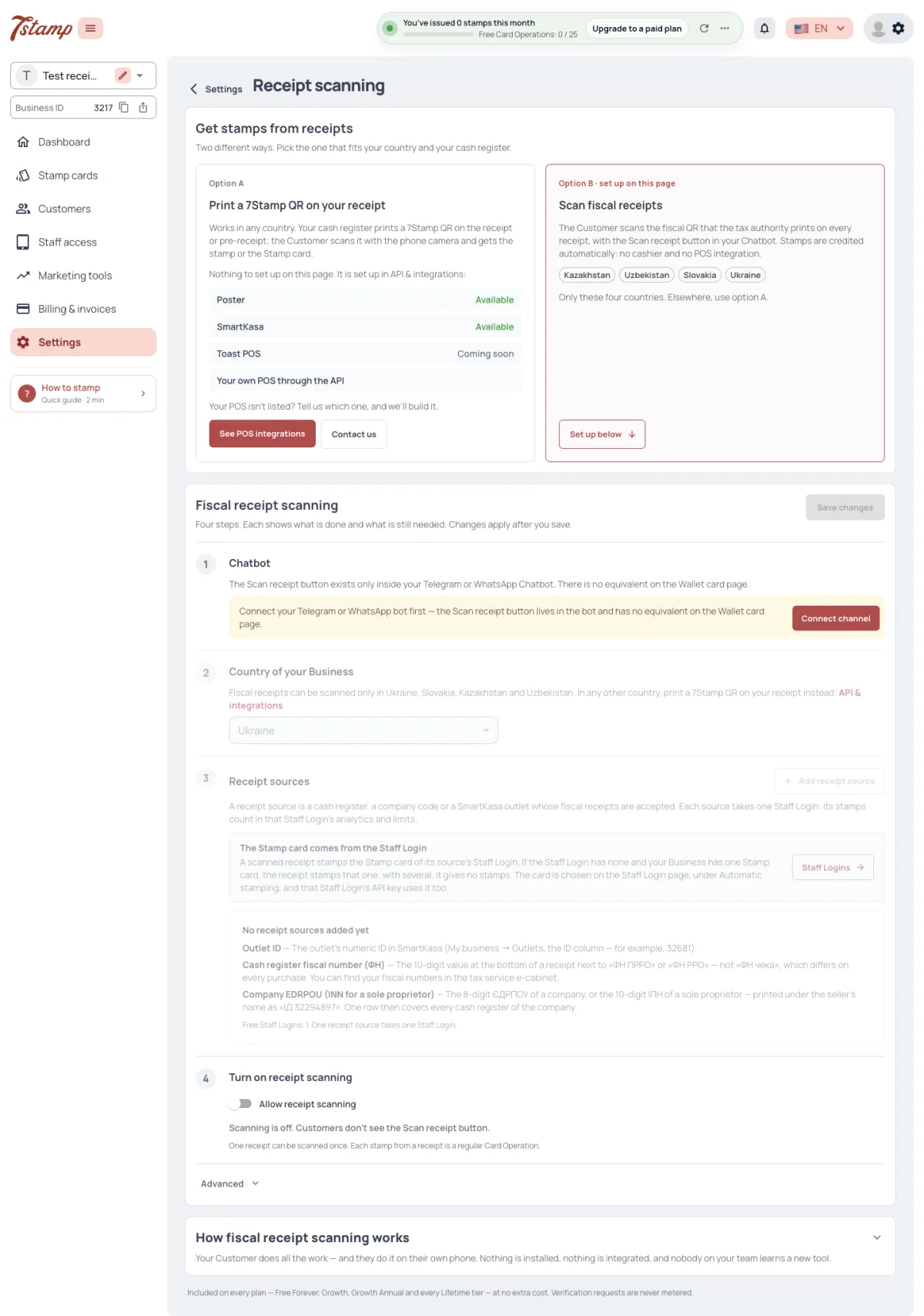
Open Settings → Receipt scanning. You can also start in How to stamp: choose QR of fiscal receipt and select Add receipt source.
Set it up in four steps:
- Connect the Business’s Telegram bot or WhatsApp number as its Chatbot.
- Choose the country where the cash registers are registered.
- Add a receipt source.
- Turn on Allow receipt scanning and select Save changes.
The country and receipt-source controls become available after the Chatbot is connected. Until the change is saved, Customers cannot scan receipts.
Why can’t I choose a country or add a receipt source?
Connect the Business’s Chatbot first. The country and receipt-source controls open after that step.
Can a Business connect Telegram and WhatsApp at the same time for receipt scanning?
No. A Business has one Chatbot channel at a time: Telegram or WhatsApp.
The receipt-scanning switch is on, but Customers cannot scan. What should I check?
Read the status line under the switch. It identifies a missing Chatbot, country, receipt source or a source with a problem; then save the changes.
Add a receipt source
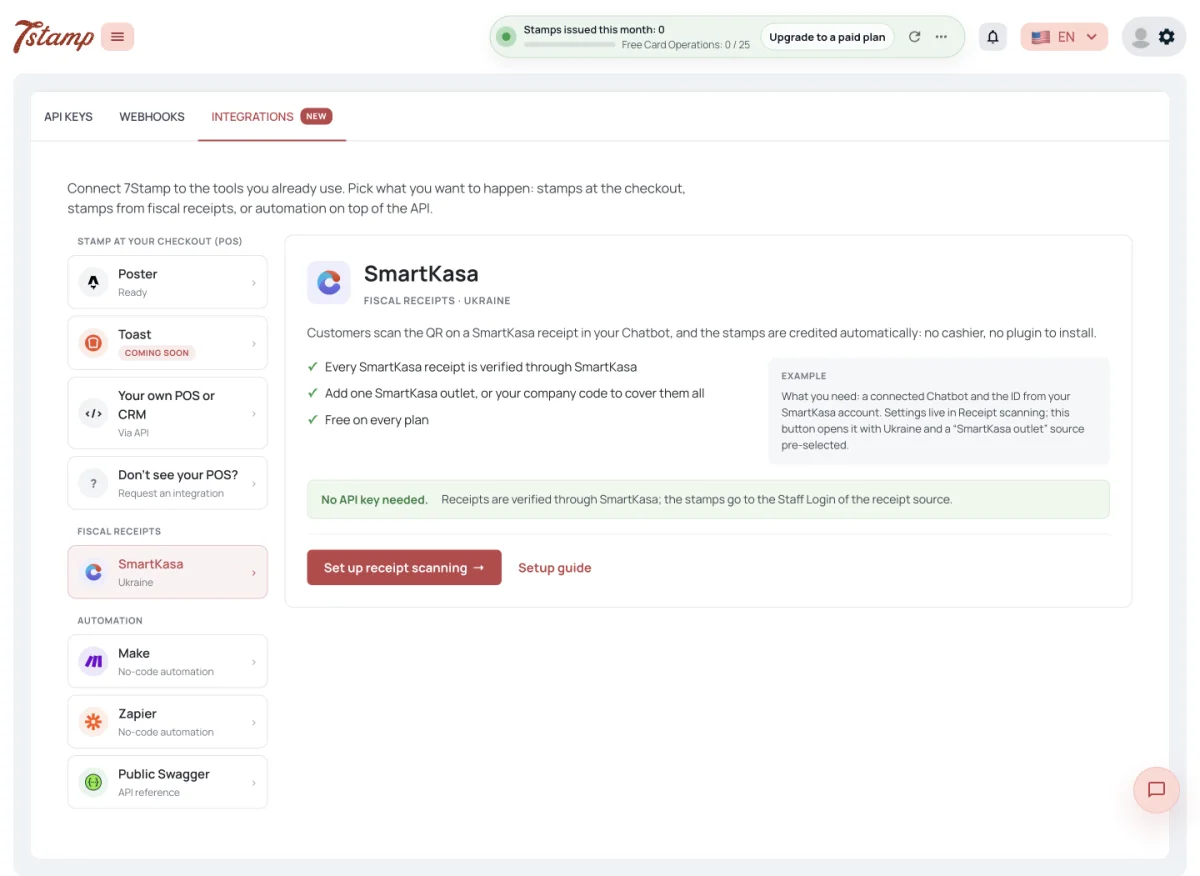
Choose the identifier that fits the receipts you want to accept:
- a company code or tax ID to cover every cash register of a company or sole trader;
- a cash-register fiscal number to accept receipts from one register; or
- a SmartKasa outlet ID to accept one SmartKasa outlet. A company code can instead cover every SmartKasa outlet of that company.
Choose an active Staff Login for the source. Its Automatic stamping setting selects the Stamp card that receives stamps from accepted receipts. A source with a switched-off or deleted Staff Login accepts no receipts.
Set the Scan window as well. New sources accept receipts for five minutes after purchase by default; set it to zero for no time limit.
We have several cash registers. Do we need to add each fiscal number?
No. Add the company code or tax ID as one receipt source to cover the company’s registers. Add a fiscal number when only one register should be accepted.
Do we need a SmartKasa API key?
No. Add the SmartKasa outlet ID, or use the company code to cover every SmartKasa outlet of that company.
Which Stamp card gets stamps from an accepted receipt?
The Stamp card selected in Automatic stamping for the active Staff Login tied to the receipt source.
Customer flow and protection
The Customer pays, receives a fiscal receipt, then scans its QR in the Chatbot. 7Stamp checks the receipt, refuses a receipt already scanned, and adds stamps by the Stamp card’s earning rule.
Use Advanced → Test mode only to try the flow before going live. It accepts any receipt without checking the country, source or Scan window and does not block the same receipt from being scanned again. Turn it off before launch.
Can the same receipt give stamps twice?
No. A normal receipt source accepts a receipt once. Test mode is the exception and should be turned off before launch.
Can a Customer scan a receipt later at home?
Only within the receipt source’s Scan window. A new source allows five minutes after purchase; zero means no limit.
Does a refused receipt use a Card Operation?
No. A receipt that is already scanned, too old or from an unknown source counts nothing.