
குறிப்புரை
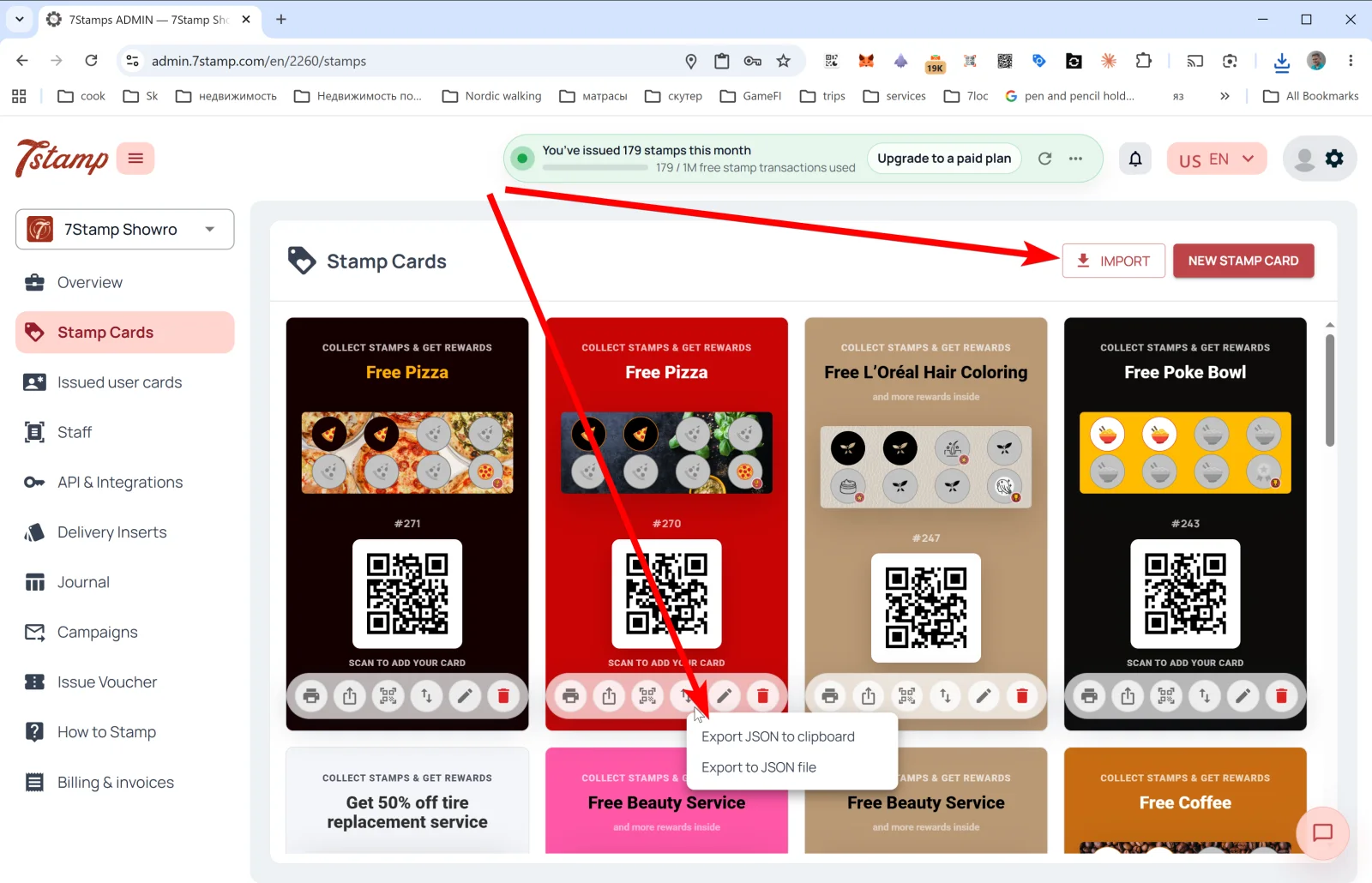
பக்க மெனுவில் உள்ள Stamp Cards பிரிவு உங்கள் எல்லா கார்டு டெம்ப்ளேட்களின் தொகுப்பு. ஒவ்வொரு கார்டும் அதன் வடிவமைப்பு, ஸ்டாம்ப் முன்னேற்றப் பட்டை, #ID மற்றும் வாடிக்கையாளர்கள் இணைவதற்கான QR ஆகியவற்றைக் காட்டுகிறது.
4. Stamp Cards — உங்கள் லாயல்டி கார்டுகள்
பக்க மெனுவில் உள்ள Stamp Cards பிரிவு உங்கள் எல்லா கார்டு டெம்ப்ளேட்களின் தொகுப்பு. ஒவ்வொரு கார்டும் அதன் வடிவமைப்பு, ஸ்டாம்ப் முன்னேற்றப் பட்டை, #ID மற்றும் வாடிக்கையாளர்கள் இணைவதற்கான QR ஆகியவற்றைக் காட்டுகிறது.
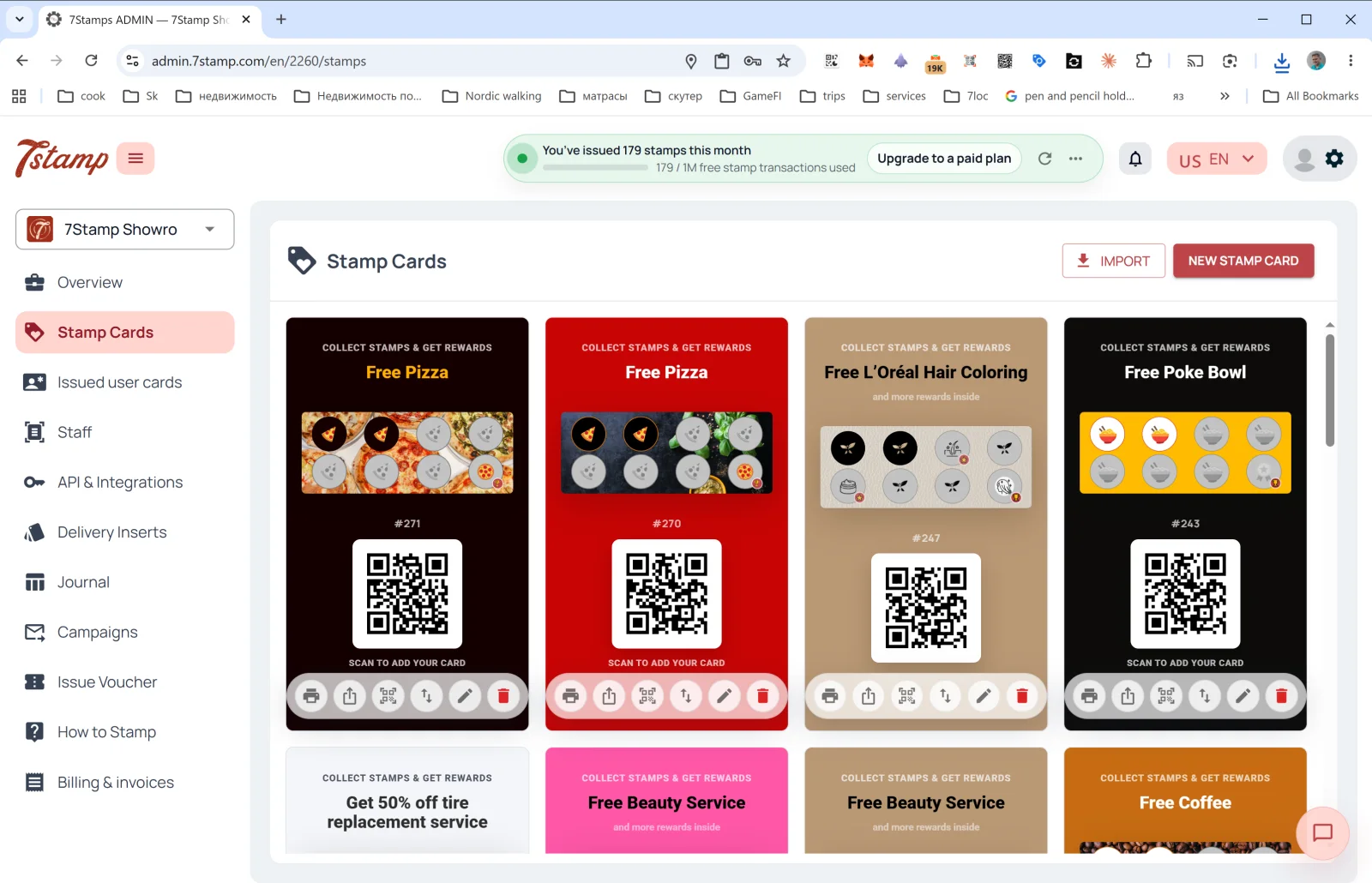
Stamp Cards பக்கத்தில் என்ன செய்யலாம்
மேல் வலப்புறம் இரண்டு பொத்தான்கள்:
- NEW STAMP CARD — Card Designer-ஐத் திறந்து, புதிதாகவோ டெம்ப்ளேட்டிலிருந்தோ புதிய கார்டை உருவாக்கலாம். விவரங்கள் பிரிவு 5. Card Designer-இல்.
- IMPORT — JSON கோப்பிலிருந்து கார்டை ஏற்றலாம் (எ.கா. வேறொரு சுயவிவரத்திலிருந்து ஏற்றுமதி செய்திருந்தால் அல்லது கூட்டாளரிடமிருந்து பெற்றிருந்தால்).
தொகுப்பில் ஒவ்வொரு கார்டுக்கும் கீழே — ஆறு செயல் ஐகான்கள் (இடமிருந்து வலமாக):
| ஐகான் | என்ன செய்கிறது |
|---|---|
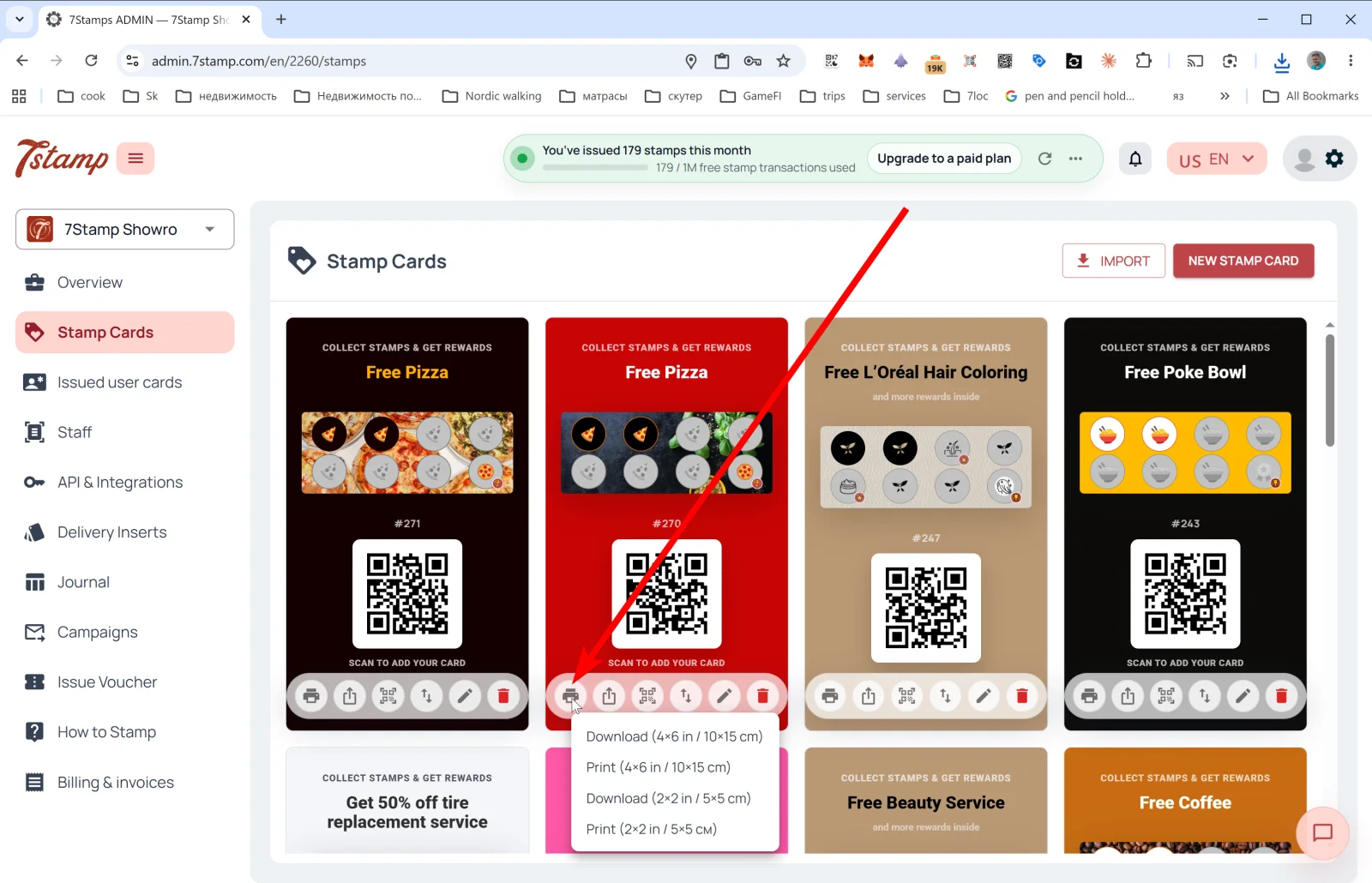
| 🖨️ Print / Download QR | QR லேபிள் ஏற்றுமதி மெனுவை இரண்டு அளவுகளில் திறக்கிறது: Download (4×6 in / 10×15 cm), Print (4×6 in / 10×15 cm), Download (2×2 in / 5×5 cm), Print (2×2 in / 5×5 cm). பெரிய அளவு நுழைவாயிலில் உள்ள போஸ்டர் அல்லது கவுண்டர் அறிவிப்புக்கு; சிறிய அளவு மேஜை ஸ்டாண்ட் அல்லது பேக்கேஜிங்கிற்கு. |
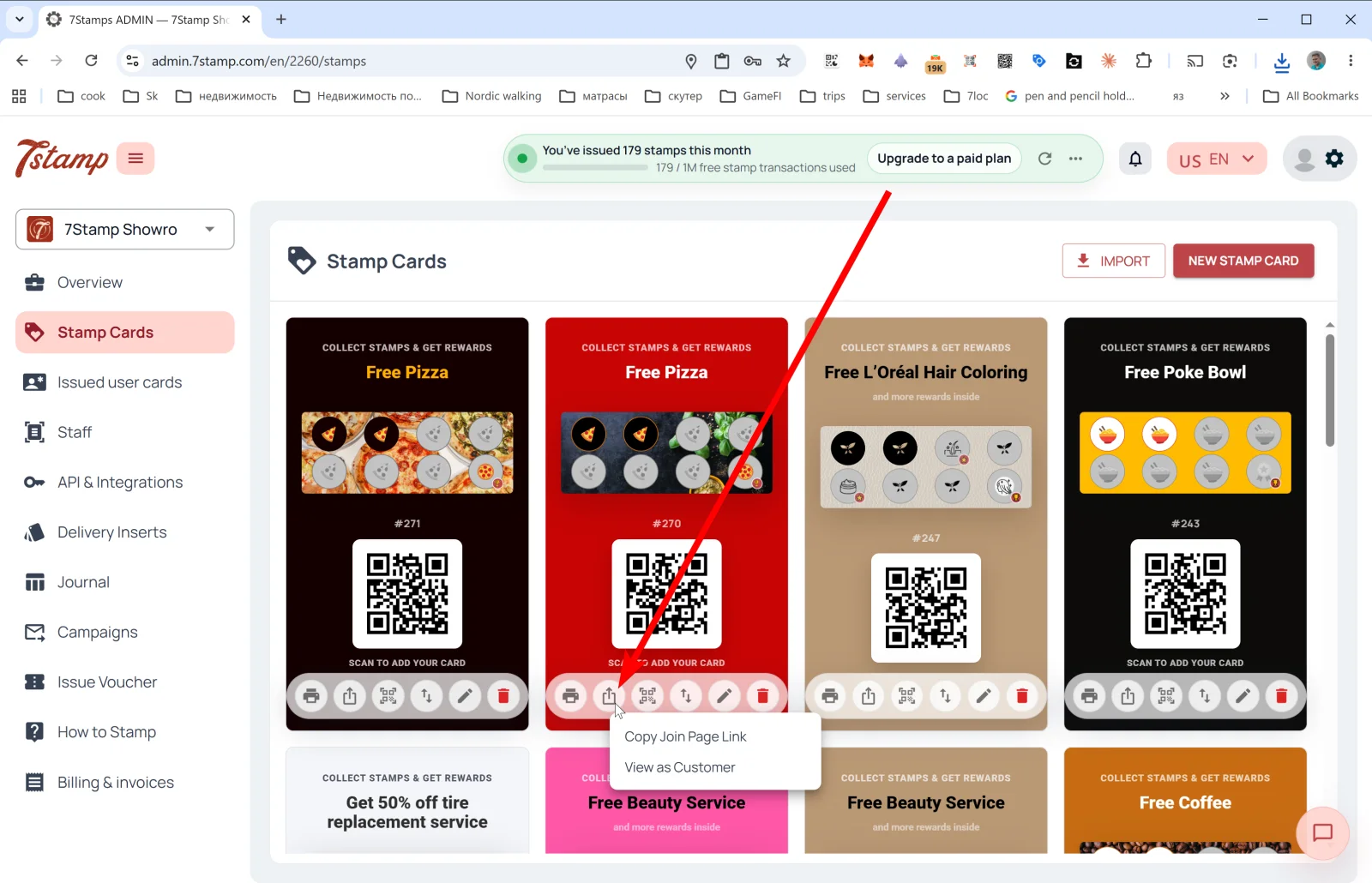
| ⤴️ Share | பொது இணைப்பு மெனு: Copy Join Page Link (Instagram பயோ, இணையதளம், மின்னஞ்சலுக்காகக் கார்டின் நேரடி இணைப்பை நகலெடுக்கிறது) மற்றும் View as Customer (வாடிக்கையாளர் பார்ப்பது போலவே இணையும் பக்கத்தைத் திறக்கிறது; அது எப்படி வேலை செய்யும் என்பதைச் சரிபார்க்கலாம்). |
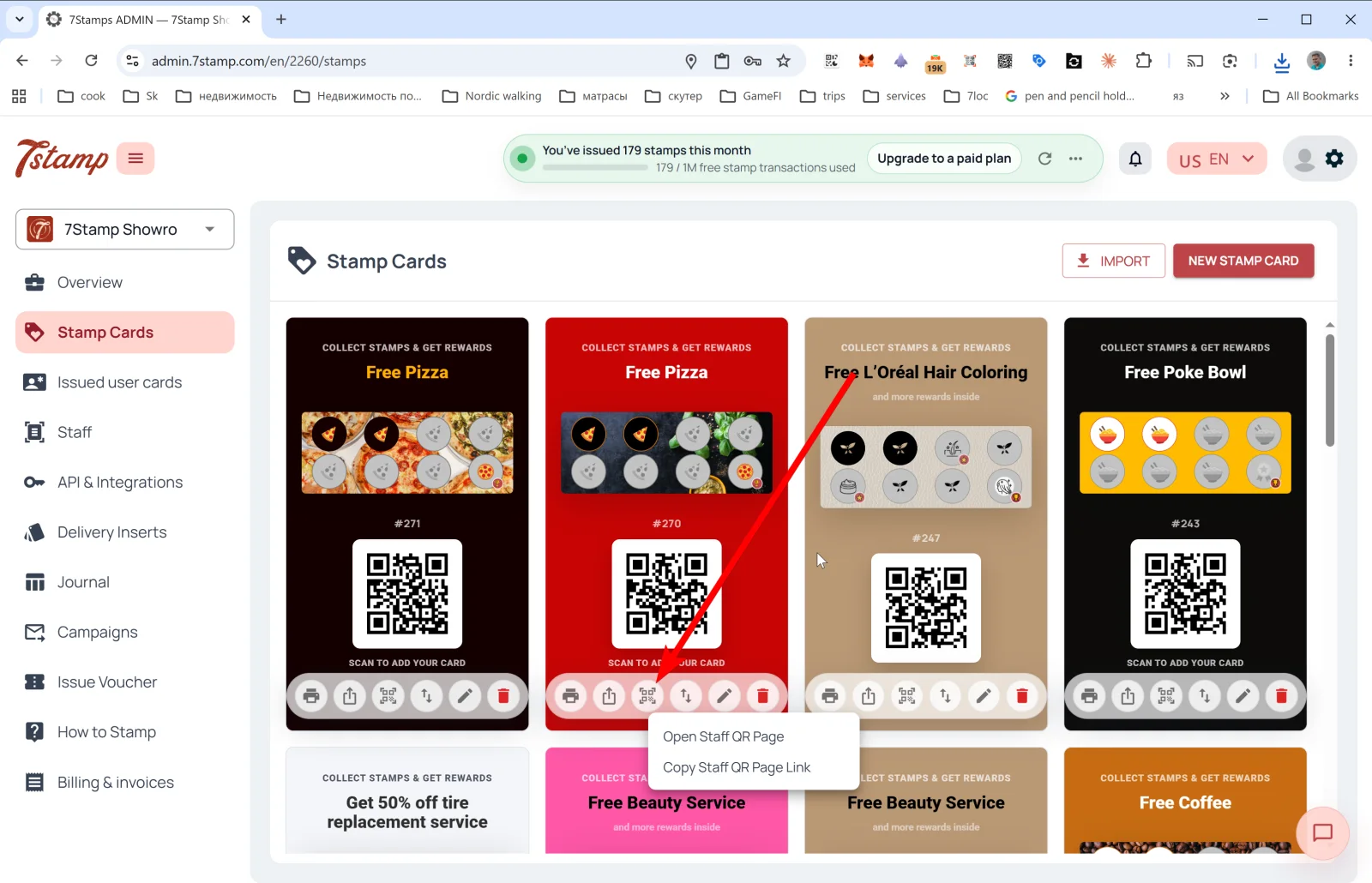
| 🔳 Staff QR Page | பணியாளர் QR பக்க மெனு: Open Staff QR Page மற்றும் Copy Staff QR Page Link. பணியாளர் இந்தப் பக்கத்தைத் தனது ஃபோனில் திறந்து வாடிக்கையாளரிடம் காட்டுகிறார் — வாடிக்கையாளர் ஸ்கேன் செய்து தனது கார்டைப் பெறுகிறார். தனிப்பட்ட தொடர்பு முக்கியமான பிரீமியம் சேவையில் பயனுள்ளது. |
| ↕️ Export Card Template | Export JSON to clipboard அல்லது Export to JSON file. காப்புப்பிரதி, இடமாற்றம், கூட்டாளருடன் கார்டைப் பகிர்தல் அல்லது டெம்ப்ளேட்டாகப் பயன்படுத்துதலுக்கு உதவும். |
| ✏️ Edit | திருத்துவதற்காகக் கார்டை Card Designer-இல் திறக்கிறது. |
| 🗑️ Delete | கார்டை நீக்குகிறது. |
குறிப்பு. தொடக்கத்தில் ஒரே நேரத்தில் ஐந்து கார்டுகள் தேவையில்லை — நன்கு அமைக்கப்பட்ட ஒரு கார்டே பொதுவாக ஒரு மாதச் சோதனைக்குப் போதுமானது. எது வேலை செய்கிறது என்று புரிந்ததும், Export/Import மூலம் அதை நகலெடுத்து A/B வகைகளை இயக்கலாம்.
தொகுப்பில் கார்டு முன்னோட்டம் என்ன காட்டுகிறது
தொகுப்பில் உள்ள கார்டு முன்னோட்டம், வாடிக்கையாளர் Apple/Google Wallet-இல் பார்ப்பதைக் காட்சியாகப் பிரதிபலிக்கிறது:
- தலைப்பு பேட்ஜ்: “COLLECT STAMPS & GET REWARDS”.
- இறுதி வெகுமதியின் பெயர் (எ.கா. “Free Pizza”, “Free Beauty Service”, “Free Coffee”).
- ஐகான்களுடன் கூடிய ஸ்டாம்ப் முன்னேற்றப் பட்டை — செயலில் உள்ளவையும் செயலற்றவையும்.
- கார்டு டெம்ப்ளேட்டின்
#ID(எ.கா.#271). - “SCAN TO ADD YOUR CARD” QR குறியீடு — கார்டை Wallet-இல் சேமிக்க வாடிக்கையாளர்கள் இதை ஸ்கேன் செய்கிறார்கள்.
Visual walkthrough
Use the screen sets below as a visual companion to the article. Open any image to inspect it at full size.