
റഫറൻസ്
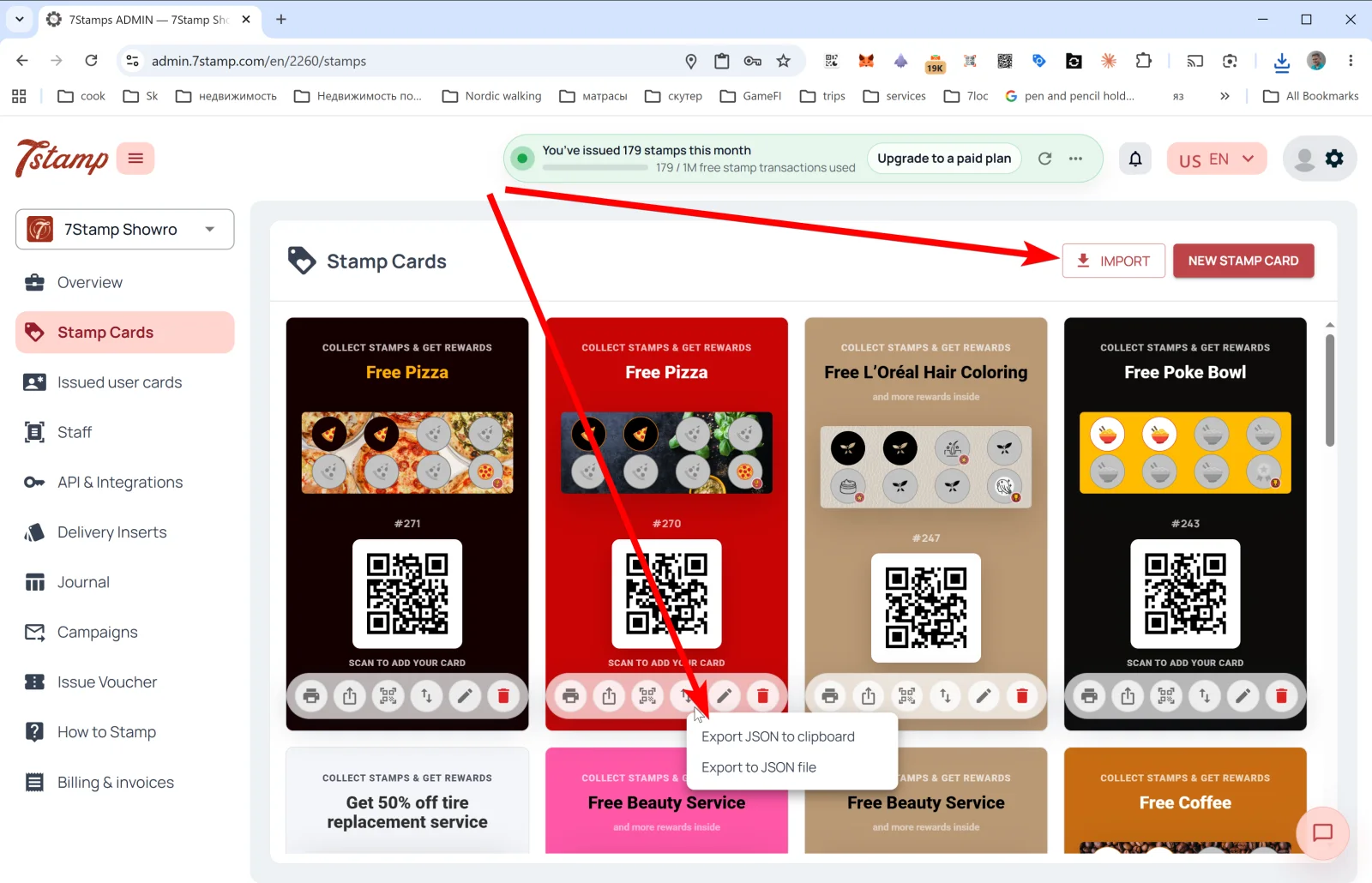
സൈഡ് മെനുവിലെ Stamp Cards വിഭാഗം നിങ്ങളുടെ എല്ലാ കാർഡ് ടെംപ്ലേറ്റുകളുടെയും ഗാലറിയാണ്. ഓരോ കാർഡും അതിൻ്റെ ഡിസൈൻ, സ്റ്റാമ്പ് പ്രോഗ്രസ് ബാർ, #ID, ഉപഭോക്താക്കൾക്ക് ചേരാനുള്ള QR എന്നിവ കാണിക്കുന്നു.
4. Stamp Cards — നിങ്ങളുടെ ലോയൽറ്റി കാർഡുകൾ
സൈഡ് മെനുവിലെ Stamp Cards (സ്റ്റാമ്പ് കാർഡുകൾ) വിഭാഗം നിങ്ങളുടെ എല്ലാ കാർഡ് ടെംപ്ലേറ്റുകളുടെയും ഗാലറിയാണ്. ഓരോ കാർഡും അതിൻ്റെ ഡിസൈൻ, സ്റ്റാമ്പ് പ്രോഗ്രസ് ബാർ, #ID, ഉപഭോക്താക്കൾക്ക് ചേരാനുള്ള QR എന്നിവ കാണിക്കുന്നു.
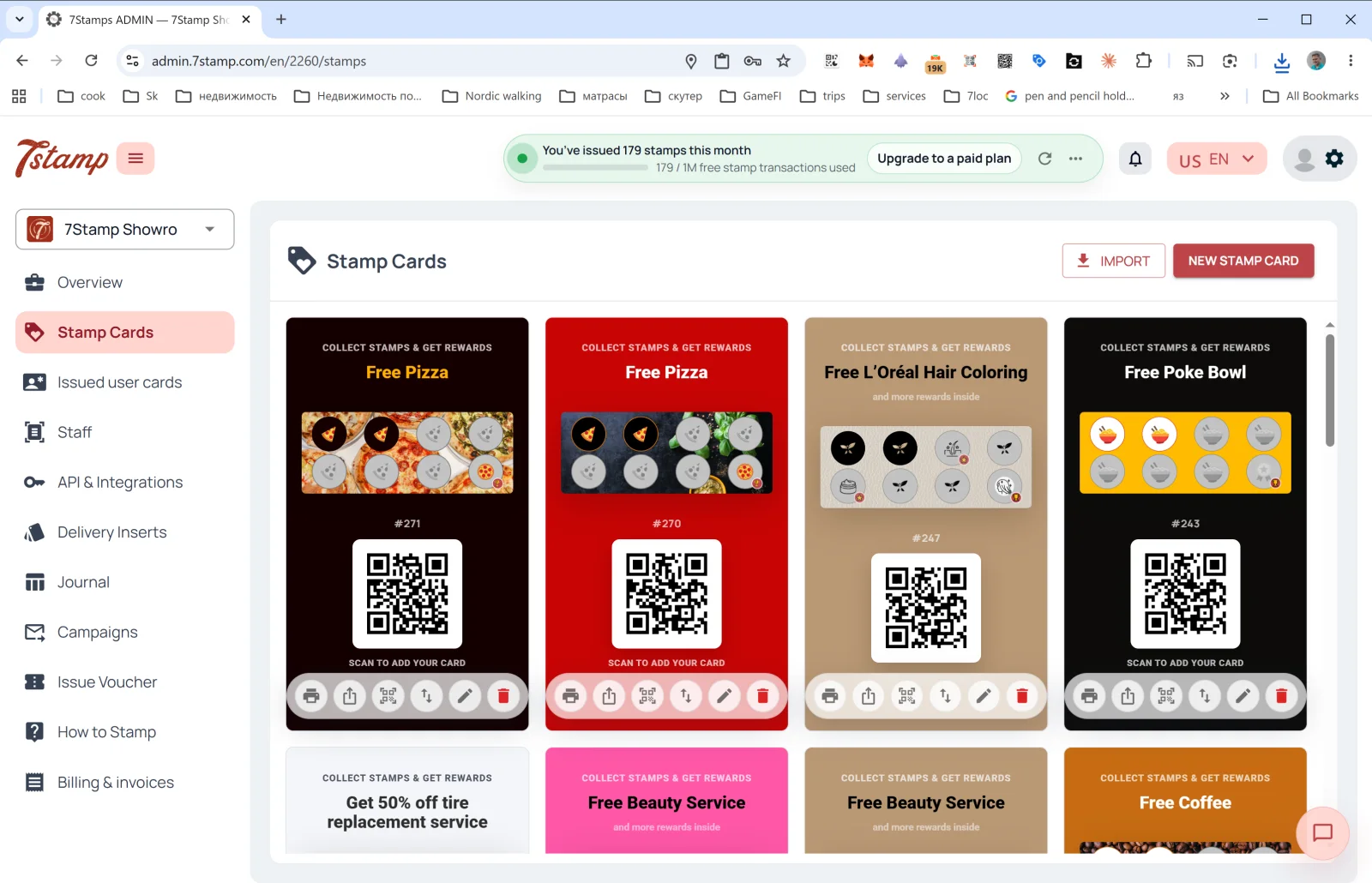
Stamp Cards പേജിൽ നിങ്ങൾക്ക് എന്തെല്ലാം ചെയ്യാം
മുകളിൽ വലതുവശത്ത് രണ്ട് ബട്ടണുകൾ:
- NEW STAMP CARD — Card Designer തുറന്ന് ആദ്യം മുതലോ ഒരു ടെംപ്ലേറ്റിൽ നിന്നോ പുതിയ കാർഡ് സൃഷ്ടിക്കുക. വിശദാംശങ്ങൾ വിഭാഗം 5. Card Designer-ൽ.
- IMPORT — ഒരു JSON ഫയലിൽ നിന്ന് കാർഡ് ലോഡ് ചെയ്യുക (ഉദാഹരണത്തിന്, മറ്റൊരു പ്രൊഫൈലിൽ നിന്ന് എക്സ്പോർട്ട് ചെയ്തതോ ഒരു പാർട്ണറിൽ നിന്ന് ലഭിച്ചതോ).
ഗാലറിയിലെ ഓരോ കാർഡിനും താഴെ — ആറ് പ്രവർത്തന ഐക്കണുകൾ (ഇടത്തുനിന്ന് വലത്തോട്ട്):
| ഐക്കൺ | എന്ത് ചെയ്യുന്നു |
|---|---|
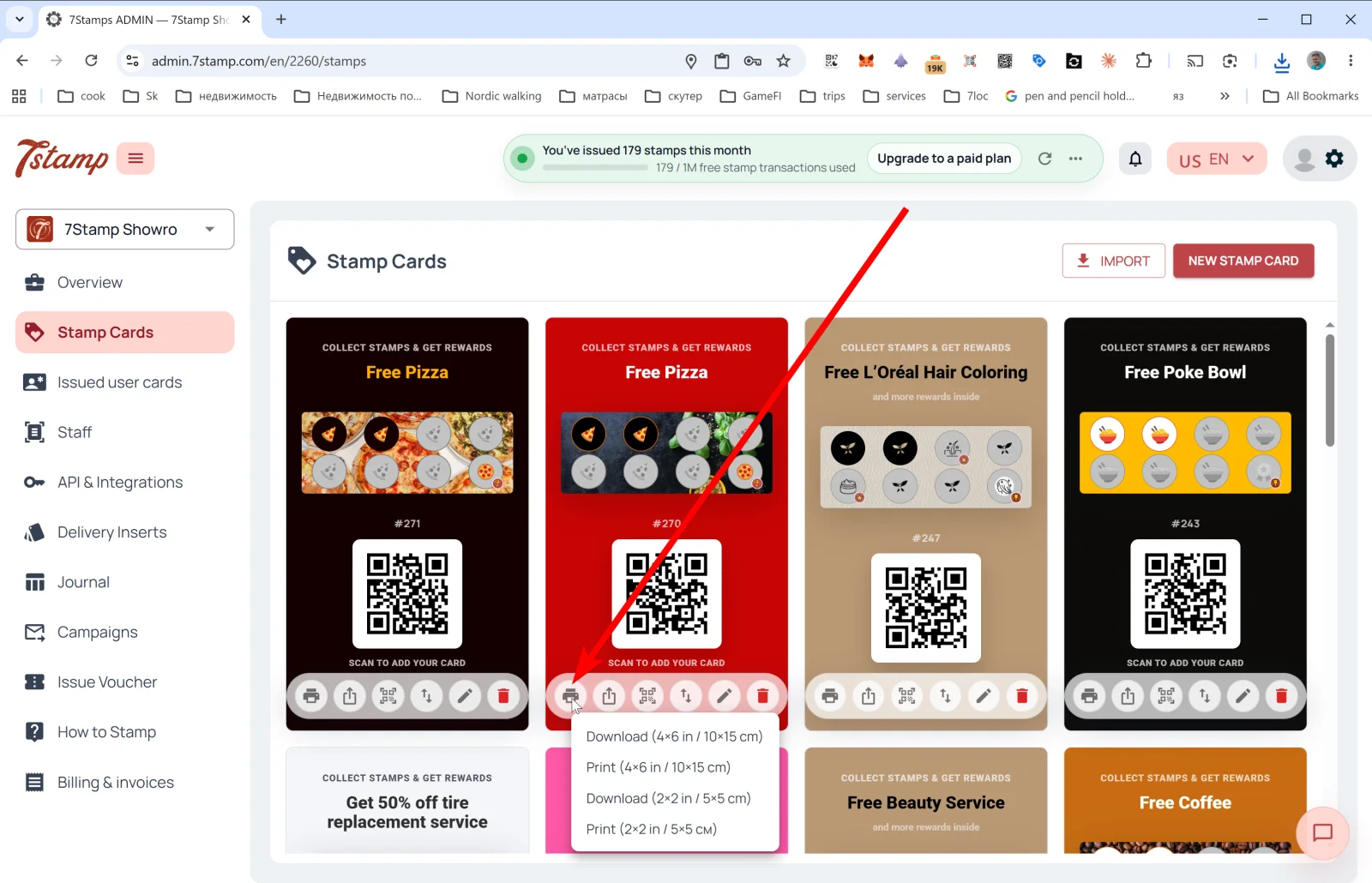
| 🖨️ Print / Download QR | രണ്ട് ഫോർമാറ്റുകളിൽ QR ലേബൽ എക്സ്പോർട്ട് മെനു തുറക്കുന്നു: Download (4×6 in / 10×15 cm), Print (4×6 in / 10×15 cm), Download (2×2 in / 5×5 cm), Print (2×2 in / 5×5 cm). വലിയ ഫോർമാറ്റ് പ്രവേശന കവാടത്തിലെ പോസ്റ്ററിനോ കൗണ്ടർ ബോർഡിനോ; ചെറിയ ഫോർമാറ്റ് ടേബിൾ സ്റ്റാൻഡിനോ പാക്കേജിംഗിനോ. |
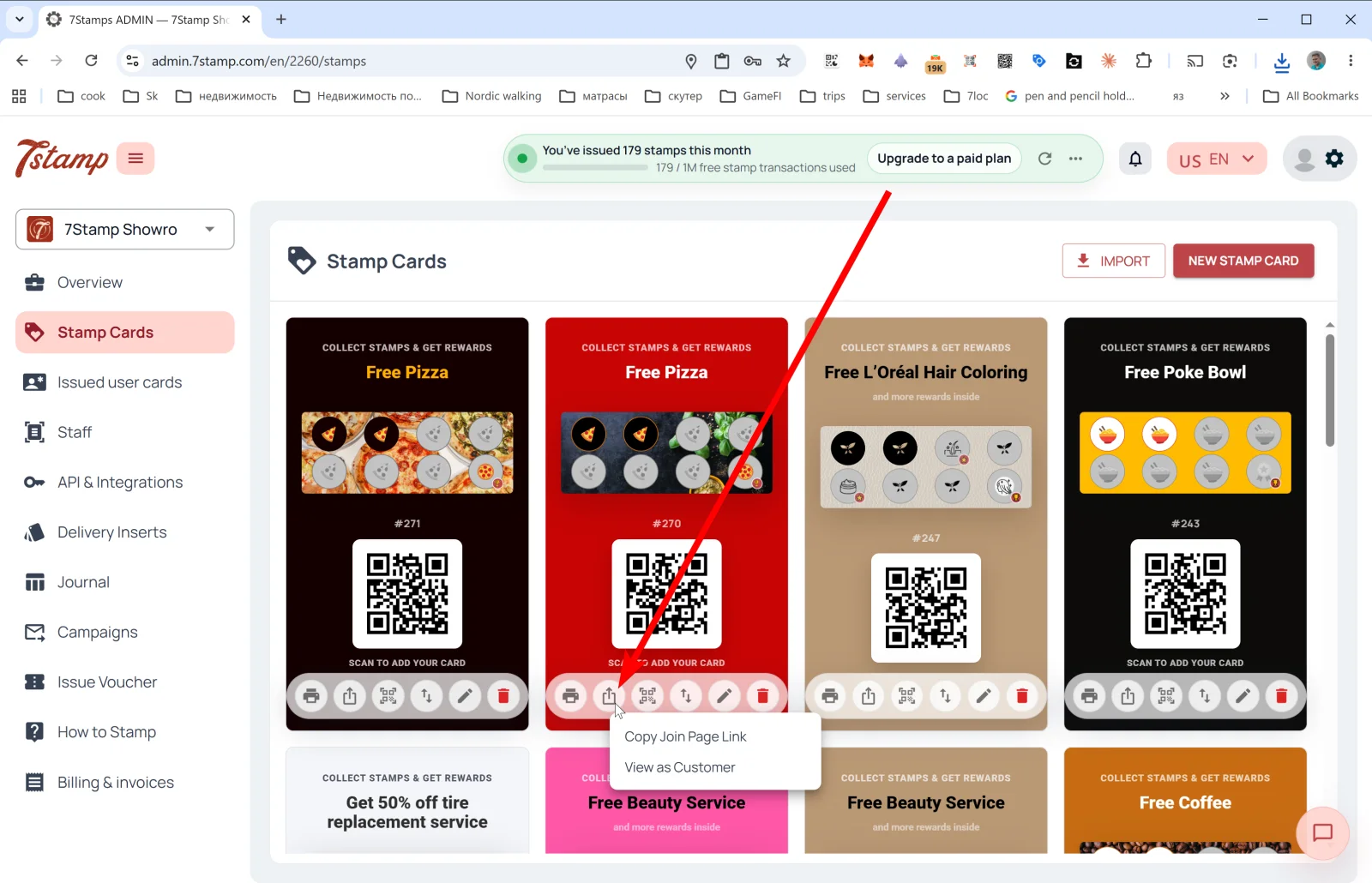
| ⤴️ Share | പൊതു ലിങ്ക് മെനു: Copy Join Page Link (Instagram ബയോ, വെബ്സൈറ്റ്, ഇമെയിൽ എന്നിവയ്ക്കായി കാർഡിലേക്കുള്ള നേരിട്ടുള്ള ലിങ്ക് പകർത്തുന്നു), View as Customer (ഉപഭോക്താവ് കാണുന്നതുപോലെ ജോയിൻ പേജ് തുറക്കുന്നു, അത് എങ്ങനെ പ്രവർത്തിക്കുമെന്ന് പരിശോധിക്കാൻ). |
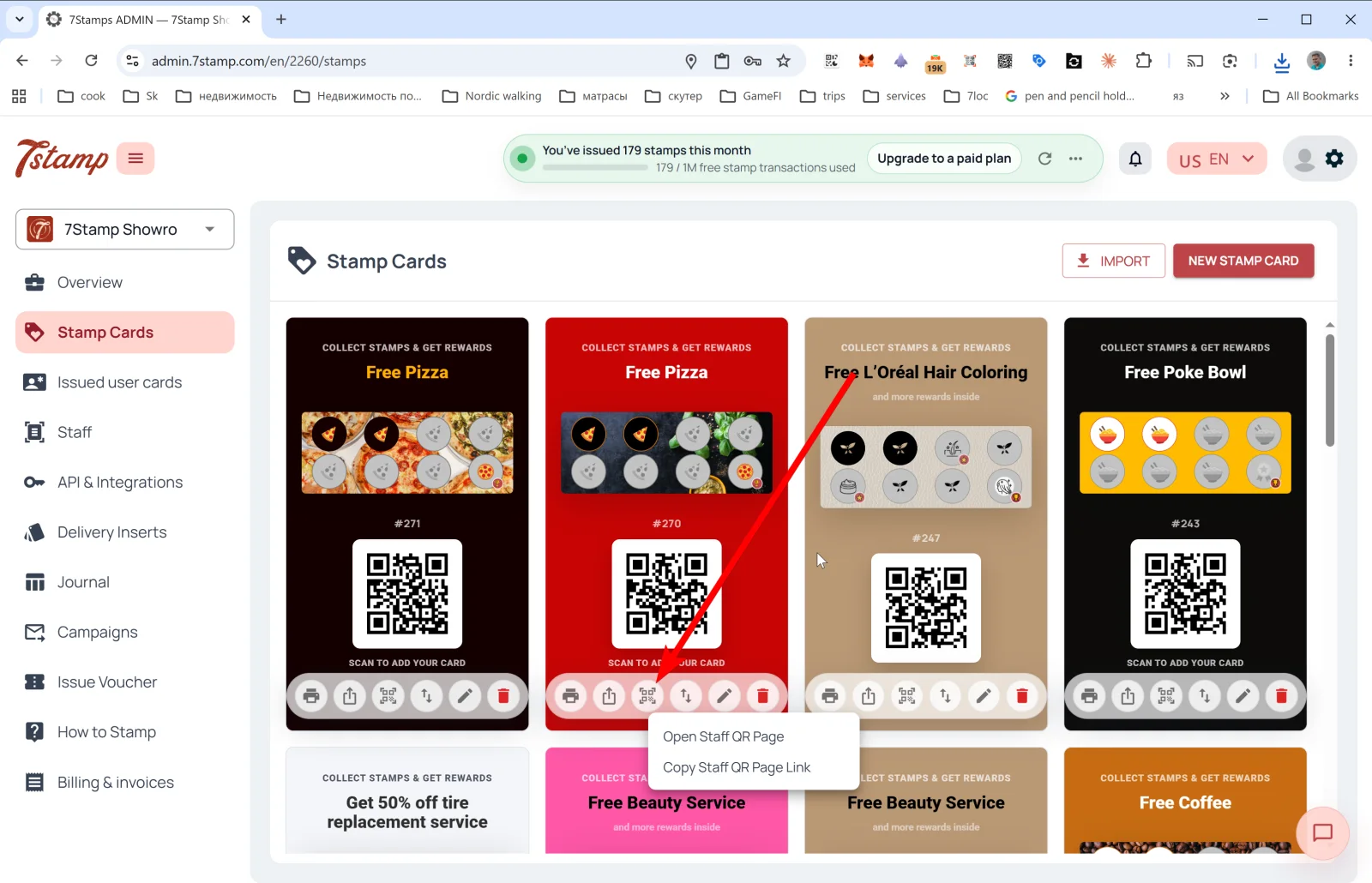
| 🔳 Staff QR Page | സ്റ്റാഫ് QR പേജ് മെനു: Open Staff QR Page, Copy Staff QR Page Link. ജീവനക്കാരൻ ഫോണിൽ ഈ പേജ് തുറന്ന് ഉപഭോക്താവിനെ കാണിക്കുന്നു — ഉപഭോക്താവ് സ്കാൻ ചെയ്ത് കാർഡ് നേടുന്നു. വ്യക്തിപരമായ സമ്പർക്കം പ്രധാനമായ പ്രീമിയം സേവനത്തിൽ ഉപയോഗപ്രദം. |
| ↕️ Export Card Template | Export JSON to clipboard അല്ലെങ്കിൽ Export to JSON file. ബാക്കപ്പ്, മൈഗ്രേഷൻ, ഒരു പാർട്ണറുമായി കാർഡ് പങ്കിടൽ, അല്ലെങ്കിൽ ടെംപ്ലേറ്റ് നിർമ്മാണം എന്നിവയ്ക്ക് ഉപയോഗപ്രദം. |
| ✏️ Edit | എഡിറ്റ് ചെയ്യാൻ കാർഡ് Card Designer-ൽ തുറക്കുക. |
| 🗑️ Delete | കാർഡ് ഇല്ലാതാക്കുക. |
നിർദ്ദേശം. തുടക്കത്തിൽ ഒരേസമയം അഞ്ച് കാർഡുകൾ ആവശ്യമില്ല — ഒരു മാസത്തെ പരീക്ഷണത്തിന് നന്നായി ക്രമീകരിച്ച ഒരു കാർഡ് സാധാരണ മതിയാകും. എന്താണ് ഫലിക്കുന്നതെന്ന് മനസ്സിലായാൽ, Export/Import വഴി അത് പകർത്തി A/B വകഭേദങ്ങൾ പരീക്ഷിക്കാം.
ഗാലറിയിലെ കാർഡ് പ്രിവ്യൂ എന്ത് കാണിക്കുന്നു
ഗാലറിയിലെ കാർഡ് പ്രിവ്യൂ, ഉപഭോക്താവ് Apple/Google Wallet-ൽ കാണുന്നതിനെ ദൃശ്യപരമായി പ്രതിഫലിപ്പിക്കുന്നു:
- തലക്കെട്ട് ബാഡ്ജ്: “COLLECT STAMPS & GET REWARDS”.
- അന്തിമ റിവാർഡിൻ്റെ പേര് (ഉദാഹരണത്തിന്, “Free Pizza”, “Free Beauty Service”, “Free Coffee”).
- ഐക്കണുകളുള്ള സ്റ്റാമ്പ് പ്രോഗ്രസ് ബാർ — സജീവവും നിഷ്ക്രിയവും.
- കാർഡ് ടെംപ്ലേറ്റിൻ്റെ
#ID(ഉദാഹരണത്തിന്,#271). - “SCAN TO ADD YOUR CARD” QR കോഡ് — Wallet-ൽ കാർഡ് സേവ് ചെയ്യാൻ ഉപഭോക്താക്കൾ ഇത് സ്കാൻ ചെയ്യുന്നു.
Visual walkthrough
Use the screen sets below as a visual companion to the article. Open any image to inspect it at full size.