
Se alguma vez quis oferecer um café a um cliente habitual na próxima visita dentro do Poster POS, provavelmente descobriu que esse objeto não existe de facto. O Poster tem descontos, promoções e o método de pagamento Certificado, mas não tem vouchers no sentido próprio de fidelização.
Isto não é uma falha do Poster. O Poster é um sistema de ponto de venda, e vouchers são um assunto de fidelização. A questão prática é como acrescentar essa camada sem substituir nem alterar o PDV. É exatamente aí que entram os 7Stamp Smart Vouchers.
Porque descontos e promoções não são vouchers
Um desconto ou código promocional no Poster é uma regra que o operador aplica no momento do pagamento. Não acompanha o cliente entre visitas. Não expira sozinho. Não sabe se o cliente já o usou. Se alguém tirar uma captura de ecrã do código e a reencaminhar, o Poster não trata isso como um objeto de fidelização fechado.
Um voucher a sério é diferente. Pertence a um cliente concreto ou a um lote de emissão concreto. Tem um ciclo de vida de emitido -> ativo -> utilizado -> expirado. Depois de utilizado, o mesmo voucher não pode voltar a ser usado, nem a partir de uma captura de ecrã, nem por outro operador, nem noutro dia.
O que o 7Stamp acrescenta por cima do Poster
O 7Stamp tem um motor de vouchers completo, pensado para ficar acima do PDV. Cada voucher pode incluir:
- título e descrição para o cliente perceber a recompensa;
- regras de validade como ilimitada, data de expiração fixa, N dias ou N meses após a emissão;
- Redeem Code em texto, QR e código de barras, para facilitar o atendimento na caixa;
- proteção de estado contra reutilização por captura de ecrã e duplo resgate.
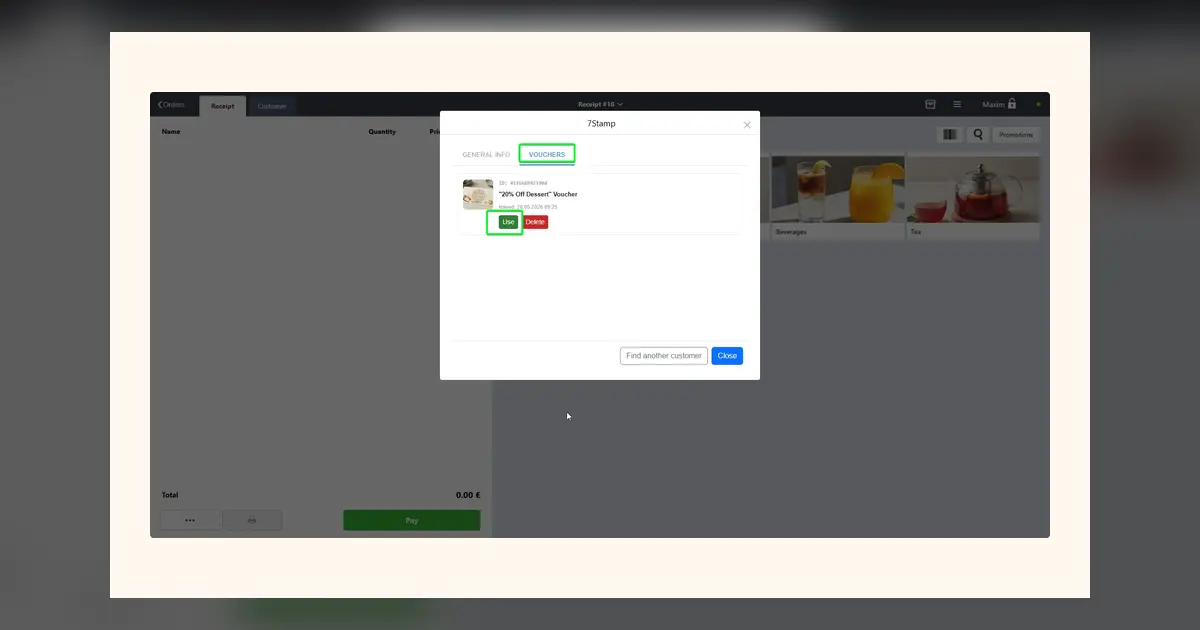
O voucher vive dentro do cartão de fidelização na Apple Wallet ou Google Wallet. Assim que o operador identifica o cliente no painel 7Stamp dentro do Poster, os vouchers ativos ficam visíveis ali mesmo.
Cinco formas de emitir um voucher
A maioria dos estabelecimentos pensa em vouchers apenas como recompensa por completar um cartão de selos. Na prática, costumam ser necessários vários caminhos de emissão:
- Recompensa por juntar selos quando o objetivo do cartão é atingido.
- Presente de aniversário emitido automaticamente no dia de anos do cliente.
- Presente manual pontual para compensar uma falha de serviço ou agradecer a um habitual.
- Voucher de campanha anexado a uma notificação wallet, e-mail ou mensagem de messenger.
- Voucher em papel impresso com QR ou código único para eventos, folhetos ou sacos de entrega.
| Cenário | Uso típico | Porque é importante |
|---|---|---|
| Recompensa de selos | Compre 9 cafés e receba 1 grátis mais tarde | Incentiva o regresso sem obrigar a usar de imediato |
| Presente de aniversário | Sobremesa grátis esta semana | Funciona sozinho, sem envolver a equipa |
| Emissão manual | Desculpe a demora, aqui está um café | A cortesia passa a ser registada em vez de improvisada |
| Voucher de campanha | Volte, aqui estão 15 por cento de desconto | Transforma uma mensagem num motivo concreto para regressar |
| Voucher impresso | Cupão num evento ou na entrega | Permite captar clientes fora do estabelecimento |
Como utilizar um voucher na caixa do Poster
O fluxo de utilização na caixa do Poster é o mesmo, independentemente de como o voucher foi emitido:
- O cliente mostra o voucher no telemóvel ou em papel.
- O operador abre o painel 7Stamp dentro do Poster e encontra o cliente, ou lê diretamente o QR do voucher.
- O sistema mostra os vouchers ativos disponíveis naquele momento.
- O operador toca em Use, e o voucher passa a
utilizado. - O operador regista a oferta no Poster com um dos três métodos padrão: artigo promocional a preço zero, promoção manual ou pagamento por Certificado.
Passo a passo completo com capturas de tela
Redeem Code: o voucher como objeto digital
Cada voucher pode ter um Redeem Code único, por exemplo FREECOFFEE ou BDAY25. O cliente vê o código em texto, QR e código de barras.
É isto que torna os vouchers compatíveis com o Poster mesmo em integrações mínimas. Se o Poster já tiver uma promoção configurada com o código FREECOFFEE, atribua o mesmo código ao voucher. O operador aplica a promoção habitual do Poster, enquanto o 7Stamp fecha ao mesmo tempo o ciclo de vida do voucher.
Os Redeem Codes também podem conter mais do que um código promocional normal, como um código de carregamento, uma ligação para um bónus ou uma chave de acesso a um evento. Assim o voucher torna-se um objeto de marketing reutilizável em vez de um desconto pontual.
Porque isto é melhor do que improvisar com folhas de cálculo
Muitos estabelecimentos imitam vouchers com uma lista em papel, uma folha de Excel ou códigos promocionais partilhados informalmente. O problema não é a solução improvisada ser feia. O problema é que não cria estado fiável, nem histórico por cliente, nem proteção contra reutilização.
Quando os vouchers passam a ter um ciclo de vida real, finalmente consegue responder a perguntas práticas: que vouchers foram emitidos, quais foram utilizados, quais expiraram sem uso e que campanha trouxe mesmo clientes de volta.
Conclusão
O Poster, enquanto PDV, não tem de fazer tudo. Tem de tratar do atendimento, do stock e dos relatórios. Vouchers são um assunto de fidelização, e o 7Stamp resolve essa camada por cima sem substituir o PDV. Se andava a aproximar vouchers com descontos mais memória, este é o caminho de atualização mais limpo.