جریان عملیاتی

How 7stamp کار می‌کند

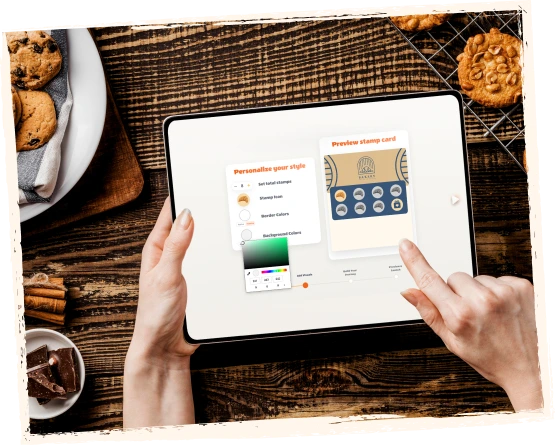
ساخت a branded stamp کارت, share a QR code, let مشتریان ذخیره it to their wallet, اعتبارسنجی stamps with پرسنل, کیوسک, Autopilot Mode, or receipt QR, then پاداش مشتریان with stamps, ووچرها, or Redeem Codes.

7stamp is designed for کسب‌وکارهای محلی that want بازگشت‌های تکراری without app-download اصطکاک or a heavy POS استقرار. The جریان is simple on the مشتری side and flexible on the کسب‌وکار side, so you can start with the گردش‌کار that fits your صف, تیم, and checkout راه‌اندازی.

راه‌اندازی in minutes Apple Wallet و Google Wallet QR code signup پرسنل, کیوسک, Autopilot, or codes
آخرین به‌روزرسانی

Frictionless enrollment in 15 seconds

راه‌اندازی a کارت Stamp دیجیتال in minutes. مشتریان یک QR code را اسکن کنید, کارت را ذخیره کنید to their phone wallet, Stamp جمع کنید, and پاداش دریافت کنید while your کسب‌وکار keeps کنترل over اعتبارسنجی and follow-up.

  1. مرحله 1 01

    Scan

    مشتریان یک QR code را اسکن کنید on a table tent, poster, receipt, تحویل bag, packaging insert, وب‌سایت, or social profile.

    آنچه مشتری می‌بیند
    A clear دعوت to پیوستن the برنامه وفاداری right where the مراجعه or order happens.
    آنچه کسب‌وکار کنترل می‌کند
    Where the QR code appears and which پیوستن moment fits best for counter, سرویس, takeaway, or تحویل جریان‌ها.
    Scan
  2. مرحله 2 02

    ذخیره

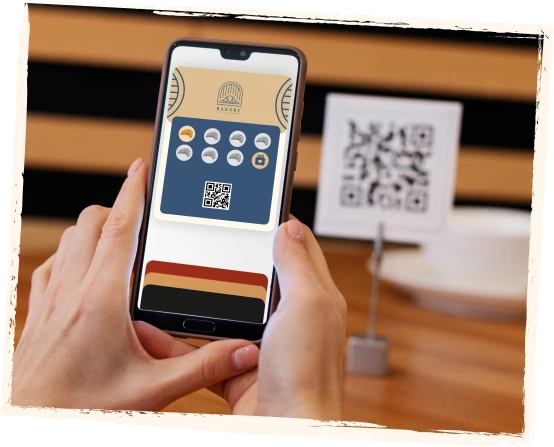
    The digital کارت saves to Apple Wallet یا Google Wallet. No separate مشتری app is required.

    آنچه مشتری می‌بیند
    One branded کارت in the wallet already on their phone, ready for the next مراجعه.
    آنچه کسب‌وکار کنترل می‌کند
    Branding, پاداش copy, کارت design, and the اول-ذخیره تجربه without pushing app installs.
    ذخیره
  3. مرحله 3 03

    جمع‌کردن

    مشتریان earn stamps with each مراجعه, purchase, سرویس, wash, order, or other اقدام you define.

    آنچه مشتری می‌بیند
    Visible پیشرفت on the same کارت after each qualifying اقدام.
    آنچه کسب‌وکار کنترل می‌کند
    Which اقدام‌ها count, how many stamps are needed, and which گردش‌کار validates each stamp.
    جمع‌کردن
  4. مرحله 4 04

    پاداش

    When the هدف is reached, 7stamp can نمایش a simple پاداش, صدور a Smart ووچر, display a Redeem Code, or راه‌اندازی a lottery پاداش.

    آنچه مشتری می‌بیند
    A پاداش moment that is easy to شناخت and easy to استفاده.
    آنچه کسب‌وکار کنترل می‌کند
    Whether پاداش‌ها stay simple, require a ووچر, or use text, QR, or barcode codes alongside checkout.
    پاداش
  5. مرحله 5 05

    بازگشت

    مشتریان come back through wallet reminders, birthday پاداش‌ها, geo-fenced notifications, push-style updates, and email کمپین‌ها.

    آنچه مشتری می‌بیند
    The same کارت وفاداری stays useful after the اول پاداش instead of disappearing like a paper کارت.
    آنچه کسب‌وکار کنترل می‌کند
    When to send reminders, birthday gifts, win-back پیشنهادها, or repeat-مراجعه کمپین‌ها from the same وفاداری base.
    بازگشت

Where مشتریان usually پیوستن the کارت وفاداری

The best پیوستن moment depends on how the کسب‌وکار serves مشتریان. 7stamp is built to capture attention at the exact moment when a مراجعه, order, or پاداش is already relevant.

01

On-site at the counter

Best for cafes, bakeries, quick-سرویس counters, salons, and retail where مشتریان are already standing in front of the تیم.

  • Table tent
  • Poster near checkout
  • Counter QR
  • Window sticker
02

After checkout

Best when you want وفاداری to start after پرداخت without slowing the صف or distracting from the sale.

  • Receipt QR
  • Pre-check QR
  • Printed bag insert
  • Takeaway packaging
03

تحویل and takeaway

Best for کسب‌وکارها using aggregators or direct تحویل that want to turn one-off orders into repeat direct traffic.

  • تحویل bag QR
  • Packaging insert
  • Receipt inside the order
  • Direct reorder کارت
04

Online and social

Best when مشتریان often discover the برند before visiting and you want them to پیوستن before the اول in-store moment.

  • وب‌سایت QR
  • Instagram bio لینک
  • Email کمپین
  • Landing صفحه CTA

انتخاب your وفاداری گردش‌کار

7stamp کار می‌کند for premium سرویس, busy counters, سلف‌سرویس stations, high-سرعت صف‌ها, تحویل orders, and کسب‌وکارها that want to start before any deep integration work.

Self-سرویس کیوسک
01

Self-سرویس کیوسک

High-traffic cafes, bakeries, quick-سرویس counters, car washes, and busy retail

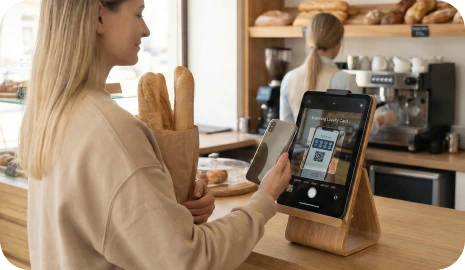
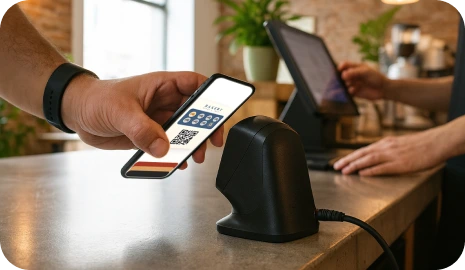
Place a tablet near checkout so مشتریان scan their own کارت Wallet, see stamp پیشرفت, and استفاده ووچرها with almost no پرسنل involvement.

Staff Scanner
02

Staff Scanner

Salons, spas, barbershops, sit-down restaurants, and premium سرویس کسب‌وکارها

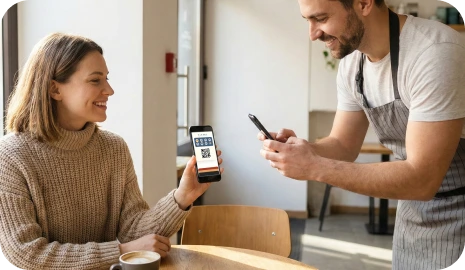
Your تیم scans the مشتری’s کارت Wallet from any phone or tablet, adds stamps quickly, and sees پاداش alerts at the right moment.

Autopilot Mode
03

Autopilot Mode

Rush hours, صف‌ها, car washes, and high-volume counters

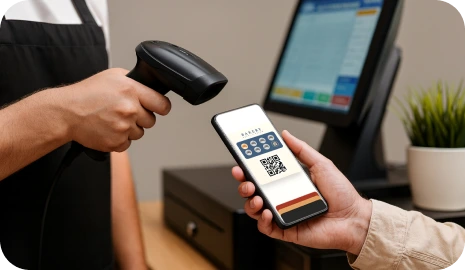
مشتریان scan their کارت with an external Scanner and 7stamp adds the stamp in the background, so the صف keeps moving.

Receipt and تحویل QR
04

Receipt and تحویل QR

Takeaway, تحویل, packaging inserts, receipts, pre-checks, and Zero-Integration starts

Print a QR code on receipts, packaging, or تحویل bags so مشتریان can claim stamps, ذخیره your کارت Wallet, and پیوستن your direct وفاداری base.

How پاداش‌ها can work after the stamp هدف is reached

The پاداش moment can stay as simple as a classic paper stamp کارت, or it can become more controlled when the کسب‌وکار needs ووچرها, checkout codes, or a game لایه.

01

Simple stamp پاداش

از یک مدل آشنا مثل buy-X-get-1-رایگان استفاده کنید. When the مشتری reaches the هدف, the کارت shows the پاداش and پرسنل can give the gift.

Example: Buy 9 coffees, get 1 رایگان.

02

Smart ووچر

When the هدف is reached, 7stamp can صدور a digital ووچر that stays separate from the collection phase and can be استفاده‌شده with more کنترل.

Example: Unlock a رایگان drink, a سرویس افزودن-on, or a birthday gift.

03

Redeem Code

نمایش a text code, QR code, or barcode inside the ووچر so پرسنل can واردکردن or scan the پاداش without custom API development in the POS.

Example: FREECOFFEE, GIFT100, or a barcode shown in the ووچر.

See the مشتری جریان and the کسب‌وکار جریان side by side

The مشتری sees a simple کارت Wallet. The کسب‌وکار controls the QR entry point, اعتبارسنجی گردش‌کار, پاداش قوانین, and repeat-مراجعه follow-up from a browser-based لایه.

A short دمو video is still being prepared. The screenshots on this صفحه already reflect the واقعی sequence from QR پیوستن to wallet ذخیره, stamp اعتبارسنجی, پاداش تحویل, and بازگشت-مراجعه activation.

See the مشتری جریان and the کسب‌وکار جریان side by side

گام بعدی

راه‌اندازی the جریان اول, optimize the گردش‌کار second

You do not need to start with a complicated وفاداری project. Begin with one پاداش, one QR code, and the اعتبارسنجی مسیر that fits your کسب‌وکار امروز, then grow into deeper اتوماسیون‌ها later.